RS-1_instruction manual.pdf - 第282页
Part 1 B asic O peration Chapter 2 Pr oduction 2- 171 Producti on oper ation When production starts (1) When the master feeder bank is enab l ed, com ponent s are picked up from the master feeder bank. When the “ Feeder …
Part 1 Basic Operation Chapter 2 Production
2-170
Changing the machine operation mode
The Non-stop operation function allows you to switch the operation mode between two modes,
Non-stop operation mode and Normal operation mode (referred as to “JUKI standard mode”
hereinafter).
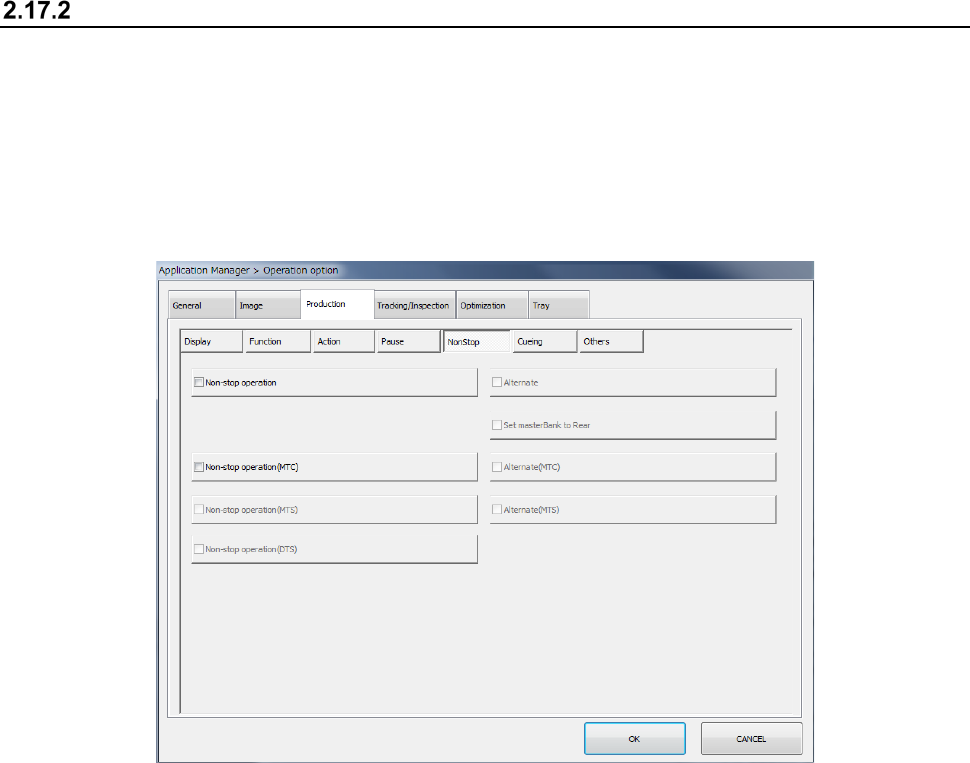
To switch the operation mode, display the “NonStop” tab of the “Production” tab invoked from the
“Operation option” screen.
When you check off the “Non-stop operation” check box on the “NonStop” tab of the “Production”
tab, the system is put in “Non-stop operation mode.” When you uncheck this check box, the
system is put in “JUKI standard mode.”
In Non-stop operation mode, priority is given to pick-up of components from the master feeder bank.
Even while a component is being picked up from the slave feeder bank, the next component is
picked up from the master feeder bank when the master feeder bank is refilled with components and
you set the bank switch to ON.
When you check off the “Alternate” check box, the system is put in “Alternate production mode.” In
Alternate production mode, the banks are switched alternately if components run out on one of
these banks during PWB production in Non-stop operation mode (that is, even though the master
feeder bank is refilled with components, components continue to be picked up from the slave bank
until components run out on the slave bank).
When you check off the “Non-stop operation” check box, the following items are set to the “unused”
state without precondition, and you cannot select any of them.
1. When components run out, production pauses.
2. Stop system on any error.
3. Measure component height when restarting after component run out.
4. Perform component verification when restarting after component run out.
Components are picked up from mainly the master feeder bank during PWB production. The
master feeder bank can be switched to another one, and the rear feeder bank can be used as the
master feeder bank also.
To use the rear feeder bank as the master feeder bank, check off the “Set masterBank to Rear”
check box. When the “Set masterBank to Rear” check box is unchecked, the front feeder bank is
used as the master feeder bank.
Part 1 Basic Operation Chapter 2 Production
2-171
Production operation
When production starts
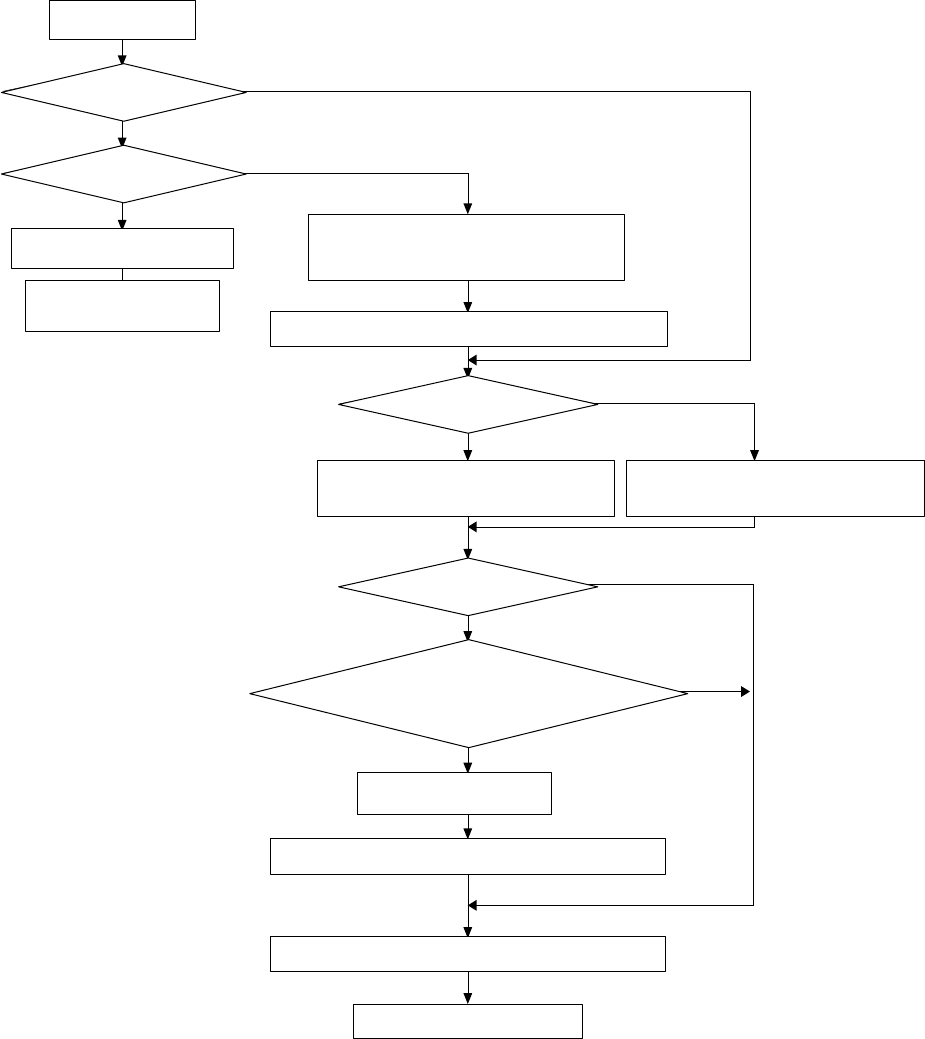
(1) When the master feeder bank is enabled, components are picked up from the master feeder
bank.
When the “Feeder trolley” check box or the “Feeder Float Detector” check box is unchecked
on the “Machine Setup” screen, the message “There is no trolley option in the setup data.”
or the message “There is no feeder float sensor in the setup data.” appears on the screen.
When you clear the displayed message in this case, and then press the Start key of the
panel switches, production starts.
(2) When the master feeder bank is disabled and the slave feeder bank is enabled
- Immediately after changeover (a production program is switched to another one)
The message “No completion change plan. Please use Feeder Bank.” appears on the
screen. When you clear this message, and then press the Start key of the panel switches
after enabling the master feeder bank in this case, components are picked up from the
master feeder bank.
If you press the Start key without enabling the master feeder bank, components are picked
up from the slave feeder bank.
- When production starts with the same production program
Components are picked up from the slave feeder bank.
(3) When both the master feeder bank and the slave feeder bank are disabled
The system temporarily stops with displaying the “Retry list.”
Part 1 Basic Operation Chapter 2 Production
2-172
● Operation flow
生産開始
前側フィーダバンクは有効か?
後側フィーダバンクは有効か?
エラーログ画面表示
マシンは一時停止状態
「段取り替えが完了していません。フィーダバンクを有効
にして下さい」メッセージ表示
メッセージを消去し、スタートキーを押してください
マスタフィーダバンクは有効か?
部品吸着のフィーダバンクをマスタ側にする
段取り替え直後か?
セットアップの「一括交換台」あるいは「フィーダ浮き」
がチェックされていないか?
メッセージ表示
メッセージを消去し、スタートキーを押してください
指定フィーダバンクから部品吸着を行います
生産動作開始
部品吸着のフィーダバンクをサブ側にする
Yes
Yes
Yes
Yes
Yes(少なくともどちらかが
チェックされている)
No
No
No
No(すべてチェックされている)
No
Is the front feeder bank
enabled?
Is the rear feeder bank
enabled?
Start of production
Display of the error log screen
The machine is put in the
pause state.
Display of the message “No completion
change plan. Please use Feeder Bank.”
Clear the displayed message and press the Start key.
Is the master bank enabled?
Specify the master bank as the feeder bank
for picking up components.
Specify the sub bank as the feeder bank for
picking up components.
Has changeover just finished?
Is the “Feeder trolley” check box or the
“Feeder Float Detector” check box checked
off on the “Machine Setup” screen?
No (Everything has been checked.)
Yes (At least one of them is
checked off.)
Display of the message
Clear the displayed message, and then press the Start key.
Components are picked up from the specified feeder bank.
Start of production operation