RS-1_instruction manual.pdf - 第663页
Pa r t 2 D et ai l ed Des c r i pt i o n of Ea c h F unc t i o n Chapte r 6 G e neral - Purpose Vision Co mpone nt 6- 32 ⑦ Cut sha pe Sp eci f y the shap e of a lea d e nd. All of the set ting s ot her t han “ Flat ” are…
Part 2 Detailed Description of Each Function Chapter 6 General-Purpose Vision Component
6-31
3. Operation on the "Element" screen
①
Type
The lead element types are mainly classified into two: inner leads and outer leads.
An inner lead refers to a lead whose end faces toward the inside of a component. An outer
lead refers to a lead whose end faces toward the outside of a component.
- In the example, a component consists of outer leads.
Select “Outer Lead” from the “Type” combo box.
②
Reference pos. (position)
The element origin of a lead element is the lead end as described earlier.
- Select “Center of the bottom” from the “Reference pos.” combo box.
③
Polarity (element polarity)
Specify how bright the image of an element should be.
- Select “Bright” from the “Polarity” combo box because a lead element looks bright under
the reflective light.
④
Offset
Normally, the offset is not used. Set “0” to the “Offset” fields.
⑤
Element size
Enter the element size. In the example, the lead length is 1.0 mm, and the lead width is 0.2
mm. In this case, enter the following values:
Size Width: 0.2
Length: 1.0
Normally, the tolerance is not used. Enter “0” to the “Tolerance” fields.
⑥
Outer Lead/Inner Lead
□ Profile (lead shape)
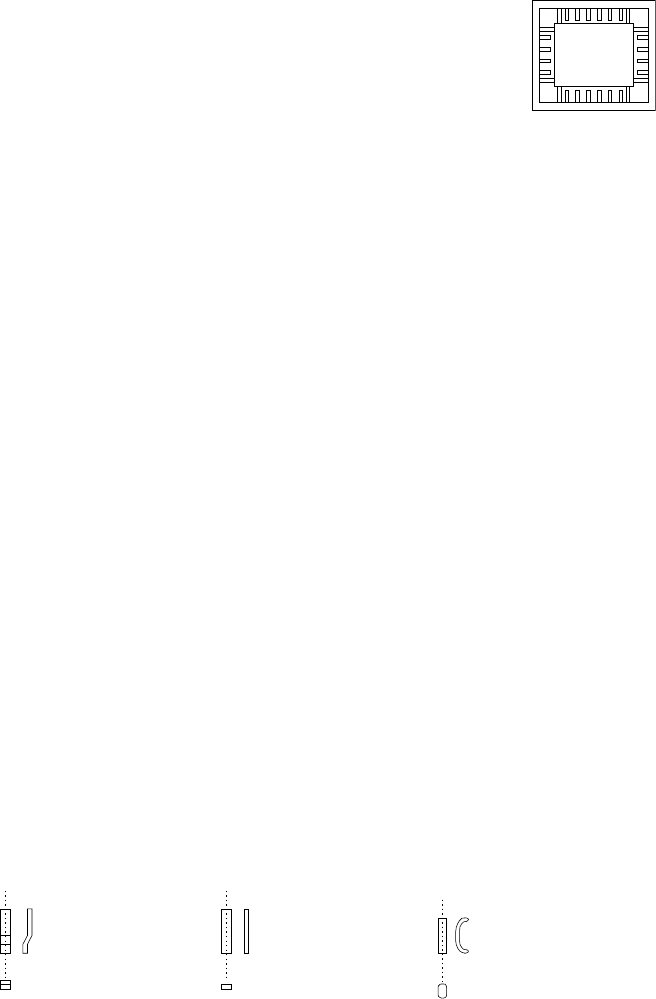
As shown in the figure, a lead whose shape is flat entirely is called a “flat lead”, a
stepped lead is called a “gullwing lead”, and a J-shaped lead is called “J-Bend lead.”
♦ A flat lead is often used for a unidirectional connector.
♦ A gullwing lead is often used for a QFP and SOP.
♦ A J-Bend lead is used for a PLCC (QFJ) and SOJ.
- In the example, a gullwing lead is shown.
Select “Gullwing” from the “Profile” combo box.
Example of
inner leads
(of a socket)
Gullwing lead
Flat lead
J-Bend lead

Part 2 Detailed Description of Each Function Chapter 6 General-Purpose Vision Component
6-32
⑦
Cut shape
Specify the shape of a lead end.
All of the settings other than “Flat” are handled in the same manner. When you select a
setting other than “Flat”, set the “Cut width” and “Cut length” fields.
- In the example, the shape of a lead end is flat.
Select “Flat” from the “Cut shape” combo box.
⑧
Coating
This item is not to be used. Select “Bare” from this combo box.
⑨
Cut width
This item is not to be used. Enter “0” to this field.
⑩
Cut length
Set this item if you select a setting other than “Flat” from the “Cut shape” combo box.
Enter the length of a not-flat portion measured from the lead end.
- In the example, the shape of a lead end is flat.
Enter “0” to the “Cut length” field.
⑪
Lead size
For a gullwing lead, enter the lead foot size here.
The “lead foot size” indicates the portion of a gullwing lead which is in contact with a board.
- In the example, the length of a gullwing lead foot is 0.5 mm.
Enter the following values:
Width : 0.2 (same as the lead width)
Length : 0.4
●
Here, you have finished entering element data. When you click the <OK> button
displayed on the lower right corner, the “Element Group” screen reappears.
● You have finished defining the first element group. When you click the <OK> button
displayed on the lower right corner, the “Element Data” screen reappears.
Part 2 Detailed Description of Each Function Chapter 6 General-Purpose Vision Component
6-33
When you have the next element group to be defined at this point, click the <Add> button to
define the element group by entering data in the same manner.
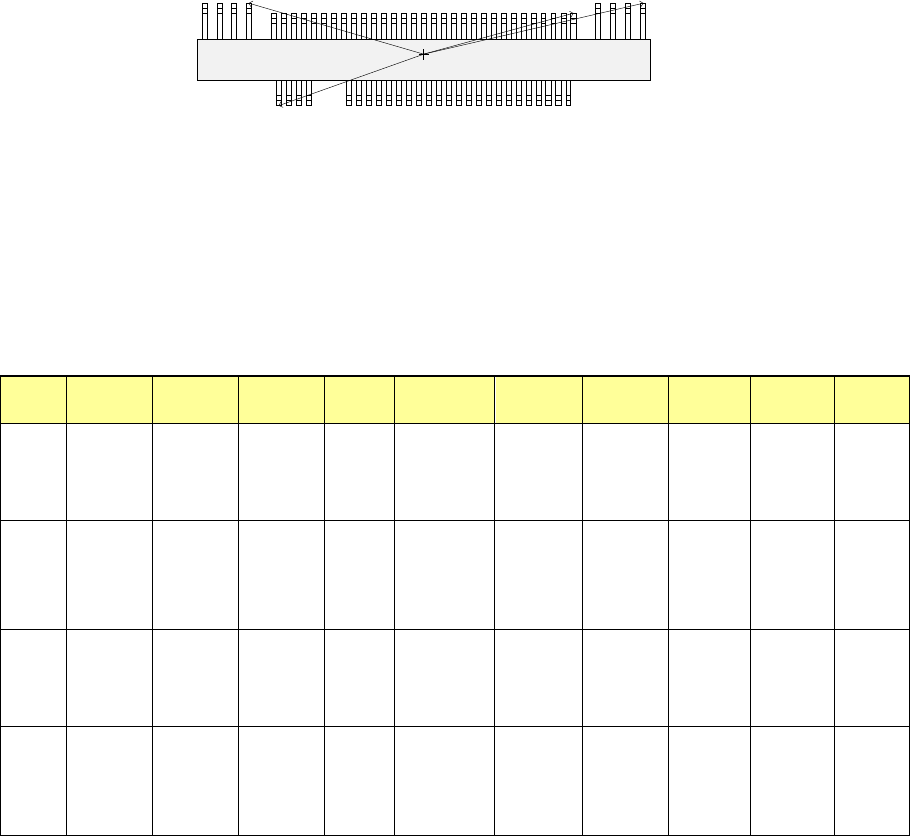
In the example, there are four element groups. Define four element groups.
All data to be entered is shown below:
Element
group
name
First element
position
Layout
inspection
(Dimension)
Missing
elements
Element
Element
offset
Element size
Element
shape
Cutting Lead size
ELG0001
X:-7.25
Y: -5.1
Z: 0
θ: 0
Tolerance:
All set to 0.
√ 25%
√ ID
Count of
Column: 30
Pitch of
Column: 0.5
Tolerance: 0
Start: 5
Count: 3
Type:
Outer Lead
Reference pos.:
Center of the
bottom
Polarity: Bright
Offset:
all set to 0.
Tolerance:
all set to 0.
Size
X: 0.2
Y: 1.0
Tolerance:
all set to 0.
Profile:
Gullwing
Cut shape:
Flat
Coating:
Bare
Cut width: 0
Cut length: 0
Size
X: 0.2
Y: 0.4
Tolerance:
all set to 0.
ELG0002 X: 13.31
Y: 5.1
Z: 0
θ: 180
Tolerance:
All set to 0.
√ 25% √ ID
Count of
Column: 4
Pitch of
Column:
1.27
Tolerance: 0
Type:
Outer Lead
Reference pos.:
Center of the
bottom
Polarity: Bright
Offset:
all set to 0.
Tolerance:
all set to 0.
Size
X: 0.4
Y: 1.2
Tolerance:
all set to 0.
Profile:
Gullwing
Cut shape:
Flat
Coating:
Bare
Cut width: 0
Cut length: 0
Size
X: 0.4
Y: 0.6
Tolerance:
all set to 0.
ELG0003
X: 7.5
Y: 4.9
Z: 0
θ: 180
Tolerance:
All set to 0.
√ 25%
√ ID
Count of
Column: 31
Pitch of
Column: 0.5
Tolerance: 0
Type:
Outer Lead
Reference pos.:
Center of the
bottom
Polarity: Bright
Offset:
all set to 0.
Tolerance:
all set to 0.
Size
X: 0.2
Y: 1.0
Tolerance:
all set to 0.
Profile:
Gullwing
Cut shape:
Flat
Coating:
Bare
Cut width: 0
Cut length: 0
Size
X: 0.2
Y: 0.4
Tolerance:
all set to 0.
ELG0004 X: -9.5
Y: 5.1
Z: 0
θ: 180
Tolerance:
All set to 0.
√ 25% √ ID
Count of
Column: 4
Pitch of
Column:
1.27
Tolerance: 0
Type:
Outer Lead
Reference pos.:
Center of the
bottom
Polarity: Bright
Offset:
all set to 0.
Tolerance:
all set to 0.
Size
X: 0.4
Y: 1.2
Tolerance:
all set to 0.
Profile:
Gullwing
Cut shape:
Flat
Coating:
Bare
Cut width: 0
Cut length: 0
Size
X: 0.4
Y: 0.6
Tolerance:
all set to 0.
Click the <OK> button at the lower left corner of the screen after you define all element groups to
finish the “Element Data” data entry.
Top View
Forth element group
(X, Y): (- 9.50, 5.1) mm
Theta: 180 degrees
Pitch: 0.5 mm,
Count: 4
Lead length: 1.2 mm
Lead width: 0.4 mm
Gullwing lead: Flat
Foot length: 0.6 mm
Foot width: 0.4 mm
Third element group
(X, Y): (7.5, 4.9) mm
Theta: 180 degrees
Pitch: 0.5 mm
Count: 31
Lead length: 1.0 mm
Lead width: 0.2 mm
Gullwing lead: Flat
Foot length: 0.4 mm
Foot width: 0.2 mm
Second element group
(X, Y): (13.31, 5.1) mm
Theta: 180 degrees
Pitch: 1.27 mm
Count: 4
Lead length: 1.2 mm
Lead width: 0.4 mm
Gullwing lead: Flat
Foot length: 0.6 mm
Foot width: 0.4 mm
First element group
(X, Y): (- 7.25, - 5.1) mm
Theta: 0 degrees
Pitch: 0.5 mm
Count: 30
Missing leads: three from the fifth lead
Lead length: 1.0 mm
Lead width: 0.2 mm
Gullwing lead: Flat
Foot length: 0.4 mm
Foot width: 0.2 mm