RS-1_instruction manual.pdf - 第285页
Part 1 B asic O peration Chapter 2 Pr oduction 2- 174 For example, if you disabl e the feeder bank whi l e a component is being pick ed up, you may hav e to stop pickin g up the component f rom the corres ponding feed er…
Part 1 Basic Operation Chapter 2 Production
2-173
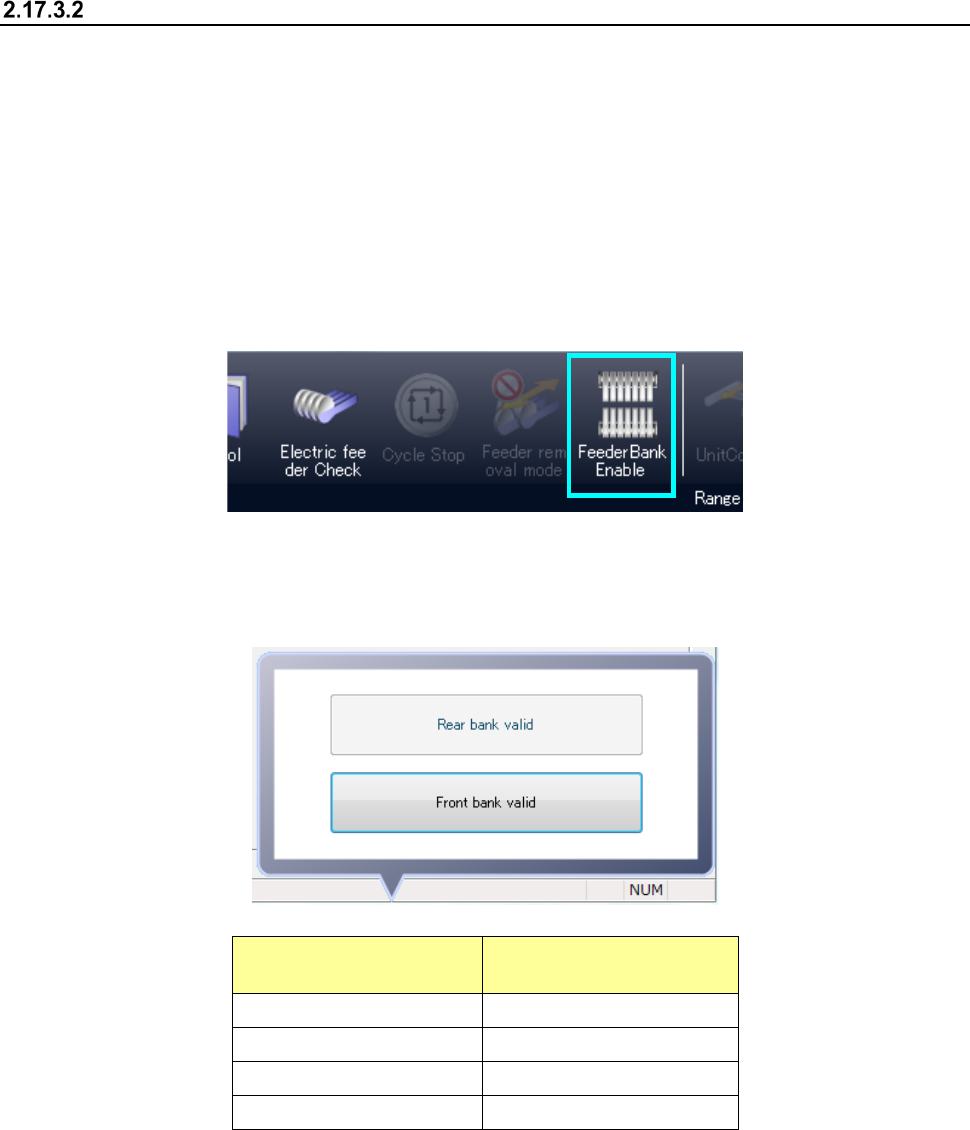
<Feeder Bank Enable> button
The <Feeder Bank Enable> button allows you to select whether to pick up components from the
corresponding feeder bank, front or rear.
(1) If you press this button when the feeder bank is enabled, the bank is disabled.
(2) If you press this button when the feeder bank is disabled, the bank is enabled.
When the feeder bank is enabled, it indicates that components can be picked up from the bank.
When the feeder bank is disabled, it indicates that components will not be picked up from the bank.
Every time you press this button, the bank condition is switched between the enabled condition and
the disabled condition.
When you press the <Feeder Bank Enable> button, the submenu appears on the screen. The
current condition of the feeder bank is displayed on this submenu.
You can select each of the menu items on this menu from the current operation side only.
Item displayed on the
submenu
Condition
Front bank valid The front bank is enabled.
Rear bank valid The rear bank is enabled.
Front bank invalid The front bank is disabled.
Rear bank invalid The rear bank is disabled.
Part 1 Basic Operation Chapter 2 Production
2-174
For example, if you disable the feeder bank while a component is being picked up, you may have
to stop picking up the component from the corresponding feeder bank immediately.
In such a case, the feeder bank from which the next component will be picked up is changed to
the enabled one after the component(s) already picked up is (are) placed on a board.
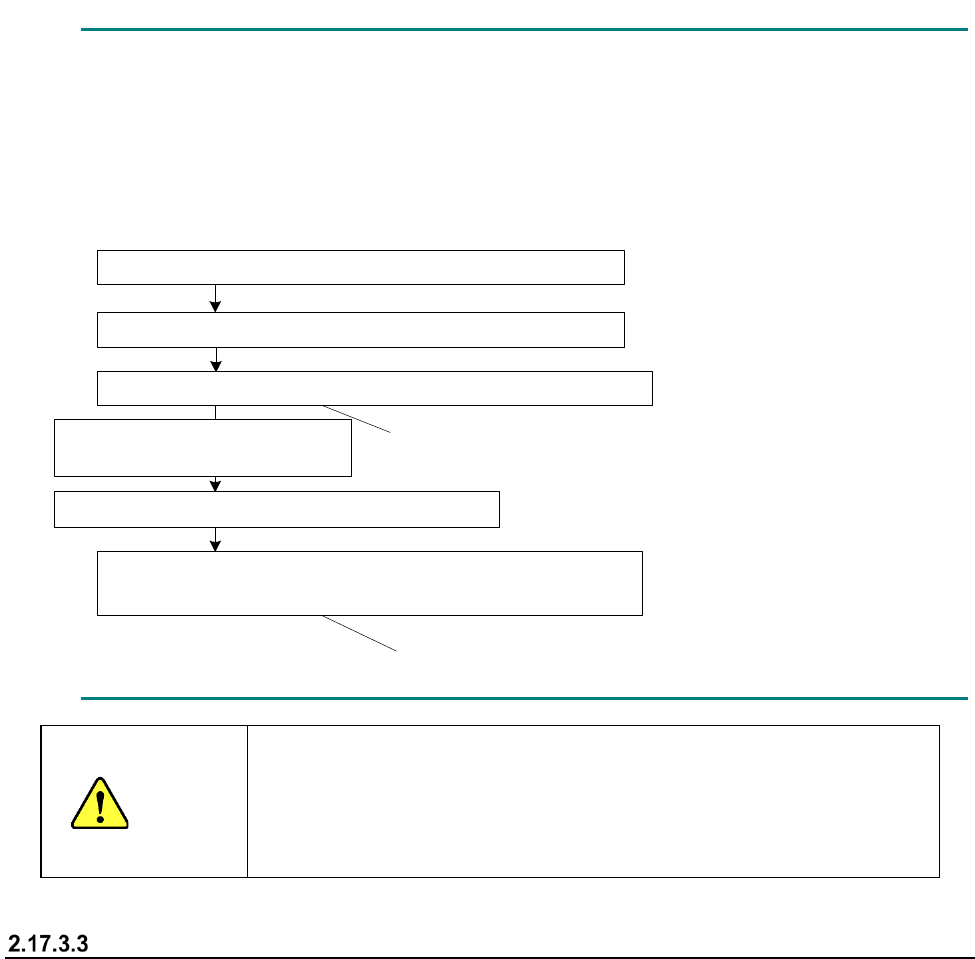
- Example: When components are placed after two components are picked up
1点目の部品吸着(マスタ側のフィーダバンクからの吸着)
このタイミングではスレーブ側には切り替わりません
このタイミングからスレーブ側からの吸着となります
マスタ
側のフィーダバンクを無効化
2点目の部品吸着(マスタ
側のフィーダバンクからの吸着)
1点目の部品搭載
2点目の部品搭載
次シーケンス
1点目の部品吸着(スレーブ
側のフィーダバンクからの吸着)
CAUTION
Even though the feeder bank is moved down during production in
Non-stop operation mode, a head(s) move(s) at high speed when a
feeder bank on one side is enabled.
Never put your hand or face in the machine or move it closer to the
machine.
When components run out
The mini signal lamp corresponding to the feeder bank on which components run out lights, and the
feeder bank is disabled.
When you detach the feeder bank, set it on the machine again, and then enable it, the
corresponding mini signal lamp goes off.
Note that this mini signal lamp works also as an indicator for indicating that the corresponding
feeder bank is set on the machine correctly. Therefore, if you fail to set the feeder bank on the
machine normally, the corresponding mini signal lamp remains lit even though you enable the
feeder bank.
Even though you enable the feeder bank without detaching the feeder bank while the mini signal
lamp is lighting, the mini signal lamp goes off.
Pick-up of the first component (from the master feeder bank)
Disabling of the master feeder bank
Pick-up of the second component (from the master feeder bank)
Placement of the second component on a board
Next sequence
Pick-up of the first component (from the slave feeder bank)
Components are picked up from the slave feeder
bank at this point.
The feeder bank for picking up a component is not
switched to the slave feeder bank at this point.
Placement of the first component
on a board
Part 1 Basic Operation Chapter 2 Production
2-175
If you are to replace a feeder bank with another one during production
(1) Check to see if the feeder bank to be replaced with another one is disabled. If it is enabled,
disable the bank on the corresponding side (front/rear).
(2) Check to see if components are picked up from the feeder bank on the opposite side. Check
to see if at least one component is picked up and at least one component is placed on a board
already.
(3) Detach the feeder bank from the machine.
(4) Set the feeder bank for replacement on the machine.
(5) If the feeder bank set on the machine is the same as the bank specified in the production
program which is being used for the current production, press the <Feeder Bank Enable>
switch to enable the feeder bank.
If you are to perform changeover of the master feeder bank during production
(1) Check to see if the master feeder bank is disabled. If the master feeder bank is enabled,
disable it.
(2) Check to see if components are picked from the slave feeder bank. This operation is required
because component pick-up operation cannot be switched to the slave feeder bank
immediately after the master feeder bank is disabled.
(3) Detach the master feeder bank from the machine.
(4) After changeover of the feeder(s), set the feeder bank on the master side of the machine.
(5) When changeover is performed (a production program is switched to another one), enable the
master feeder bank. In Alternate production mode, enable the master feeder bank before
switching the programs. If you enable the master feeder bank after switching a production
program to another one, components are picked up from the sub feeder bank, and then this
may cause a component to be placed at a wrong position.
(6) Press the Start switch to pick up components from the master feeder bank.
When the system is not put in Alternate production mode, priority is given to the master feeder
bank even though the slave feeder bank is enabled. Therefore, components are not picked up
from the sub feeder bank unless the master feeder bank is disabled.
If you are to perform changeover of the salve feeder bank during production
(1) Disable the slave feeder bank.
(2) Check to see if components are picked up from the master feeder bank. This operation is
required because components may run out on the master feeder bank depending on when the
slave feeder bank is disabled, so that components may be picked up from the slave feeder
bank.
(3) Detach the slave feeder bank from the machine.
(4) After changeover of the feeder(s), set the feeder bank on the slave side of the machine.
(5) Enable the feeder bank on the slave side after the system finishes producing the planned
number of PWBs and the machine stops.
(6) Switch the production program to another one, and disable the master feeder bank.
(7) If you start production when the front side is specified as the master feeder bank, the front
feeder bank is disabled and the rear feeder bank is enabled, the message “No completion
change plan. Please use Feeder Bank.” appears on the screen. When you clear this
message and then press the Start key of the panel switches, components start being picked up
from the rear feeder bank.
(8) When you set the master feeder bank on the machine after changeover of the master feeder
bank and then enable the mater feeder bank, components are picked up from the master
feeder bank. However, when the system is put in Alternate production mode, components
keep being picked up from the slave feeder bank.