RS-1_instruction manual.pdf - 第427页
Part 1 B asic O peration Chapter 4 Cr eating a Produc tion Progra m 4- 92 3) QFP , PLCC (QFJ), PQF P (BQFP), J - lead, gull - wing soc ket and soc ket with a bumper The “V ision 1” tab allows you t o set the lead pitc h …
Part 1 Basic Operation Chapter 4 Creating a Production Program
4-91
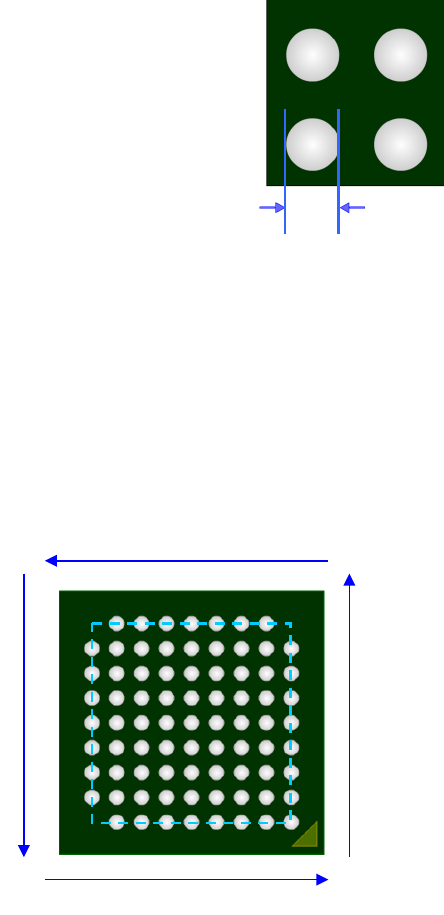
② Ball information
a) Width
Enter the ball width (diameter).
b) Number of balls (bottom, right, top and left)
Enter the number of balls on the outer periphery for each side.
Even if there is a lack of ball on the outer periphery, enter the number of balls supposing a
lack-free status.
c) Start/lack (bottom, right, top and left)
When there is a lack of ball on the outer periphery of each side, enter the lack information.
The lack information can be set independently for each side and up to 3 positions can be set for
one side.
1
1
1
1
Number Start 1 Lack 1 Start 2 Lack 2
Bottom 9 1 1 0 0
Right 9 0 0 9 1
Top 9 1 1 9 1
Left 9 1 1 9 1
Ball width
Part 1 Basic Operation Chapter 4 Creating a Production Program
4-92
3) QFP, PLCC (QFJ), PQFP (BQFP), J-lead, gull-wing socket and socket with a bumper
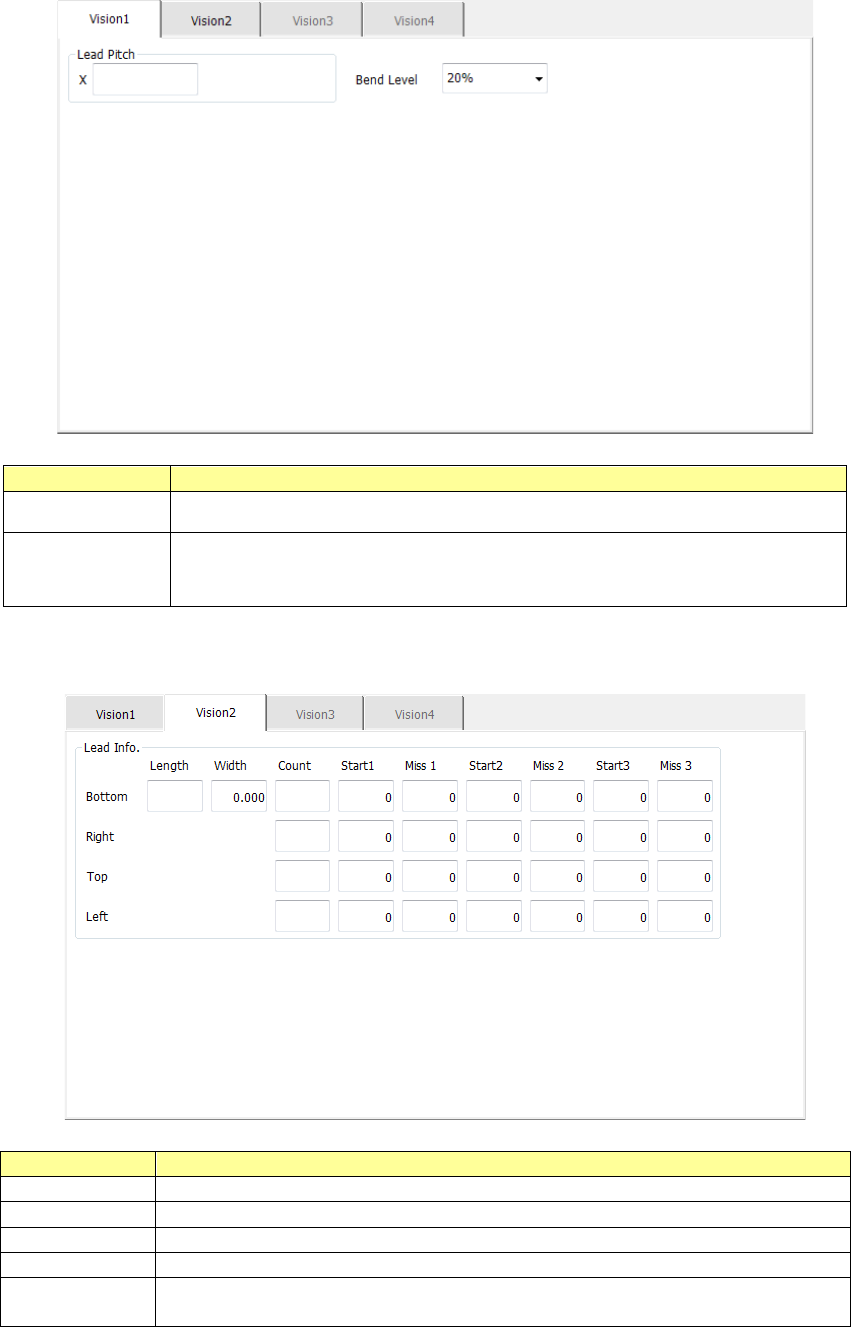
The “Vision 1” tab allows you to set the lead pitch and the lead bending level.
Menu item
Overview
Lead Pitch Enter the distance between two consecutive leads.
Bend level
Select the bending level of a lead to be detected among “15 %,”
“20 %,” “25 %,” “30 %” and “None.”
The default value is 20 %.
The “Vision 2” tab allows you to set information on leads located on each side.
Menu item
Overview
Length
Enter the length of a section of a lead that is in contact with a board.
Width
Enter the width of a lead.
Count
Enter the number of leads when a component type is a lead component.
Start 1 to 3
Enter the position of a missing lead.
Miss 1 to 3
Enter the number of missing leads.
The input range is from 0 to the number of leads (default: 0).
Part 1 Basic Operation Chapter 4 Creating a Production Program
4-93
4) QFN
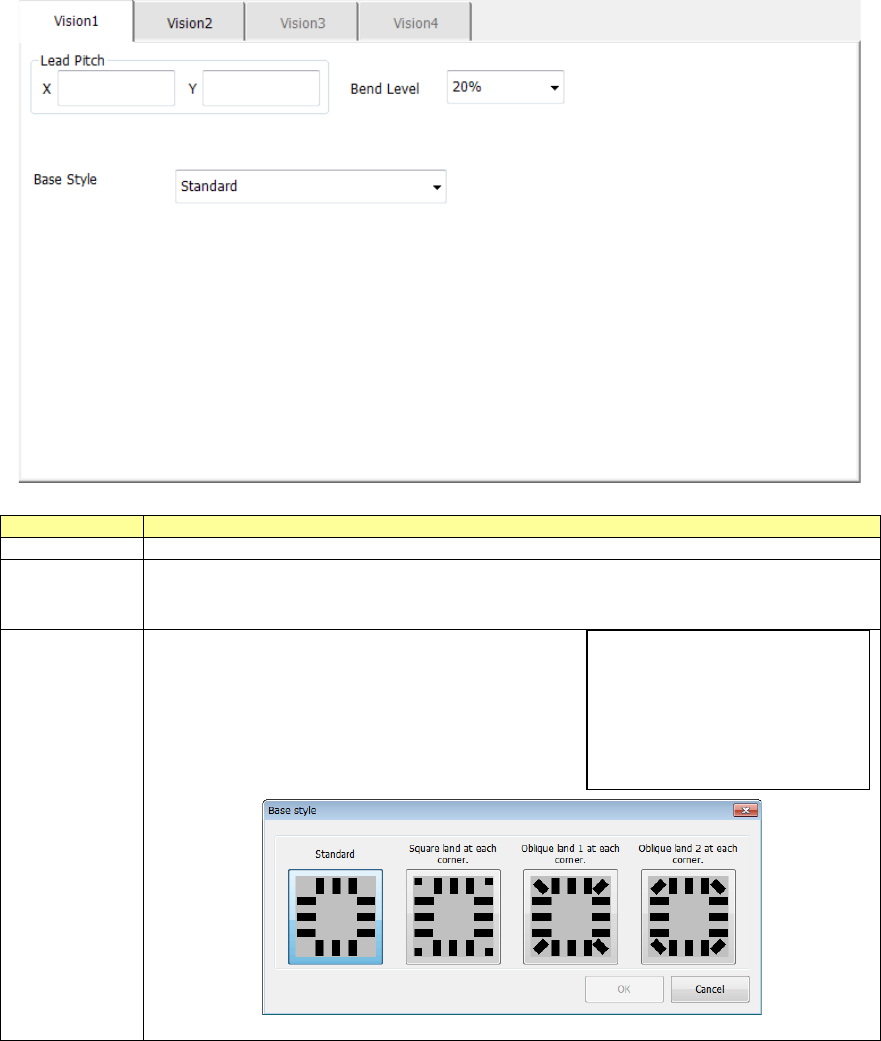
The “Vision 1” tab allows you to set the lead pitch, the lead bending level and the base style.
Menu item
Overview
Lead Pitch
Enter the distance between two consecutive leads.
Bend level
Select the bending level of a lead to be detected among “15 %,” “20 %,” “25 %,” “30 %”
and “None.”
The default value is 20 %.
Base style
Select the base style (land arrangement pattern).
“Standard” is selected by default.
You can select a base style from the drop-down list
shown on the right side.
When you select the [Browse] command, the
following dialog box appears on the screen.
Browse
Standard
Square land at each corner
Oblique land 1 at each corner
Oblique land 2 at each corner