RS-1_instruction manual.pdf - 第680页
Part 2 D etaile d Descript ion of E ach Functi on Chapter 7 Operation Option 7-5 7.3 Im age s Specify oper ation opt ions for images. 7.3.1 Teaching When you pres s the < T each ing > button, the “ teach ing option…
Part 2 Detailed Description of Each Function Chapter 7 Operation Option
7-4
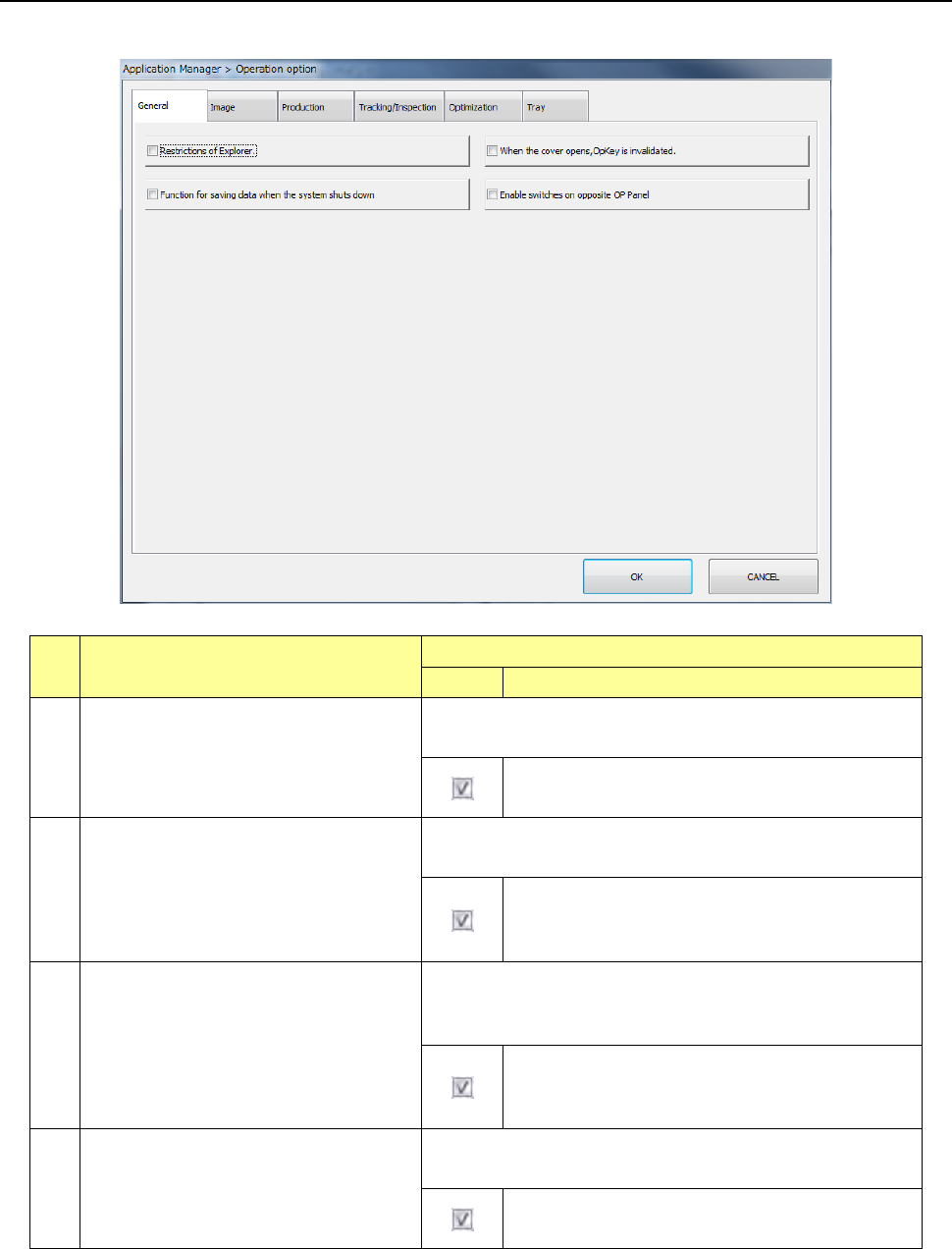
7.2 General
Specify the operation options for general.
No Menu item
Description
Status
Operation and detailed explanation
1
Restriction of Explorer
Specify a function to restrict the use of Windows Explorer by
user level.
The use of Windows Explorer is restricted by user
level.
2
When the cover opens, OpKey is
invalidated.
Specify a function to disable all the switches other than the
STOP switch on the operation panel when the cover is opened.
When the cover is opened, all the switches on the
operation panel other than the STOP switch are
disabled.
3
Function for saving data when the system
shuts down.
Specify a function to save the read production program
information at the end of the desktop screen, and restore the
production program information at the next start.
The read production program information at the end
of the desktop screen is saved and the production
program information is restored at the nest start.
4 Enable the OpKey on the opposite side.
Specify a function to enable the START switch of the operation
panel on the side opposite to the panel being operated.
The START
switch of the operation panel on the side
opposite to the panel being operated is enabled.
Part 2 Detailed Description of Each Function Chapter 7 Operation Option
7-5
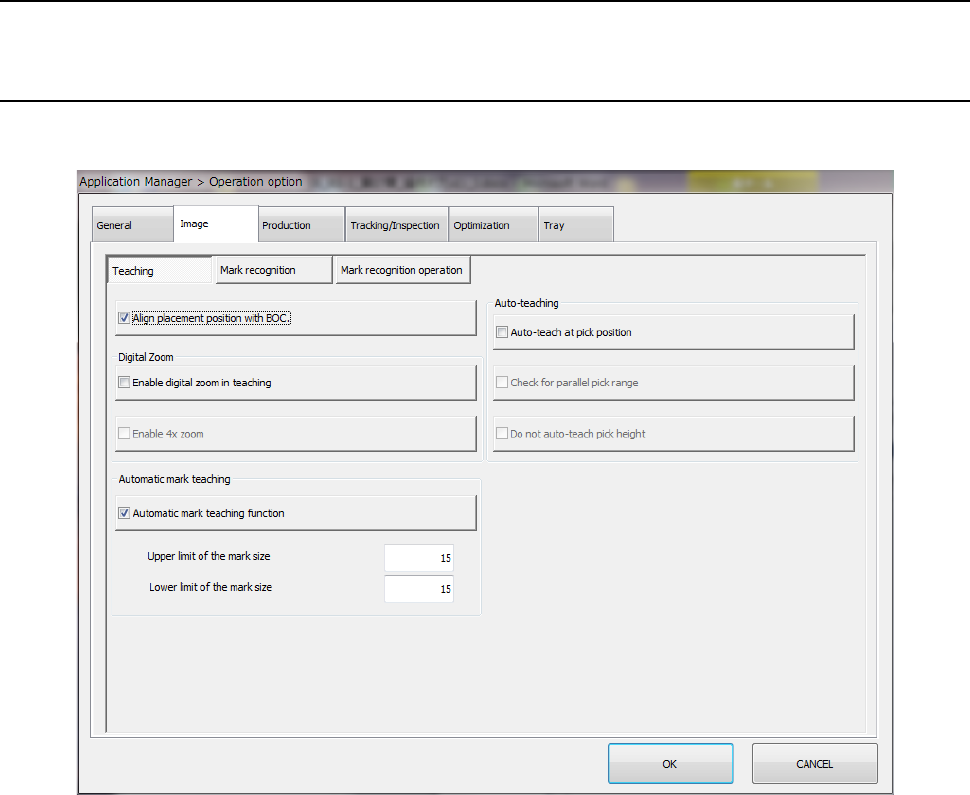
7.3 Images
Specify operation options for images.
7.3.1 Teaching
When you press the <Teaching> button, the “teaching option setting” screen appears.
Part 2 Detailed Description of Each Function Chapter 7 Operation Option
7-6
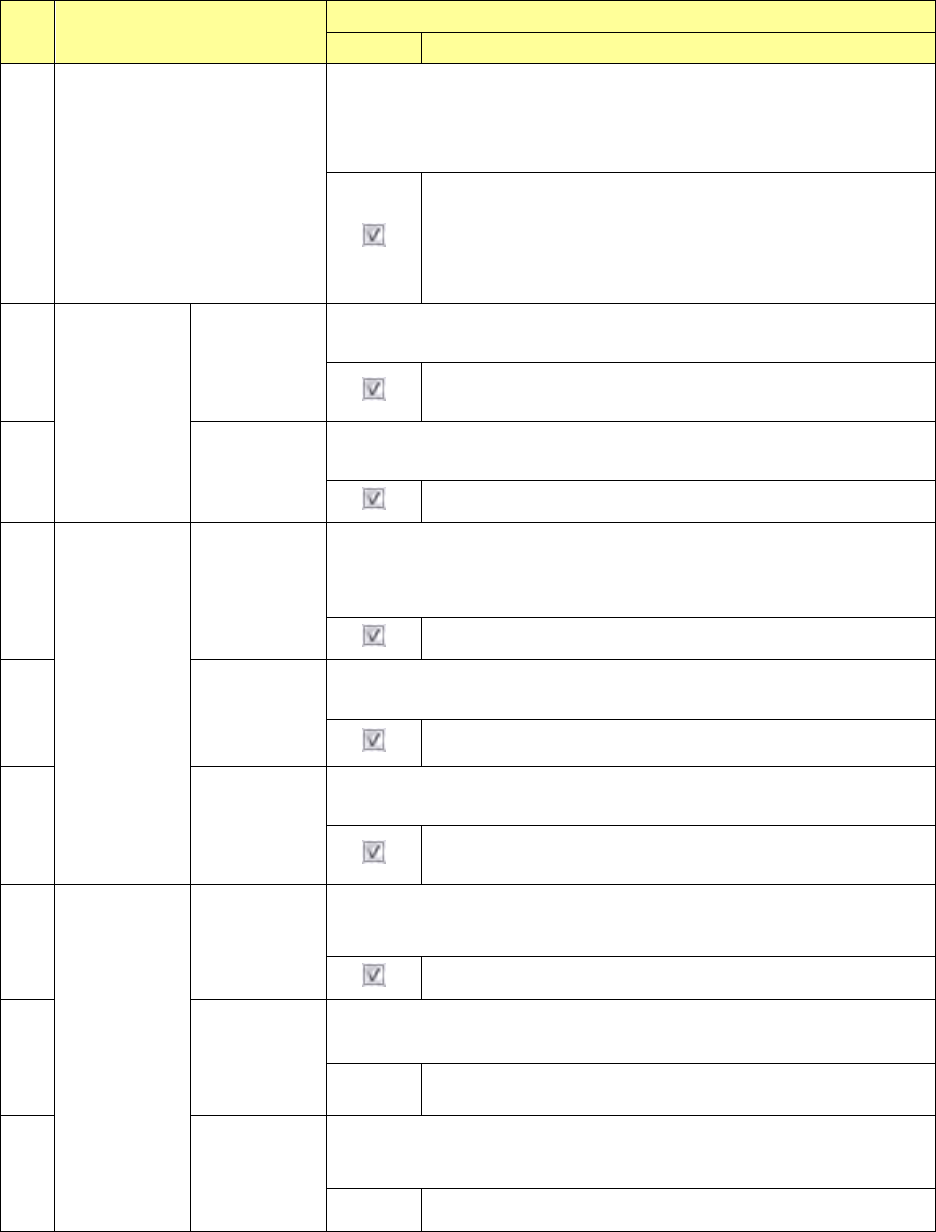
No. Menu item
Description
Status Operation and detailed explanation
1
BOC alignment
Specify whether BOC correction is performed at placement position
teaching of data editing and others.
Movement is performed to the coordinates after BOC
correction at placement position teaching and reverse
correction is executed when fetching a value.
Accordingly, the correct placement position coordinates can
be taught for the PWB.
2
Digital zoom
Perform
digital zoom
at teaching.
Specify whether digital zoom is performed by WINDOW button at teaching
during tracking.
Digital zoom is performed by WINDOW button during
teaching.
3
Use a x4
digital zoom.
Specify whether x4 digital zoom is performed when “Digital zoom is
performed at teaching” is set.
An x4 magnified display is made by digital zoom.
4
Auto teaching
Execute auto
teaching by
pick tracking.
Specify auto teaching execution by pick tracking.
* This setting is enabled when pick tracking was executed at production.
It has no effect on the auto teaching to be called by program editing.
Auto teaching is performed by pick tracking.
5
Check the
simultaneous
pick enable
range.
When “Auto teaching is executed by pick tracking” is checked off, the
simultaneous pick enable range can be checked.
The simultaneous pick enable range is checked.
6
Do not
perform auto
teaching of
pick height.
When “Auto teaching is executed by pick tracking” is checked off, it is set
whether the auto teaching of pick height Z-coordinates is executed or not.
The auto teaching of Z-coordinates is not executed by auto
teaching.
7
Mark auto
teaching
Mark auto
teaching
function
Specify whether the auto teaching of the BOC mark is executed or not.
The auto teaching of the mark is executed.
8
Upper limit
value of mark
size
Specify the upper limit value of mark size when “Mark auto teaching
function” is checked off.
Input
The upper limit value (%) of the mark size is specified.
9
Lower limit
value of mark
size
Specify the lower limit value of mark size when “Mark auto teaching
function” is checked off.
Input
The lower limit value (%) of the mark size is specified.