RS-1_instruction manual.pdf - 第696页
Part 2 D etaile d Descript ion of E ach Functi on Chapter 7 Operation Option 7- 21 No. Menu item Description Status Oper ation and d etailed explanation 4 Non - stop operati on (MTC) Set execut ion of t he Non - st op op…
Part 2 Detailed Description of Each Function Chapter 7 Operation Option
7-20
7.4.5 Non-stop
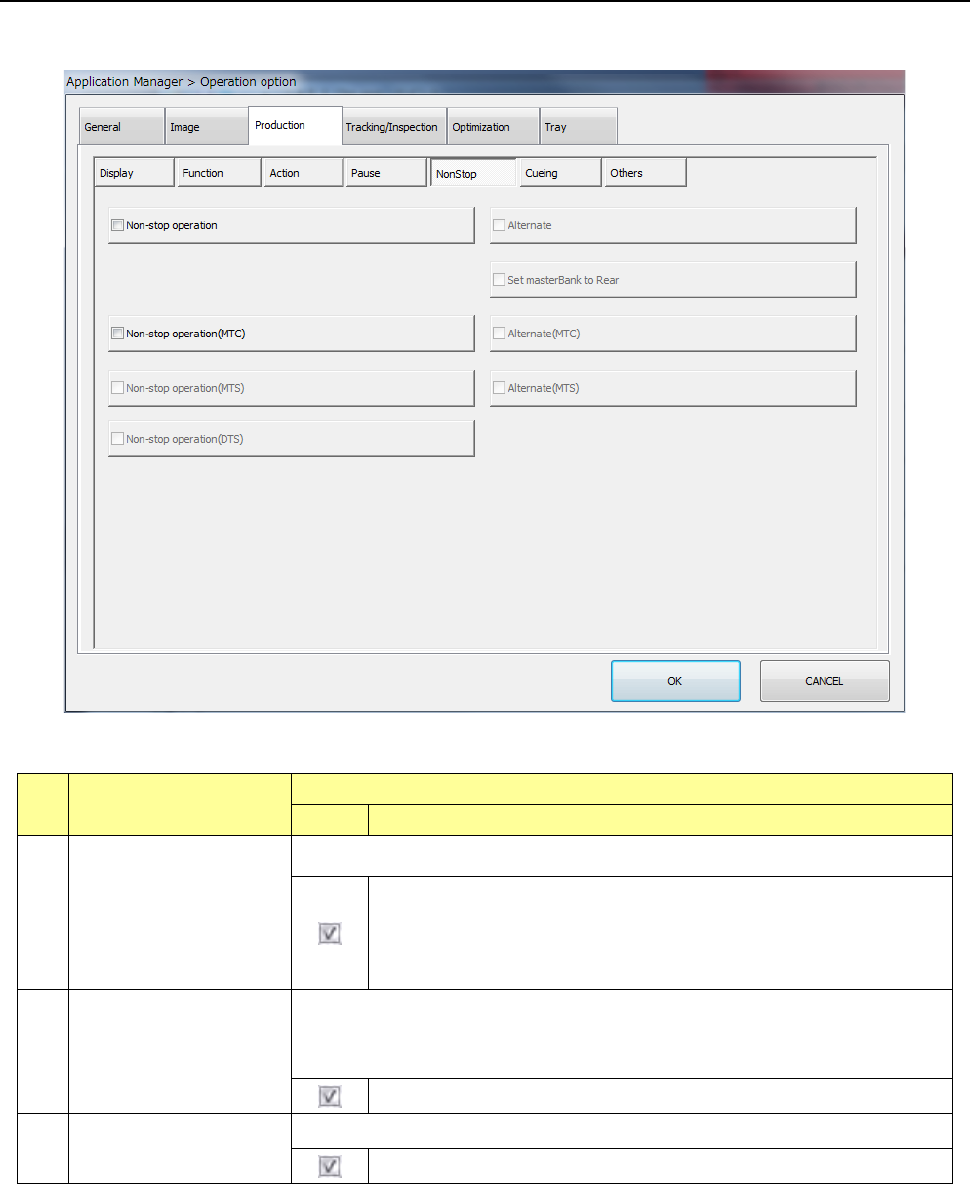
When you press the [Non-stop] button, the “production non-stop option setting screen” appears.
No. Menu item
Description
Status Operation and detailed explanation
1
Non-stop operation
Specify the execution of the non-stop operation function.
The Non-stop operation function is enabled.
When you execute the “Line symmetry” copy of the feeder layout on
the front/rear with the Program Editor, the Non-stop operation can be
performed.
2
Alternate
Make settings of the alternate production mode function to be executed during
Non-stop operation.
When you enable the Non-stop operation function, you can set this menu item.
The alternate production function is enabled.
3 Set masterBank to Rear
Specify whether to set the rear side as the master bank.
The rear side is to be set as the master bank.

Part 2 Detailed Description of Each Function Chapter 7 Operation Option
7-21
No. Menu item
Description
Status Operation and detailed explanation
4
Non-stop operation
(MTC)
Set execution of the Non-stop operation function of an MTC.
This item is enabled only when “TR6D” is selected for the menu item “MTC” on
the “Device enable” screen invoked from the “Machine Setup” screen.
If components run out at the main stacker when both the main stacker
and the sub stacker are prepared, the machine continues to pick up
components from the sub stacker without stopping production.
5
Alternate (MTC)
Make settings of the alternate production mode function to be executed during
Non-stop operation (MTC).
Components are picked up by the sub-stacker until the sub-stacker is
put to a “no components” status even if components are replenished in
the main stacker while the sub-stacker is used.
The pick from the main stacker has priority.
6
Non-stop operation
(MTS)
Set execution of the Non-stop operation function of an MTS.
This item is enabled only when “TR5D” is selected for the menu item “MTS” on
the “Device enable” screen invoked from the “Machine Setup” screen.
If components run out at the main stacker when both the main stacker
and the sub stacker are prepared, the machine continues to pick up
components from the sub stacker without stopping production.
7
Alternate (MTS)
Make settings of the alternate production mode function to be executed during
Non-stop operation (MTS).
Components are picked up by the sub-stacker until the sub-stacker is
put to a “no components” status even if components are replenished in
the main stacker while the sub-stacker is used.
The pick from the main stacker has priority.
8
Non-stop operation
(DTS)
Set execution of the Non-stop operation function of a DTS.
This item is enabled only a DTS is connected to the mounter.
If components run out at the main stacker when both the main stacker
and the sub stacker are prepared, the machine continues to pick up
components from the sub stacker without stopping production.
Part 2 Detailed Description of Each Function Chapter 7 Operation Option
7-22
7.4.6 Cueing
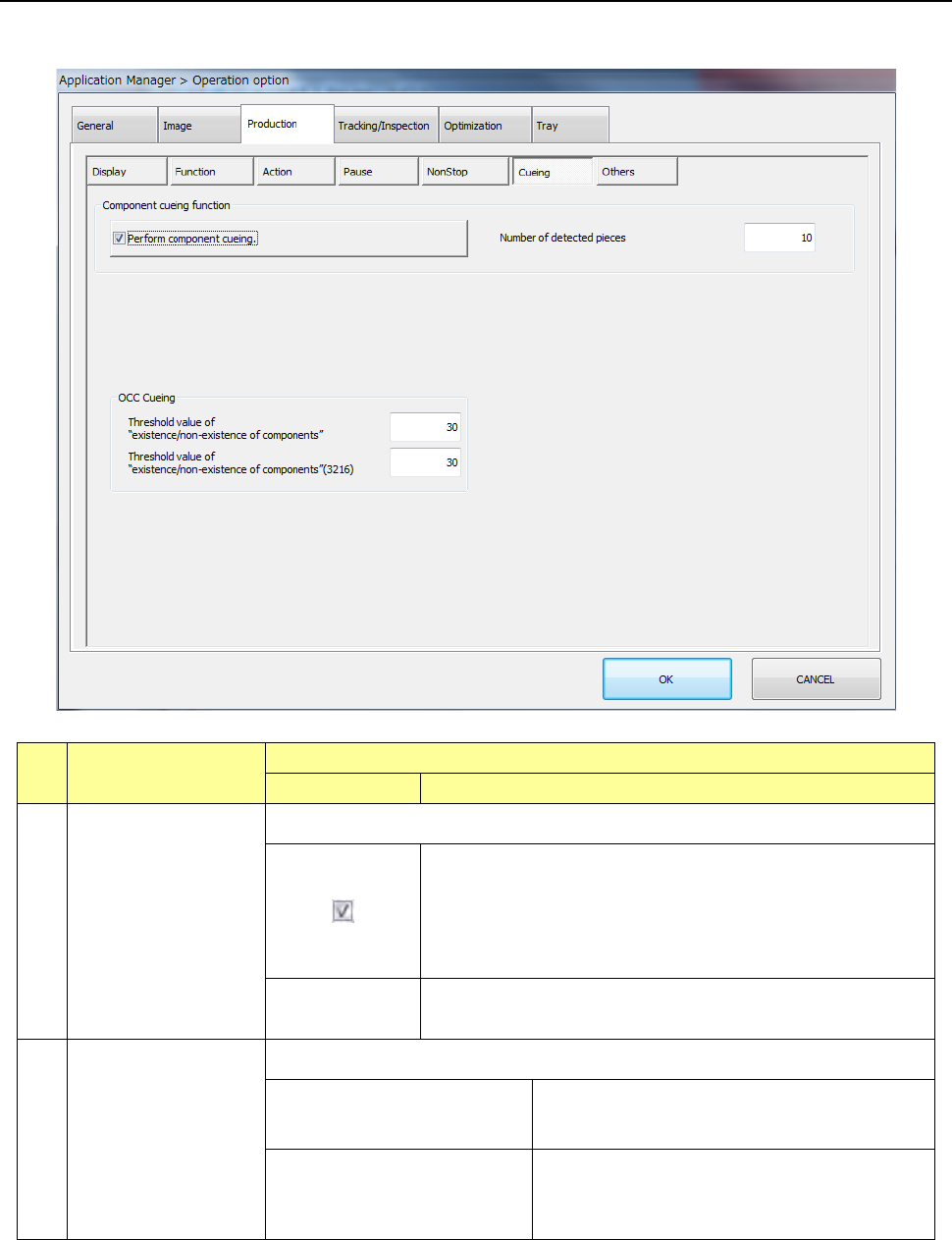
When you press the <CUEING> button, the “Component cueing function” setting screen appears.
No. Menu item
Description
Status Operation and detailed explanation
1
Perform component
cueing.
Make settings of the component cueing function.
The cueing buttons become effective on the pick position
teaching screen and the pick tracking (manual feeding) screen
and component cueing can be executed.
In the preparation support (feeder setup), automatic cueing is
enabled.
Number of
detected pieces
Specify the maximum number of components to be checked
when cued.
2
OCC Cueing
Make settings of the cueing function with the OCC camera.
Threshold value of
“existence/non-existence of
components” (OCC cueing)
Set a threshold value for determining whether
there is any component or not.
Threshold value of
“existence/non-existence of
components” (3216) (OCC
cueing)
Set a threshold value for determining whether
there is any 3216 component or not.