RS-1_instruction manual.pdf - 第660页
Pa r t 2 D et ai l ed Des c r i pt i o n of Ea c h F unc t i o n Chapte r 6 G e neral - Purpose Vision Co mpone nt 6- 29 - The VCS f i nds each el em ent g r oup o f a g ener al - purp ose v is ion com p onent, th en rec…
Part 2 Detailed Description of Each Function Chapter 6 General-Purpose Vision Component
6-28
①
Name
Name an element group to be handled. When you want to change an element group,
specify its name to edit it.
- A name is assigned automatically with serial numbers.
- Users can change this numbered name to an alphanumeric name (up to 32 characters).
In the example, the numbered name is used.
②
First element position
Specify the position (X, Y) and direction (Theta) of an element group.
As the position, specify the distance (offset) from the center of a component. Normally, the
center of a component is the center of the component outline.
- If the placement coordinates set in Placement data of a production program is not based
on the center of the component outline, you can specify the coordinates of the reference
component center with coordinates different from the center of the component outline.
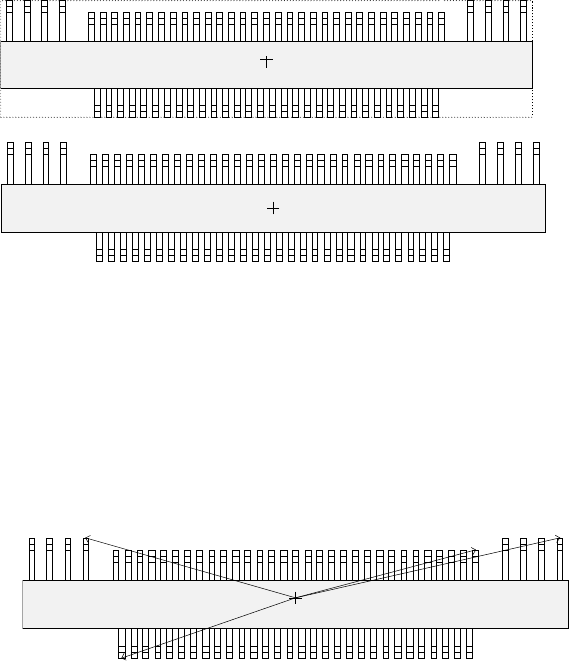
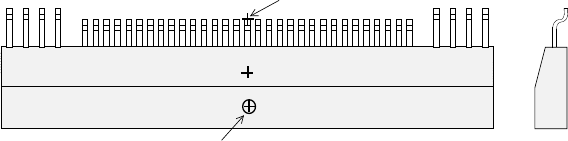
Figure 6.5.1.3 indicates that the center of the component outline is the center of a
component, while Figure 6.5.1.4 indicates that the center of component body is the
center of a component.
- To be precise, the “First element position” is the distance (offset) from the center of a
component to the first element.
In the same manner as defined for a standard lead components (such as a QFP, SOP
and connector), the first element is the leftmost element when an element group is
located on the bottom side, the lowest element when located on the right side, the
rightmost element when located on the top side, or the top element when located on the
left side. The figure below shows the first element position of the component.
For a lead element, the first element position is the end of the first lead with being
viewed from the center of a component.
- The direction (angle) of an element group is 0 degrees when it is located on the bottom
side, 90 degrees when located on the right side, 180 degrees when located on the top
side, and 270 degrees when it is located on the left side with counting anti-clockwise.
In the example, the angle of the first element group is 0 degrees and the angle of each
group from the second element group to fourth element group is 180 degrees.
Top View
Center of a component
(Center of the component outline)
Top View
Center of a component
(Center of the component body)
Top View
Direction: 0 degrees
Direction: 180 degrees
Part 2 Detailed Description of Each Function Chapter 6 General-Purpose Vision Component
6-29
- The VCS finds each element group of a general-purpose vision component, then
recognizes it with assuming that the component center obtained when you set the
element group layout is on the VCS center.
If the component pick-up position is shifted from the center of a component as shown in
the figure, set the following values as the recognition offset: an offset for recognizing a
component so that the center of a component can be located on the VCS center.
Recognition offset X: (Xcenter – Xpick)
Y: (Ycenter – Ypick)
When the machine recognizes a general-purpose vision component, the center for
recognizing a component is the component center obtained when you set the element
group layout.
Therefore, if the placement center position of a component is shifted from the center of a
component as shown in the figure below, set the following values as the Placement
offset: an offset for placing a component so that the placement center point of a
component can be moved on the placement position on a board.
Placement offset X: (Xplace – Xcenter)
Y: (Ycenter – Ycenter)
③
When the first lead end position is set to (- 20.0 mm, - 5.0 mm), set each value in the
“First element position” field as follows:
Offset X : - 20.0
Offset Y : - 5.0
Offset Z : 0 (not used)
Offset Theta: 0
Set “0” to each field of the setting item “Tolerance”.
* Next, set the element group arrangement.
To set the element group arrangement, the setting items “Dimension” (Point, 1D or 2D)",
and “Count” and “Pitch” of the “Column” and “Row” are provided.
Top View
Component center position (Xcenter, Ycenter)
(component outline center)
Component pick-up position (Xpick, Ypick)
Placement center point of a component
Cross
section
Part 2 Detailed Description of Each Function Chapter 6 General-Purpose Vision Component
6-30
④
Dimension (Point, 1D or 2D)
For a lead element, the dimension is one. Select “1D.”
In the example, the number of leads located in the first element group is 30. Enter “30” to
the “Count” field displayed under the setting item “Row.”
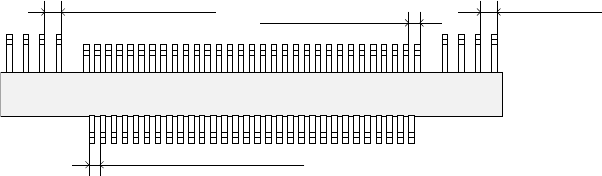
The pitch of each element group is shown in the figure.
- When the pitch is 0.5 mm, enter “0.5” in the “Pitch” field.
- Set “0” to the “Tolerance” field.
⑤
Layout inspection
Set the level used for checking the layout of an element group (checking a bent lead of a
lead component). If you are to check the layout, check the “Layout inspection” check box.
In the same manner as setting of a QFP, use the ratio of a bent lead to the lead pitch to set
the bent lead detection level.
- When you want to set the level to “20 %,” check the “Layout inspection” check box, then
check “20 %.”
⑥
Missing Elements
In the example, there is no missing lead on the element group. If there is/are a missing
element(s), specify this setting item also in the same manner as that of a QFP.
Up to four blocks of missing leads can be specified per element group.
To specify a block, set the position of the first missing lead and the number of missing leads
located continuously in the same manner when you set those of a QFP component.
- If three leads are not located from the fifth lead,
Enter “5” to the “Start” field of the “Row” setting item, “3” to the “Count” field.
• Here, you have finished setting an element group. Next, define a recognition element of
this element group
Only one element can be defined per element group. Even though you define two or more
elements, they are handled as “invalid.”
Click the <Add> button in the “Element” setting field.
Top View
Lead pitch of the first element
group
Lead pitch of the
second element group
Lead pitch of the third element
group
Lead pitch of the fourth
element group