RS-1_instruction manual.pdf - 第1039页
Pa r t 2 D et ail ed Des c r i p ti on of Each Function C hapter 1 3 Supp l em en t ar y I nf o rm ati on f or C r eating a Production P rogra m 13 - 16 Af ter sp ecif ying the sour ce f older, cl ick the b utton. The f …
Part 2 Detailed Description of Each Function Chapter 13 Supplementary Information for
Creating a Production Program
13-15
Process for restoring a control data file form the USB memory or other media 13.2.4
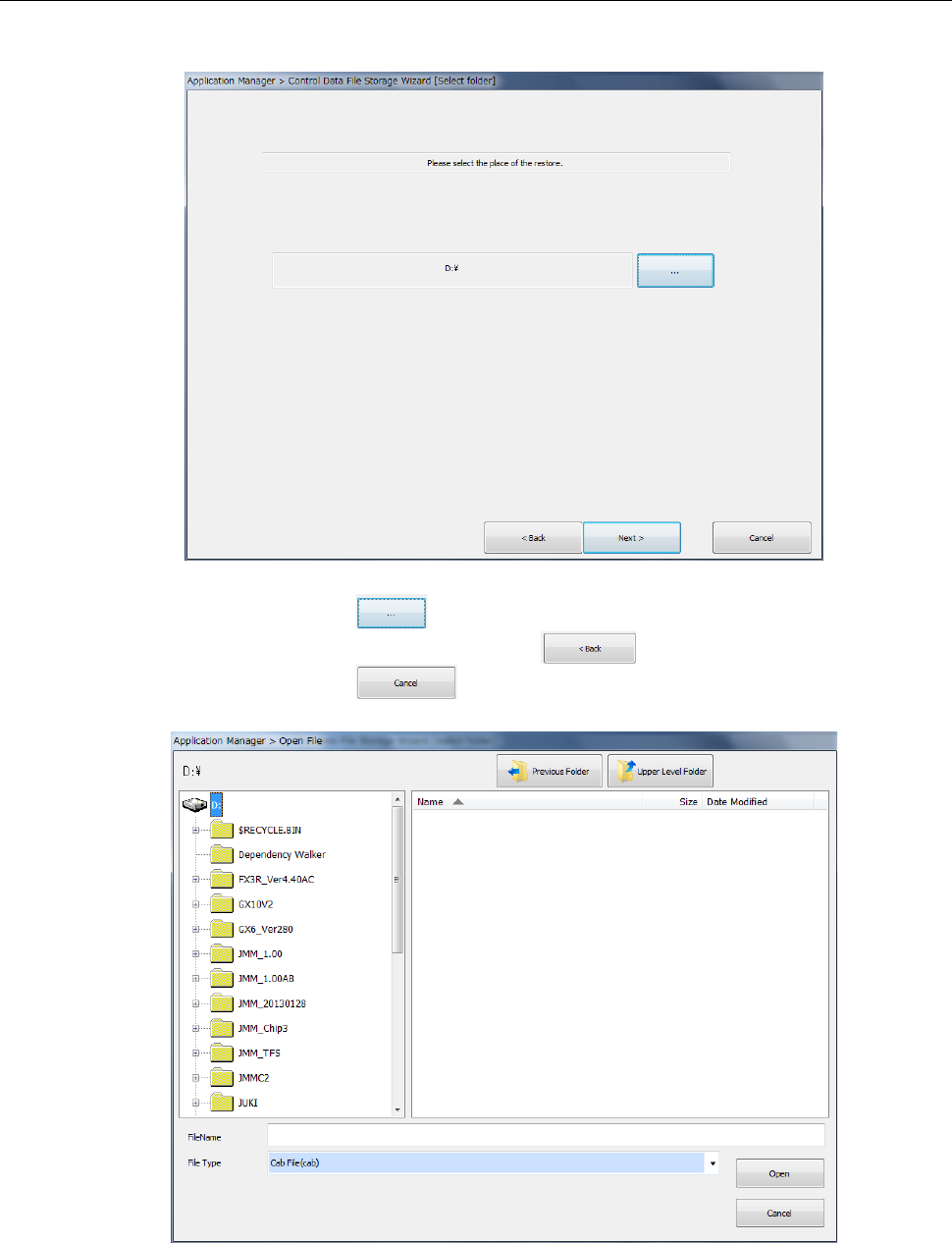
When you select <4.SSD ===> SSD or USB (serviceman only)> (restoration from the USB
memory or the specified folder on the hard disk), the following dialog appears.
Press the file browsing button ( ) to specify which file to be restored.
To change the operation to be performed, click the button.
To quit the operation, click the button.
Part 2 Detailed Description of Each Function Chapter 13 Supplementary Information for
Creating a Production Program
13-16
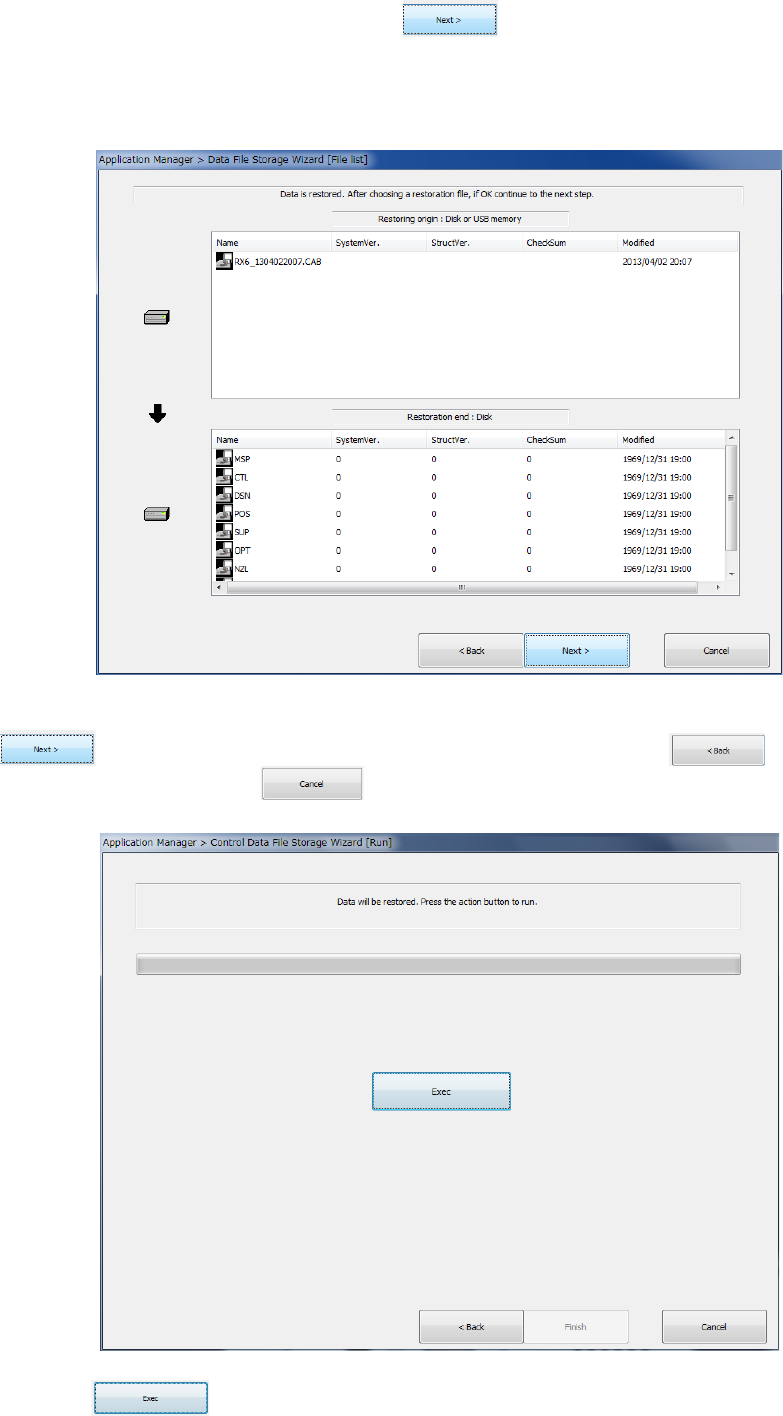
After specifying the source folder, click the button.
The following dialog box appears on the screen.
(The screen shown below as an example indicates that the control data file is to be restored from
the USB memory.)
After selecting a restorable file among files that are displayed in the source folder, click the
button. To change the operation to be performed, click the button. To
quit the operation, click the button.
Click the button to restore the control data.

Part 2 Detailed Description of Each Function Chapter 13 Supplementary Information for
Creating a Production Program
13-17
Functions available to each user level 13.3
Menu and
button
Function Operator Programmer Manager Maintenance
Service
Engineer
File menu
New × ○ ○ ○ ○
Open ○ ○ ○ ○ ○
Save ○ ○ ○ ○ ○
Save as ○ ○ ○ ○ ○
Print × ○ ○ ○ ○
Error log record display ○ ○ ○ ○ ○
Program
editing menu
Production program editing × ○ ○ ○ ○
Preparation/
adjustment
menu
Control data management × × ○ ○ ○
Machine information saving ○ ○ ○ ○ ○
Image information saving × ○ ○ ○ ○
Machine operation
information
× ○ ○ ○ ○
Return-to-origin ○ ○ ○ ○ ○
Production
menu
PWB production ○ ○ ○ ○ ○
Trial run ○ ○ ○ ○ ○
Dry run ○ ○ ○ ○ ○
Idle mode ○ ○ ○ ○ ○
Warming up ○ ○ ○ ○ ○
Machine
setting menu
Machine setup × × ○ ○ ○
Operation option × ○ ○ ○ ○
Maintenance
menu
Manual control × × ○ ○ ○
Mech. Parameter setting × × × × ○
MS parameter setting × × × × ○
Maintenance log × × ○ ○ ○
Self-diagnostic function ○ ○ ○ ○ ○
FCS × × ○ ○ ○
Bend correction × × × × ×
Environment
setting menu
User level
change/environment setting
○ ○ ○ ○ ○
Production program initial
directory
○ ○ ○ ○ ○
Display language selection
setting
× × ○ ○ ○
Operating environment
setting
× × ○ ○ ○
Version information ○ ○ ○ ○ ○
Startup
menu
File management (Explorer) × ○ ○ ○ ○
Saf e removal of hardware ○ ○ ○ ○ ○
Date and time adjustment × × × ○ ○
Application
cut
Exit
○ ○ ○ ○ ○