RS-1_instruction manual.pdf - 第930页
Part 2 D etaile d Descript ion of E ach Functi on Chapter 12 Handling th e Optional Device s 12 - 46 (2) Board that allow s the ZA - axi s to mov e down when the OUT sensor is set to OFF If the board s ize exceeds t he h…
Part 2 Detailed Description of Each Function Chapter 12 Handling the Optional Devices
12-45
12.7.4 ZA-axis operation with the substrate size for 3 buffers
When the machine transports a board in 3-buffer mode, this function adjusts the ZA-axis height to
the highest one of positions at which components have been already placed in the same manner
as 1-buffer mode. This allows the machine to always produce a PWB at the optimal ZA height.
When there is a board on the OUT buffer in this case, the machine controls the ZA-axis operation
according to the board size so that any head will not come in contact with components already
placed on the board.
12.7.4.1 Supported board size
The machine supports the board size that can be handled in 3 buffer mode.
Note that the conveyor extension option decides the applicable board size and the ZA-axis
operable timing as shown in the table below.
Conveyor extension option
Available ZA-axis moving-down timing
OUT sensor is set to ON. OUT sensor is set to OFF.
No conveyor extension (standard) 50mm – 150 mm
More than 150 mm, and less than or
equal to 360 mm
Downstream side extension by 150 mm
(option)
50mm – 300 mm
More than 300 mm, and less than or
equal to 360 mm
Downstream side extension by 250 mm
(option)
50mm – 360 mm -
Both sides extension by 150 mm
(option)
50mm – 300 mm
More than 300 mm, and less than or
equal to 500 mm
Both sides extension by 250 mm
(option)
50mm – 400 mm
More than 400 mm, and less than or
equal to 600 mm
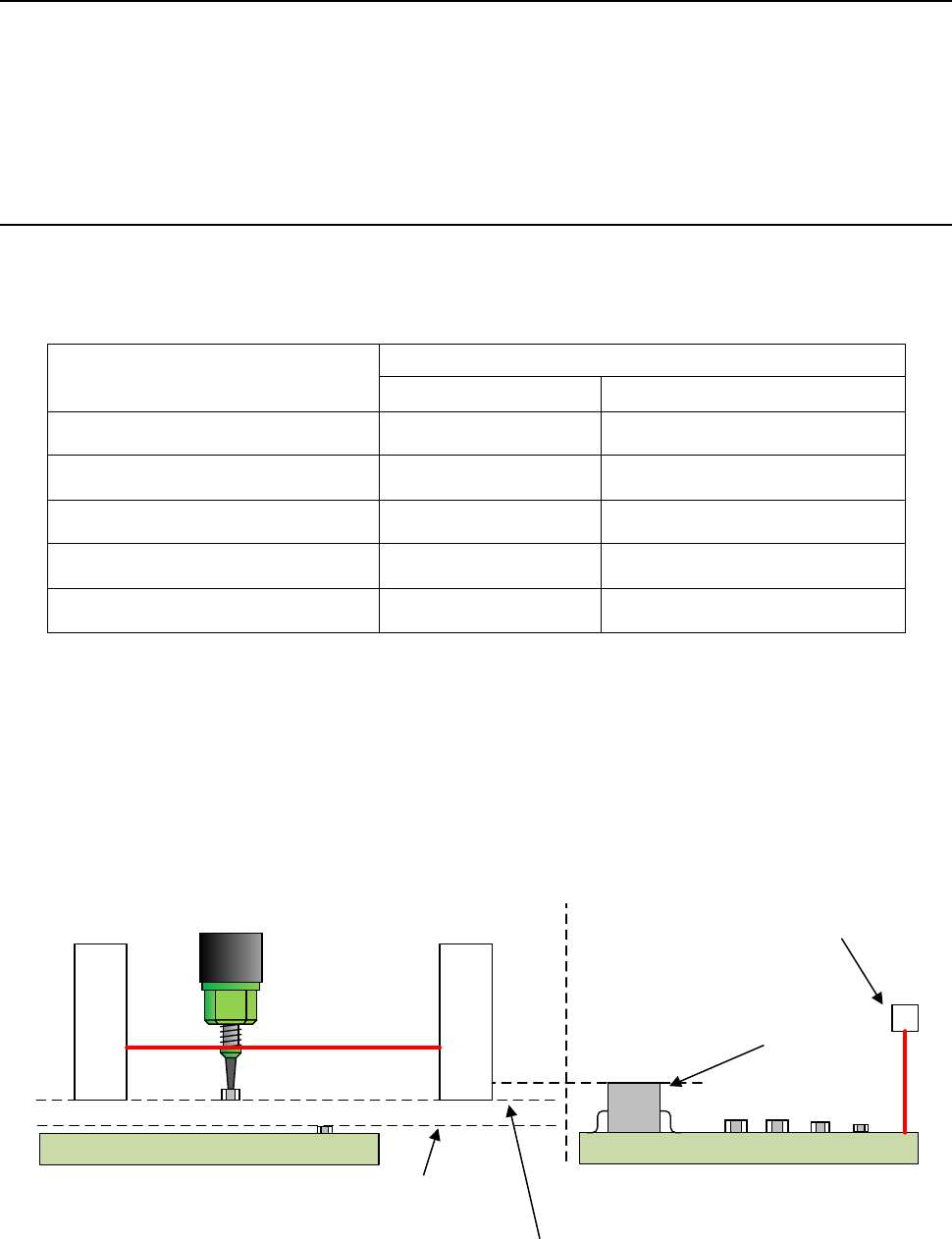
(1) Board that allows the ZA-axis to move down when the OUT sensor is set to ON
If a board is shorter than the head movable limit when another board on which a component
has been already placed waits for itself to be ejected above the OUT sensor, the ZA-axis can
move down even though there is a standby board (the OUT sensor is set to ON), and the
ZA-axis can operate according to the highest one of the positions at which components have
been already placed.
Head movable limit
OUT sensor
Board on which a component is already
placed and waits for ejection
Board on which a
component is being
placed
Maximum height of a
component already
placed on the board
Height of the bottom side of the LNC120
XY-axes movable height
Maximum height of a
component already
placed on the board that
waits for ejection
Part 2 Detailed Description of Each Function Chapter 12 Handling the Optional Devices
12-46
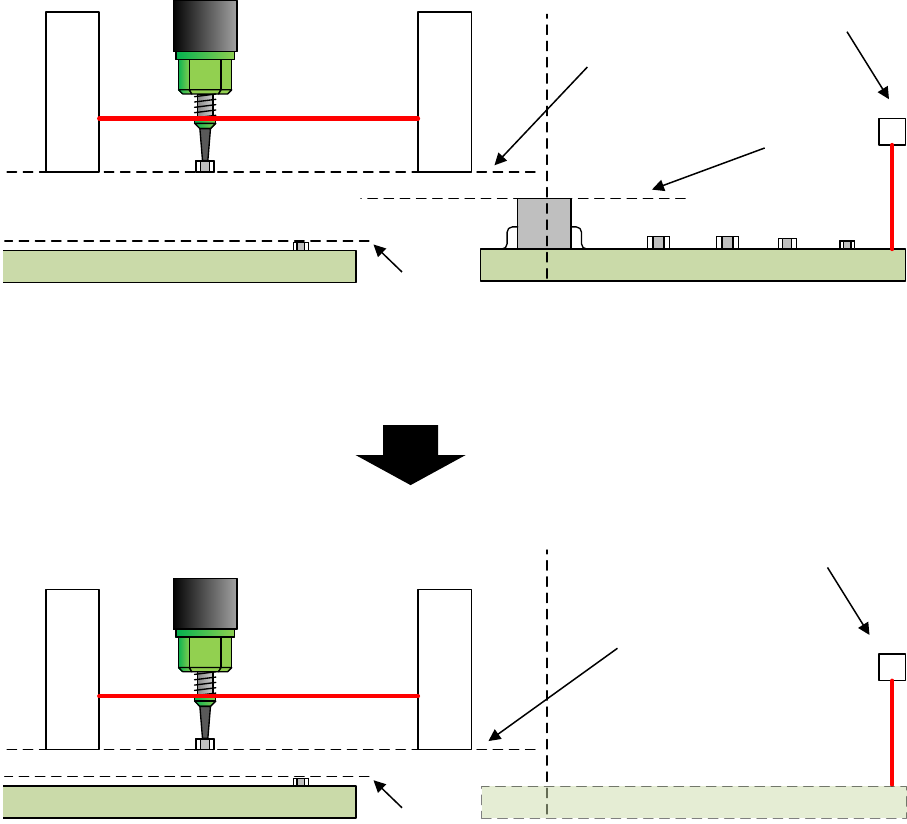
(2) Board that allows the ZA-axis to move down when the OUT sensor is set to OFF
If the board size exceeds the head movable limit when another board on which a component
has been already placed waits for itself to be ejected above the OUT sensor, the ZA-axis
height is adjusted to the highest one of all component placement positions as long as there is
a board waiting for ejection (the OUT sensor is set to ON). When the board waiting for
ejection is ejected, and no board is located above the OUT sensor (the OUT sensor is set to
OFF) as a result, the ZA-axis height can be adjusted to the highest one of positions at which
components have been already placed.
Head movable limit
OUT sensor
Board on which a component is
placed already and that waits for
ejection
Board on which a
component is being placed
Maximum height of a
component already
placed on the board
Height of the bottom side
of the LNC120
XY-axes movable height
Maximum height of a
component already placed on
the board that waits for
ejection
No board on which a component is placed
already and that waits for ejection
Ejection of a board on which a
component is already placed from
the machine
Board on which a
component is being placed
Maximum height of a
component already
placed on the board
Head movable limit
OUT sensor
Height of the bottom side
of the LNC120
XY-axes movable height
Part 2 Detailed Description of Each Function Chapter 12 Handling the Optional Devices
12-47
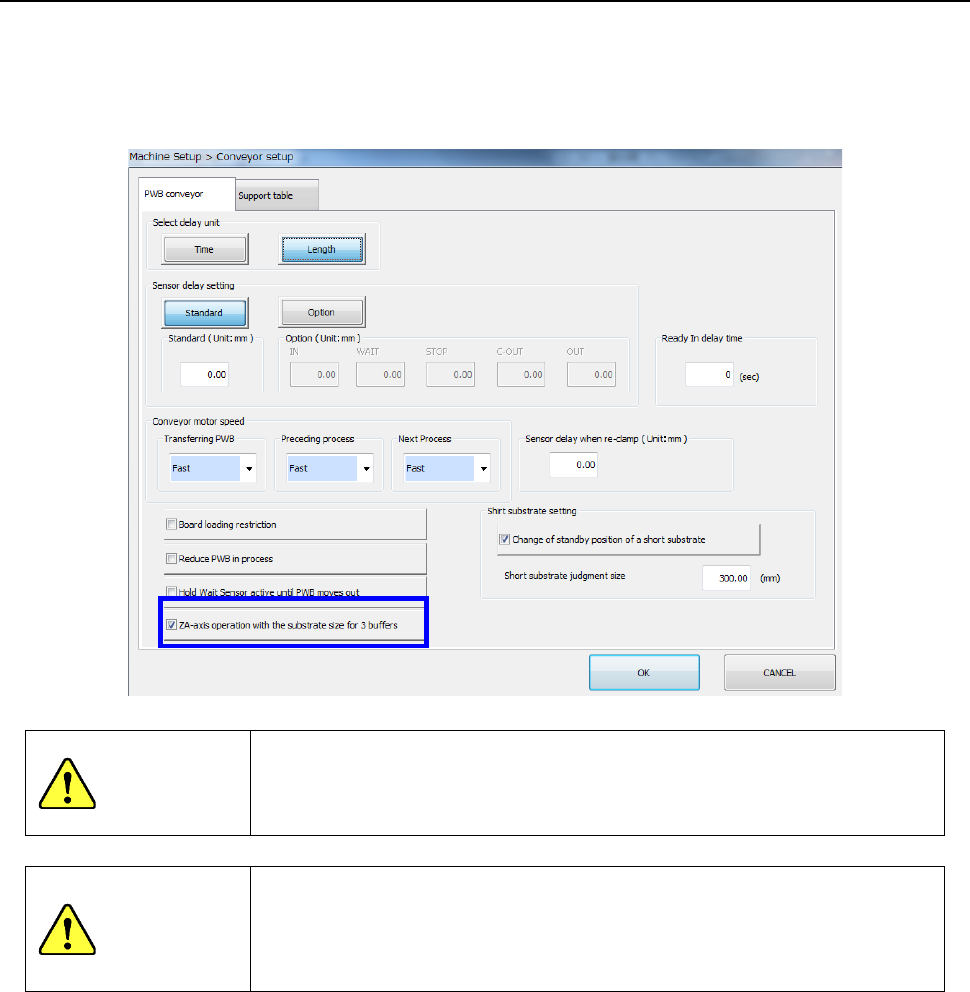
12.7.4.2 How to set (on the “Machine Setup” screen)
Select the [Conveyor setup] command, and then the “PWB conveyor” tab from the “Machine Setup”
screen to check to see if a checkmark is put in the check box “ZA-axis operation with the substrate
size for 3 buffers.”
See Section 8.3.3.1 “Conveyor setup” for how to set this item.
CAUITON
If you do not enter the board size correctly, a head may come in contact
with a component already placed on the board.
Be sure to enter the correct setting value.
CAUITON
To enable this function, check and understand the operation conditions
of the ZA-axis such as the conditions described under Section 2.14.1
“Conditions necessary to operate the ZA-axis at a 3mm-height” before
using it in the same manner as production in 1-buffer mode.