RS-1_instruction manual.pdf - 第102页
Part 1 B asic O peration Chapter 1 Overv iew of the Machine 1- 84 (2) A dvance d S etti ngs of Mac hine Data Acquisition Setti ngs If you clic k the <Advance d Settings> butt on in the “ M achine Data A cqu i sitio…
Part 1 Basic Operation Chapter 1 Overview of the Machine
1-83
When you check off the “Special logs” check box in the “Machine Data Acquisition Settings”
area, the following folders are compressed, and then saved.
Saving target folder: D:¥JUKI¥LOG¥SpclLog
No.
File name
Contents
1 xxxx_spcl.log Special log file
2 xxxx_.s01x Production program file
3
Productivity_xxxx.log
Operation information file
A “nozzle operation information file” is displayed only when an individual nozzle management
system” is attached on the machine. When you check off the “Nozzle operation information
file” check box in the “Machine Data Acquisition Settings” area, the following folder is
compressed, and then saved.
Saving target folder: D:¥JUKI¥Data¥NozzleManage
No.
File name
Contents
1
xxxx.bin
Nozzle operation information file
Part 1 Basic Operation Chapter 1 Overview of the Machine
1-84
(2) Advanced Settings of Machine Data Acquisition Settings
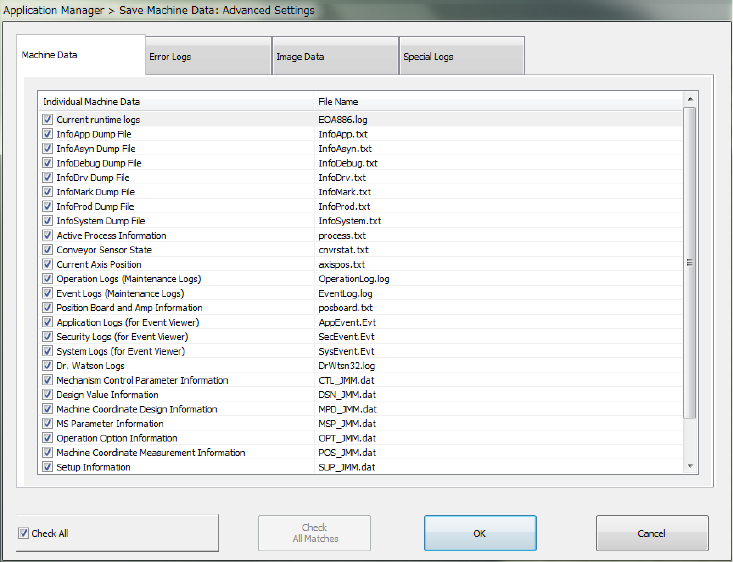
If you click the <Advanced Settings> button in the “Machine Data Acquisition Settings” area,
you can select more information on items you have checked on in the “Save Machine Data:
Advanced Settings” dialog box to save it.
The system gets the machine data you have checked off and saves it.
If you check off the “Check All” check box, all items displayed in the dialog box are checked on.
If you check off the “Check All” check box, all items are then checked off.
The “Check All” check box is checked off by default.
If you click <OK>, the settings you have made are saved and the “Save Machine Data:
Advanced Settings” dialog box is closed.
If you click <Cancel>, the settings are not saved and the “Save Machine Data: Advanced
Settings” dialog box is closed.
Part 1 Basic Operation Chapter 1 Overview of the Machine
1-85
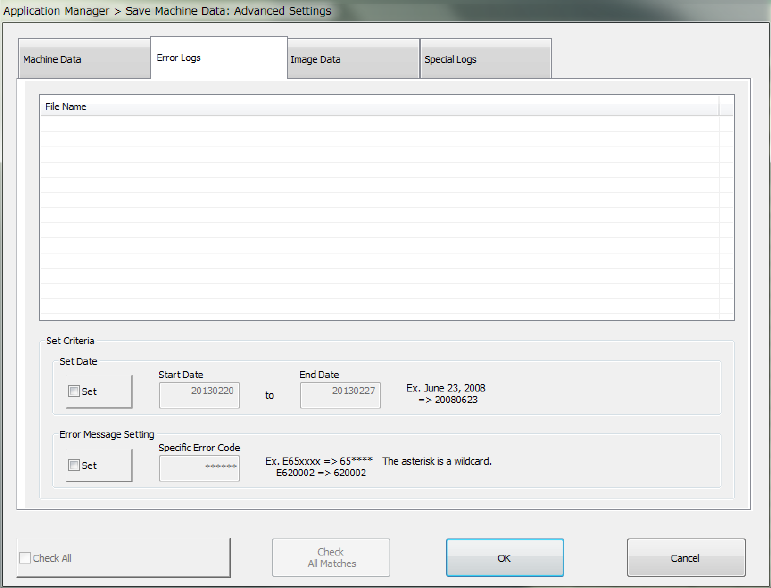
The system gets the error log file you have checked off and saves it.
If you check on the “Set” check box in the “Set Date” area of the “Set Criteria” area, specify a
start date and an end date, and click the <Check All Matches> button, the system checks the
error log files matching with the conditions.
If you check off the “Set” check box in the “Error Message Setting” area of the “Set Criteria” area,
specify a specific error code, and click the <Check All Matches> button, the system checks the
error log files matching with the conditions.
If you click the <Check All Matches> button when the “Set” check boxes in both the “Set Date”
and “Error Message Setting” areas of the “Set Criteria” area are checked, the system checks off
the error logs matching with both conditions.
If you check the “Check All” check box, all items displayed in the dialog box are checked.
If you uncheck the “Check All” check box, all items are then unchecked.
The error log files from now to one week before are checked off by default.
If you click <OK>, the settings you have made are saved and the “Save Machine Data: Advanced
Settings” dialog box is closed.
If you click <Cancel>, the settings are not saved and the “Save Machine Data: Advanced
Settings” dialog box is closed.