RS-1_instruction manual.pdf - 第184页
Part 1 B asic O peration Chapter 2 Pr oduction 2- 73 Pick Select the “P i ck” tab d i splayed o n the top of the screen. (1) Li st of t he displaye d menu items Pick data is sho wn in the list. Menu item Description Comp…
Part 1 Basic Operation Chapter 2 Production
2-72
MTC Shuttle
Specify the type of the pad on the shuttle side of the MTC.
Operator
MTS Speed
Set the speed at which a tray of the MTS is to be pulled out.
Operator
DTS Speed
Set the speed at which a tray of the DTS is to be pulled out.
Operator
(10) Inspection
These menu items allow you to display/edit the menu items on inspection.
Menu item Description User level
Tombstone
Select whether to use the tombstone error detecting option or not.
Enter a value for judging whether a tombstone error occurs or not also.
Operator
PickPosition Detection
Select whether to detect a component pick-up position error or not.
Enter a value for judging whether a pick-up position error occurs or not also.
Operator
GNRL. Vision direction
continuous inspection
Select whether component direction inspection is performed or not.
(When the component type is GNRL. Vision)
Operator
Dimension check
Select whether to check a dimension error or not.
(When the component type is “Chip,” “LED,” “Melf,” “SOT,” “Lead
connector” or “Socket.”)
Operator
Component verification
Select whether to detect the resistance, capacity and polarity of a
component or not. (When the component type is “Chip,” “LED,” “Melf,” or
“Electrolytic capacitor”)
Operator
(11) Vision
These menu items allow you to display/edit the menu items for recognition of components that
are to be recognized with a VCS.
Menu item Description
User
level
VCS Selection
Displays a VCS to be used to recognize a component.
-
Split ViewSettings
Displays the number of divisions of the field of view when a
component is recognized.
-
Lighting main
division
Displays the light type.
-
Lighting sub-division
Displays the light style.
-
Light setting
Set the brightness of each light.
Operator
You cannot edit certain data such as a feeder type.
Part 1 Basic Operation Chapter 2 Production
2-73
Pick
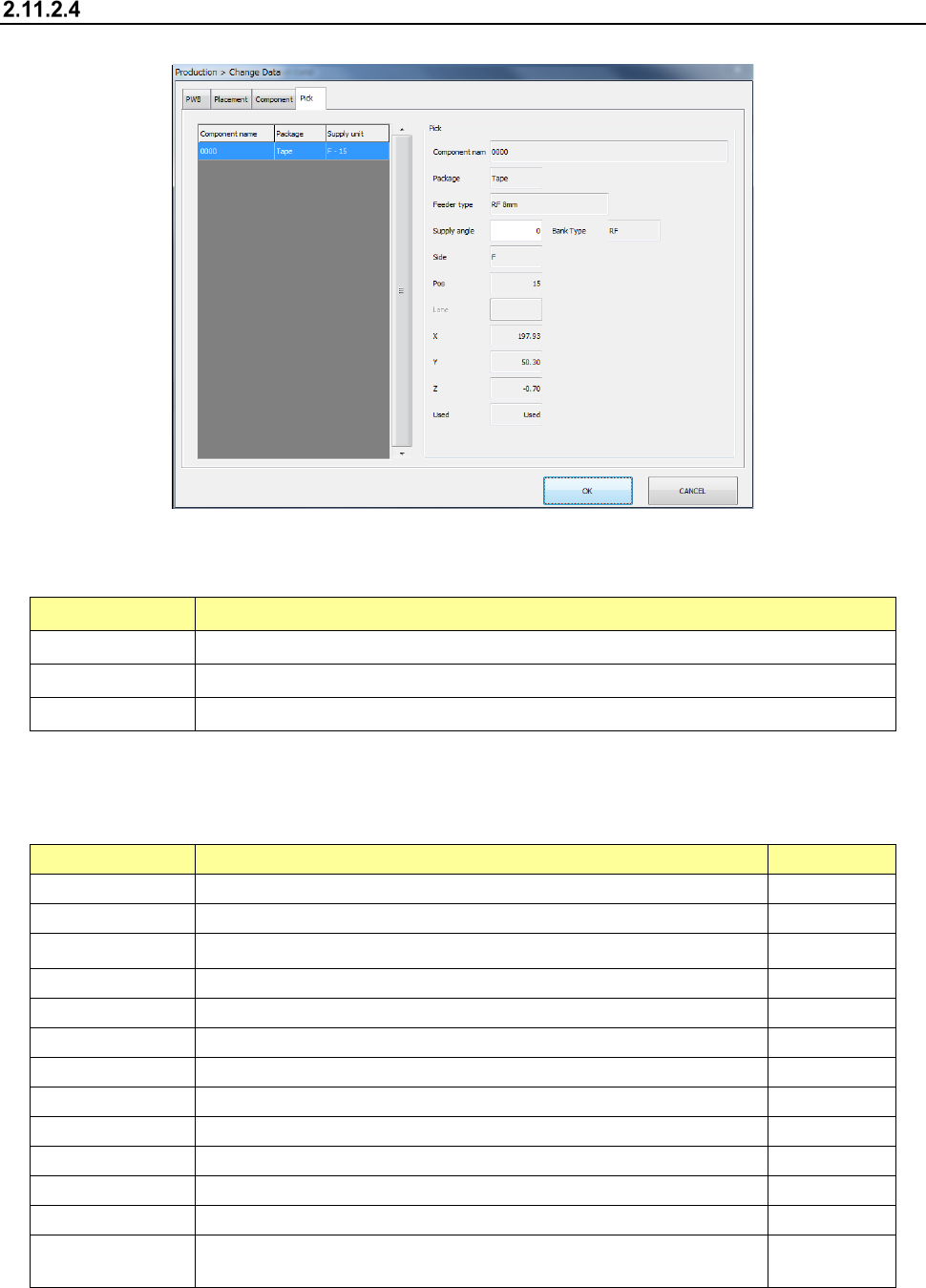
Select the “Pick” tab displayed on the top of the screen.
(1) List of the displayed menu items
Pick data is shown in the list.
Menu item Description
Component name Displays the name of a component to be picked up.
Package Displays the package style of a component to be picked up.
Supply unit Displays the supply position of a component to be picked up.
(2) Pick information
These menu items allow you to display and/or edit the information on pick operation you
selected in the list.
Menu item
Description
User level
Component name
Displays the name of a component to be picked up.
Package Displays the package style of a component to be picked up.
Supply unit Displays the supply unit.
Supply angle
Enter the component supply angle.
Programmer
Bank type
Displays the bank type of the feeder. (RF or RF/EF)
Side
Displays the bank from which a component is supplied.
Feeder type
Displays the feeder type.
Pos
Displays the pick-up number.
Lane Displays the lane number (if the component type is “Stick”).
X
Displays an X coordinate of a component pick-up position.
Y
Displays a Y coordinate of a component pick-up position.
Z
Displays a Z coordinate of a component pick-up position.
Used Select whether to pick a component based on this data to produce
PWBs.
Operator
Part 1 Basic Operation Chapter 2 Production
2-74
Program Check
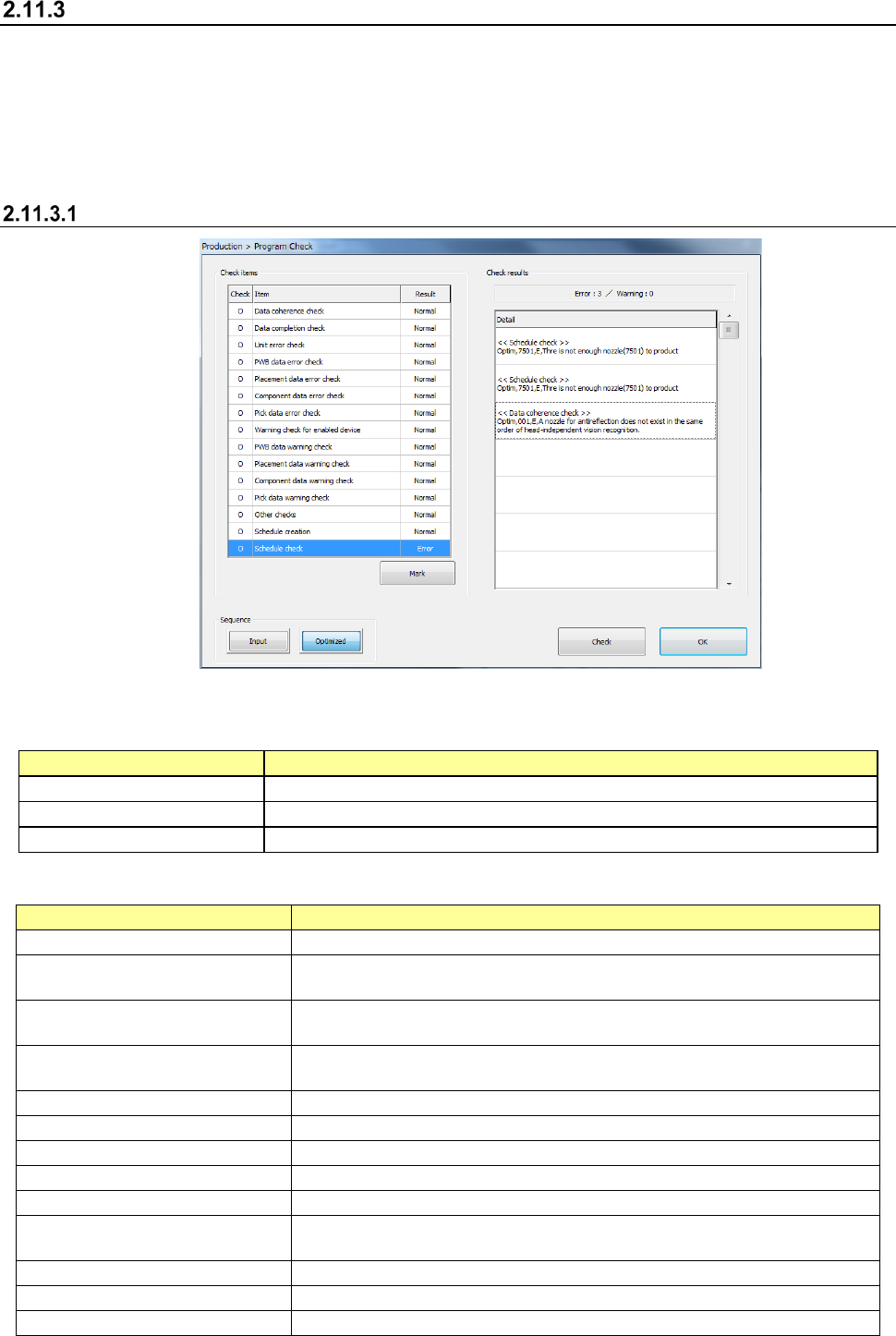
When you select the [Program] command from the “Production” menu, and then the [Program
Check] command from the “Program” menu, the “Program Check” screen appears.
This menu command checks a production program and displays the result before PWB production
starts.
The system will not check any functions that are set to OFF with the “Edit Data” command described
in Section 2.11.2, unused data and data to be skipped.
“Program Check” screen
(1) Check Items
The items for checking a production program are displayed here.
The system checks these items from the top to the bottom.
Columns of the table
Description
Check
Displays whether to check a production program.
Item
Displays the category of the check items.
Result
Displays the check result.
The check items of a production program are listed below.
Item
Description
Data coherence check
Performs an optimized data coherence check.
Data completion check
Checks the number of PWBs, the range for placing components, and
completion and link of each type of data.
Unit error check
Checks whether heads are used or not and whether placement position marks
are used or not.
PWB data error check
Checks the reference side, the board transporting direction and the BOC mark
position.
Placement data error check
Checks the placement heads and the position of an area mark.
Component data error check
Checks the used nozzles, the centering method and component supply units.
Pick data error check
Checks Pick data of each component supply unit and the CVS dead space.
Warning check for enabled device
Checks the condition of units to be used for a production program.
PWB data warning check
Checks assignments of BOC marks and those of circuits.
Placement data warning check
Checks the component placement position, assignment of area marks and
component placement during trial production.
Component data warning check
Checks discarding of components.
Pick data warning check
Checks movement of the head to the component pick-up position.
Other checks
Checks the settings of the environment.