RS-1_instruction manual.pdf - 第154页
Part 1 B asic O peration Chapter 2 Pr oduction 2- 43 3) Items for bank/ conveyor i nformatio n The state of t he banks and t hat of the conveyor are sho w n here. Informat ion shown w ith each item is a s follows. No. It…
Part 1 Basic Operation Chapter 2 Production
2-42
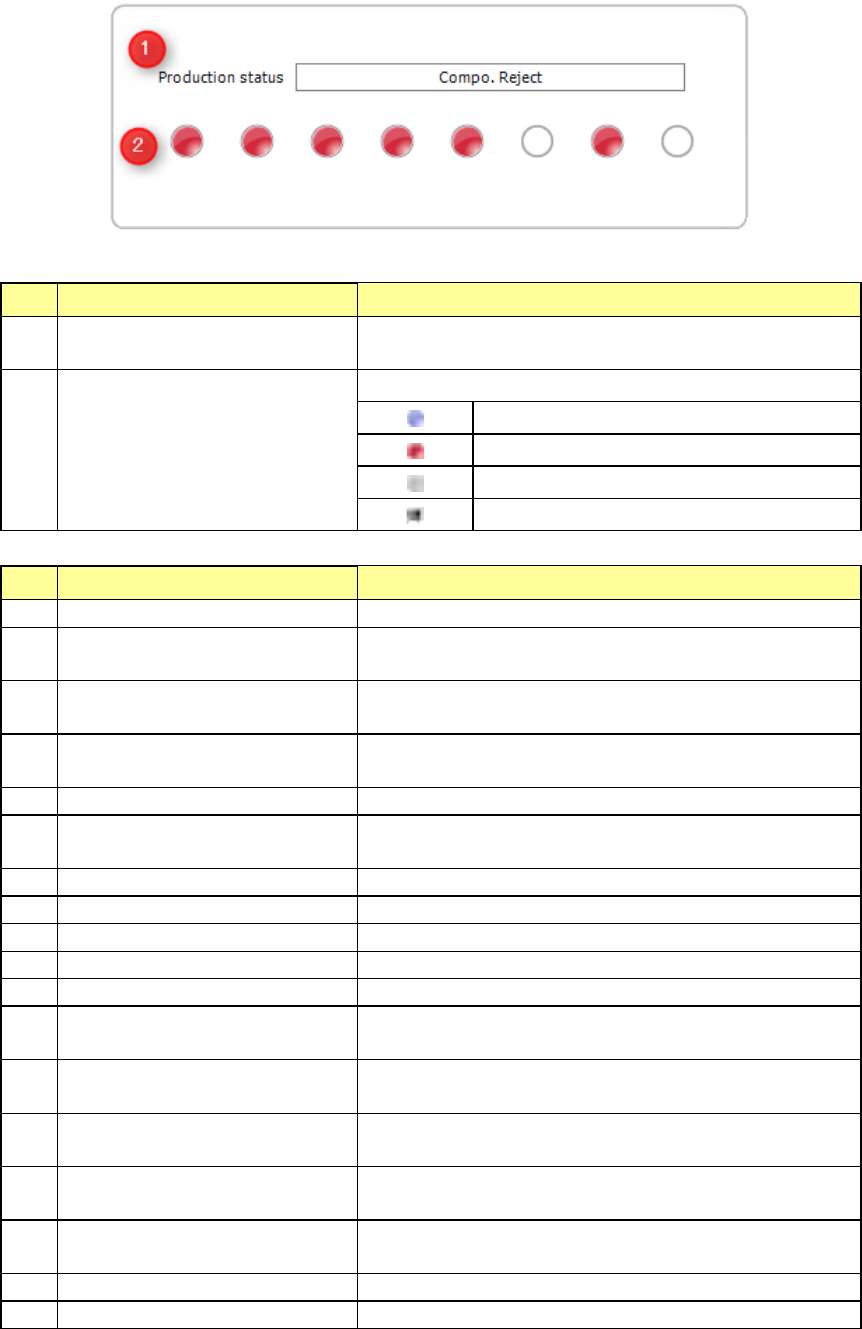
2) Items for head/bank information
These items show the state of each head and that of each bank.
Information shown with each item is as follows.
No. Item Description
1 Production
Shows the current production state.
See the table shown below for details.
2 Head
Shows the head number of each item.
Normal state
Error state
Unused state
Picking up component...
No. Displayed message State
1
PWB translating
A board is being transported.
2 VCS recognizing
The process for using a VCS to recognize a component that
is to be recognized with a VCS is being performed.
3 Multi recognizing
The process for multi-recognizing a component that is to be
multi-recognized is being performed.
4 SVCS recognizing
The process for using a SVCS to recognize a component
that is to be recognized with a SVCS is being performed.
5
Conveyor Waitingplace Moving
A board is moving to the board transport waiting position.
6 Recognizing area mark
The process for recognizing an area mark is being
performed.
7
Recognizing BOC mark
A BOC mark is being recognized.
8
Detecting bad mark
A bad mark is being detected.
9
Recognizing bank mark
A bank mark is being read.
10
Recognizing area bad mark
An area bad mark is being recognized.
11
Recognizing global bad mark
A global bad mark is being detected.
12 Attaching nozzle
A nozzle is being attached on a head or it is moving to the
nozzle attachment position.
13 Returning nozzle
A nozzle is being returned or it is moving to the nozzle return
position.
14 Place position
A component is being placed on a board or it is moving to the
placement position.
15 Pick position
A component is being picked up or it is moving to the pick-up
position.
16 Compo. Reject
A component is being discarded or it is moving to the
component discarding position.
17
Waiting for start production
The machine is preparing for PWB production.
18
Other position
The machine is performing operation other than the above.
Part 1 Basic Operation Chapter 2 Production
2-43
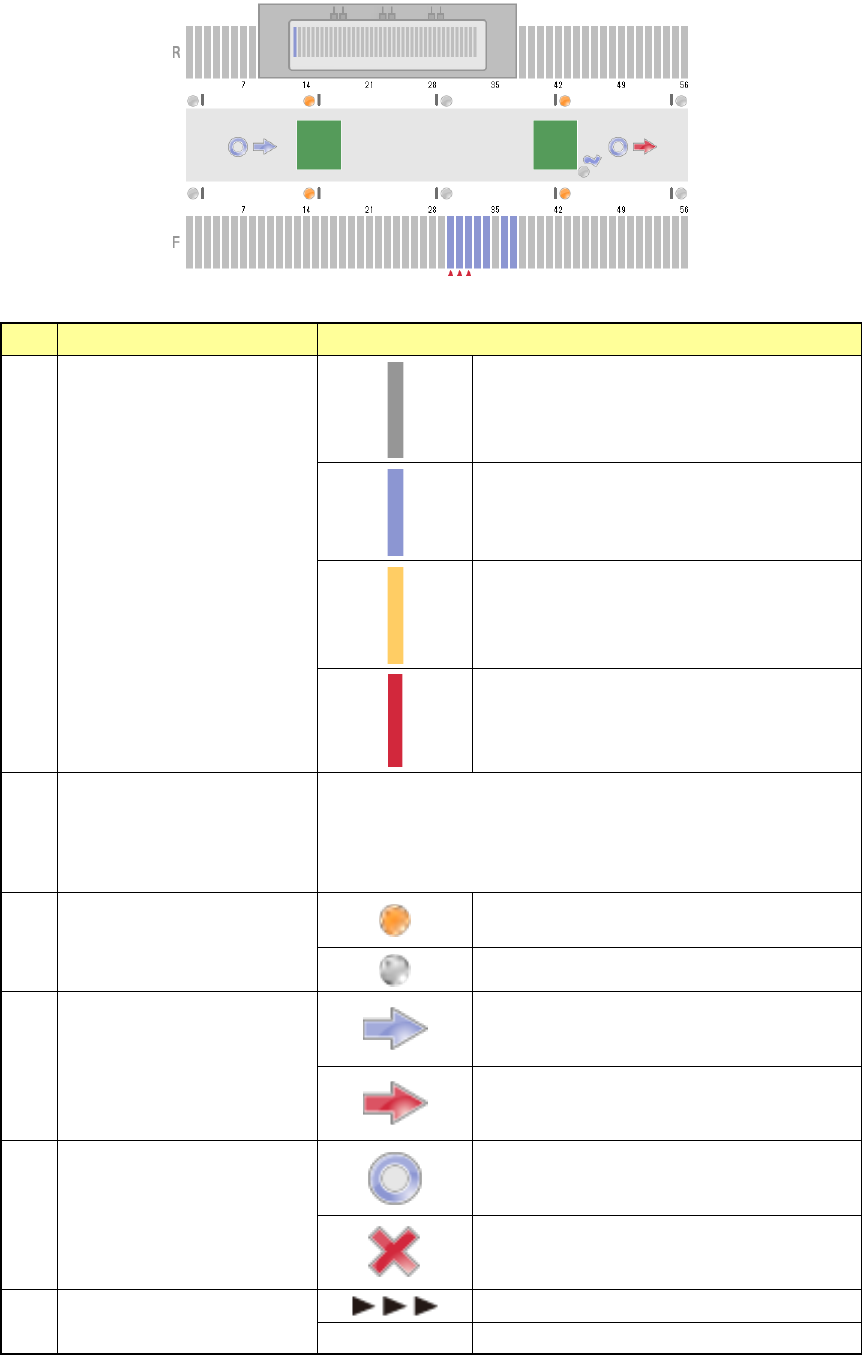
3) Items for bank/conveyor information
The state of the banks and that of the conveyor are shown here.
Information shown with each item is as follows.
No.
Item
Description
1 Feeder state
No feeder
Normal state
Components run out.
Error state
2 Worst feeder
Worst 3 feeders
Set the worst feeder with the menu item “Worst feeder selection
method” on the “Production (Display)” tab invoked from the
“Operation option” screen.
(“Pick-up rate” or “Number of pick-up errors”)
3
In sensor, WAIT sensor,
WAIT2 sensor, Stop sensor,
C-Out sensor, Out sensor
The sensor is set to ON.
The sensor is set to OFF.
4 Ready signal
The sensor is set to OFF.
The sensor is set to ON.
5 Board available
The sensor is set to OFF.
The sensor is set to ON.
6 Conveyor motor state
The motor is operating.
No display The motor is stopping.
Part 1 Basic Operation Chapter 2 Production
2-44
4) Items for recognition of marks
This item displays the mark recognition screen.
When the system recognizes a mark, it displays the superimpose screen over the stop sensor
of the conveyor information.
No.
Type
1
BOC mark
2
Area mark
3
Bad mark
4
Bank mark
5
Area bad mark
6
Global bad mark
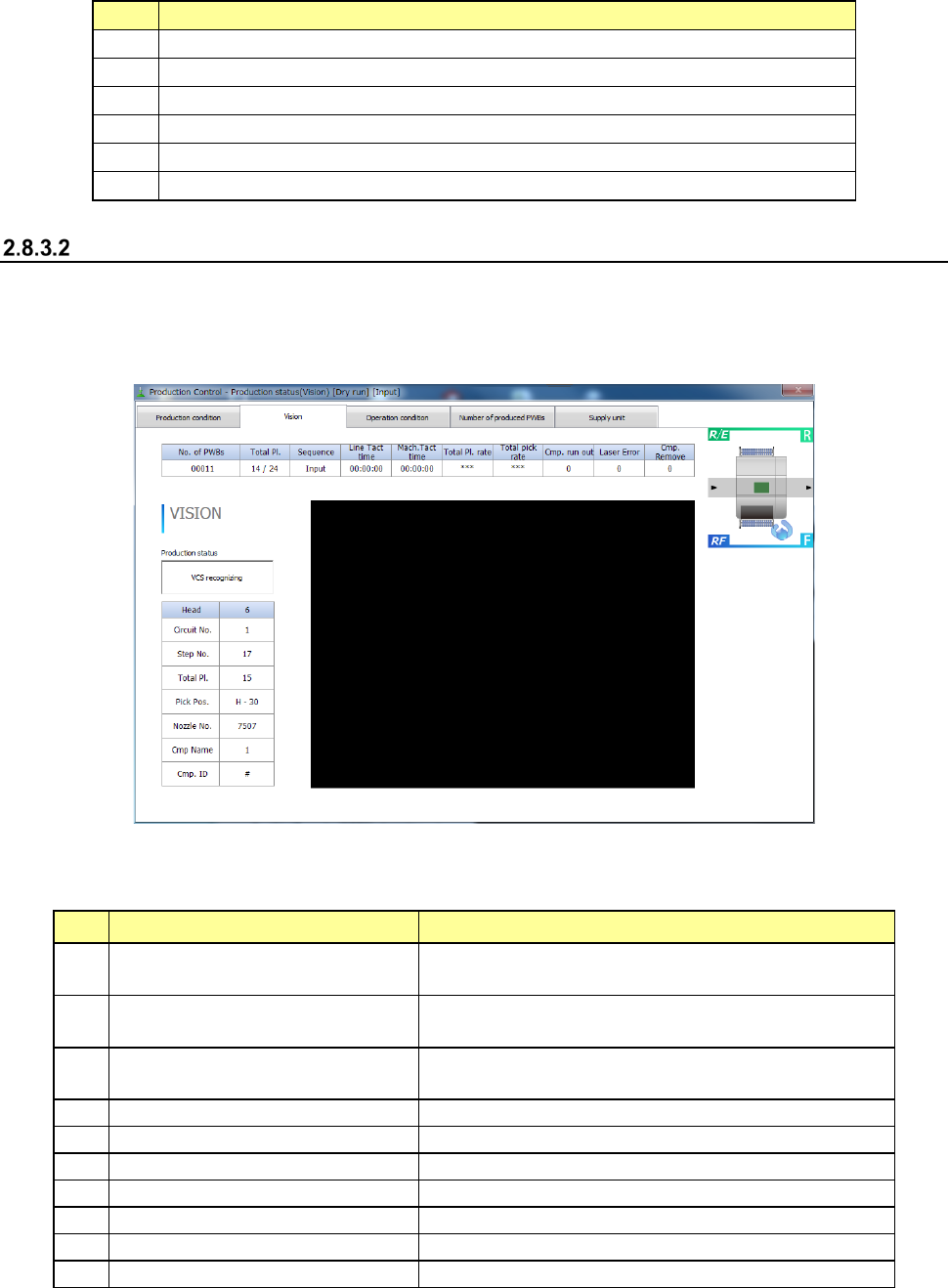
Vision
When you select the commands, [Window] and [Production status (Vision)], the “Production status
(Vision)” screen appears.
Each mark whose image is taken during production and the superimpose screen are displayed. The
figure below shows the example of displaying the screen.
1) Item for production state
The production state on the currently superimposed screen is displayed.
The following production states are displayed on the “Production status (Vision)” screen.
No.
Display
State
1
Recognizing component with
VCS
Recognizing vision recognition components with
VCS
2 Multi recognizing
The process for multi-recognizing a component that
is to be multi-recognized is being performed.
3
SVCS recognizing
The process for using a SVCS to recognize a component
that is to be recognized with a SVCS is being performed.
4
Recognizing area mark
Recognizing an area mark
5
Recognizing BOC mark
Recognizing a BOC mark
6
Recognizing bad mark
Detecting a bad mark with the OCC
7
Recognizing bank mark
Recognizing a bank mark
8
Recognizing area bad mark
Recognizing an area bad mark
9
Recognizing global bad mark
Detecting a global bad mark with the OCC
10
Other states
Cal mark recognition, Nozzle D-cut detection