RS-1_instruction manual.pdf - 第1040页
Pa r t 2 D et ail ed Des c r i p ti on of Each Function C hapter 1 3 Supp l em en t ar y I nf o rm ati on f or C r eating a Production P rogra m 13 - 17 F uncti on s avai la ble to e ac h user le vel 13. 3 M enu and butt…
Part 2 Detailed Description of Each Function Chapter 13 Supplementary Information for
Creating a Production Program
13-16
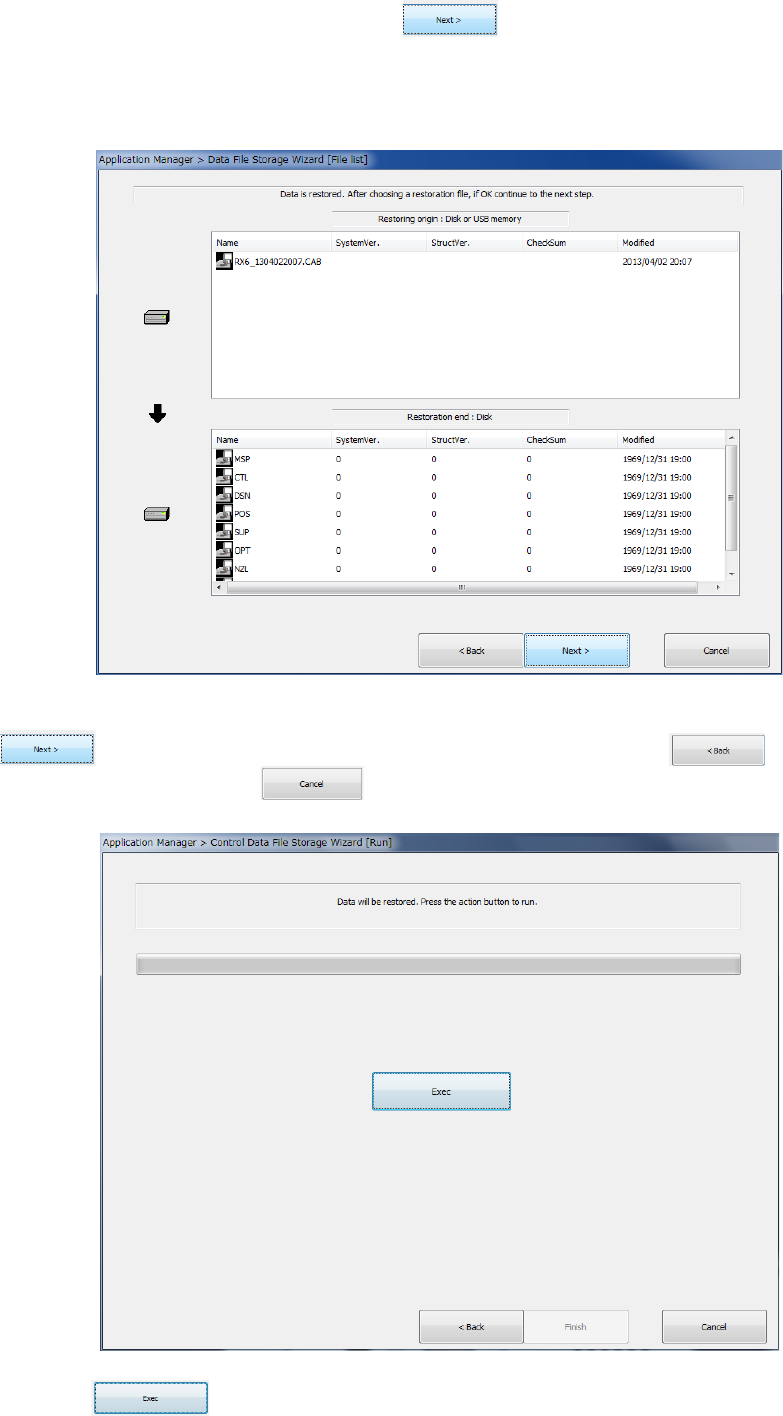
After specifying the source folder, click the button.
The following dialog box appears on the screen.
(The screen shown below as an example indicates that the control data file is to be restored from
the USB memory.)
After selecting a restorable file among files that are displayed in the source folder, click the
button. To change the operation to be performed, click the button. To
quit the operation, click the button.
Click the button to restore the control data.

Part 2 Detailed Description of Each Function Chapter 13 Supplementary Information for
Creating a Production Program
13-17
Functions available to each user level 13.3
Menu and
button
Function Operator Programmer Manager Maintenance
Service
Engineer
File menu
New × ○ ○ ○ ○
Open ○ ○ ○ ○ ○
Save ○ ○ ○ ○ ○
Save as ○ ○ ○ ○ ○
Print × ○ ○ ○ ○
Error log record display ○ ○ ○ ○ ○
Program
editing menu
Production program editing × ○ ○ ○ ○
Preparation/
adjustment
menu
Control data management × × ○ ○ ○
Machine information saving ○ ○ ○ ○ ○
Image information saving × ○ ○ ○ ○
Machine operation
information
× ○ ○ ○ ○
Return-to-origin ○ ○ ○ ○ ○
Production
menu
PWB production ○ ○ ○ ○ ○
Trial run ○ ○ ○ ○ ○
Dry run ○ ○ ○ ○ ○
Idle mode ○ ○ ○ ○ ○
Warming up ○ ○ ○ ○ ○
Machine
setting menu
Machine setup × × ○ ○ ○
Operation option × ○ ○ ○ ○
Maintenance
menu
Manual control × × ○ ○ ○
Mech. Parameter setting × × × × ○
MS parameter setting × × × × ○
Maintenance log × × ○ ○ ○
Self-diagnostic function ○ ○ ○ ○ ○
FCS × × ○ ○ ○
Bend correction × × × × ×
Environment
setting menu
User level
change/environment setting
○ ○ ○ ○ ○
Production program initial
directory
○ ○ ○ ○ ○
Display language selection
setting
× × ○ ○ ○
Operating environment
setting
× × ○ ○ ○
Version information ○ ○ ○ ○ ○
Startup
menu
File management (Explorer) × ○ ○ ○ ○
Saf e removal of hardware ○ ○ ○ ○ ○
Date and time adjustment × × × ○ ○
Application
cut
Exit
○ ○ ○ ○ ○

Part 2 Detailed Description of Each Function Chapter 13 Supplementary Information for
Creating a Production Program
13-18
File type of Production Programs 13.4
Read enable file type table 13.4.1
Type name (extension) Explanation of program file
RS-1/1R type file (s01x) File created by RS-1/1R main unit
RX-7 type file (prd) File created by RX-7 main unit
RX-6/6B/6R type file (j01x) File created by RX-6
2050/2050R type file (e54) File created by 2050/2050R main unit
2060 type file (e46) File created by 2060 main unit
2070 type file (e47) File created by 2070/1070 main unit
2080 type file (e48) File created by 2080/2080R main unit
CX-1 type file (e56) File created by CX-1 main unit
FX-1/FX-1R type file (e51) File created by FX-1/FX1R main unit
FX-2 type file (X52) File created by FX-2 main unit
FX-3 type file (x01) File created by FX-3 main unit
2077 type file (X52) File created by FX-2 main unit
3010 type file (X11) File created by 3010 main unit
3020 type file (x21) File created by 3020/3020R
File divided by optimization (i01) File divided for machine #1 of line by Production support system
File divided by optimization (i02) File divided for machine #2 of line by Production support system
File divided by optimization (i03) File divided for machine #3 of line by Production support system
File divided by optimization (i04) File divided for machine #4 of line by Production support system
File divided by optimization (i05) File divided for machine #5 of line by Production support system
File divided by optimization (i06) File divided for machine #6 of line by Production support system
File divided by optimization (i07) File divided for machine #7 of line by Production support system
File divided by optimization (i08) File divided for machine #8 of line by Production support system
File divided by optimization (i09) File divided for machine #9 of line by Production support system
File divided by optimization (i10) File divided for machine #10 of line by Production support system
* The extension may be the same in the production program created by the mounter not listed in the
above "Explanation of program file", but please do not read it because RS-1/1R does not support it.
Example: JX 300 LED is the same as 2070 format file (e 47)
CAUTION
* Precautions on reading data
The 770, 775, 2077, RX-7 type file contains component names but no
contents of component data. For the files of a type other than RS-1/1R,
the pick data is selected automatically.
Save enable file type table 13.4.2
Type name (extension) Explanation of program file
RS-1/1R type file (s01x) File created by RS-1/1R