semi合集-English.pdf - 第1086页
SEMI E5-1104 © SEMI 1982, 2004 28 Name Format Description Values Where Used PMAX 3(), 5() Para mete r Count Maximum Maximum amount of data to be accepted by the host for this parameter. When a conflict arises between val…
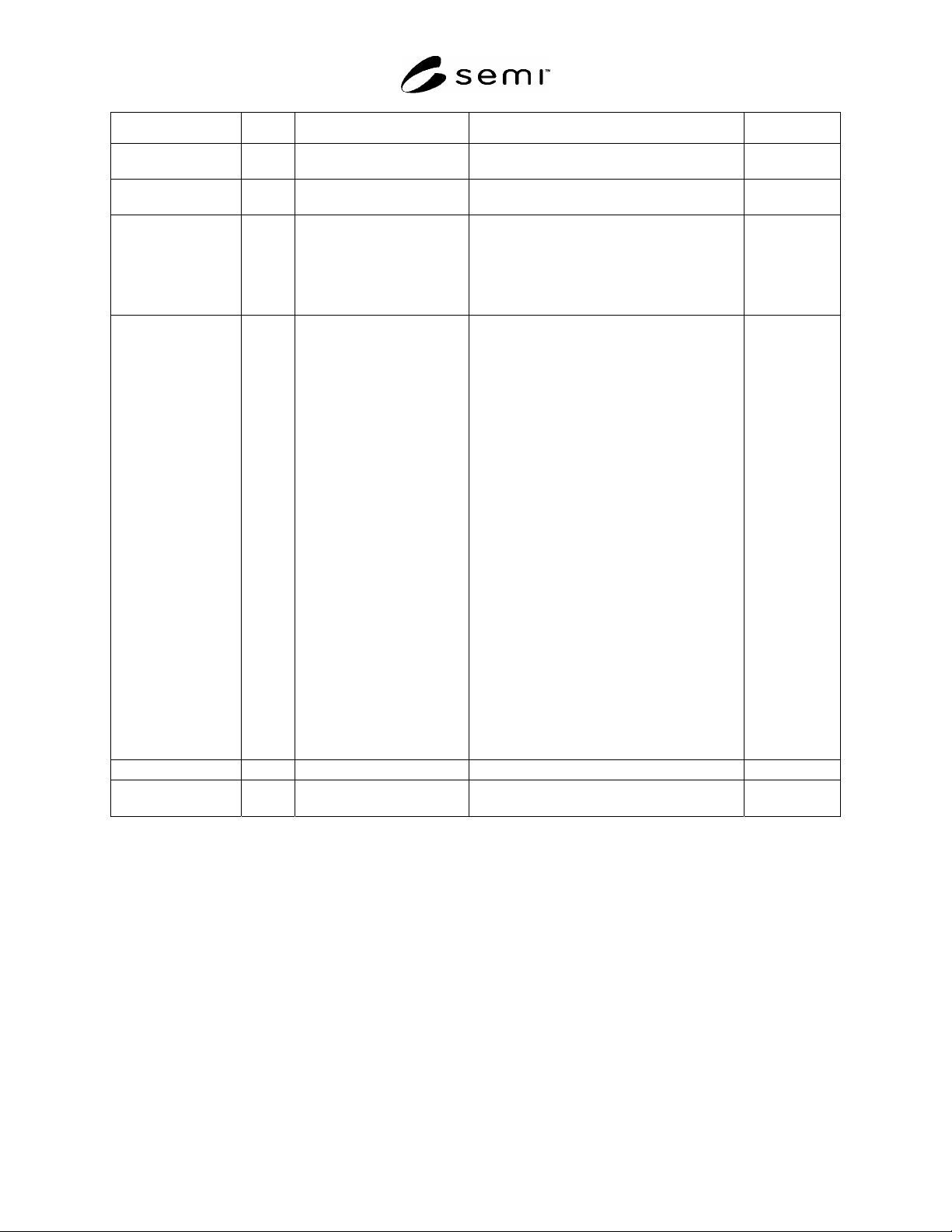
SEMI E5-1104 © SEMI 1982, 2004 27
Name Format Description Values Where Used
OUTPTN 10, 51 A specialized version of PTN
indicating the OutPutPort
S3F35
PARAMNAME 20 The name of a parameter in a
request
S3F21, F23
PARAMVAL 1, 10,
11, 20,
3(), 4(),
5()
The value of the parameter
named in PARAMNAME.
Values that are lists are
restricted to lists of single
items of the same format
type.
S3F21, F23
PDFLT 11, 20,
3(), 4(),
5()
Parameter Default Value
Specifies default value and data
type of parameter. If no
defaults are provided, item data
length will be zero. For
numeric or Boolean data, the
default item may be a multi-
varied vector if the parameter
itself can be a vector.
If RQPAR is false:
Position of data in a default
item is significant. When
obtaining a default value to be
used in the Nth position of a
vector parameter, the
value is obtained from the Nth
position of the default item.
If the default item has L
entries, no default value will
be provided for the L+1,...,PMAX
parameter entries.
If RQPAR is true:
The length of the default vector
(L) specifies the minimum number
of
entries which must be entered
for the parameter. If > PMAX,
only PMAX
entries are required.
S7F22
PFCD 10 Predefined form code, 1 byte
S6F9
PGRPACTION 20 The action to be performed
on a port group
S3F23
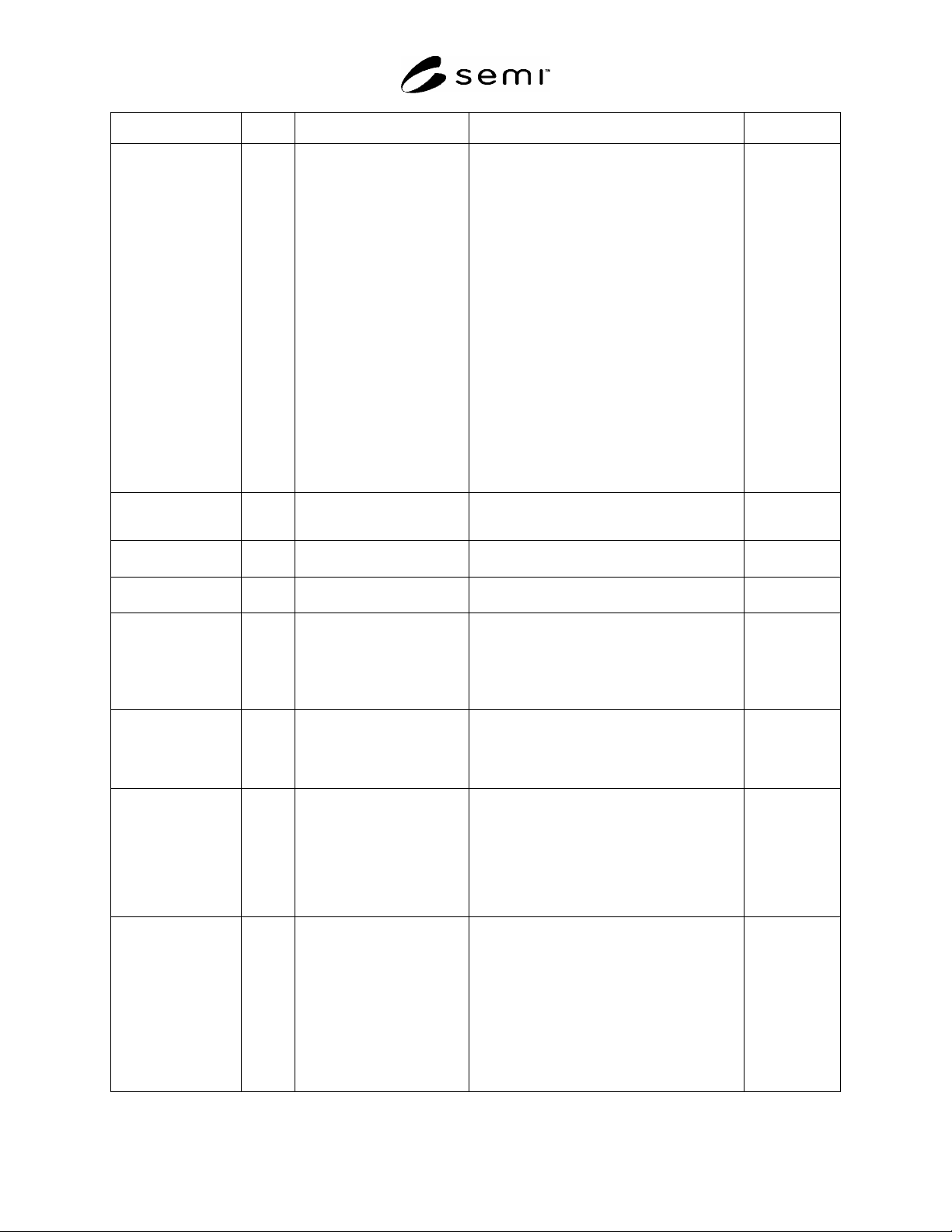
SEMI E5-1104 © SEMI 1982, 2004 28
Name Format Description Values Where Used
PMAX 3(), 5() Parameter Count Maximum
Maximum amount of data to be
accepted by the host for this
parameter. When a conflict
arises between value of PMAX and
length of PDFLT, PMAX takes
precedence.
For numeric and Boolean
parameters:
PMAX < 0 invalid
PMAX = 0 specifies there is no
upper bound
PMAX = 1 specified a single
value is expected
PMAX > 1 specifies a vector of
values is expected with a
maximum of PMAX entries
For string parameters:
PMAX < 0 invalid
PMAX = 0 specifies there is no
upper bound
PMAX > 0 maximum length of
parameter string
S7F22
PNAME 20
Parameter Name 16
characters
Text string identifying the
parameter value expected by its
parent process command.
S7F22
PORTACTION 20 The action to be performed
on a port
S3F25
PORTGRPNAME 20 The identifier of a group of
ports
S3F21,F23
PPARM 11, 20,
3(), 4(),
5()
Process Parameter
Numeric or Boolean SECS data
item, single or multiple value,
or text string which provides
information required to complete
the process command to which the
parameter refers.
S7F23, F26,
F31, F39, F43
PPBODY 10, 20,
3(), 5()
Process program body
The process program describes to
the equipment, in its own
language, the actions to be
taken in processing the material
it receives.
S7F3, F6, F36,
F37, F41
PPGNT 10 Process program grant status,
1 byte
0 = OK
1 = Already have
2 = No space
3 = Invalid PPID
4 = Busy, try later
5 = Will not accept
>5 = Other error
6-63 Reserved
S7F2, F30
PPID 10, 20 Process program ID
Limited to a maximum of 80
bytes.
The format used in the PPID will
be host-dependent. For internal
use of the equipment, the PPID
can be treated as a unique
binary pattern. If the local
equipment is not prepared to
display the transmitted code,
the display should be in
hexadecimal form.
S2F27;
S7F1, F3, F5,
F6, F8, F10,
F11, F13, F17,
F20, F23, F25,
F26, F27, F31,
F33, F34, F36,
F53;
S9F13
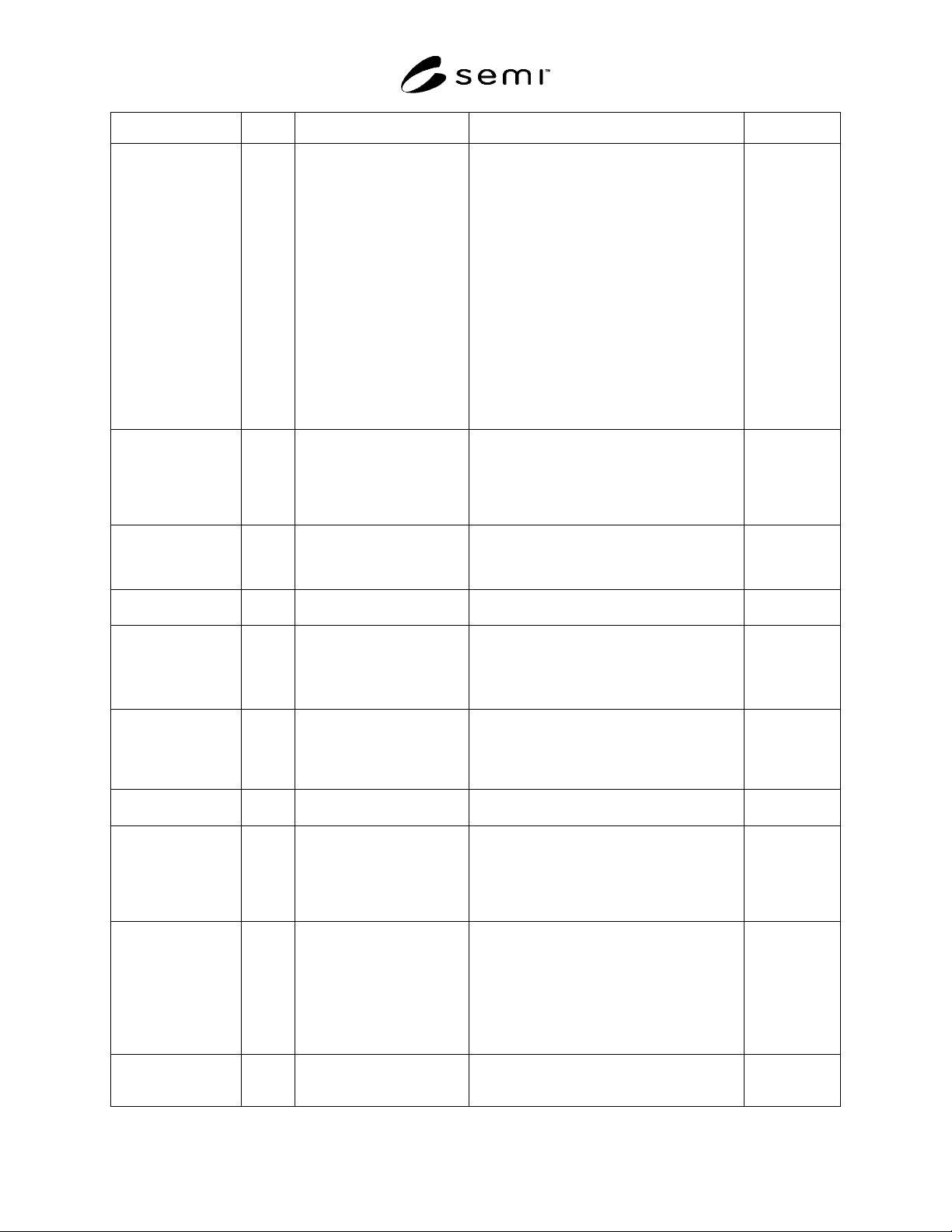
SEMI E5-1104 © SEMI 1982, 2004 29
Name Format Description Values Where Used
PRAXI 10 Process axis
0 = Rows (X-axis), top,
increasing
1 = Rows (X-axis), top,
decreasing
2 = Rows (X-axis), bottom,
increasing
3 = Rows (X-axis), bottom,
decreasing
4 = Columns (Y-axis), left,
increasing
5 = Columns (Y-axis), left,
decreasing
6 = Columns (Y-axis), right,
increasing
7 = Columns (Y-axis), right,
decreasing
>7 = Error
8-63 Reserved
S12F1, F3
PRCMDNAME 20 Commands sent to a process
job:
“START”
“STOP”
“PAUSE”
“RESUME”
“ABORT”
“CANCEL”
S16F5
PRDCT 5() Process Die Count
Number of die to be processed or
number of die which have been
processed. (Zero length
indicates not used.)
S12F1, F4
PREVENTID 5() Processing related event
identification:
1 = Waiting for material
2 = Job state change
S16F9
PRJOBID 20 Text string which uniquely
identifies a process job
S16F4, F5, F6,
F7, F9, F11,
F12, F13, F14,
F15, F16, F17,
F20, F23, F25
PRJOBMILESTONE 5() Notification of Processing
status shall have one of the
following values:
1 = Job Setup
2 = Job Processing
3 = Job Processing Complete
4 = Job Complete
5 = Job Waiting for Start
S16F7
PRJOBSPACE 52 The number of process jobs
that can be created
S16F22
PRMTRLORDER 51 Defines the order by which
material in the process jobs
material list will be
processed. Possible values
are assigned as follows:
1 = ARRIVAL – process whichever
material first arrives
2 = OPTIMIZE – process in an
order that maximizes throughput
3 = LIST – follow the order in
the list
S16F29
PRPAUSEEVENT 00 The list of event identifiers,
which may be sent as an
attribute value to a process
job. When a process job
encounters one of these
events it will pause, until it
receives the PRJobCommand
RESUME.
S16F11, F13,
F15
PRPROCESSSTART 11 Indicates that the process
resource start processing
immediately when ready:
TRUE = Automatic Start
FALSE = Manual Start
S16F11, F13,
F15, F25