semi合集-English.pdf - 第3385页
SEMI E132.1-0305 © SEMI 2005 12 ID Pu blic/P rivat e Key Privil eges X.509 Certificate E132 ACL Entry E132 Principal I d = ID Certif icate Sub ject Name: Common Name=ID Securit y Ad m i n CA Admin Authority Admin Authori…
SEMI E132.1-0305 © SEMI 2005 11
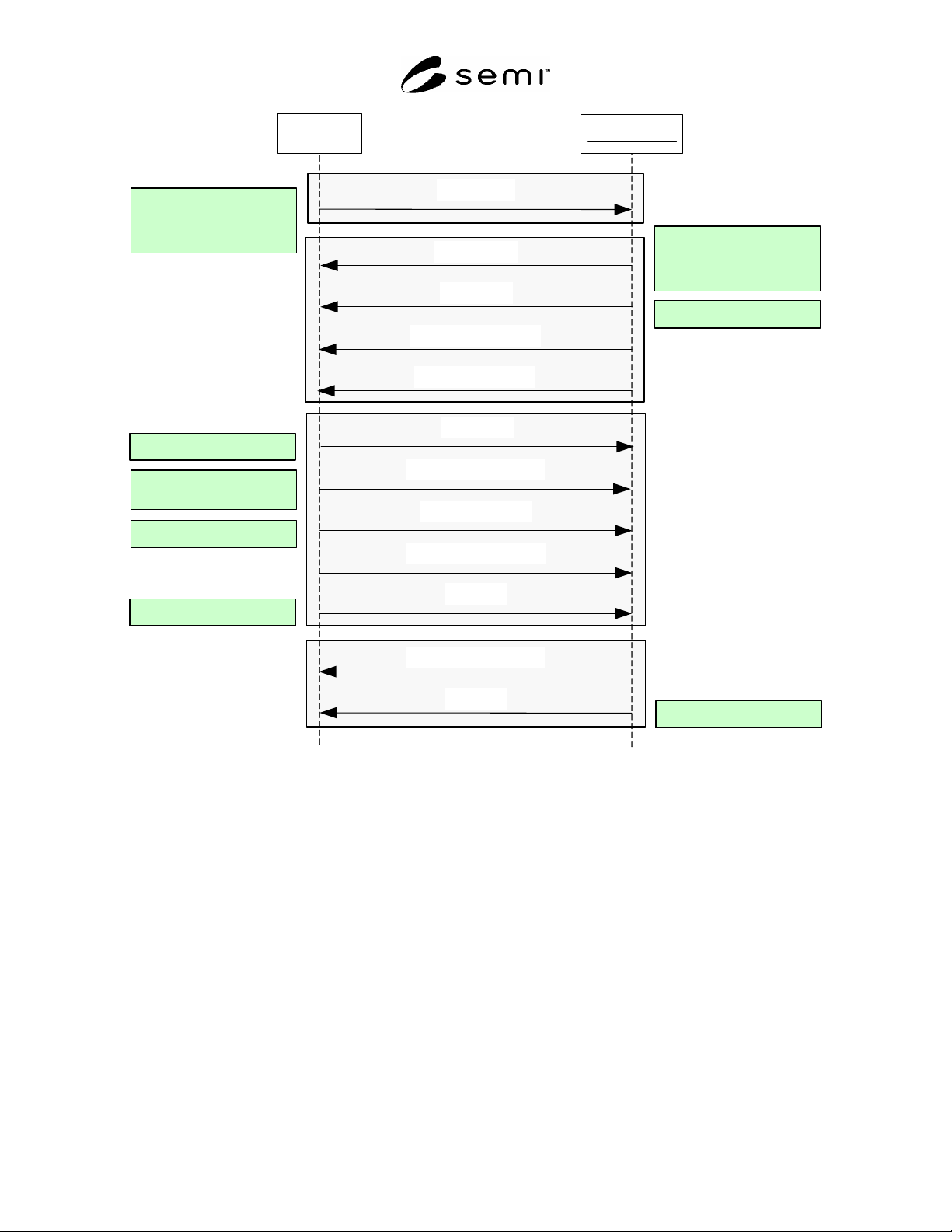
Client
Equipment
ClientHello
ServerHello
Certificate
CertificateRequest
Certificate
ClientKeyExchange
CertificateVerify
ChangeCipherSpec
ServerHelloDone
Server public key certificate
Key Parameters:
session id
server random data
selected algorithms
Key Parameters:
protocol version
client random data
supported algorithms
Client public key certificate
session secret encrypted
with server's public Key
Client signature
ChangeCipherSpec
Finished
Finished
Sent under new algorithms
Sent under new algorithms
Session Request
Equipment Challenge
Client Authenticate
Equipment ACK
Figure 3
SSL Basic Handshake Flow
7.2 Credentials and Digital Certificates
7.2.1 Overview
7.2.1.1 X.509 certificates shall be used to establish identities for equipment and application clients. The certificate
is used by SSL for authentication and to establish secure connections between equipment and clients. An illustration
of the SEMI E132.1 security credentials showing role of certificates and ACL is presented in Figure 4. As shown,
an X.509 certificate binds an ID to a public key, managed by an agent called the CA described in following sections.
An ACL Entry binds the ID to a set of authorizations, managed by the Security Admin. Authorization management,
ACL Entry and Security Admin are as defined in SEMI E132, see Authorizations section.
SEMI E132.1-0305 © SEMI 2005 12
ID
Public/Private Key
Privileges
X.509 Certificate
E132 ACL Entry
E132 Principal Id = ID
Certificate Subject Name:
Common Name=ID
Security
Admin
CA
Admin Authority
Admin Authority
ID
Public/Private Key
Privileges
X.509 Certificate
E132 ACL Entry
E132 Principal Id = ID
Certificate Subject Name:
Common Name=ID
Security
Admin
CA
Admin Authority
Admin Authority
Figure 4
SEMI E132.1 Security Credentials
7.2.1.2 CA is the Certification Authority that issues certificates to equipment and application clients wishing to
communicate over SSL. The authenticity of the certificate is verified by the CA signature within the certificate, in
effect the CA is certifying the validity of the information contained in the certificate, more importantly it certifies
the binding between the entity identified in the certificate and its public key used for authentication purposes in SSL.
For more information on certificate validation and signature verification, please see referenced X.509 v3
documentation in ¶4.4. The CA may or may not be the same as the Security Admin as defined in SEMI E132,
which manages access control permissions for application clients. Implementation and maintenance of both the CA
and the Security Admin are the responsibility of the equipment user, including certificate issuance and security
credentials management. Equipment suppliers shall not be required to provide CA or Security Admin
implementations.
7.2.1.3 In this specification, only the common name (CN) attribute of the certificate’s subject distinguished name
(DN) is required, this is represented as ID in Figure 4. The same ID must be used by the Security Admin when
binding authorizations to a principal id in an ACLEntry. In summary, SEMI E132 principals are identified by the
common name (CN) attribute of the subject distinguished name field of the certificate issued to the principal.
7.2.1.4 Certificates issued by the CA for SEMI E132 shall be encoded in PKCS#12 format along with
corresponding private keys. Equipment shall support PKCS#12 to decode certificate and any associated private key
issued by the CA. There are no restrictions on the local encoding format of certificates. See PKCS#12
documentation referenced in ¶4.4 for complete details. The CA certificate will also be delivered in same format but
without the private key. The CA certificate is used by SSL for certificate verification.
7.2.1.5 Certificates must minimally support signing capability if the KeyUsage extension field is present in the
certificate, more specifically the digitalSignature bit must be asserted. Please see the X.509 v3 specification for
more information on certificate profile.
7.2.2 Establishing Equipment Credentials
7.2.2.1 Equipment must install both the CA’s public certificate and its own certificate along with the corresponding
private key, the CA certificate to verify client certificates are from the same trusted CA. Equipment is responsible
for decoding the PKCS#12 encoded certificates and private key from CA to a format supported by its
implementation.
7.2.2.2 An ACLEntry defining the Security Admin for the equipment must be added using the local equipment
interface. This shall be done at time of equipment install to allow remote administration of access permissions for
the equipment.
7.2.3 Establishing Application Credentials
7.2.3.1 Application clients wishing to establish SEMI E132 sessions with any equipment must first possess a valid
certificate issued by the CA prior to any communications. Equipment shall ensure SSL handshake terminates for
any client that does not present a valid certificate issued by a trusted CA. Similar to equipment certificates, all client
certificates and corresponding private key from CA will be encoded in PKCS#12 format. The CA certificate must
also be installed by the application client to verify equipment certificate chain.

SEMI E132.1-0305 © SEMI 2005 13
7.2.3.2 Each client must also have an ACLEntry defined on the equipment granting the appropriate privileges to
support its functions prior to establishing SEMI E132 sessions with the equipment. This can be done via the
Security Admin or via the equipment console.
7.2.3.3 Equipment shall reject all SEMI E132 establish session requests if client does not have an ACLEntry
defined, even if client possesses a valid certificate issued by trusted CA.
7.3 Enabling/Disabling SSL Authentication
7.3.1 There may be some integration, development, and/or test environments in which it is not practical or feasible
to install equipment and/or client certificates in order to communicate with the equipment. As a practical
consideration for such environments only, the equipment shall support the ability of the user to enable or disable
SSL authentication at the equipment.
7.3.2 If enabled, all SEMI E132-based communication with the equipment shall take place via mutually-
authenticated SSL as described in ¶7.1.
7.3.3 If disabled, all SEMI E132-based communication with the equipment shall take place via the normal,
unauthenticated HTTP transport. While disabled, requests shall still follow the normal authorization verifications
using the client ID provided in the FROM field of the SEMI E132 header; however, because requests are not
authenticated there can be no guarantee that the requesting application is authentic. Users should be aware that
disabling SSL authentication provides unrestricted access to all SEMI E132 equipment operations for any
application (factory authorized or not) with network access to the equipment.
7.3.4 Equipment shall provide a configuration option to allow switching between SSL and non-SSL
communications. Only one such communication port shall be active at any time. During a configuration change, it
is the responsibility of the equipment user to close existing sessions prior to the change, as the active port will no
longer be available for requests following the change, and clients will not be notified of the change by the
equipment.
7.3.5 After a configuration change, any pre-existing persistent sessions shall remain active as defined in the SEMI
E132 Session State Model. Users should be aware that all requests made by those sessions after the change must
take place on the new port. The equipment is not required to retain non-persistent sessions in the active state
following a configuration change. If an equipment reset is required to change this configuration, then persistent
sessions shall be resumed, and non-persistent sessions shall be closed as for any equipment shutdown as defined in
the SEMI E132 Session State Model.
8 Mapping of SEMI E132 UML to XML Schema and WSDL
8.1 WSDL Organization
8.1.1 Each interface definition in SEMI E132 is mapped to a WSDL portType and binding definition. WSDL
portType definitions are named after the interface and its operations as they appear in SEMI E132. WSDL binding
definitions for each portType are used to specify the SOAP 1.1 envelope contents for each operation, and to define
the corresponding XML encoding styles and HTTP header usage. All SEMI E132 WSDL interfaces use
document/literal encoding, with the complete SOAP header and body contents defined in XML Schema file(s) via
global element definitions.
8.1.2 Figure 5 shows the relationship between the WSDL binding and portType definitions and the XML Schema
types used for each interface. The portType definition imports XML Schema type definitions used in each operation
via the XML Schema “import” statement. The WSDL binding definition imports the portType definition via the
WSDL “import” statement.