semi合集-English.pdf - 第1873页
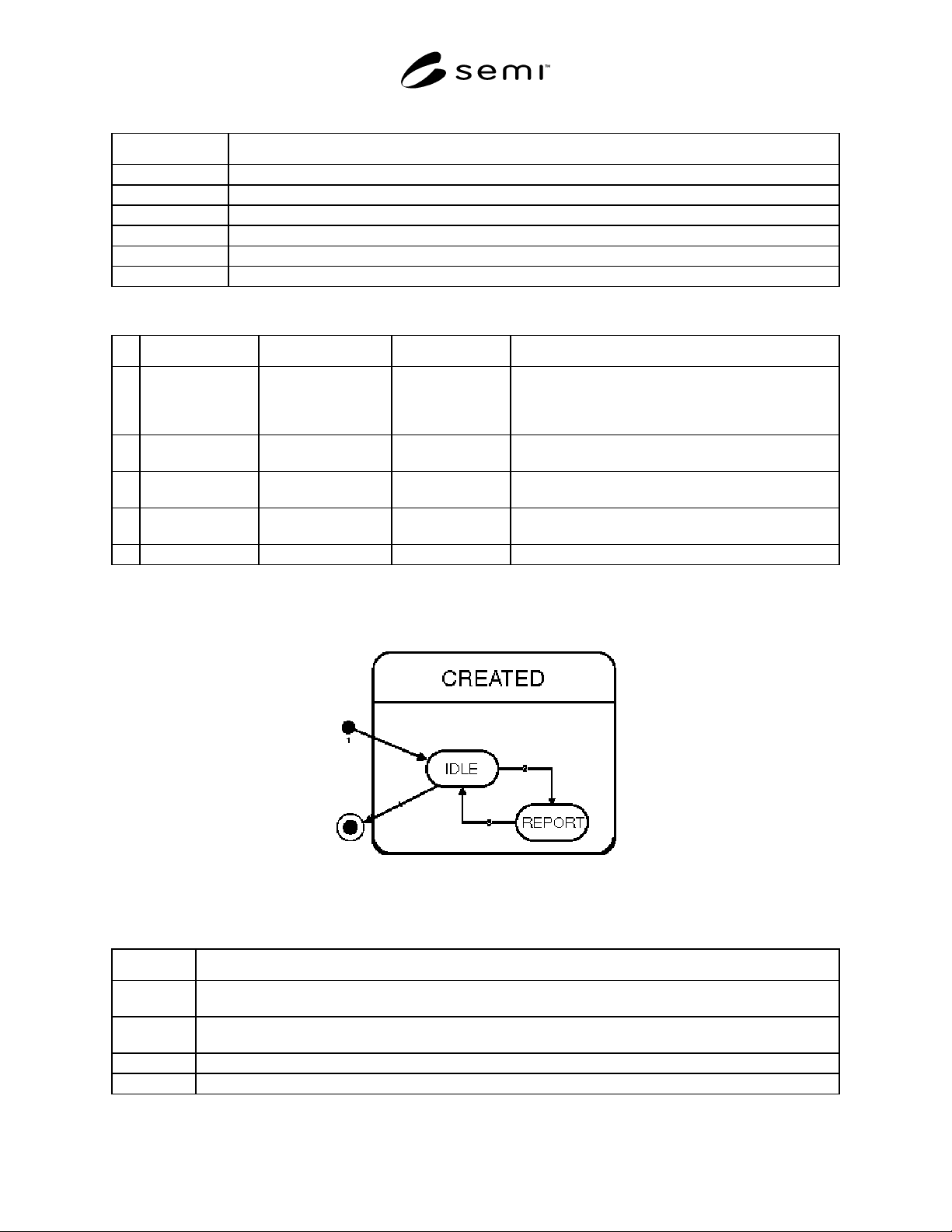
SEMI E53-0704 © SEMI 1996, 2004 13 Table 8 Data Report State Tran sition # Current State Trigge r New State Action(s) 1 CreateRequest CREATED and IDLE New Repor tID is defined. Wait for an actionable event. 2 IDLE Report…
SEMI E53-0704 © SEMI 1996, 2004 12
Table 5 Collection Event Object State Definitions
State Definition
CREATED Each collection event is associated with a unique Collection Event ID.
ENABLED The Service User will be notified by the sending of an event report when the collection event occurs.
DISABLED Event reports will not be sent to the Service User.
WAITFOREVENT The object is waiting for its associated Collection Event to occur.
REPORT Send an Event Report to a Service User, sample Data Reports which have been linked.
notExist User view of Collection Event Objects prior to connection (establishment of communications).
Table 6 Event Report Transition Table
# Current State Trigger New State Action(s)
1 Service user
establishes connection.
CREATED and
ENABLED or
DISABLED
A Collection Event Object is created on behalf of the
service user for every collection event. The event
reporting Enable attribute setting is conditional. It may
get its value from stored configuration information.
2 DISABLED Enable attribute set to
TRUE
ENABLED Event reporting is enabled for a specific collection event.
3 ENABLED Enable attribute set to
FALSE
DISABLED Event reporting is disabled for a specific collection event.
4 WAITFOREVENT Collection Event
occurs
REPORT Sample linked data reports. Send event report with linked
data reports.
5 REPORT Reporting Complete WAITFOREVENT The object waits for the collection event.
8.2.2 Data Report Object State Model — Each data report shall follow the transitions as specified in Figure 11.
Multiple instances of data report are managed by the event services. There are two basic types of data reports; pre-
defined and user defined.
Figure 11
Data Report Object State Chart
Table 7 Data Report Object State Definitions
State Definition
notExist The state from which the service provider creates reports.
NOTE: Some reports may be predefined, that is, they are not created by a user request.
IDLE Reports are sampled and generated only when requested from an external source such as the Trace or Event
Report object or the Service User directly.
CREATED This is the super-state of Idle and Report. Variables and/or attributes to be sampled are defined.
REPORT The variables or attributes specified in the Data Report Object are sampled and then sent to the report requestor.
SEMI E53-0704 © SEMI 1996, 2004 13
Table 8 Data Report State Transition
# Current State Trigger New State Action(s)
1 CreateRequest CREATED and IDLE New ReportID is defined. Wait for an actionable
event.
2 IDLE ReportRequest REPORT Sample data in report definition.
3 REPORT SamplingComplete IDLE Send data to report requestor.
4 IDLE DeleteRequest and not pre-defined notExists ReportID is no longer valid.
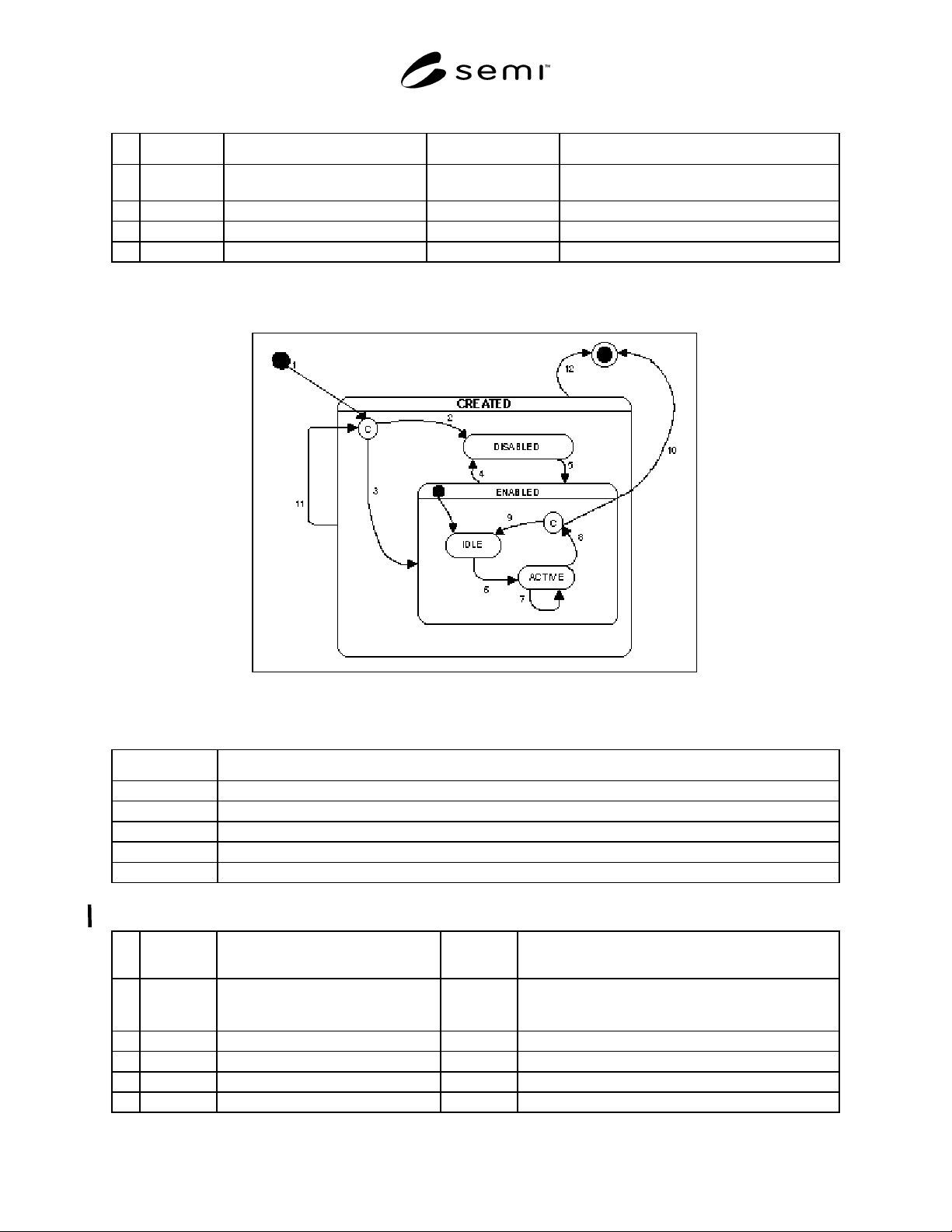
8.2.3 Trace Object State Model — Figure 12 shows the state diagram for a trace object. The Harel State Model
Notation used is described Section 5. The state transition table is shown in Table 10.
Figure 12
Trace Object State Diagram
Table 9 Trace Object State Definitions
State Definition
CREATED The Trace Object is created and ready to be accessed.
DISABLED Trace report is created but will not be sampled or sent.
ENABLED Trace object may begin generation of trace reports. See sub-states IDLE and ACTIVE.
IDLE Trace reports are not being generated.
ACTIVE The trace reports are being generated and sent periodically.
Table 10 Trace Object State Transition Table
# Current
State
Trigger New State Action(s)
1 (deleted) Trace Object Create (condition) A Trace Object is created with Report ID, Enabled,
Group Size, Total Samples, Sample Period, Start Event,
Stop Event, and Auto Delete parameters.
2 (condition) Enabled was initially FALSE. DISABLED Trace reporting is disabled.
3 (condition) Enabled was initially TRUE. ENABLED Trace reporting is enabled.
4 ENABLED Trace Report Disable DISABLED Trace reporting is disabled.
5 DISABLED Trace Report Enable ENABLED Trace reporting is enabled.
SEMI E53-0704 © SEMI 1996, 2004 14
# Current
State
Trigger New State Action(s)
6 IDLE Start Event is not defined or Start
Event is defined and occurs.
ACTIVE Sample Data Reports and send. Start sample timer.
Reset sample counter. Reset group counter. Wait for
sample timer to elapse.
7 ACTIVE Sample period elapses. ACTIVE Sample data reports into a trace report. If group sample
counter equals group size, then send the trace report and
reset group counter. Then prepare to generate the next
trace report. Start sample time and wait for it to elapse.
8 ACTIVE Stop Event is defined and occurs or…
Total Samples > 0 and sample counter
equals Total Samples.
(condition) Sample data reports into a trace report. Send the trace
report.
9 (condition) Auto Delete is FALSE IDLE (none)
10 (condition) Auto Delete is TRUE (deleted) Delete Trace Object.
11 CREATED Event Report Reset (condition) Reset Trace Object state back to initial state when it was
first created.
12 CREATED Event Report Delete (deleted) Delete Trace Object.
8.3 Messaging Services Detail — This section specifies the messages required to implement the event reporting
service. The messages were introduced in Section 7.3.1. These services are independent of the messaging protocol
used.
The specification includes a list of required messages, the definition of the parameters contained within the
messages, and data type of the parameters. Not defined here is the internal structure of the actual messages as
transferred, including order of the parameters and how various data structures and data types are represented.
The service message notation used in the tables below is described in the Conventions, Section 5.4.
8.3.1 Service List
Table 11 Event Reporting Services
Service Type Description
Event Report
Request
R Requests the specified event report, and the data reports linked to it, to be sampled and returned to
the service user.
Event Report Send N Notifies the service user of the occurrence of an event with a time stamp indicating when the event
occurred. Any data reports linked to the event report are sampled and attached to the event report
sent to the service user.
Data Report Create R Creates a data report which defines a set of attributes of an object to be reported.
Data Report Delete R Deletes one or more data report definitions.
Data Report Request R Requests the specified data report to be sampled and returned to the service user.
Collection Event
Link
R Request a Collection Event Object to link a Data Report. All Data Reports linked to an enabled
Collection Event Object are sampled and sent with the event report when the collection event
occurs.
Collection Event
Unlink
R Unlinks one or more Data Reports from the Collection Event Object.
Trace Create R Creates a trace object which defines the sample period, group size, start and stop events, auto
delete, report change only, and the initial state (enabled or disabled).
Trace Delete R Deletes one or more trace object definitions.
Trace Report
Request
R Requests that the data reports assigned to the trace report be sampled and returned to the service
user.
Trace Report Send N Notifies the service user of trace report samples taken. Group size samples are taken before the
service user is notified. After notifying the service user, the group counter is reset to zero. A trace
report sample is taken either when the start event occurs or the sample period elapses.