semi合集-English.pdf - 第3358页
SEMI E132-0305 © SEMI 2004, 2005 11 Principals to request sessions shall be rejected unless ther e is a default set of privileges assigned to the reserved “anyPrincipal” (see Section 11.2.8 ). Otherwise, in order for ses…
SEMI E132-0305 © SEMI 2004, 2005 10
id
Subject
privilegeId
Privilege
ACLEntry
Principal
Role
subject
11
PrivilegeAssignment RoleAssignment
privileges1
1..*
principal
1
1
role1
1
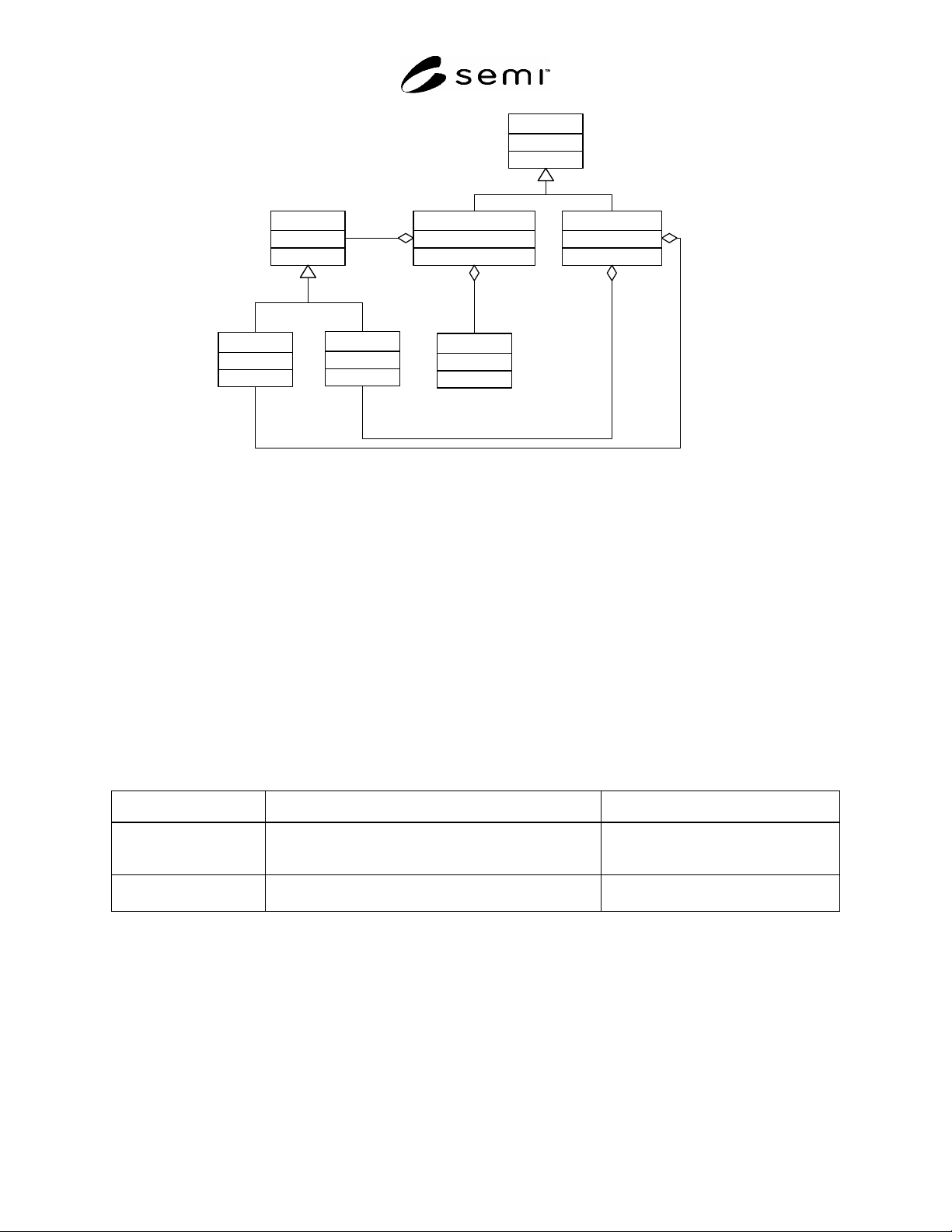
Figure 7
ACL Entry Description
11.2.4 ACLEntry
11.2.4.1 Figure 7 shows the classes used for requesting the creation of a new ACLEntry on the equipment (see
Section 12.3.2.3). The ACLEntry is an abstract base class for the two kinds of ACL entries, PrivilegeAssignment,
and RoleAssignment. There can be only one ACLEntry for each subject. Attempts to add a second entry for same
subject shall generate a duplicate entry error (see Section 12.3.2.3). This class has no attributes or associations.
11.2.5 PrivilegeAssignment
11.2.5.1 This class defines an association between a given subject (either a Principal or a Role) and its set of
assigned privileges on the equipment. A PrivilegeAssignment for a Principal establishes all privileges that are
specifically granted to the Principal. A given Principal must either have a PrivilegeAssignment ACLEntry or a
RoleAssignment ACLEntry (see Section 11.2.6); it cannot have one (or more) of each. A PrivilegeAssignment for a
Role defines the role itself and the privileges that will be granted to any Principal that is assigned to that Role (see
Section 11.2.6). There can be only one PrivilegeAssignment ACLEntry for a given Role.
Table 8 PrivilegeAssignment Association Definitions
Association Role Name Definition Comments
subject The Principal or Role that is being granted privileges. One and only one element of any type
derived from Subject, described in
Section 11.2.7.
privileges The set of privileges being granted. List of one or more elements of type
Privilege, described in Section 11.2.10.
11.2.6 RoleAssignment
11.2.6.1 This class assigns a specific Principal to a Role. The identified Role must have a PrivilegeAssignment
ACLEntry elsewhere in the ACL. All privileges assigned to the identified Role are granted to the identified
Principal’s sessions. A given Principal must either have a RoleAssignment ACLEntry or a PrivilegeAssignment
ACLEntry (see Section 11.2.5); it cannot have one (or more) of each.
11.2.6.2 A PrivilegeAssignment ACLEntry for a Role cannot be deleted from the ACL until all Principals that were
assigned to that Role have been removed from it by deletion of their RoleAssignment ACLEntry. Any authenticated
sessions that were established for such Principals prior to the deletion of their RoleAssignment ACLEntry shall
continue to be operable with that Role’s privileges until the session is terminated. Subsequent attempts by such
SEMI E132-0305 © SEMI 2004, 2005 11
Principals to request sessions shall be rejected unless there is a default set of privileges assigned to the reserved
“anyPrincipal” (see Section 11.2.8). Otherwise, in order for session requests to be accepted, these Principals will
have to have specific privileges assigned to them directly through a PrivilegeAssignment ACLEntry, or indirectly
through assignment to a new Role.
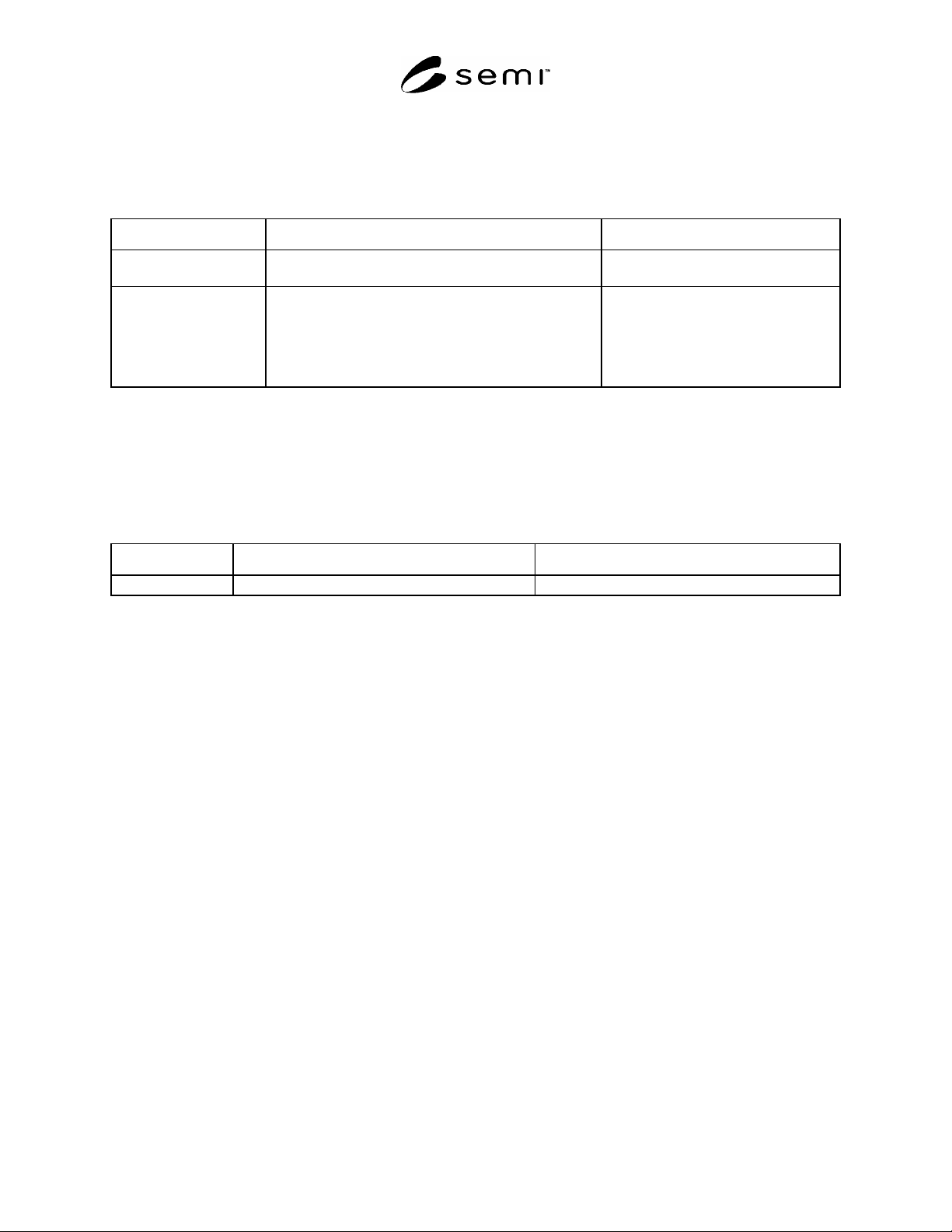
Table 9 RoleAssignment Association Definitions
Association Role Name Definition Comments
principal The principal that is being assigned to the Role. One and only one element of type
Principal, described in Section 11.2.8.
role The Role to which the principal is being assigned. One and only one element of type Role,
described in Section 11.2.9. The Subject
id for the identified Role must be equal to
the Subject id of a PrivilegeAssignment
for a Role appearing elsewhere in the
ACL.
11.2.7 Subject
11.2.7.1 This is an abstract base class used to represent any entity that can be granted privileges in an ACL entry.
This can be either a Principal or a Role. The id is a text field that identifies a particular Subject. If the Subject is a
Principal, then the id is equal to that Principal’s unique id used during authentication. If the Subject is a Role, then
the id is equal to the name of the Role.
Table 10 Subject Attribute Definitions
Attribute Name Definition Form
id Identifies a Principal or Role. Text.
11.2.8 Principal
11.2.8.1 This class represents a specific Principal that can be authenticated and assigned privileges. This
specification defines a reserved Principal id that represents any Principal that successfully authenticates to the
equipment. The value of the id for this reserved Principal is “urn:semi-org:auth:anyPrincipal”. All implementations
shall support this reserved Principal. If an equipment user’s security policy permits the approach, a
PrivilegeAssignment or RoleAssignment ACL entry can be created for the reserved Principal to assign a default set
of privileges to any client that successfully authenticates, rather than creating an ACL entry for each Principal.
11.2.8.2 Each client that attempts to authenticate to the equipment must have an id that matches the id of one
PrivilegeAssignment or RoleAssignment ACLEntry for that Principal, or else there must be one
PrivilegeAssignment or RoleAssignment ACLEntry for the reserved “anyPrincipal”. If there are no such entries for
the authenticating client, the equipment shall reject the session request. If there is a PrivilegeAssignment or
RoleAssignment ACLEntry for both the specific Principal and the reserved “anyPrincipal”, the equipment shall
accept the session request, and shall grant only those privileges assigned to the specific Principal to the session.
Privileges assigned to the reserved “anyPrincipal” shall not be granted to such sessions.
11.2.9 Role
11.2.9.1 This class represents a Role that can be assigned privileges. Roles can simplify the assignment of
privileges to Principals. This is achieved by creating a single PrivilegeAssignment ACL entry for the Role
containing the appropriate privileges, and then assigning each Principal (or the reserved “anyPrincipal”) to that Role
using a RoleAssignment ACL entry.
11.2.10 Privilege
11.2.10.1 This class represents a specific privilege that can be granted to subjects as part of an ACL entry. All
defined privileges supported by the equipment can be obtained using the GetDefinedPrivileges operation of the
SecurityAdmin interface. How each privilege is applied to a subject is determined by the specification or equipment
supplier that defines the privilege. The privilege id is a text field that identifies a particular privilege and must be
SEMI E132-0305 © SEMI 2004, 2005 12
unique across all privileges defined on the equipment. Permission and privilege is used interchangeably in this
specification.
11.2.10.2 This specification defines a reserved Privilege id that represents all Privileges that are supported by the
equipment. The value of the id for this reserved Privilege is “urn:semi-org:auth:allPrivileges”. All implementations
shall support this reserved Privilege. If an equipment user’s security policy permits the approach, an ACL entry can
be created for any Principal or Role that assigns this reserved Privilege to that Principal or Role. Principals or Roles
that are assigned this privilege are granted all privileges supported by the equipment. A PrivilegeAssignment ACL
entry containing this privilege cannot include any other privileges supported by the equipment in the entry.
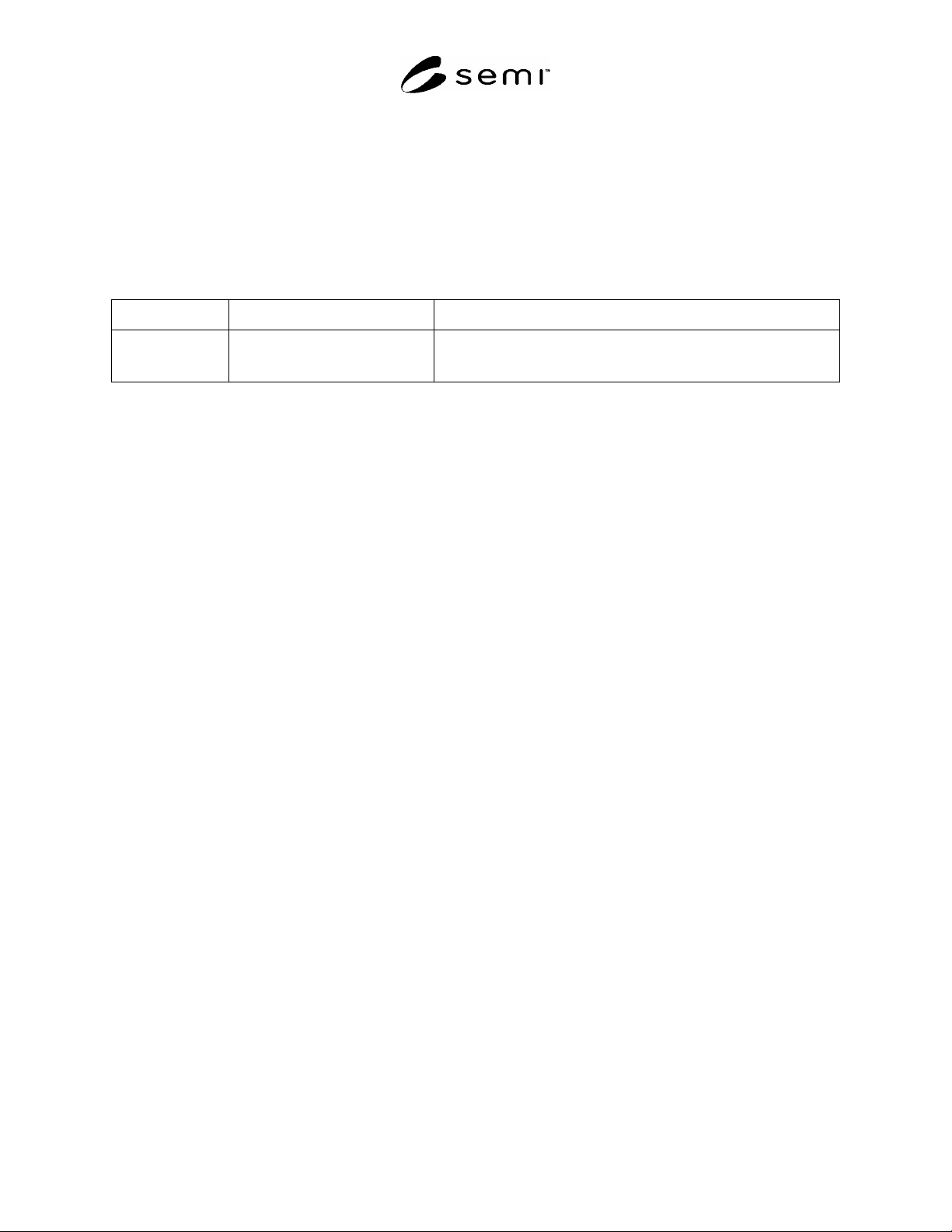
Table 11 Privilege Attribute Definitions
Attribute Name Definition Form
privilegeId Identifies a specific privilege. Text, must be equal to either the reserved value “urn:semi-
org:auth:allPrivileges”, or to the ‘id’ attribute of one of the
DefinedPrivileges supported by the equipment (see Section Table 21).
11.2.10.3 This specification also defines a reserved Privilege id that represents the Privileges of the SecurityAdmin
as described in 12.2. The value of the id for this reserved Privilege is “urn:semi-org.auth:securityAdminPrivileges”.
All implementations shall support this reserved Privilege. One and only one Principal can be assigned this privilege,
either through a RoleAssignment or PrivilegeAssignment ACLentry. Once assigned, that Principal is permitted
access to all operations defined for the SecurityAdmin interface. Requests to create more than one ACLEntry
assigning this privilege to a Principal shall be rejected (see Section 12.3.2.3).
12 Administration
12.1 Administration Overview
12.1.1 As the number of clients and resources to manage across a factory scales up, support for a centralized security
administration model becomes a critical capability. This specification will not describe how a factory can
implement such a model for their network, but will specify standard mechanisms to enable this capability. This
specification describes a security administration interface to allow remote management of client credentials and
authorizations, such as from a central location. Only concepts and behavior are described, it is expected that a
separate technology adjunct standard will be created describing the specific message structure, protocols and
algorithms that will used.
12.2 Security Admin
12.2.1 The equipment must support one security administration account. This admin agent will have privileges to
utilize the SecurityAdmin interface defined in this specification. The initial security admin credentials must be
established at the time of equipment install via some out of band means, this can be a local operator interface or
provided by equipment vendor as a factory preset. If the admin credentials are factory preset, then there must be
some means for end-user to re-establish its credentials. This specification requires that only the security admin can
utilize the services defined in the security administration interface. Security admin privileges are granted to one and
only one Principal via a reserved privilege id. The equipment shall only support 1 active security admin session at a
time.