semi合集-English.pdf - 第1539页
SEMI E32-0997 © SEMI 1994 , 1997 34 Cmd Descr iption Pick Co mmands th e secondary partner to take all action s necesary to remove th e transfer ob ject from the primary partner's por t. Place Co mmands th e seconda…

SEMI E32-0997 © SEMI 1994, 199733
HOCancelReady
Having previously sent an HOReady message, a transfer partner determines that it is no longer ready to begin the
transfer and sends the HOCancelReady message.
Parameter REQ/IND RSP/CONF Description Form
TRLink M M(=) Identifier of the atomic transfer. Unsigned integer
HOCancelAck* - M Acknowledge code for HOCancelReady. Enumerated
HOHalt
This message may be sent by either transfer partner when the equipment or transfer object is endangered. It requires
the receiver to cease all transfer-related movement immediately. Manual intervention is required before the halted
partner may again be available for transfer.
Parameter REQ/IND RSP/CONF Description Form
TRLink M M(=) Indentifier of the atomic transfer. Unsigned integer
HOHaltAccept - M True if the request is accepted. Request may be denied only if
referenced atomic transfer does not exist.
Boolean
5.4.3 Parameter Definitions — This section gives further detail on certain parameters defined above. Parameters
which are defined in Section 4.4 are not repeated here.
ErrorCode
HOCommand:
• Rejected/Unrecognized Command.
• Rejected/Parameter Error.
• Failed (Completed Unsuccessfully) — indicates that the activity was attemped, but failed; the mechanisms
continue to be operational.
• Failed (Unsafe) — indicates that the equipment was left in an unrecoverable state at the end of the activity due
to the failure of a mechanism or due to the risk of damage to the equipment or material. Manual intervention is
required.
HOVerify:
• Sensor-Detected Obstable.
• Material Not Sent.
• Material Not Received.
• Material Lost.
• Hardware Failure.
• Handoff Canceled Externally (by host or operator).
HOCmdName — The set of micro commands is provided below as an example. The commands used are not
limited to this set. However, adherence to a common set of commands will speed implementation of material
transfer.
This particular example applies to a situation where the secondary partner is active and the primary partner is
passive.

SEMI E32-0997 © SEMI 1994, 1997 34
Cmd Description
Pick Commands the secondary partner to take all
actions necesary to remove the transfer object
from the primary partner's port.
Place Commands the secondary partner to take all
actions necesary to place the transfer object in
the primary partner's port.
Extend Commands the secondary partner to reach into
the primary partner's port area in close proximity
to the material location.
Acquire Commands the secondary partner to acquire
control of the material.
Release Commands the secondary partner to release
control of the material.
Retract Commands the secondary partner to withdraw
from the primary partner's port area.
Store Commands the secondary partner to place the
transfer object in its final location.
Retrieve Commands the secondary partner to pick up the
transfer object from its initial location.
MoveTo Commands the secondary partner to move its
transfer mechanism (e.g., robot gripper) to a
specified position (given as a parameter).
The Pick command might actually be an equivalent of
the sequence:
Extend, Acquire, Retract, Store.
The Place command might be an equivalent to the
sequence:
Retrieve, Extend, Release, Retract.
HOCancelAck — Conveys the response to the
HOCancelReady request. Possible values are:
0 — Accept Cancel.
1 — Atomic Transfer Unknown.
2 — Reject Cancel—Transfer Begun.
HOHaltAck — Conveys the response to the HOHalt
request. Possible values are:
0 — Accept Halt.
1 — Atomic Transfer Unknown.
SEMI E32-0997 © SEMI 1994, 199735
APPLICATION NOTES
A1-1 Transfer-Related Mechanisms — A transfer job
interacts very closely with port-related hardware. This
may include a variety of mechanisms such as port
doors, cassette indexers, robot arms, carrier restraints,
etc. The state models for the transfer job and atomic
transfers shown above relate to this port hardware, but
do not define hardware behavior directly. Therefore, an
additional state model is needed for the port hardware.
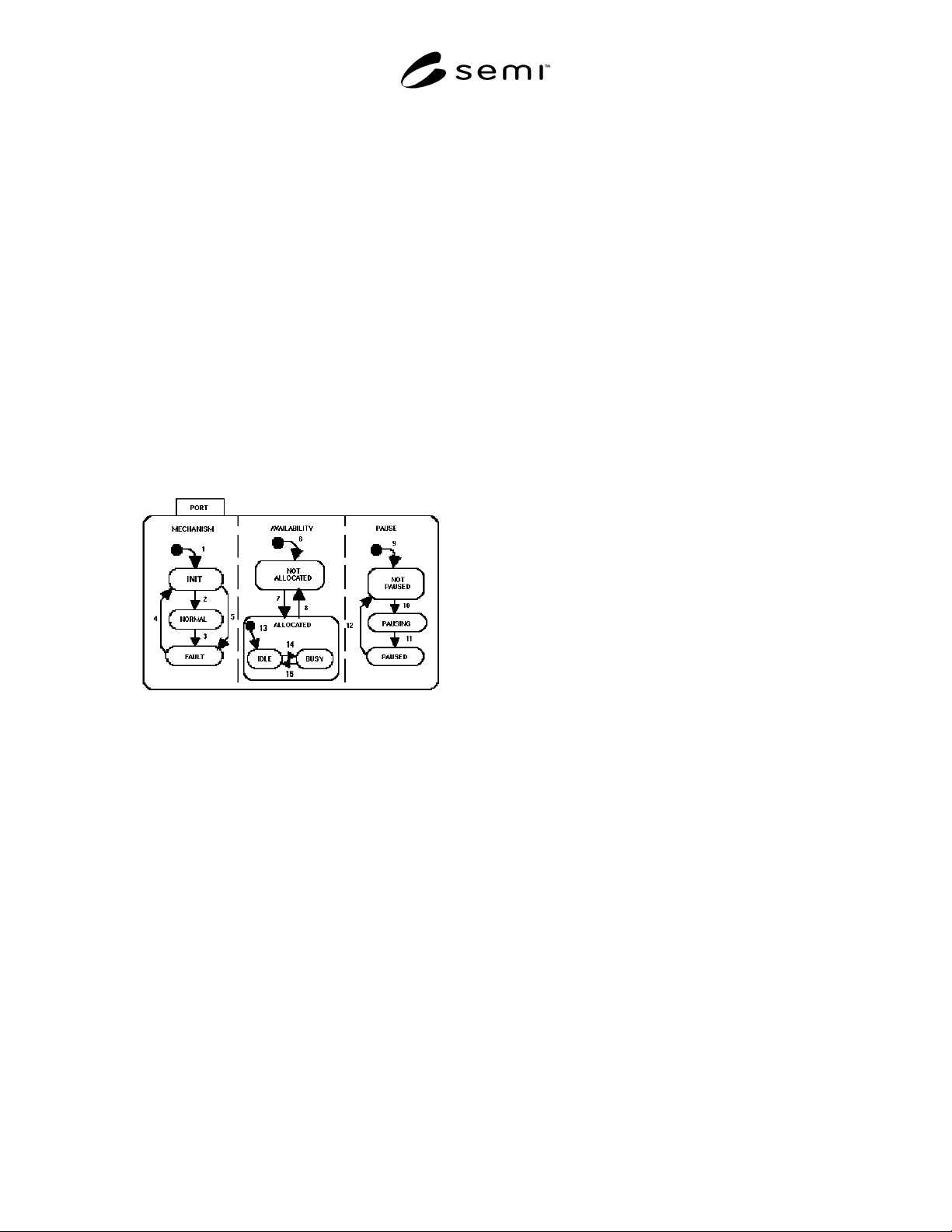
A1-1.1 Example Port State Model — Figure A1-1
provides an example of a state model for a port. It is
divided into three AND substates: MECHANISM,
AVAILABILITY, and PAUSE. These substates
represent the three most common areas of interest to the
host.
Below, the states shown in Figure A1-1 are described,
followed by a transition table. This is presented as an
example. The actual model is implementation-
dependent.
Figure A1-1
Example Port State Diagram
MECHANISM
This state pertains to the port's overall ability to
function. It has three substates: INIT, NORMAL, and
FAULT.
INIT
This is the default state upon powerup or reset of the
port. It includes some unspecified operations to ensure
that the port is ready to operate.
NORMAL
When in this substate, the port is in normal working
order.
FAULT
In this substate, a problem has been detected with a port
mechanism.
AVAILABILITY
This state pertains to the availability of the port to
perform a function. This state has two substates: NOT
ALLOCATED and ALLOCATED.
NOT ALLOCATED
In the NOT ALLOCATED state, neither the equipment
nor the host has allocated the port. The port is waiting
to be allocated to either a transfer job or to some
process-related task. This is the default state upon
equipment system startup.
ALLOCATED
In this state, the port is allocated to either the equipment
(typically process-related) or to the host for a transfer
job.
NOTE: If the port is allocated to an equipemnt function and
the host does not wish to wait for the equipment to release the
port, it must take some other action to force the port to
become available. One possibility is a “Pause for Transfer”
remote command that might be used during a processing
cycle.
IDLE
Port is allocated to a task (e.g., processing or transfer
job), but activity on the task has not yet begun.
PAUSE
This state pertains to the pausing of current port
activity. Pausing of the port is different than pausing a
transfer job which might be using the port.
NOT PAUSED
The port defaults to NOT PAUSED upon system
startup. In this state, port activities are not hindered by
the pause function.
PAUSING
In this state, the port has received a directive to pause
and is in the process of bringing the current activity to a
halt.
PAUSED
All port activity has ceased. The port is awaiting a
directive to resume activity.
Table A1-1 describes the transitions for the example
port state model. In the application-specific
implementation, events should be defined for all
significant occurences related to the model.