semi合集-English.pdf - 第1433页
SEMI 30.1-0200 © SEMI 1998, 2000 8 7.3.6 AL IGN (WORKING Sub-Stat e ) — T h e equipmen t or operator i s perform ing an alignmen t of the m aterial to the equipment. If needed, within this state, the equipment shall refi…
SEMI 30.1-0200 © SEMI 1998, 20007
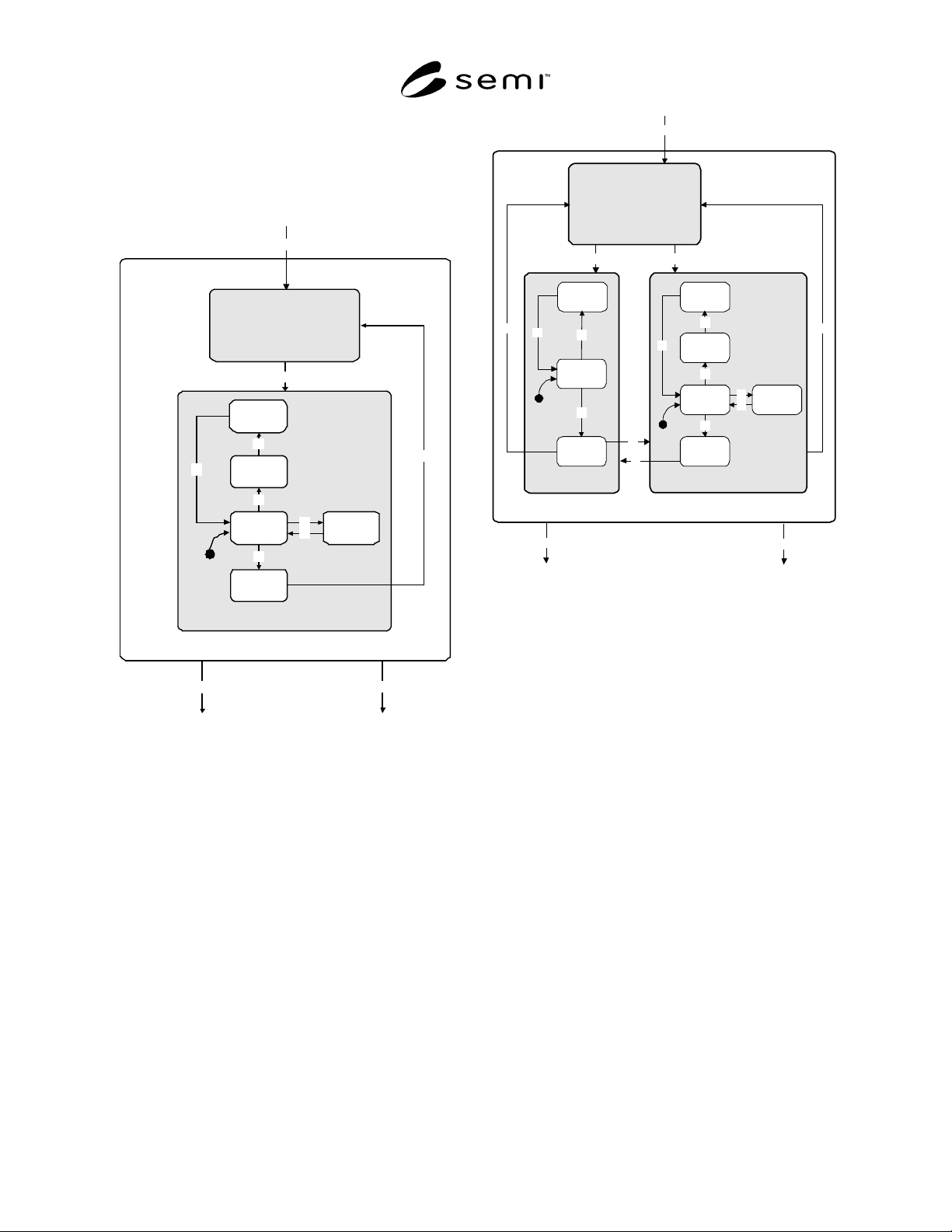
7.2.2 Working State for Review Equipment — The
processing state model for review equipment is
identical to the generic ISEM Processing State Model
(Figure 1). Only the WORKING state is unique to the
review equipment processing state model. This is
shown in Figure 3.
23
24
WORKING
A
LIGN
32
REVIEW
CL
A
SSIF
Y
REVIEW
SETUP
REVIEW
COMPLETE
37
35
38
A
CQUIRE
A
NOM
A
L
Y
IM
A
GE
36
A
CQUIRE
A
NOM
A
L
Y
D
A
T
A
34
33
39
26
Figure 3
Working State for Review Equipment
7.2.3 Working State for Inspection/Review Equipment
— The processing state model for inspection/review
equipment is identical to the generic ISEM Processing
State Model (Figure 1). Only the WORKING state is
unique to the inspection/review equipment processing
state model. This is shown in Figure 4.
23
24
WORKING
ALIGN
32
39
REVIEW
CLASSIFY
REVIEW
SETUP
REVIEW
COMPLETE
37
35
38
ACQUIRE
ANOMALY
IMAGE
36
ACQUIRE
ANOMALY
DATA
34
33
27
INSPECT
INSPECT
REGION
INSPECT
SETUP
INSPECT
COMPLETE
29
30
40
41
28
31
26
Figure 4
Working State for Inspection and Review
Equipment
7.3 Processing State Definitions
7.3.1 ABORTED — All activity is suspended as a
result of an ABORT command. Any alarm and abort
conditions shall be cleared before exit from this state.
The CLEANUP command is available to the operator
or host to transition the equipment from the ABORTED
state to IDLE state.
7.3.2 ABORTING (PROCESSING ACTIVE Sub-State)
— The equipment has received an ABORT command.
All normal activity is suspended. The equipment is
taking appropriate action to put the equipment and
material in a “safe state” where possible. Data may be
invalid or not available.
7.3.3 ACQUIRE ANOMALY DATA (REVIEW Sub-
State) — Data is being acquired about anomaly
locations.
7.3.4 ACQUIRE ANOMALY IMAGE (REVIEW Sub-
State) — The equipment is obtaining a view of the
anomaly.
7.3.5 ALARM PAUSED (PAUSE Sub-State) — An
alarm has occurred in the PROCESS or PROCESS
PAUSE states, and the equipment is waiting for the
alarm to be cleared or a command (STOP or ABORT).

SEMI 30.1-0200 © SEMI 1998, 2000 8
7.3.6 ALIGN (WORKING Sub-State) — The
equipment or operator is performing an alignment of
the material to the equipment. If needed, within this
state, the equipment shall refine or establish its SEMI
M20 coordinate system and establish any secondary
coordinate systems.
7.3.7 CHECKING (PROCESS PAUSE Sub-State) —
The equipment verifies that the process program update
request is valid. No process program parameters are
changed unless “all” reported updates are valid. This is
a similar procedure to that which is done in SETTING
UP before the equipment is ready to transition to the
READY state. Valid commands in this state are STOP,
ABORT, and RESUME.
7.3.8 CLASSIFY (REVIEW Sub-State) — The operator
or equipment is determining the classification of an
anomaly.
7.3.9 EXECUTING (PROCESS Sub-State) — The
equipment is processing material automatically and can
continue to do so without external intervention but
normally may include interaction with the host or
operator.
7.3.10 IDLE — Checks for queued ISEM jobs or
awaits a PP-SELECT, MAP-CARRIER, or PP-
ASSIGN command. IDLE is free of alarm and error
conditions. Any transition into this state shall deselect
any selected Process program(s).
7.3.11 IDLE with ALARMS — An alarm has occurred
in the IDLE state, and the equipment is waiting for all
alarms to be cleared.
7.3.12 INIT — Equipment initialization is occurring.
Equipment remains in this state unless initialization is
successful.
7.3.13 INSPECT (WORKING Sub-State) — The
current alignment area of the substrate is being
inspected for anomalies.
7.3.14 INSPECT COMPLETE (INSPECT Sub-State)
— The equipment has completed inspection of the
current alignment area. Based on the recipe, the
equipment determines if (a) additional alignment areas
are required to do more inspections, (b) the recipe on
this material is complete, or (c) a review of the current
inspection area is required.
7.3.15 INSPECT REGION — A region on a substrate
is being inspected for anomalies.
7.3.16 INSPECT SETUP (INSPECT Sub-State) — The
equipment is in this sub-state immediately upon
entering the INSPECT state. The equipment is
determining if all conditions are satisfied to begin
inspecting the regions in the current alignment as
defined by the recipe and any commands.
7.3.17 LOAD (EXECUTING Sub-State) — The
equipment is determining if the process program has
completed. When additional processing is required,
then the next unprocessed substrate shall be transferred
to the equipment processing location, such as the stage.
If equipment determines that there are more process
programs in the “CARRIERBLD” ISEM job, the
equipment makes the transition to setup for the next
process program specified. Otherwise, the equipment
transitions to IDLE through STOPPING.
7.3.18 PAUSE (PROCESS ACTIVE Sub-State) —
PROCESS shall be suspended at the next opportunity.
Actions to put the equipment in a “safe state” shall be
performed. The equipment is awaiting a command
(STOP or ABORT).
7.3.19 PAUSED (PROCESS PAUSE Sub-State) —
PROCESS has been suspended, and the equipment is
waiting for a command (RESUME, PP-UPDATE,
STOP, or ABORT).
7.3.20 PAUSING (PROCESS PAUSE Sub-State) —
PROCESS shall be suspended at the next opportunity,
and the equipment shall be put in a “safe state.”
ABORT, STOP, and RESUME commands are valid in
this state.
7.3.21 PROCESS (PROCESSING ACTIVE Sub-State)
— This state is the parent of those sub-states which
refer to the active preparation and execution of a
process program.
7.3.22 PROCESSING ACTIVE — This state is the
parent of all sub-states where the context of a process
program execution exists.
7.3.23 PROCESS PAUSE (PAUSE Sub-State) — The
equipment is free of alarm conditions in the PAUSE
state. The equipment is awaiting for a command
(ABORT, RESUME, or STOP).
7.3.24 READY (PROCESS Sub-State) — The
equipment is ready to begin processing and is awaiting
a START command from the operator or host.
7.3.25 REVIEW (WORKING Sub-State) —
Classification is being done on anomalies previously
found in the current alignment area of the substrate.
7.3.26 REVIEW COMPLETE (REVIEW Sub-State) —
The equipment has completed review of the current
alignment area. Based on the recipe, the equipment
determines if (a) additional alignment areas are required
to do more classifications, (b) the recipe on this
material is complete, or (c) an inspection is required.
7.3.27 REVIEW SETUP (REVIEW Sub-State) — The
equipment is in this sub-state immediately upon
entering the REVIEW state. The equipment is
determining if all conditions are satisfied to begin

SEMI 30.1-0200 © SEMI 1998, 20009
reviewing the anomalies in the current alignment as
defined by the recipe and any commands.
7.3.28 SETTING UP (PROCESS Sub-State) — The
equipment is being setup so that external conditions are
satisfied to start processing the material. This includes
the receipt of any process programs and material to be
processed and their validation. Any of these conditions
may be satisfied on entry to SETTING UP. For
example, the selected process program may have
already been loaded (e.g., if it was the default process
program), or the specified material may have already
been placed on the equipment material port. Additional
information may come from the host during the
execution of this state.
7.3.29 STOPPING (PROCESSING ACTIVE Sub-
State) — The equipment has completed all process
programs within a “CARRIERBLD” ISEM job or has
been instructed to stop processing and shall do so
gracefully at the next opportunity. All cleanup
necessary is being completed within this state with
regard to material, data, control system, etc. Data is
normally preserved. Any alarm or error condition in
this state causes a transition to ABORTING.
7.3.30 UNLOAD (EXECUTING Sub-State) — The
substrate is being removed from the processing
location.
7.3.31 WORKING (EXECUTING Sub-State) — The
equipment is processing a specific material.
7.4 Processing State Transition Table
Table 1 Processing State Transition Table
Transi-
tion #
Previous State Trigger New State Actions Comments
1 INIT All equipment
initialization is
complete with no
alarms or error
conditions.
IDLE Equipment awaits for a PP-
SELECT, PP-ASSIGN, or
MAP-CARRIER command.
All equipment requires INIT to
be free of errors and alarms
when exited. IDLE state entry
requires that no process
program is selected.
2 IDLE A ISEM job has been
or is queued
(PP-ASSIGN) or
selected
(PP-SELECT).
SETTING UP The setup procedure is
equipment-dependent.
Commit has been made to
setup. Material may have been
placed on the equipment
before SETUP is entered.
When the job becomes active,
the process program gets
selected.
3
SETTING UP All setup activity has
completed, and the
equipment is ready to
receive a START
command.
READY The equipment is waiting for a
START command. START
may be initiated by an operator
or may be included in the
process program.
The selected process program
is available for execution.
When running multiple
process programs within a
ISEM job, the equipment
makes the next process
program available for
execution.
4
READY The equipment
receives a START
command from the
user or from within the
body of the process
program selected for
execution.
LOAD The equipment determines if
processing is completed. If not,
it transfers the next substrate to
the processing location.
Equipment transitions to
STOPPING when all process
programs in the selected ISEM
job are executed. If a new
process program within the
ISEM job needs to be
executed, the equipment
transitions to SETTING UP.
5
LOAD The processing job is
complete, and there are
no more substrates to
load or process
programs to run.
STOPPING Equipment initiates a cleanup
to remove the completed ISEM
job and process program.
Normal completion of the run.
6
PROCESS The equipment has
received a STOP
command.
STOPPING The equipment unloads the
material and brings the
equipment to a “safe state.”
Data is typically preserved and
is valid.