semi合集-English.pdf - 第1115页
SEMI E5-1104 © SEMI 1982, 2004 57 9.8.2 attribute name — A reserved text string, of at most 40 characters, that is unique for t h at object. 9.8.3 description — A description of the attribute. 9.8.4 access — Indicates wh…
SEMI E5-1104 © SEMI 1982, 2004 56
Table 19 Recipe Namespace Attribute Definition
Attribute Name Definition Access Format Value
“ObjType” The object type. RO 20 “RNS”
“ObjID” The name of the namespace. RO 20 A name of “Default” is prohibited.
“RecipeReadOnlyLevel” The level of approval at which recipes are read-
only.
RW 52
“Members” The names of agents capable of verifying and
executing the recipes in the namespace.
RW 00 List of items of format 20.
Table 20 Recipe Namespace Manager Attribute Definition
Attribute Name Definition Access Format Value
“ObjType” The object type. RO 20 “RNS_Mgr”
“ObjID” The manager’s name. RO 20
“NamespaceName” The name of the namespace managed. RO 20
Table 21 Table Attribute Definition
Attribute Name Definition Access Format Value
“ObjType” The object type. RO 20 “Table”
“ObjID” The object’s identifier. RO 20 1–80 characters.
“NumCols” Number of columns. RO 5() Non-zero.
“NumRows” Number of rows. RO 5() Non-zero.
“TableLength” Total number of bytes required to store the table elements,
exclusive of any formatting required for storage.
RO 5() Non-zero.
Table 22 Trace Object
Attribute Name Description Access Format Related Data Items Value
“ObjType” Trace Report Object type RO 20 - “TRACE”
“ObjID” Identifier of a specific Trace Report RO 20 TRID -
“Enabled” Boolean true means the specific Trace Report is
enabled.
RW * CEED -
“ReportID” List or report linked to this Trace Report RO 20 - (list of) RPTID
“SamplePeriod” Time between report samples given in floating
point seconds.
RW 4 () TRSPER -
“TotalSamples” The maximum number of samples that this Trace
Report will perform.
RW * TOTSMP -
“GroupSize” Number of trace reports to be grouped before a
report is sent.
RW * REPGSZ -
“StartEventID” Identifier of the event which starts trace
reporting.
RW 20 CEID -
“StartEvtSrcSpec” Source for the start event RW 20 EVNTSRC -
“StopEventID” Identifier of the event which stops trace
reporting.
RW 20 CEID -
“StopEvtSrcSpec” Source for the stop event RW 20 EVNTSRC -
“AutoDelete” Boolean true means this report is deleted when
reporting is complete.
RW 11 TRAUTOD -
“ReportChangeOnly” Boolean, if true, then trace reports are sent only
if at least one of the reported variables changes.
RW 11 RPTOC -
SEMI E5-1104 © SEMI 1982, 2004 57
9.8.2 attribute name — A reserved text string, of at most 40 characters, that is unique for that object.
9.8.3 description — A description of the attribute.
9.8.4 access — Indicates whether the attribute may be set through messages. Access is either read-only (RO) or
read-write (RW).
9.8.5 format — Indicates the type of data (format code).
9.8.6 timestamp format — Text form indicating date and time in the format “YYYYMMDDhhmmsscc”.
9.8.7 related data items — Indicates an explicit relationship with a corresponding data item.
9.8.8 value — Specifies any restrictions on the possible values. Examples of restrictions include exclusion of zero
for format 5(), a maximum length for text, a format imposed on text, an order imposed on a list, or an enumerated
set of valid values.
9.8.9 Requirements
The attributes “ObjType” and “ObjID” are required for all object definitions and shall use format 20.
The attribute “ObjType” shall be assigned a fixed value for each object.
The value of “ObjID” may not be changed by using SetAttr (S14F3).
9.8.10 The value of “ObJType” may be used for messages using the data item OBJTYPE. The value of the attribute
“ObjID” may be used for messages using the data item OBJID.
9.8.11 The name of a public attribute may be used for messages using the data item ATTRID. The value of a public
attribute may be used for messages using the data item ATTRDATA.
9.8.12 Variable data items defined in Section 9.7 may be regarded as attributes of the object type “Equipment”,
where SVs and DVVALs are RO and ECVs are RW.
9.9 With the use of Harel
4
state diagrams to describe the behavior of objects, an object’s state must be describable
as a combination of a set of sub-states and concurrent states. The rules for describing the state of an object are: (1)
use the comma (‘,’) to deliminate concurrent states, (2) use the foreslash (‘/’) to delimit a super-state and sub-state,
(3) to deliver the set of lowest level concurrent states, and (4) optionally omit super-state names when there are no
ambiguities in the names of the lowest level states.
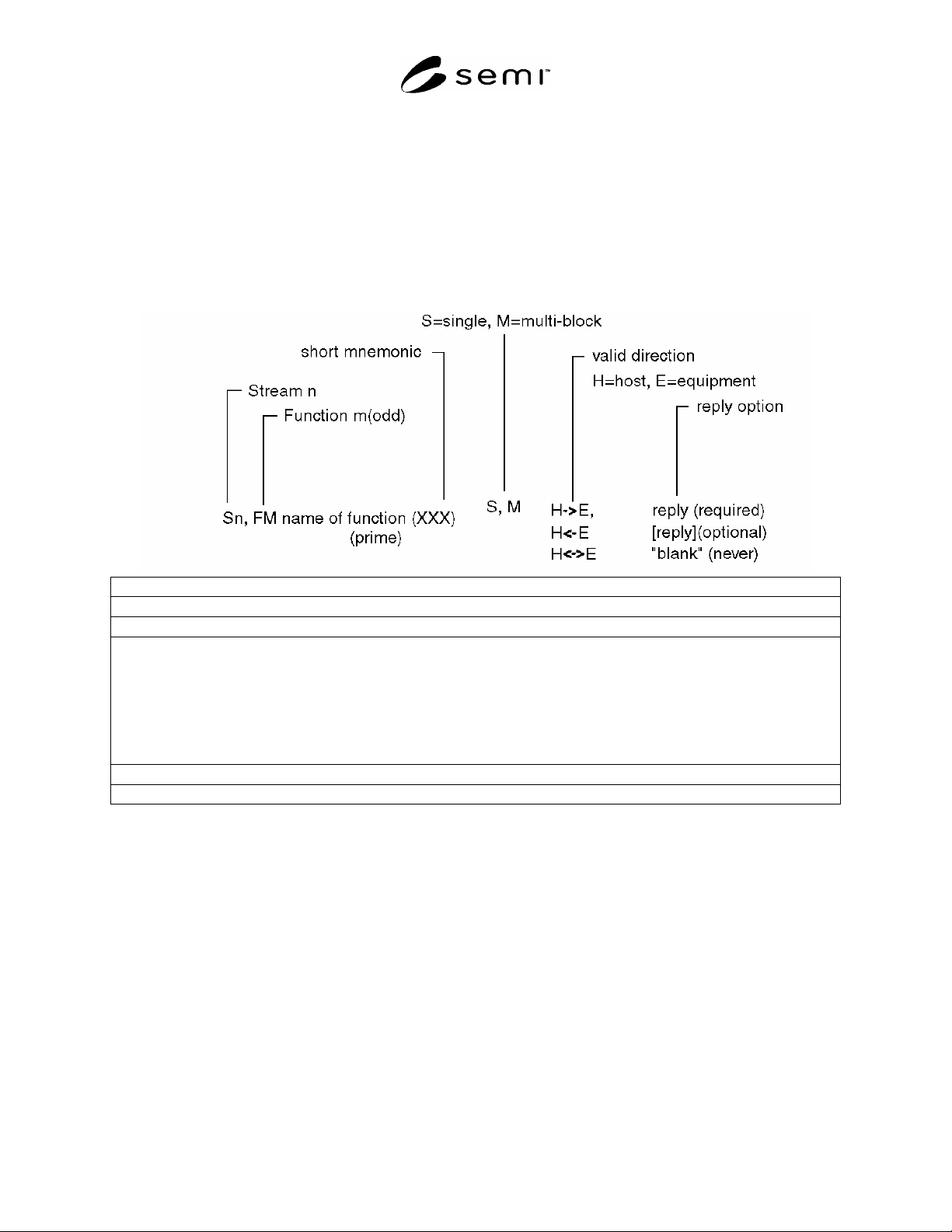
9.9.1 Please refer to Figure 3 in order to follow the discussions for the notations. In Harel notation, ‘pump’ and
‘vacuum’ are concurrent states. The text to specify this relation in a response to a request for state is ‘pump,
vacuum’. The comma can be read as meaning ‘and’. ‘on’ and ‘off’ are sub-states of ‘pump’. ‘vent’, ‘rough’, and
‘Hi-V’ are sub-states of ‘vacuum’. The sub-state syntax is ‘state/sub-state’ where the ‘/’ can be read as ‘is in sub-
state’. So using the example in Figure 3, if the pump is off and the vacuum is vented, then the text message which
conveys this is ‘pump/off, vacuum/vent’. This message can be shortened to ‘off,vent’ because there is no ambiguity
in doing so.
Figure 3
State Chart Example
4 Harel D. “Statecharts: A Visual Formalism for Complex Systems”, Science of Computer Programming, 8, 1987, pp. 231-274. Elsevier Science,
P.O. Box 945, New York, NY 10159-0945, http://www.elvesier.nl/homepage/browse.htt
SEMI E5-1104 © SEMI 1982, 2004 58
10 Message Detail
10.1 Intent — This section defines a number of specific functions in different streams which can be used as a basis
for communication between host and equipment. The functions are defined in the form of transaction message pairs
according to the transaction level requirements specified in Section 8.
10.2 The functions are described in a standard form which involves specification of the number, name, single or
multiple block, direction of communication, nature of reply required, description, variable definition, and the
detailed structure of the message in terms of lists and items. Double lines separate streams, and single lines separate
transactions to aid readability.
10.2.1 The abbreviations used in each transaction are as follows:
Description
A description of the action generated by the function.
Structure
Detailed structure showing lists and defined items. Lists are denoted by a capital L
followed by the length separated by a comma. The individual elements in the list are
numbered on separate lines. Nested lists are indented to emphasize the structure.
The detailed form of the items is given in the define section at the beginning of the
transaction. The symbols "<" and ">" are used to enclose each item in the structure
data and imply that there is an item header. A detailed description of each data item
as well as a list of the allowable data formats can be found in the Data Item
Dictionary.
Exception
Special cases in the structure that have a different meaning.
Sn,Fm+1 Name of function (same structure as above
(secondary) except never with reply)
10.3 Message Usage — This section discusses message features and where they may be used.
10.3.1 Zero Length Items and Lists — Certain message definitions may use zero length data items and zero length
lists as a technique to convey specific information to the receiver of the message. For commands (i.e., “Do
Something”) and requests (i.e., “Return Some Data”), it may be used to mean “Use default values for the data
item(s) which were not included”. The default may be a specific value or a value chosen by the equipment.
10.3.1.1 For messages reporting data (either responses to requests or asynchronous reports), the technique may be
used to indicate that the desired information is not available or not applicable. In some cases, the fact that data is
unavailable may indicate success or failure of a command.
10.3.1.2 Certain message definitions may define a zero length data item or a zero length list to mean “the
information is not supplied.” The receiving party should react to this lack of information as it deems appropriate.
10.3.2 Compliance to Message Definitions — Any given standard SECS-II message shall comply to the format
shown in the Message Definition for that Stream and Function. Specifically: