semi合集-English.pdf - 第1867页
SEMI E53-0704 © SEMI 1996, 2004 7 • Delete a data report. 7.2.6 Event Report — Event reports may be sent as messages to the service user whe n ever the associate d collection even t occurs. The collection event obj ect i…
SEMI E53-0704 © SEMI 1996, 2004 6
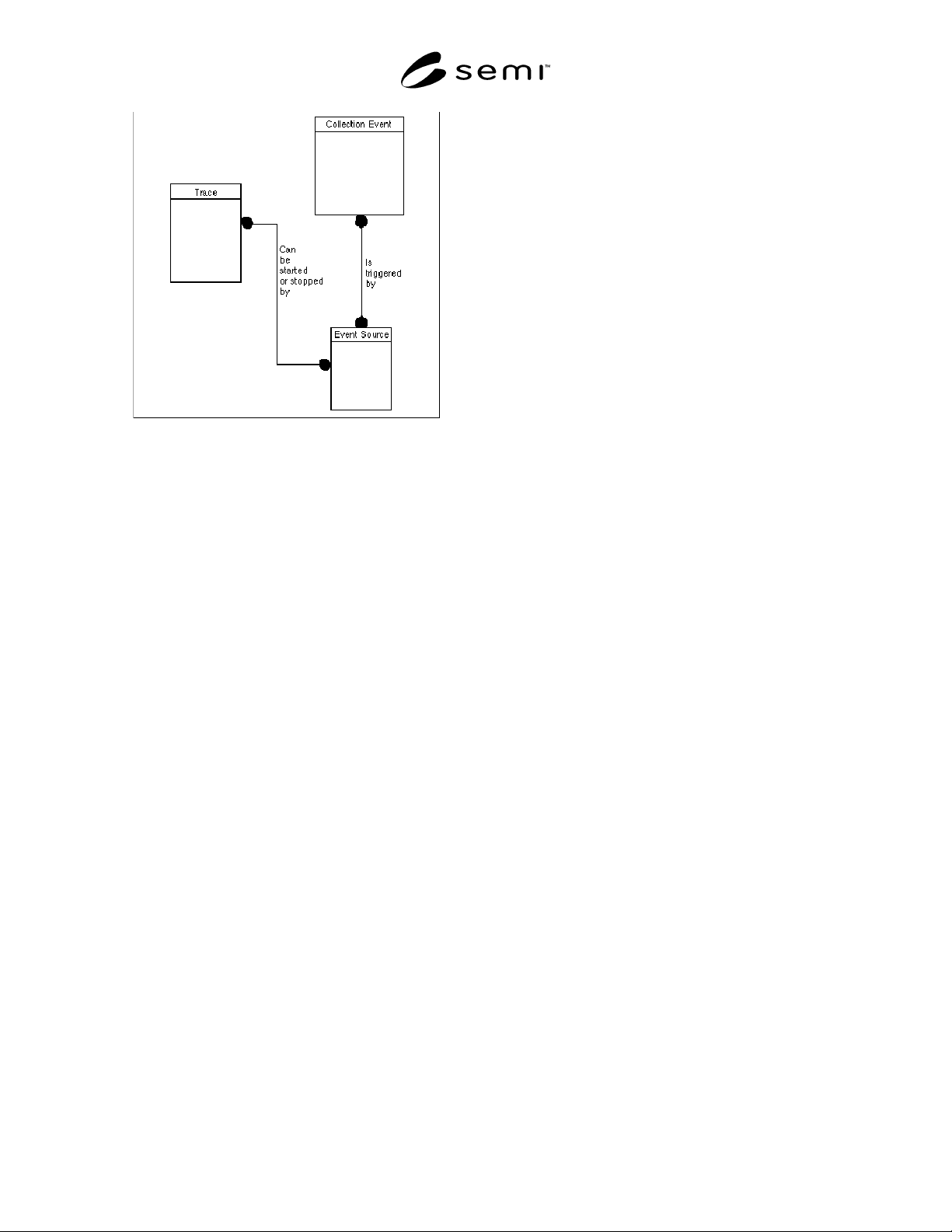
Figure 5
Trace Object Information Model
7.2.1 Service Provider Object — The service provider
is responsible for compiling report samples according
to each service user setup. It detects collection events,
provides trace timing and accesses the value of data
source object attributes (variables) in order to compile
the data reports. ERS does not specify the attributes or
behavior of this object. It is included in the event report
object model to provide context for other objects within
ERS.
7.2.2 Service User Object — The service user is
responsible for configuring its own event reporting
setup and receives reports from the service provider
according to that setup. ERS does not specify the
attributes or behavior of this object. It is included in the
event report object model to provide context for other
objects within ERS. However, the service user object
shall be able to receive the event report send and trace
report send messages from the service provider.
7.2.3 Collection Event Object — This object type or
class is responsible to provide all the collection event
identifiers for which event reports can be generated.
Other factory services and objects may provide event
notification messages which are important in the
context of a service or functionality that they provide.
But, in general, these notifications do not provide
mechanisms to report information beyond their domain
boundaries. For example, Processing Management,
SEMI E40, includes an event notification for process
complete (PRJobAlert (Milestone)). In order to collect
data associated with this event, it must be “known” to
the collection event object type. When it is “known” by
the collection event object, then event reports can be
generated using data or attributes from the data sources
which are “known” by the event reporting service
provider. A data source could provide information on
process chamber pressure and temperature, which are
attributes or variables important to the process but
which are not known to the processing management
service.
7.2.4 Event and Data Source Objects — The use of the
event source and data source objects provides extensive
capability to access the attributes of objects in a
distributed environment. Where the event services
provider has a domain which extends over multiple
resources, such as a cell controller for a furnace bay or
a cluster tool controller, these objects provide an
unambiguous mechanism for addressing the data that
the service user wishes to access.
7.2.4.1 The event and data source objects are to the
event reporting services what directory object is in a
file system of a computer’s operating system. They
should be thought of as containers of information which
provide pointers (or names) of objects that are the
actual sources of events or data.
7.2.4.2 The event source object is not directly
accessible to the service user. Knowledge of events and
event sources can be accumulated by interrogation of
the collection event object using OSS.
7.2.4.3 Collection event identifiers shall be determined
by either of two possible methods. One, the equipment
supplier may define and supply with the equipment a
list of collection event IDs (identifiers). Two, the
equipment’s collection event object can be interrogated
with object services requests for collection event
sources and identifiers. For example, using the second
method, one could use object services to ask the
collection event object for a list of collection event
sources, which might include objects such as
“PM:Etch>MFC:CCL4” or “TM>Aligner.” Then using
OSS, the collection event object can be queried for
events associated with these sources. For the MFC a list
of events might include “preslow,” “overlimit,”
“valvemax,” etc.
7.2.5 Data Report Object — A data report defines the
variables (or attributes) of a specific object (data
source) which are to be sampled. Data reports are either
pre-defined or defined dynamically by the service user.
A data report sample is a set of data containing the
values of the variables defined for the data report. To
sample a data report means that the current values of
the variables at their data source object should be
recorded. Data reports may be sampled and sent either
with an event report and/or with a trace report. The
service user may request:
• To sample an individual data report.
• Create a data report.
SEMI E53-0704 © SEMI 1996, 2004 7
• Delete a data report.
7.2.6 Event Report — Event reports may be sent as
messages to the service user whenever the associated
collection event occurs. The collection event object is
the source of the event report message. Event reporting
is initially disabled. If the data to be sent with an event
report has more than one data source, then there must
be at least one data report for each data source to be
included in the event report link definition. The service
user may request:
• Event reporting to be enabled.
• Event reporting to be disabled.
• One or more data reports to be to linked (included
in) the event report.
7.2.7 Trace Report — Trace reports are messages
which are sent to the service user periodically. The
trace report will contain the value(s) of the data item(s)
specified in the data report(s) referred to by the trace
object which is the source of the trace report.
7.2.7.1 The trace object contains the description of
what to include in the trace report and trace objects are
either pre-defined or defined dynamically by the service
user. The service user may request:
• Trace reporting to be enabled.
• Trace reporting to be disabled.
• One or more trace reports to be reset at any time to
their initial state.
• One or more trace reports to be deleted at any time.
7.2.7.2 When the enabled attribute of the trace object is
set, then trace reporting may be started or in response to
a start event. When the trace reporting starts, the sample
count is reset to zero. A trace report may be stopped
when a certain number of samples have been reported
or when a stop event occurs.
7.2.7.3 The service user may specify a trace object to
be automatically deleted once it has been stopped by
whichever mechanism. Otherwise, the trace reporting
simply stops. If no start event is defined, then the trace
is restarted immediately. Otherwise, the next start event
will restart the trace. Disabling or deleting a trace report
stops reporting immediately.
7.3 Scenarios — The communications involved in
event reporting are introduced below in the form of
some representative scenarios. The full behavior and
message set are covered in Sections 8.2 and 8.3
respectively.
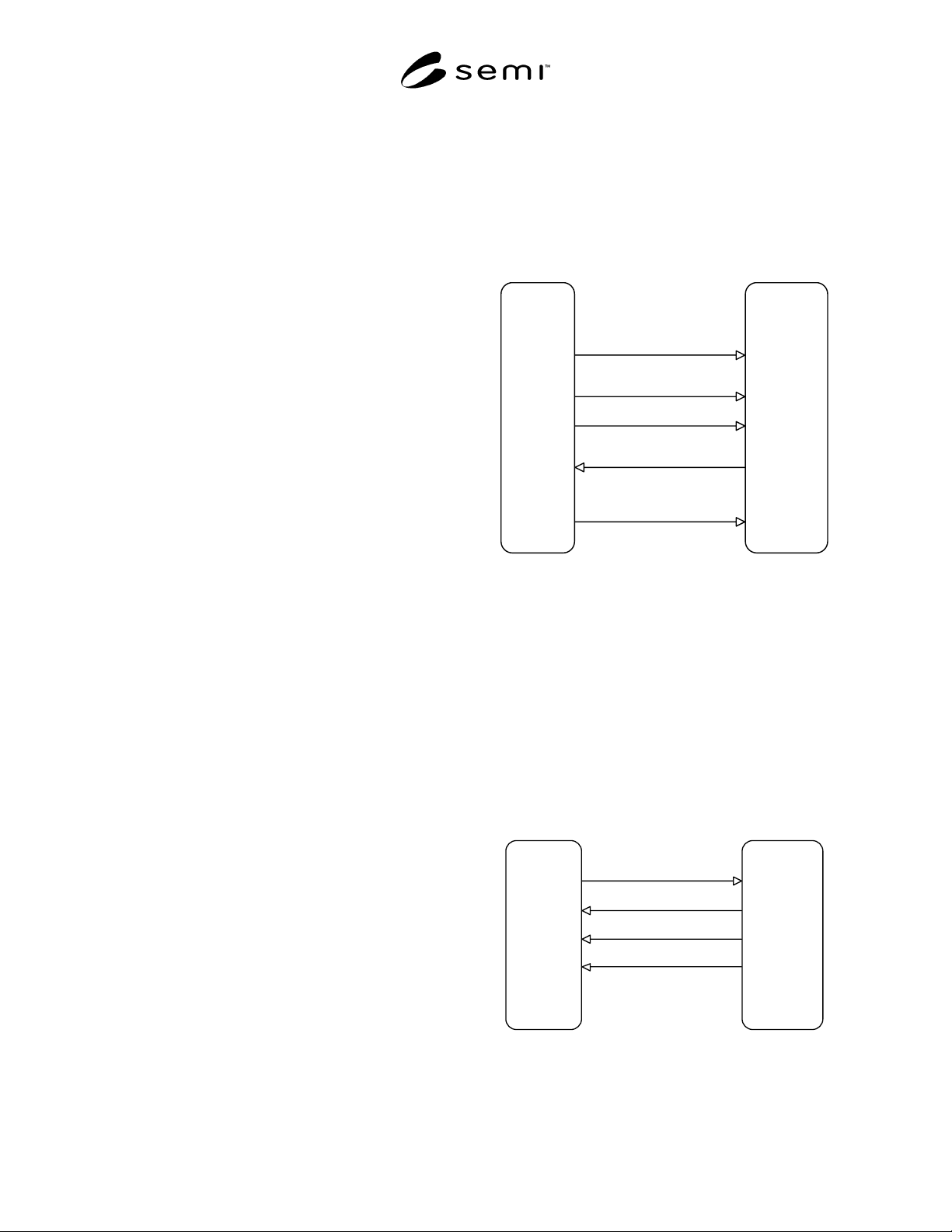
7.3.1 Event Reporting — Figure 6 shows a scenario in
which a data report is created by the service user and
linked to an event report. Event reporting is then
enabled. Subsequently, an event report is sent with the
data reports attached whenever the collection event
occurs. The service user then disables event reporting,
preventing subsequent collection events from triggering
the report. Data reports and links to event reports may
be pre-defined by the equipment in which case the
DataReportCreate and LinkCreate messages are
omitted.
EQUIPMENT
Service Provider
FACTORY
Service Use
r
Event report
disabled
Processing
com
p
lete
Compile data
re
p
ort and send
with event report
Enables an
event re
p
ort
Disables
event report
Receives
event reports
Event report
enabled
Defines a
data report
Event re
p
ort
disabled
Data report
created
Links
data report to
an event re
p
ort
Data report
linked
EventRe
p
ortEnable
EventRe
p
ortSend
EventRe
p
ortDisable
DataRe
p
ortCreate
LinkCreate
Figure 6
Event Reporting Scenario
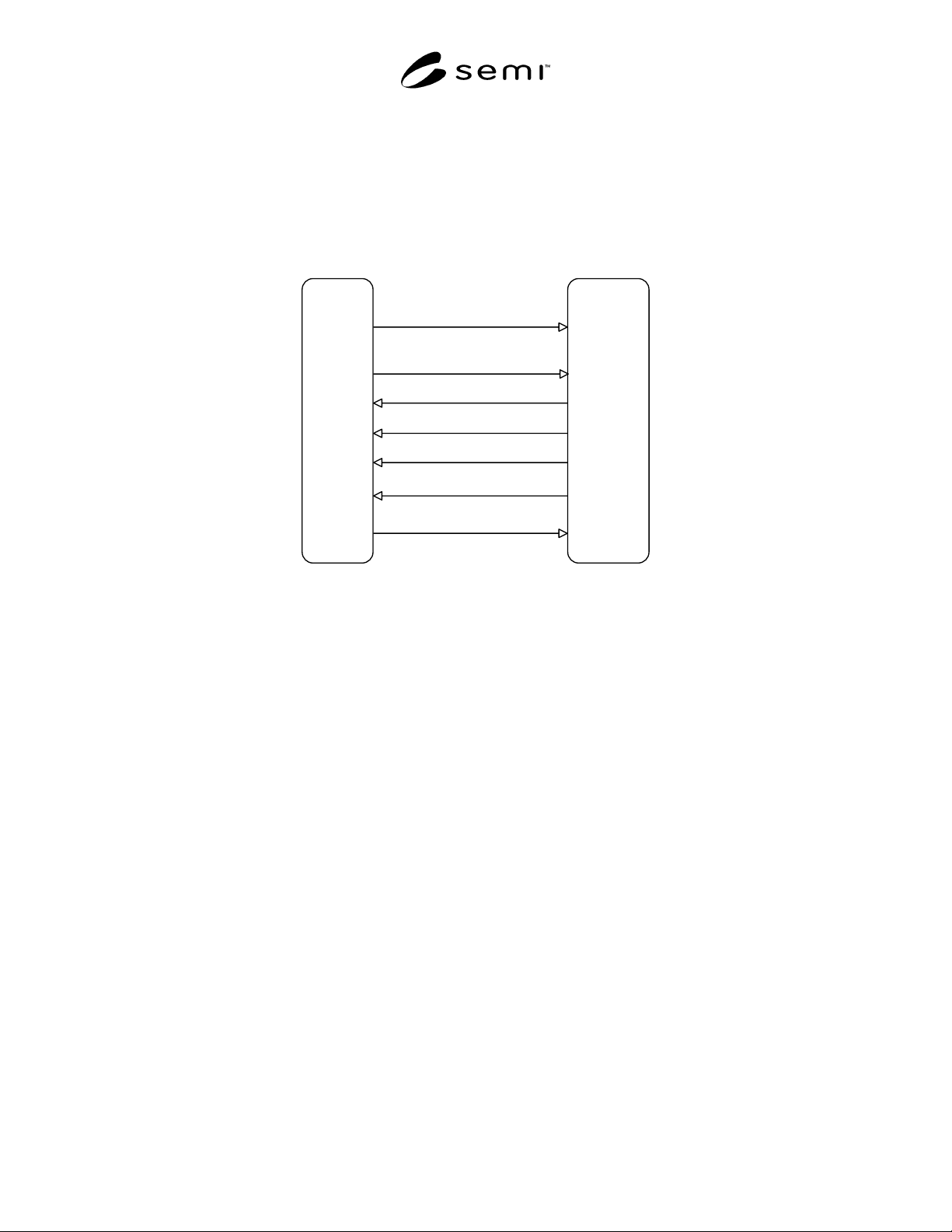
7.3.2 Trace Reporting — Figure 7 shows a scenario in
which a trace object is created with enabled and
AutoDelete both set to TRUE. Since the trace object is
enabled and there is no start event defined the data
reports assigned to the trace object are sampled and sent
immediately as a trace report message. The trace object
timer is started and the sample counter set to zero. Each
time the sample period elapses thereafter, a new trace
report is sent, and the sample counter incremented.
When the sample counter reaches the total samples
parameter, then the trace report is automatically
deleted.
EQUIPMENT
Service Provider
FACTORY
Service User
First re
p
ort sent
immediately
Sample Period
Ela
p
sed
Sam
p
le Period
Elapsed
Total Sam
p
les
reached
Trace re
p
ort
auto deleted
Creates a
trace report
Receives
trace re
p
orts
Trace report
created
TraceReportCreate
TraceReportSend
TraceReportSend
TraceRe
p
ortSend
Figure 7
Trace Reporting Scenario
SEMI E53-0704 © SEMI 1996, 2004 8
7.3.3 Trace Reporting with Event Control — Figure 8 shows a scenario in which a trace object is created with
enabled and AutoDelete both set to FALSE. There is also a start event (ProcessingStarted) and a stop event
(ProcessingComplete) defined. When the start event occurs, the data reports assigned to the trace are sampled and
sent, the trace timer is started and the sample counter set to zero. Each time the sample period elapses thereafter, a
report is sent and the sample counter incremented. Since a total samples parameter was not specified, the trace report
stops only when the stop event occurs. Once the stop event has occurred, the service user disables the trace report
preventing it from restarting when the next start event occurs.
EQUIPMEN
T
Service Provider
FACTORY
Sevice Use
r
Processin
g
started
Sample Period
Ela
p
sed
Sample Period
Ela
p
sed
Processin
g
com
p
lete
Will no longer
res
p
ond to
StartEvent
Creates a
trace report
Receives
trace reports
Disables
trace re
p
or
t
Will respond to
StartEven
t
Enables
trace re
p
or
t
Trace re
p
or
t
created but will
not res
p
ond
to StartEvent
TraceReportCreate
TraceRe
p
ortSend
TraceReportSend
TraceRe
p
ortSend
TraceReportSend
TraceRe
p
ortDisabl
e
TraceRe
p
ortEnabl
e
Figure 8
Trace Reporting with Event Control