semi合集-English.pdf - 第1874页
SEMI E53-0704 © SEMI 1996, 2004 14 # Current State Trigger New State Action(s) 6 IDLE Start Event is not defined or Start Event is defined and occurs. ACTIVE Sample Data Reports and send. Start sample timer. Reset sample…
SEMI E53-0704 © SEMI 1996, 2004 13
Table 8 Data Report State Transition
# Current State Trigger New State Action(s)
1 CreateRequest CREATED and IDLE New ReportID is defined. Wait for an actionable
event.
2 IDLE ReportRequest REPORT Sample data in report definition.
3 REPORT SamplingComplete IDLE Send data to report requestor.
4 IDLE DeleteRequest and not pre-defined notExists ReportID is no longer valid.
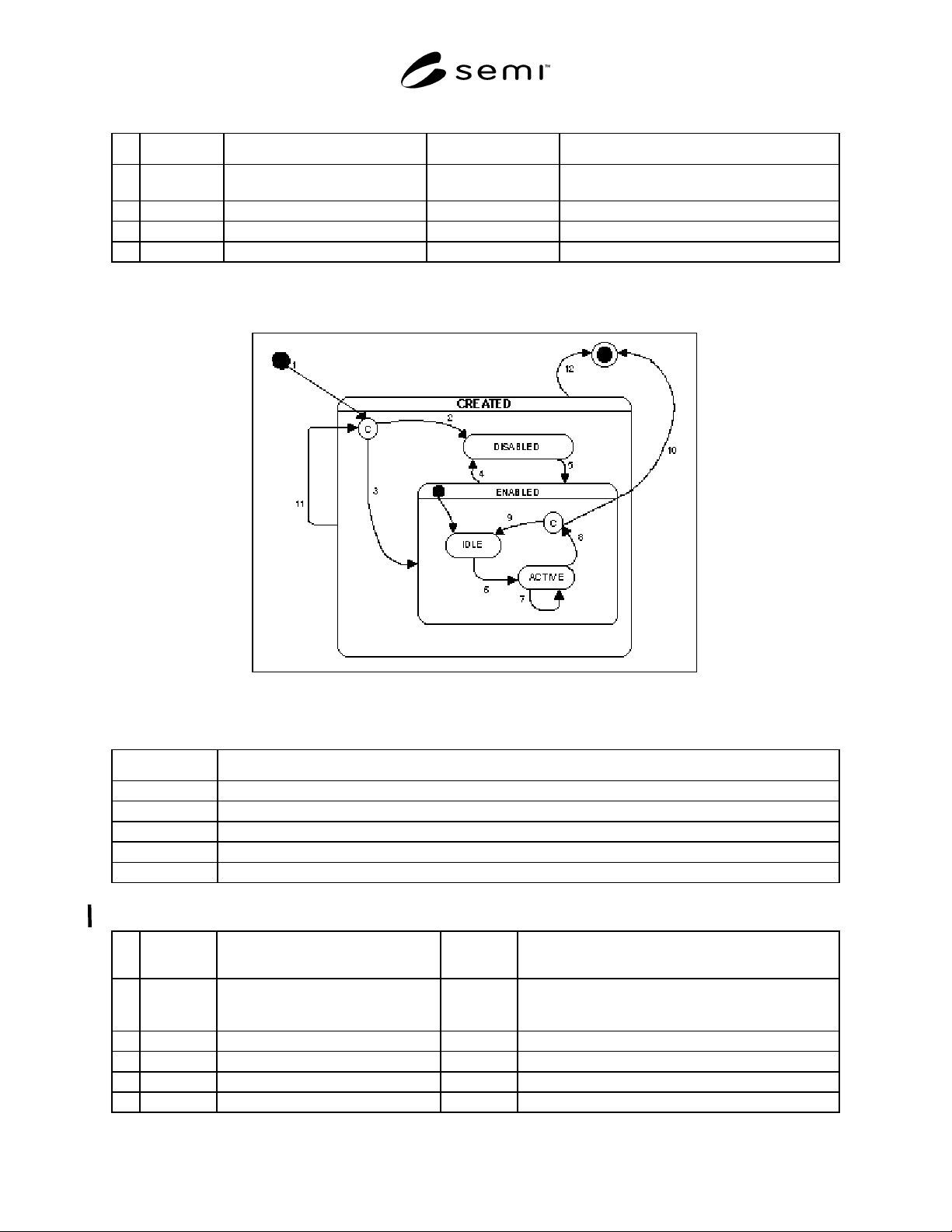
8.2.3 Trace Object State Model — Figure 12 shows the state diagram for a trace object. The Harel State Model
Notation used is described Section 5. The state transition table is shown in Table 10.
Figure 12
Trace Object State Diagram
Table 9 Trace Object State Definitions
State Definition
CREATED The Trace Object is created and ready to be accessed.
DISABLED Trace report is created but will not be sampled or sent.
ENABLED Trace object may begin generation of trace reports. See sub-states IDLE and ACTIVE.
IDLE Trace reports are not being generated.
ACTIVE The trace reports are being generated and sent periodically.
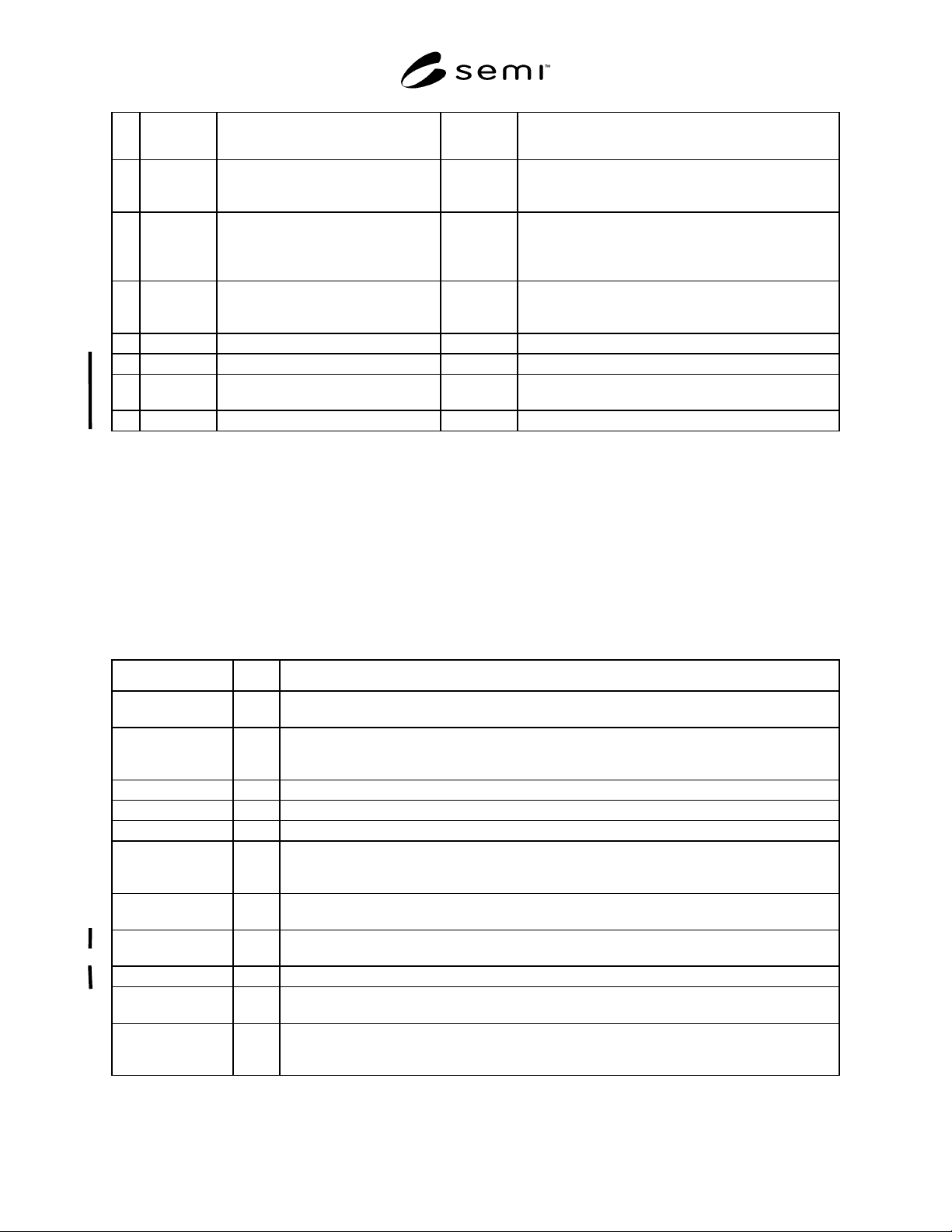
Table 10 Trace Object State Transition Table
# Current
State
Trigger New State Action(s)
1 (deleted) Trace Object Create (condition) A Trace Object is created with Report ID, Enabled,
Group Size, Total Samples, Sample Period, Start Event,
Stop Event, and Auto Delete parameters.
2 (condition) Enabled was initially FALSE. DISABLED Trace reporting is disabled.
3 (condition) Enabled was initially TRUE. ENABLED Trace reporting is enabled.
4 ENABLED Trace Report Disable DISABLED Trace reporting is disabled.
5 DISABLED Trace Report Enable ENABLED Trace reporting is enabled.
SEMI E53-0704 © SEMI 1996, 2004 14
# Current
State
Trigger New State Action(s)
6 IDLE Start Event is not defined or Start
Event is defined and occurs.
ACTIVE Sample Data Reports and send. Start sample timer.
Reset sample counter. Reset group counter. Wait for
sample timer to elapse.
7 ACTIVE Sample period elapses. ACTIVE Sample data reports into a trace report. If group sample
counter equals group size, then send the trace report and
reset group counter. Then prepare to generate the next
trace report. Start sample time and wait for it to elapse.
8 ACTIVE Stop Event is defined and occurs or…
Total Samples > 0 and sample counter
equals Total Samples.
(condition) Sample data reports into a trace report. Send the trace
report.
9 (condition) Auto Delete is FALSE IDLE (none)
10 (condition) Auto Delete is TRUE (deleted) Delete Trace Object.
11 CREATED Event Report Reset (condition) Reset Trace Object state back to initial state when it was
first created.
12 CREATED Event Report Delete (deleted) Delete Trace Object.
8.3 Messaging Services Detail — This section specifies the messages required to implement the event reporting
service. The messages were introduced in Section 7.3.1. These services are independent of the messaging protocol
used.
The specification includes a list of required messages, the definition of the parameters contained within the
messages, and data type of the parameters. Not defined here is the internal structure of the actual messages as
transferred, including order of the parameters and how various data structures and data types are represented.
The service message notation used in the tables below is described in the Conventions, Section 5.4.
8.3.1 Service List
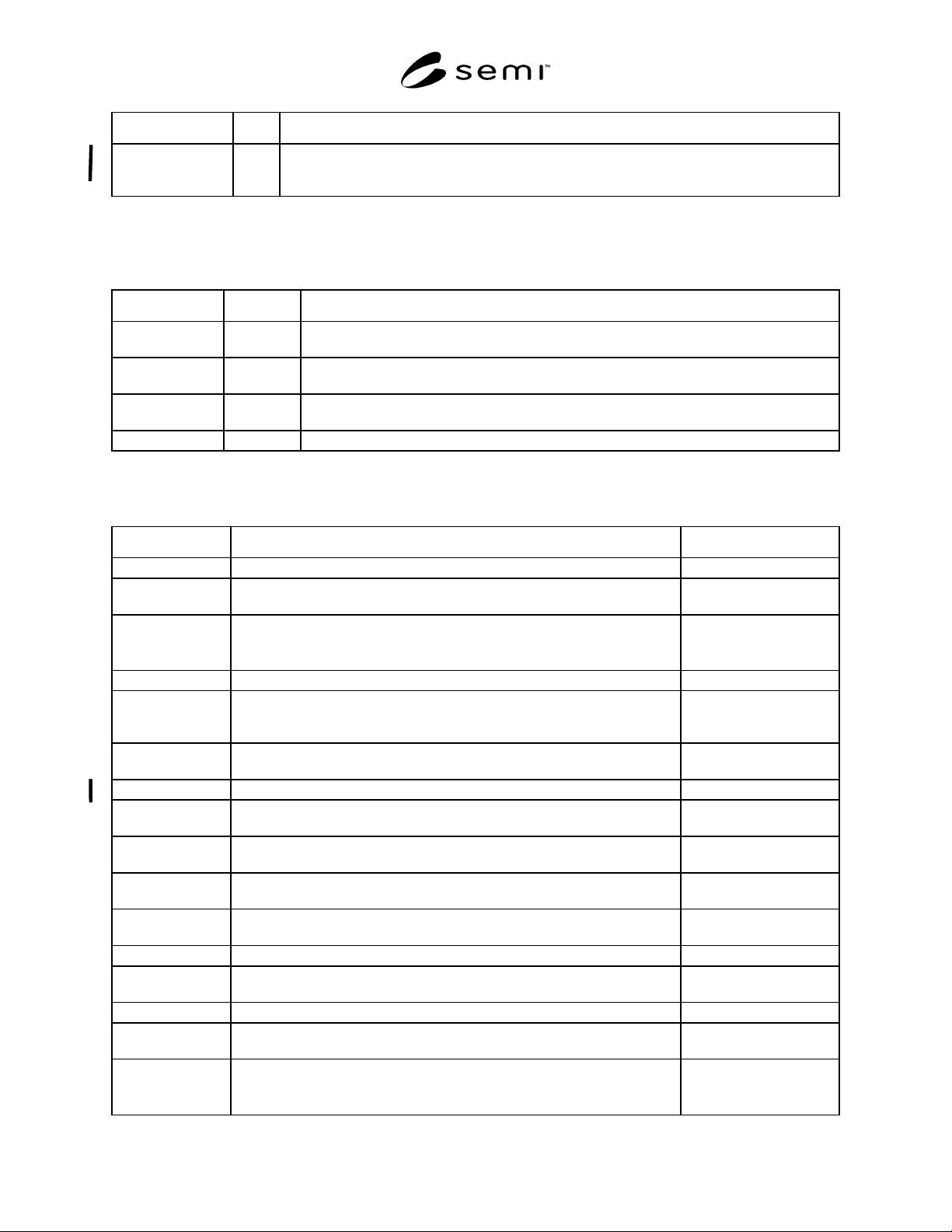
Table 11 Event Reporting Services
Service Type Description
Event Report
Request
R Requests the specified event report, and the data reports linked to it, to be sampled and returned to
the service user.
Event Report Send N Notifies the service user of the occurrence of an event with a time stamp indicating when the event
occurred. Any data reports linked to the event report are sampled and attached to the event report
sent to the service user.
Data Report Create R Creates a data report which defines a set of attributes of an object to be reported.
Data Report Delete R Deletes one or more data report definitions.
Data Report Request R Requests the specified data report to be sampled and returned to the service user.
Collection Event
Link
R Request a Collection Event Object to link a Data Report. All Data Reports linked to an enabled
Collection Event Object are sampled and sent with the event report when the collection event
occurs.
Collection Event
Unlink
R Unlinks one or more Data Reports from the Collection Event Object.
Trace Create R Creates a trace object which defines the sample period, group size, start and stop events, auto
delete, report change only, and the initial state (enabled or disabled).
Trace Delete R Deletes one or more trace object definitions.
Trace Report
Request
R Requests that the data reports assigned to the trace report be sampled and returned to the service
user.
Trace Report Send N Notifies the service user of trace report samples taken. Group size samples are taken before the
service user is notified. After notifying the service user, the group counter is reset to zero. A trace
report sample is taken either when the start event occurs or the sample period elapses.
SEMI E53-0704 © SEMI 1996, 2004 15
Service Type Description
Trace Report Reset R Resets one or more trace objects back to their initial state when created regardless of the current
state of the trace object. All trace objects may be reset at once providing a simple way to re-
establish the event reporting setup after modifications have been made.
8.3.2 Use Object Services — Attributes of the standardized objects listed in Table 12: SEMI E39 shall be accessed
by using the GetAttr and SetAttr messages as defined in SEMI E39.
Table 12 SEMI E39 Access
Object Attribute Comment
Collection Event Enabled When set to TRUE, a Collection Event Report will be sampled and sent when the Collection
Event occurs. When FALSE, Collection Event Reports are not sampled and sent.
Trace Enabled When set to TRUE, a Trace Report will be sampled and as described by the Trace Report
definition. When FALSE, Trace Reports are not sampled and sent.
Data Source AttrList Use GetAttr to get the names of the attributes of a data source. These names can be used in the
Data Report Create message.
Data Report AttrList Use GetAttr and SetAttr to change the variables included in a data report definition.
8.3.3 Parameter Dictionary
Table 13 Event Reporting Parameters
Parameter Definition Form
EvtSrcSpec The object specifier of the Event Source Object. Formatted text
CollEventID References the Object Identifier of the collection event, within the scope of the
event source object, that triggers an event report to be sent.
Text
Enabled Specifies whether an Event or Trace Report is enabled. Boolean:
TRUE – Successful
FASLE – Unsuccessful
DatSrcSpec The object specifier of the data source object. Formatted text
(list of) AttrName An ordered list of attribute names from the data source object which specify the
samples to be included in a data report. Maximum must be documented by
supplier.
Text
ReportID References the Object Identifier of a data report, either pre-defined by the
service provider or specified by the service user.
Text
TraceID References the Object Identifier of a trace object specified by the service user. Text
(list of) ReportID A list of data reports to be linked to a trace. Maximum must be documented by
supplier.
Text
SamplePeriod The time delay between samples. Minimum and maximum must be
documented by supplier.
Float
TotalSamples The number of samples to be taken before trace data reporting stops
automatically.
Positive Integer
GroupSize The number of trace report samples made before the report is sent to the
service user. Maximum group size must be documented by supplier.
Positive Integer
StartEvtSrcSpec The object which is the source of the event which starts the trace reporting. Text
StartEventID The Collection Event Object Identifier within the event source object which
starts the trace reporting.
Text
StopEvtSrcSpec The object which is the source of the event which stops the trace reporting. Text
StopEventID The Collection Event Object Identifier within the event source object which
stops the trace reporting.
Text
AutoDelete Specifies if trace report automatically deletes itself when its reporting cycle is
complete.
Boolean:
TRUE – Successful
FASLE – Unsuccessful