semi合集-English.pdf - 第2614页
SEMI E91-0600 © SEMI 1999 , 2000 19 10.6 Res triction on the Operator by Co ntrol States 10.6.1 For th e re mote comman ds, the o p erator of the prober or the hos t is restricted by th e co ntrol states of the equipment…
SEMI E91-0600 © SEMI 1999, 2000 18
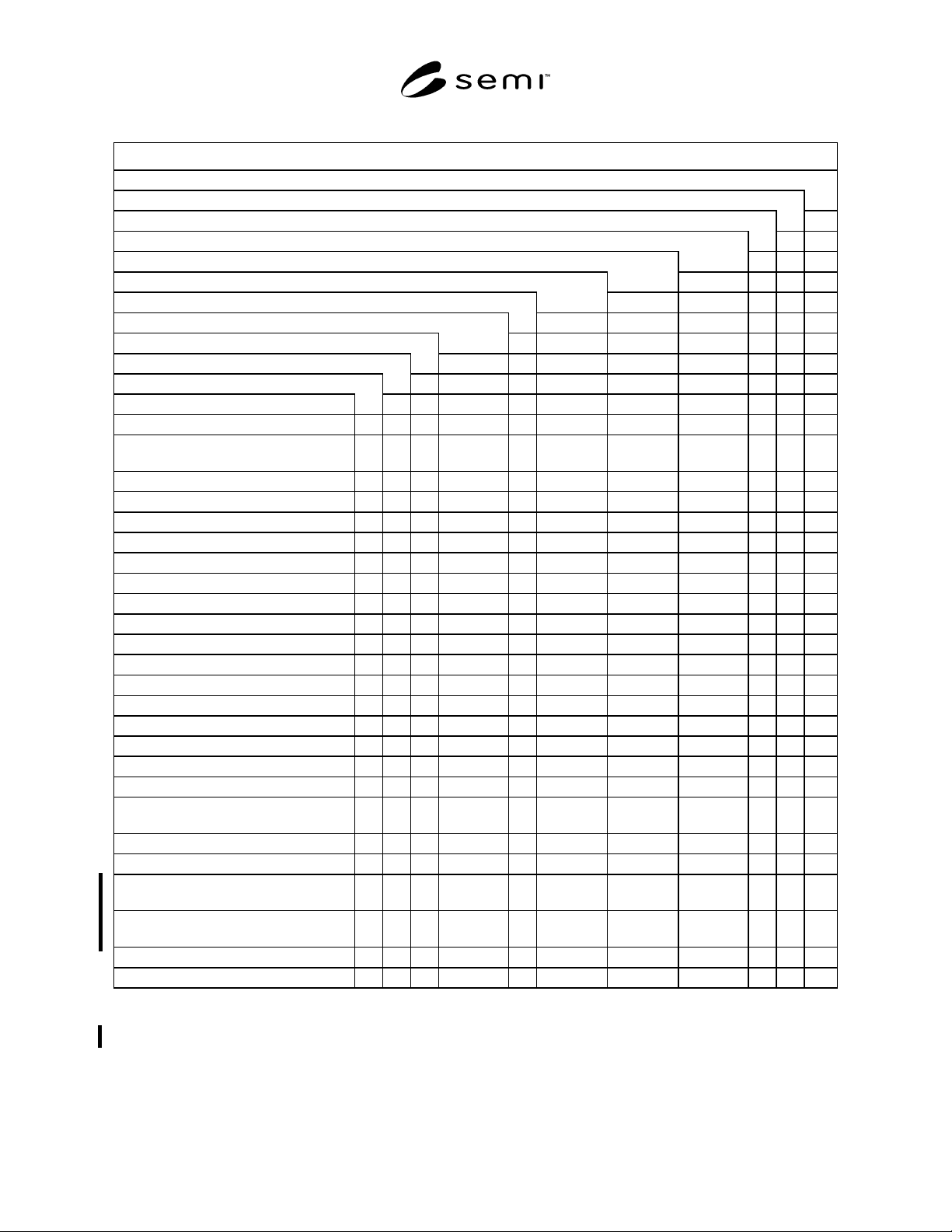
Table 14 Remote Command vs. Process State/Prober Job State
Command Name
ABORT
JOB_CANCEL
JOB_CREATE
PRE-DATA_DOWNLOAD (See NOTE 3.)
ONLINE-LOCAL
ONLINE-REMOTE
PAUSE
PP-SELECT
RESUME
START
STOP
PROCESSING STATE
INIT
IDLE X (See
NOTE 1.)
X (See
NOTE 2.)
X (See
NOTE 2.)
IDLE with ALARMS
MAINTENANCE
PROCESSING ACTIVE
...PROCESS
......SETTING UP X X X
......EXECUTING X X X
...PAUSE
......PROCESS PAUSE
.........PAUSING X X
.........PAUSED X X X
.........CHECKING X X
.........PAUSED SETTING UP X X
......ALARM PAUSED X X
...STOPPING X
...ABORTING
Prober Job STATE
Undefined X (See
NOTE 1.)
X (See
NOTE 2.)
X (See
NOTE 2.)
X
JOB CREATED X X
JOB ACTIVE
...JOB SET UP X (See
NOTE 3.)
...JOB PROCESSING X (See
NOTE 3.)
(X)
JOB STOPPING
JOB ABORTING
NOTE 1: Both IDLE and Undefined need hold true for PP-SELECT.
NOTE 2: Both IDLE and Undefined need hold true for ONLINE-REMOTE and ONLINE-LOCAL.
NOTE 3: PRE-DATA_DOWNLOAD is valid when Ready to Receive Previous Data event is reported.
SEMI E91-0600 © SEMI 1999, 200019
10.6 Restriction on the Operator by Control States
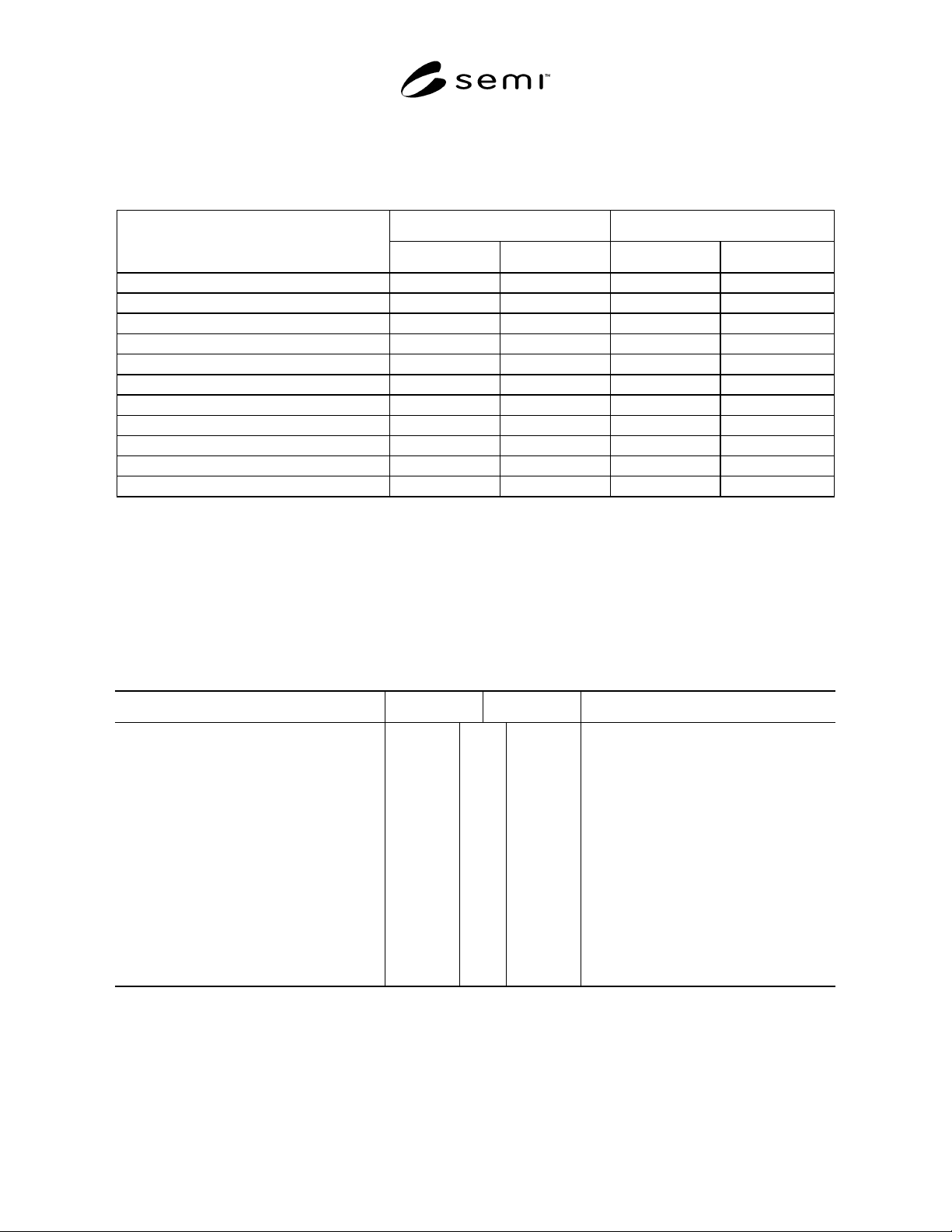
10.6.1 For the remote commands, the operator of the prober or the host is restricted by the control states of the
equipment.
Table 15 Table of Restrictions on the Operator by Control States
Operator Host
Remote Commands
LOCAL REMOTE LOCAL REMOTE
JOB_CREATE O X O O
PP-SELECT O X O O
PRE-DATA _DOWNLOAD X X O O
JOB_CANCEL O X O O
START OXX O
PAUSE O O X O
RESUME O O X O
STOP O O X O
ABORT O O X O
ONLINE-LOCAL X O X O
ONLINE-REMOTE O X O X
O: Operation is allowed.
X: Operation is prohibited.
11 Scenario
11.1 The purpose of this section is to document a typical PSEM specified operation scenario.
11.2 From Power-On to Online Remote
11.2.1 A typical scenario of transition from equipment power-on to online remote is shown below.
Comment Host Equipment Comment
(Equipment power-on)
(Equipment initialization operation)
S1,F13 Communication establishment request
Communication establishment request
confirmation
S1,F14
(Press the online transition switch.)
S1,F1 Are You There Request
Online data S1,F2
(Online transition is completed.)
S6,F11 Send ONLINE-REMOTE transition event
report
Confirm event report S6,F12
S6,F11 Send IDLE transition event report
Confirm event report S6,F12 S6,F12
11.3 1 Lot Processing in Online Remote
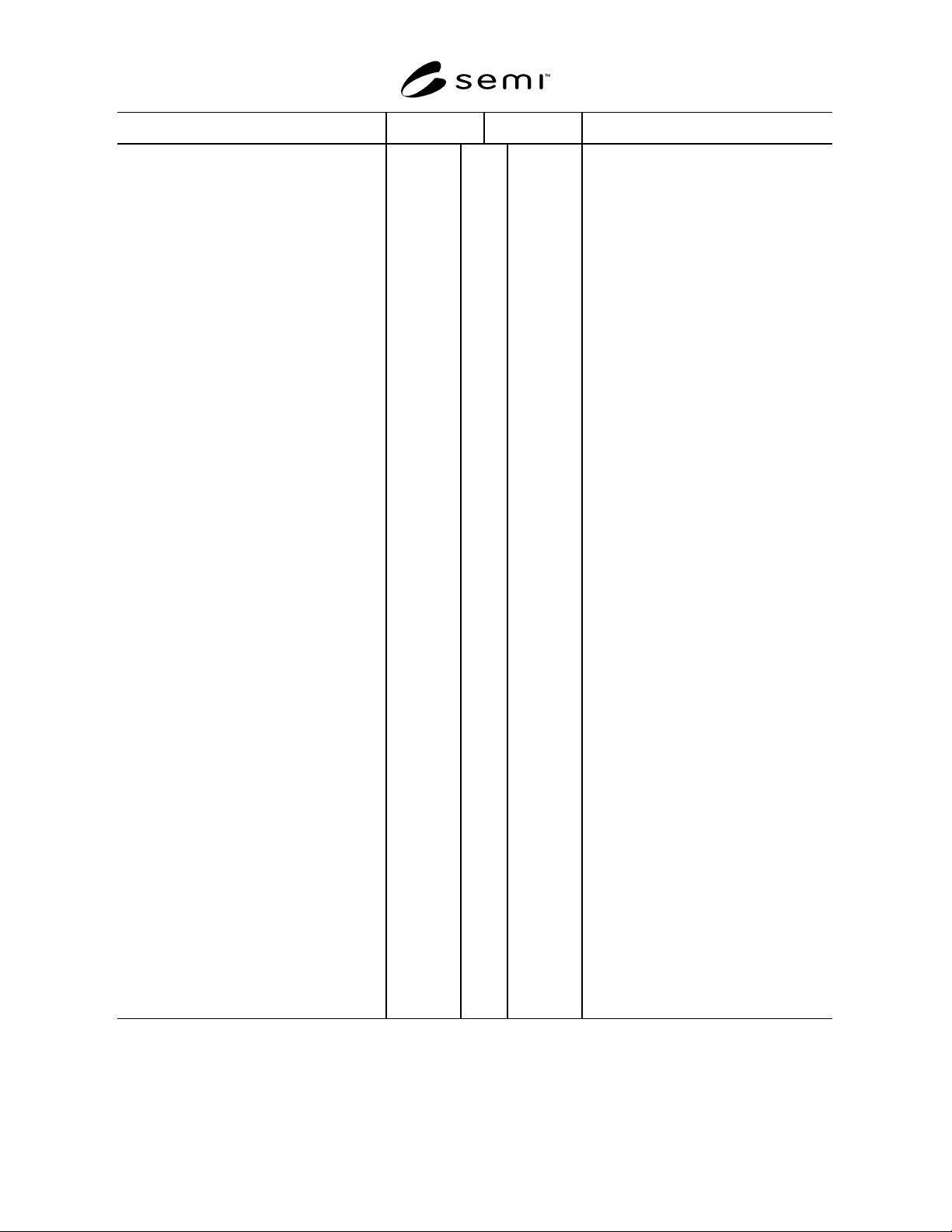
11.3.1 A typical scenario from 1 lot p rocessing instruction to processing completion in online remote is shown
below.
SEMI E91-0600 © SEMI 1999, 2000 20
Comment Host Equipment Comment
ONLINE-REMOTE IDLE
Send JOB_CREATE command S2,F49
S2,F50 Confirm host command
S6,F11 Send Prober Job Created event report
Confirm event report S6,F12
(Carry in cassette)
S6,F11 Send material carry-in event report
Confirm event report S6,F12
Send START command S2,F49
S2,F50 Confirm host command
S6,F11 Send Prober Job Started event report
Confirm event report S6,F12
S6,F11 Send SETTING UP transition event
report
Confirm event report S6,F12
(Equipment setup is started.)
(Equipment setup is completed.)
S6,F11 Send Enter Processing event report
Confirm event report S6,F12
S6,F11 Send EXECUTING transition event
report
Confirm event report S6,F12
[DO] “wafer count times”
(Wafer load is completed.)
[IF]
Is Instruction data required?
[THEN]
S6,F11 Send Waiting Previous Data event report
Confirm event report S6,F12
Send PRE-DATA_DOWNLOAD command S2,F49
S2,F50 Confirm host command
[END_IF]
(Wafer processing is started.)
(Wafer processing is completed.)
S6,F11 Send wafer end event report (Result
Data)
Confirm event report S6,F12
(Wafer unload is completed.)
[END_DO]
S6,F11 Send End Processing event report
Confirm event report S6,F12
S6,F11 Send IDLE transition event report
Confirm event report S6,F12
(Carry out cassette)
S6,F11 Send material carry-out event report
Confirm event report S6,F12
NOTE 1: Each event report send order in Prober Job Started and SETTING UP transition, Enter Processing and EXECUTING transition, and
End Processing and IDLE transition may be inverted.