semi合集-English.pdf - 第2912页
SEMI E109-0305 © SEMI 2001, 2005 22 11.3.3 Access Mode State Definitions 11.3.3.1 ACCESS MODE — The parent state for the MANUAL a n d AUTO sub-states. 11.3.3.2 MANUAL — A sub-state of ACCESS MODE. When the product ion eq…
SEMI E109-0305 © SEMI 2001, 2005 21
Table 8 Reticle Pod Transfer Boundaries
Transfer Type Transfer Method Starting Boundary Ending Boundary
MANUAL This starting boundary is specified by the
user. Known examples of the starting
boundary include but are not limited to the
p
lacement sensor detecting a pod, a pod load
port operator access door opening, input to
the equipment by the operator through a
switch at the load port or the equipment
console.
This ending boundary is specified by the
user. Known examples of the ending
boundary include but are not limited to a
preset configurable time following
p
lacement sensor detecting a pod, a pod load
p
ort operator access door closing, or input to
the equipment by the operator through a
switch at the load port or the equipment
console or a service message.
LOAD
AUTO The PIO Ready signal is active for load. The PIO signals a transfer complete.
MANUAL This starting boundary is specified by the
user. Examples of the starting boundary
include but are not limited to placement
sensor no longer detecting a pod, a pod load
port operator access door opening, or input
to the equipment by the operator through a
switch at the load port or the equipment
console or a service message.
This ending boundary is specified by the
user. Examples of the ending boundary
include but are not limited to a preset
configurable time following placement
sensor no longer detecting a pod, a pod load
port operator access door closing, or input to
the equipment by the operator through a
switch at the load port or the equipment
console or a service message.
UNLOAD
AUTO The PIO Ready signal is active for unload. The PIO signals a transfer complete.
11.2 Manual Pod Transfer Confirmation Trigger
11.2.1 For a manual transfer completion confirmation, the production equipment supplier must implement a
software or hardware mechanism for an operator to inform the equipment that the pod transfer is complete, but also
support methods such as timers that allow equipment to consider a manual transfer complete without operator input.
11.3 Access Mode Initial Value
11.3.1 Also, when equipment re-initialization occurs, the access mode(s) must be remembered, and used as the
initial value when initializing. Since the access mode is remembered through re-initializations, the initial value that
is used the very first time the software is ever loaded is not important. The equipment supplier is free to set this
default value.
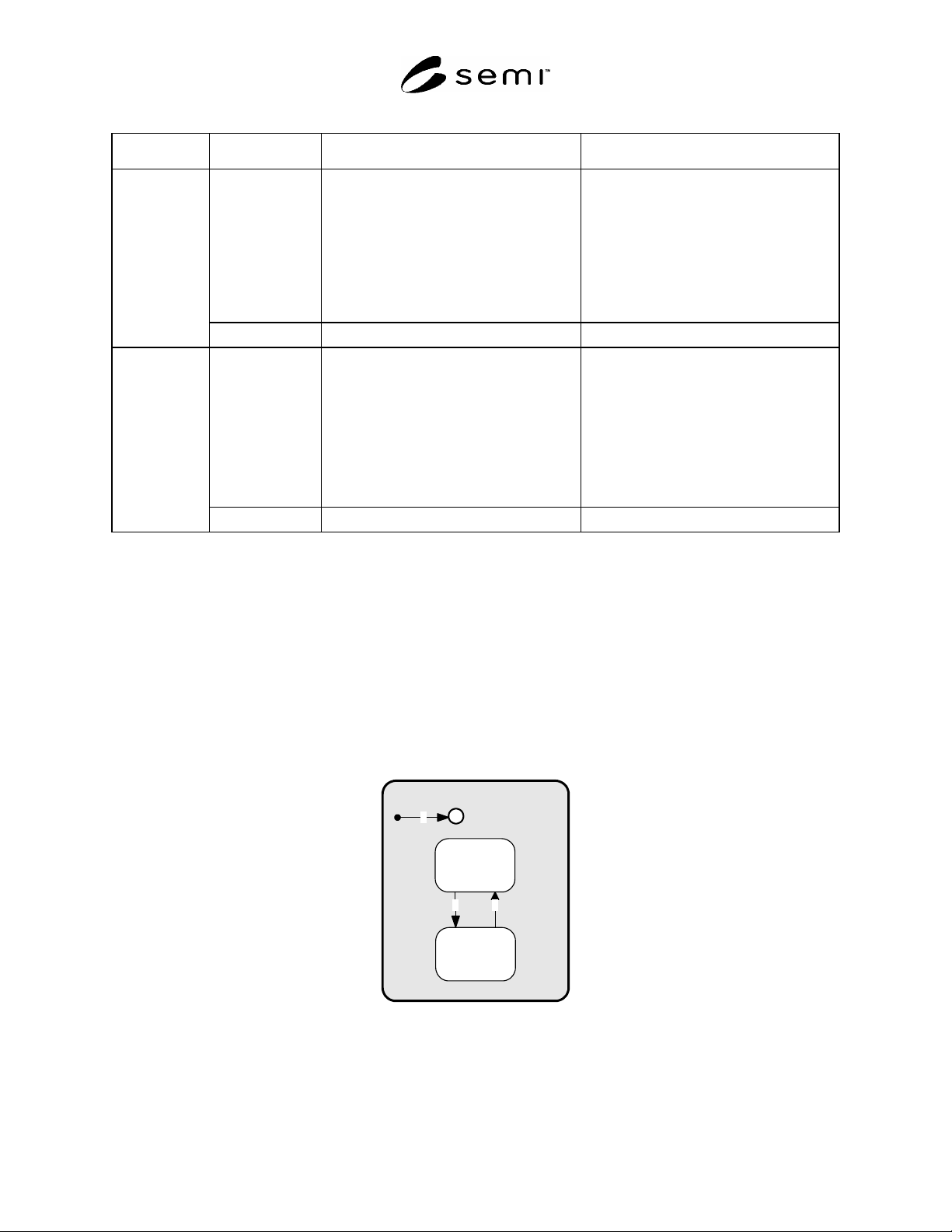
11.3.2 Access Mode State Model Diagram
ACCESS MODE
MANUAL
AUTO
1
2 3
H
Figure 3
Access Mode State Model Diagram

SEMI E109-0305 © SEMI 2001, 2005 22
11.3.3 Access Mode State Definitions
11.3.3.1 ACCESS MODE — The parent state for the MANUAL and AUTO sub-states.
11.3.3.2 MANUAL — A sub-state of ACCESS MODE. When the production equipment or specified reticle pod
load port is in this mode, only manual (non-AMHS) pod transfers are allowed. The production equipment shall have
the capability of generating an alarm if an automated (AMHS) delivery is attempted.
11.3.3.3 AUTO — A sub-state of ACCESS MODE. When the production equipment or specified reticle pod load
ports are in this mode, only automated (AMHS) pod transfers are allowed. The production equipment shall have the
capability of generating an alarm if a manual delivery is attempted.
11.3.4 Access Mode State Transition Table
11.3.4.1 Table 9 defines the transitions for the Access Mode State Model.
Table 9 Access Mode State Transition Definitions
# Previous State Trigger New state Actions Comments
1 (no state) System restart. MANUAL
or
AUTO
(History)
The access mode
returns to the
mode it was
previous to the
system reset.
Data required to be available for this
event report:
PortID
2 MANUAL The host or operator has
executed a Change-
Access service with the
value of AUTO. This
trigger can happen at
anytime, except during a
reticle pod transfer.
AUTO Manual deliveries are not allowed after
this state transition. The operator may
also trigger this transaction from the
production equipment console.
Data required to be available for this
event report:
PortID
3 AUTO The host or operator has
executed a
ChangeAccess service
with the value of
MANUAL. This trigger
can happen at anytime,
except during pod
transfer.
MANUAL The operator may also trigger this
transaction from the production
equipment console or a manual switch at
the reticle load port. Automated transfers
are not allowed after this state transition.
Data required to be available for this
event report:
PortID
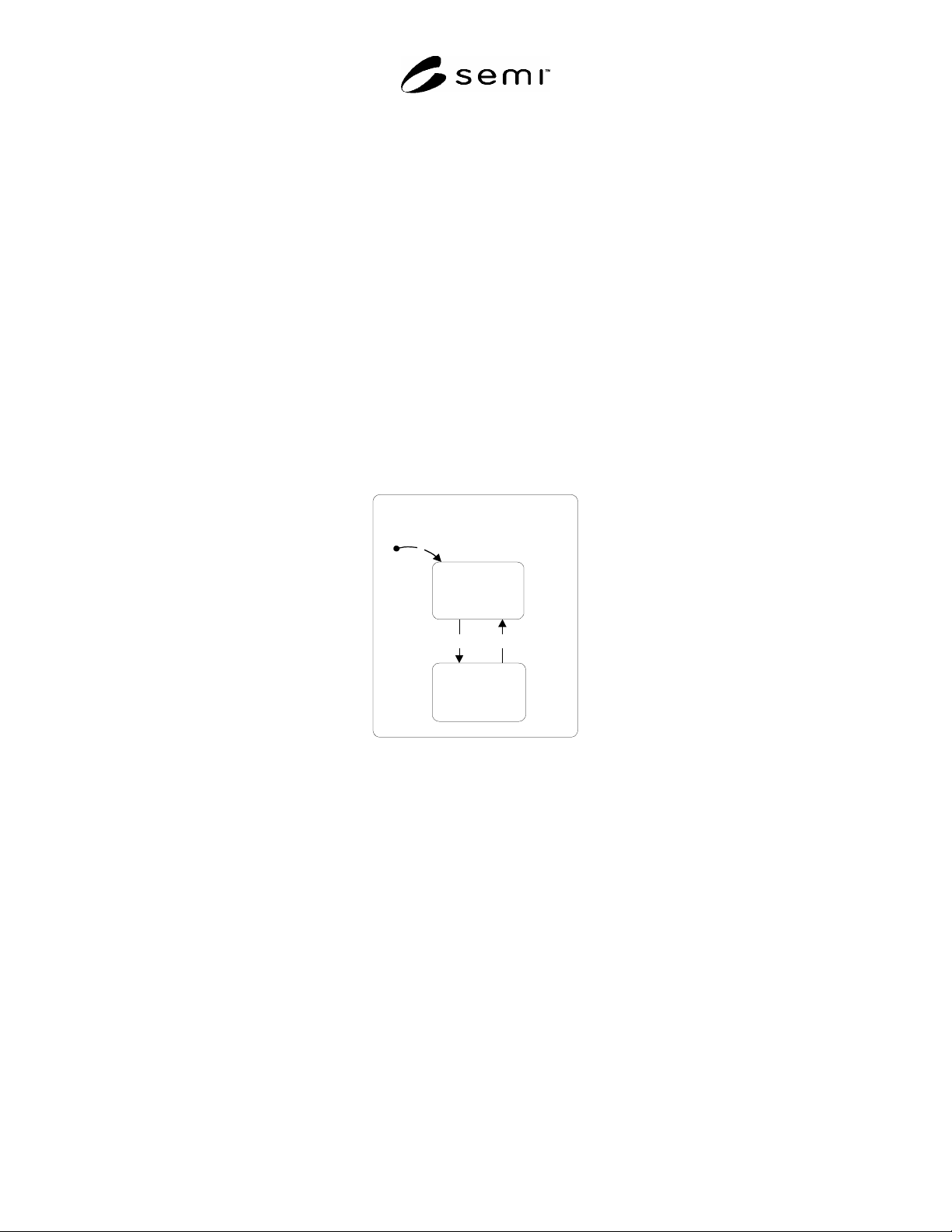
12 Reservation State Model
12.1 The purpose of the Reticle Load Port Reservation State Model is to define the host view of future activity at a
specific reticle load port.
12.1.1 The Reticle Load Port Reservation State Model, the ReserveAtPort service and CancelReserveAtPort enable
the following items:
1. They enable the host to inform the equipment of a future reticle pod delivery without specifying the reticle
PodID and at the same time allow host based verification. (Equipment based verification is enabled via the
Load Port/Pod Association State Model, the Bind service, ReticleTransferJob, and the PodNotification service
detailed in §13, ¶¶18.4.2, 18.5.19, and 18.4.11.)
2. They enable the equipment to send a state change event to the host if the operator (either local or remote)
informs the equipment of a future pod delivery to a reticle load port without specifying the reticle PodID. Thus
the host knows that the operator expects to use that reticle load port for something the host did not request for
AMHS based delivery.
SEMI E109-0305 © SEMI 2001, 2005 23
3. The Bind, ReticleTransferJob, and CancelBind, CancelReticleTransferJob services also trigger changes in the
Reticle Load Port Reservation State Model. If the Reticle Load Port Reservation State Model is in the NOT
RESERVED state, the Bind or ReticleTransferJob service triggers a transition to the RESERVED state. If the
Reticle Load Port Reservation is in the RESERVED State, the CancelBind or CancelReticleTranserJob service
triggers a transition to NOT RESERVED.
12.1.2 For Lithography, reticle inspection, and bare reticle stocker equipment, the Reservation State Model, the
ReserveAtPort service, the CancelReserveAtPort service, and all other associated functionality is a user option and
not necessary for fundamental compliance.
12.1.3 For equipment implementing the reservation state model, the equipment shall provide a reticle
load port
reservation state model for each load port.
12.2 Reservation Visible Signal
12.2.1 When a port reservation has taken place, the equipment shall display a visible signal indicating that the
designated load port is in the Reserved State. Examples of visible signals for the associated load port are: Blinking
LEDs, flags, color indicators, or other methods that allow easy recognition that the load port is reserved; proximity
to or location on the load port is recommended. The visible signal shall remain present as long as the load port state
remains RESERVED. When the state changes to NOT RESERVED the visible indicator shall cease. This
capability is not required for fundamental compliance to RPMS.
12.3 Load Port
Reservation State Model Diagram
NOT
RESERVED
RESERVED
2
3
1
Reticle Load Port
Reservation
Figure 4
Reticle Load Port Reservation State Model Diagram
12.4 Reticle Load Port Reservation State Definitions
12.4.1 RETICLE LOAD PORT RESERVATION — The super state of the substates NOT RESERVED and
RESERVED.
12.4.2 NOT RESERVED — A substate of LOAD PORT RESERVATION, this state is active when there is no
reservation existing at the load port.
12.4.3 RESERVED — A substate of LOADPORT RESERVATION, this state is active when there is a reservation
for future activity at the load port. When in this state, the access mode for a load port may not be changed.