semi合集-English.pdf - 第3028页
SEMI E122-0703 © SEMI 2003 9 Example: A test system wit h three test-heads mig ht require the use of virtual tester 1 to address te st-head 1, virtu a l tester 2 to address test -head 2, and virt ual tester 3 to address …
SEMI E122-0703 © SEMI 2003 8
7.2.6 Each unique virtual tester host/client connection
is an independent GEM communication session. The
following hierarchy relationship can be established.
7.2.7 GEM Communication session (1 ... n) accepts
program load instances (1 ... n) which uses tester
hardware resources (x ... y) which establishes Virtual
Tester (1 ... n). This relationship does not imply any
order of assignment. The station controller can select
any available GEM communication port in order to load
a program and establish a virtual tester.
7.2.8 Multiple station controllers can address a single
physical test system, with each station controller
establishing its own virtual testers, until the physical
limit for the test system is met.
7.3 GEM Communication Synchronicity to Virtual and
Physical Tester
7.3.1 The GEM communication client interface must
represent the actual real time state of the related virtual
tester at all times.
7.3.2 Events from outside the GEM communication
interface, such as local operator actions, can cause state
transitions to occur.
7.3.3 Synchronization of the virtual tester to physical
tester events (from any source) is required.
7.3.4 The methodologies and effectiveness of this
virtual tester to physical tester synchronization is
outside the scope of the TSEM and is the responsibility
of the test vendor.
7.4 GEM communication Sessions and Alarms
7.4.1 Any alarm condition that impacts more than one
virtual tester must be communicated to all impacted
virtual testers.
7.5 State Model Implications
7.5.1 When the test system workstation is powered up,
and the workstation operating system (O/S)
successfully loads, (n) GEM communication port IDs
will be established and made available for the station
controller. Each GEM communication port represents a
potential virtual tester. Each GEM communication port
will have a fully independent process state model,
which initializes into the GEM READY state.
7.5.2 The station controller can connect to and
establish a GEM communication session with any of
the available GEM communication ports. Once the
station controller establishes a GEM communication
session, the remote command START EXEC will load
the tester executive and, if successful, cause the process
state model for that GEM communication session or
virtual tester to transition to the IDLE state. This
transition is wholly independent of any other GEM
communication sessions. The other GEM sessions
remain in their original states.
Example: The host issues the first START EXEC to
GEM communication port #1. The virtual tester
transitions to INIT and starts the Tester Executive
which in turn initializes all hardware. If successful, the
virtual tester then transitions to IDLE. GEM
communication ports 2 through (n) remain in a
“logical” GEM READY state even though the physical
test system has started the Tester Executive.
7.5.3 If a previous START EXEC remote command to
a different GEM communication session on the same
tester workstation has already started the tester
executive, and the tester executive can support multiple
virtual testers, then the new GEM communication
session can transition to the IDLE state without starting
a new tester executive.
7.5.4 The station controller can issue a STOP EXEC
remote command to an active virtual tester. If another
virtual tester is running in that test system, the virtual
tester that received the remote command will transition
to the GEM READY state, but leave the tester
executive running. If no other virtual testers are
currently running on that test system, the test system
can shut down the tester executive.
7.6 Physical Resources and Virtual Testers
7.6.1 For the case of a multi-site virtual tester, each
test-site should be uniquely identified without having to
identify the test-head associated with that test-site.
7.6.2 Once a GEM communication session or virtual
tester is in the IDLE state, the station controller can
issue the PP-SELECT remote command. Until a PP-
SELECT has been issued to a virtual tester, and the
SETTING UP state is entered, the GEM
communication session exists only as a
communications path to a potential virtual tester.
7.6.3 In the SETTING UP state, the test system will
determine whether the physical hardware resources
required for that test program are available. If the
resources are available, they are reserved for this virtual
tester, the test program loads, SETTING UP process
state is successful, and the virtual tester transitions to
READY. If the physical hardware resources required
for that test program are not available, the SETTING
UP process state fails, the virtual tester has an ALARM,
and it returns to the IDLE state. Before entering the
IDLE state, all resources that have been reserved during
SETTING UP must be freed.
7.6.4 Depending on the architecture of the test system,
the hardware resources may or may not be tied to a
specific virtual tester.
SEMI E122-0703 © SEMI 2003 9
Example: A test system with three test-heads might require the use of virtual tester 1 to address test-head 1, virtual
tester 2 to address test-head 2, and virtual tester 3 to address test-head 3. If a process-program requiring the
resources of two test-heads is loaded on virtual tester 1, it might assign both test-head 1 and test-head 2 to that
virtual tester. An attempt to load a program on virtual tester 2 would then fail, but a program might still be loaded
to virtual tester 3.
7.6.5 If all test-sites on a test-head are disabled, the test-head itself may be considered to be disabled. If a test-head
is disabled the test-head may be undocked from the unit handling equipment and the test-board may be removed
from the test-head. Commands to enable test-sites on a test-head that is not connected to the test-board or is not
docked should fail. Testing should be able to proceed on test-sites on other test-heads.
7.6.5.1 If a virtual tester includes test-sites on more than one test-head, disabling a test-head should not prevent
testing from continuing on the test-sites on other test-heads.
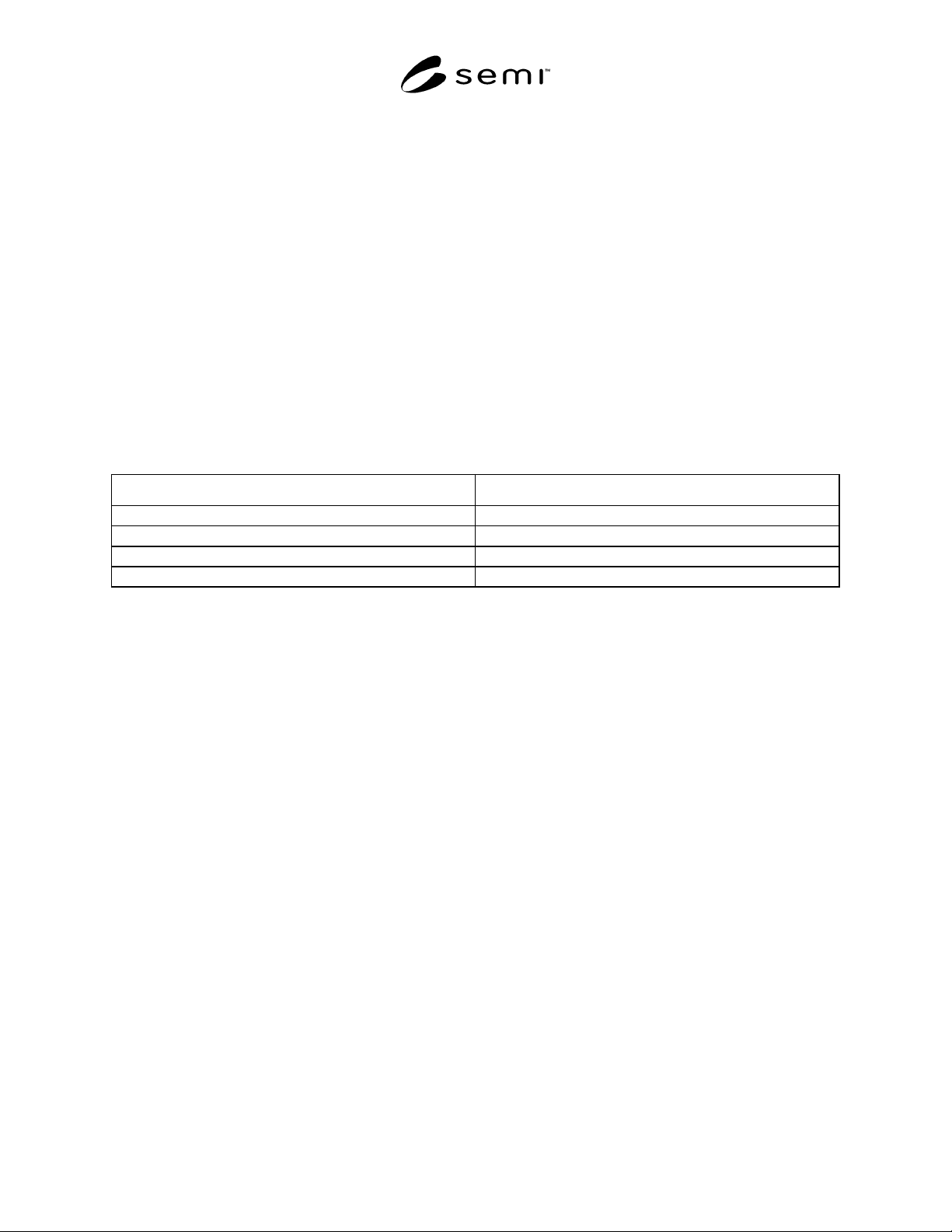
8 Collection Event List
8.1 Requirements
8.1.1 All defined TSEM process state model state transitions are required collection events. In addition to defined
process state model state transition collection events, the following collection events are also required.
Table 3 Additional Required Collection Events
Collection Event Name Collection Event Description
TestBoardChange A test-board is attached, removed, or changed.
DockStatusChange The test-head is docked or undocked from the materials handler.
EnableSite A previously disabled test-site is enabled.
DisableSite A previously enabled test-site is disabled.
9 Variable Items
9.1 The purpose of this section is to define the list of variable items required by the TSEM. Values of these
variables will be available to the host through collection event reports and host status queries.
9.2 Requirements
9.2.1 Variable items required by TSEM are categorized as follows:
• Common Variables (CVs) — Variables common to all testers.
• Configuration-Specific Variables (CSVs) — Variables associated with a specific configuration of the above
equipment class.
9.2.2 Equipment constants have various uses in TSEM, including the following:
• Equipment offsets that match the performance of several pieces of equipment that would otherwise perform
differently due to inherent manufacturing differences. Examples are home values and motion axis scaling
factors.
• Setting the configuration of the equipment to allow for different material specifications, equipment options,
material flows, frequency of automatic functions, etc. An example is yield check frequency.
• Managing optional machine features. Examples are constants that indicate whether optional features such as
automated media stackers are present and control the configuration and function of these optional subsystems
when they are present.
• Equipment Constants can be changed by the user but are not modified by the equipment. Its value can be
queried by the host at any time. Equipment constants remain in effect until they are modified by the user.
9.2.3 Status Variables are valid at all times. A status variable may not be changed by the host but may be changed
by the equipment or operator. The value of status variables may be queried by the host at anytime.
SEMI E122-0703 © SEMI 2003 10
9.2.4 Data Variables are valid only upon the occurrence of specific collection events. Data variables may be
queried by the host. An attempt to read a data variable item at the wrong time does not generate an error, but the
data reported may not have relevant meaning.
9.2.5 Data Item Requirements for Multi-Head, Multi-Site Equipment — Some variables may change value
depending on the processing state (whether or not resources are allocated to a virtual tester). See definition of
Virtual Tester.
Example: If calibration is done separately on two test-heads, and a virtual tester has been allocated resources only
from the more recently calibrated test-head, CalDate for that virtual tester may have a more recent date in the
READY state than it did in the IDLE state.
9.3 class, hard-bin, and soft-bin — Equipment is to maintain variables that provide three levels of granularity for
test results: class, hard-bin, and soft-bin. Classes, hard-bins, and soft-bins are defined within a process program, and
their values are made available during events. When unit testing has completed, the process program is to determine
the class, hard-bin, and soft-bin with which the unit is to be associated, based on the results of the testing.
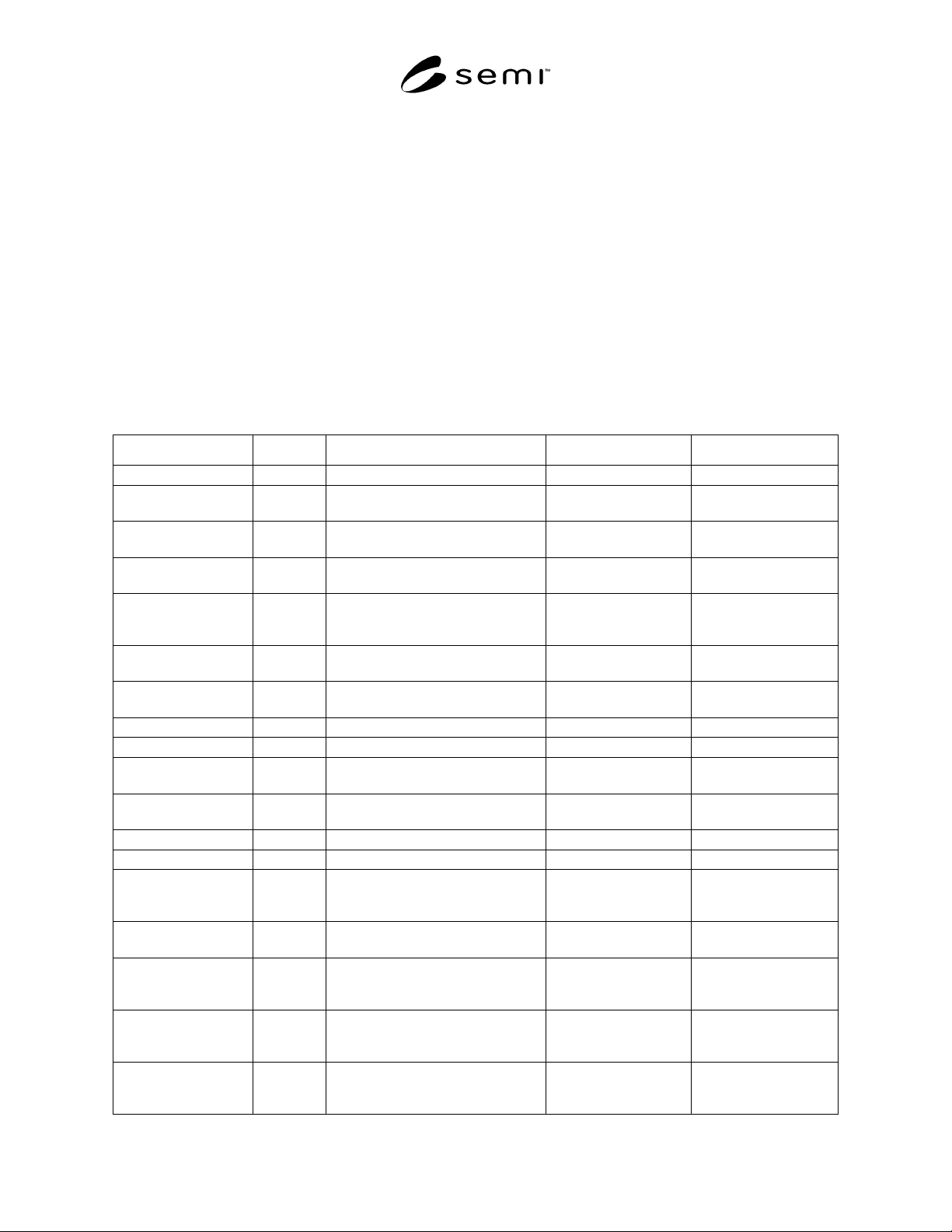
9.4 Variable Item Tables
Table 4 Variable Item Table
Variable Name Category Description Format Comments
ActiveSites CV List of test-sites that are to be tested. List of integer
Address CSV Address of the reported vector. Integer Valid only in Datalog
reports.
Channel CV Hardware channel or resource
identifier.
Text List by PinID.
ClassID CV Test result class number. Integer Valid in PROCESS
states. List by test-site.
ClassName CV Test result class name. Text Valid at BIN-DATA-
AVAILABLE state. List
by ClassID.
ConfigInfo CSV Physical configuration information. Format is determined by
vendor.
Valid in all states.
Cycle CV Cycle count for this report. Integer Valid only in Datalog
reports.
DatalogConfig CV Datalog Configuration. Text Valid in all states.
DatalogPlanName CV Datalog report plan name. Text Valid in all states.
DockingStatus CSV Information on handler/prober
docking status.
Boolean Valid in all states.
EnabledSites CV List of test-sites initially enabled at
process program download.
List of integer
EquipMake CV Tool Manufacturer. Text Valid in all states.
EquipSerialID CV Unique Equipment identifier. Text Valid in all states.
FunctionalResult CSV Vector of bits indicating pass or fail
for each pin. Where 0 = Fail and
1 = Pass.
Binary Valid only in Datalog
reports.
HardBinID CV Test result hard-bin number. Integer Valid in PROCESS
states. List by test-site.
HardBinName CV Test result hard-bin name. Text Valid at BIN-DATA-
AVAILABLE Event.
List by HardBbinID.
HighLimit CSV Higher limit for measurement.
Multiple instances of this variable
exist. See TEST-LIST report.
Float List by TestID.
LowLimit CSV Lower limit for measurement.
Multiple instances of this variable
exist. See TEST-LIST report.
Float List by TestID.