semi合集-English.pdf - 第2062页
SEMI E54.10-0600 © SEMI 2000 7 8.2.2 Device Manager Object Servic e s — The serv ices provided by the Device Manager object are def ined in SEMI E54.1 [1]. T he Device Man a ger object supports th e additional services l…

SEMI E54.10-0600 © SEMI 2000 6
8.2.1.5 Gain (Optional) — An attribute that specifies
the Gain value of the amplifier for the photodiode sig-
nal. The factory configured out-of-box value is deter-
mined by the manufacturer based on the sensor type.
8.2.1.6 Filter Bandwidth (Optional) — An attribute
that determines the bandwidth in kilohertz of the
amplifier for the photodiode signal. The factory
configured out-of-box value is determined by the
manufacturer based on the sensor type.
8.2.1.7 Tool State (Optional) — An attribute that
identifies the current state of the tool that is utilizing the
counter. In many cases, the ISPM device can detect and
report the Tool State; this variable is utilized for this
type of reporting. This attribute is enumerated and is
specified by the manufacturer.
8.2.1.8 Laser Status — An attribute that records the
current status of the laser. This attribute is enumerated.
The possible enumeration and the requirement for
support are as follows:
0 = LASER OFF (required)
1 = LASER TURNING ON (optional)
2 = LASER ON BUT NOT STABLE (optional)
3 = LASER ON AND STABLE (required)
4 = LASER INTERLOCKED (optional)
5 = SENSOR MISSING (required)
6–63 = Reserved
64–255 = Manufacturer Specified (optional)
8.2.1.9 Flow Path (Optional) — An attribute that
identifies the current flow path (from multiple sources)
being utilized. The source may be modified by a Host at
anytime. Changing the “Flow path” attribute connects
the ISPM device to a different source. When changing
sources, data is not valid for a time interval whose
length is a function of the distance to the source.
8.2.1.10 Volume (Optional) — An attribute that
maintains the sample volume. This attribute is used
primarily by liquid particle counters utilizing a
sampling technique in a small container to extrapolate
the particle count in the volume of interest. The value
of this attribute is the size of the small container.
8.2.1.11 Volume Units (Optional) — An attribute that
specifies the unit for the “Volume” attribute. This
attribute is enumerated and can take on one of the
following values: milliliters or gallons. (See Appendix
1 of SEMI E54.1 for assigned values.)
8.2.1.12 Leak Status (Optional) — An attribute that
indicates which one of the potential leak locations is
actually leaking. This attribute is enumerated and is
specified by the manufacturer. The enumerated value
corresponds to a specific leak location.
8.2.1.13 Time Stamp (Optional) — An attribute that
records the time when the last counting event
completed.
8.2.1.14 Duration (Optional) — An attribute that
defines the interval of time during which the particle
counts are collected and put into the bin assemblies.
8.2.1.15 Initial and Default Values
Table 6 DM Object Attribute Initial and Default Values
Attribute Initial Value Default Value Comment
Device Type ISPM ISPM ISPM = In-Situ Particle Monitor Device
Exception Detail Alarm 0 0
Exception Detail Warning 0 0
Laser Status 0 0 Laser Off
SEMI E54.10-0600 © SEMI 20007
8.2.2 Device Manager Object Services — The services provided by the Device Manager object are defined in
SEMI E54.1 [1]. The Device Manager object supports the additional services listed below.
Table 7 Device Manager Object Services
Service Service Identifier Type Description
Laser On S1 R Used to prompt the device to take the laser from the
LASER OFF state to LASER ON AND STABLE state as
defined by the Laser Status attribute.
Laser Off S2 R Used to prompt the device to take the laser immediately to
the LASER OFF state as defined by the Laser Status
attribute.
Reserved S3–S64 — Reserved for future expansion
Manufacturer Specified > S64 — Manufacturer Specific services
8.2.2.1 Laser On (Optional) — This service is used to prompt the device to take the laser from the LASER OFF
state through supported laser states 1 and/or 2, to state 3, as defined by the Laser Status attribute. If the laser turns on
successfully, a “success” response code is returned. If the sensor is missing or interlocked off, a “object state
conflict” error response is returned and the laser remains in the appropriate state.
8.2.2.2 Laser Off (Optional) — This service is used to prompt the device to take the laser to the LASER OFF state
immediately. If the laser turns off successfully, a “success” response is returned. If the sensor is in an interlocked
state, a “object state conflict” error response is returned and the laser remains in the interlocked off state.
8.2.3 Device Manager Object Behavior — The behavior exhibited by the Device Manager object is defined in
SEMI E54.1 [1]. Additional behavior is detailed below.
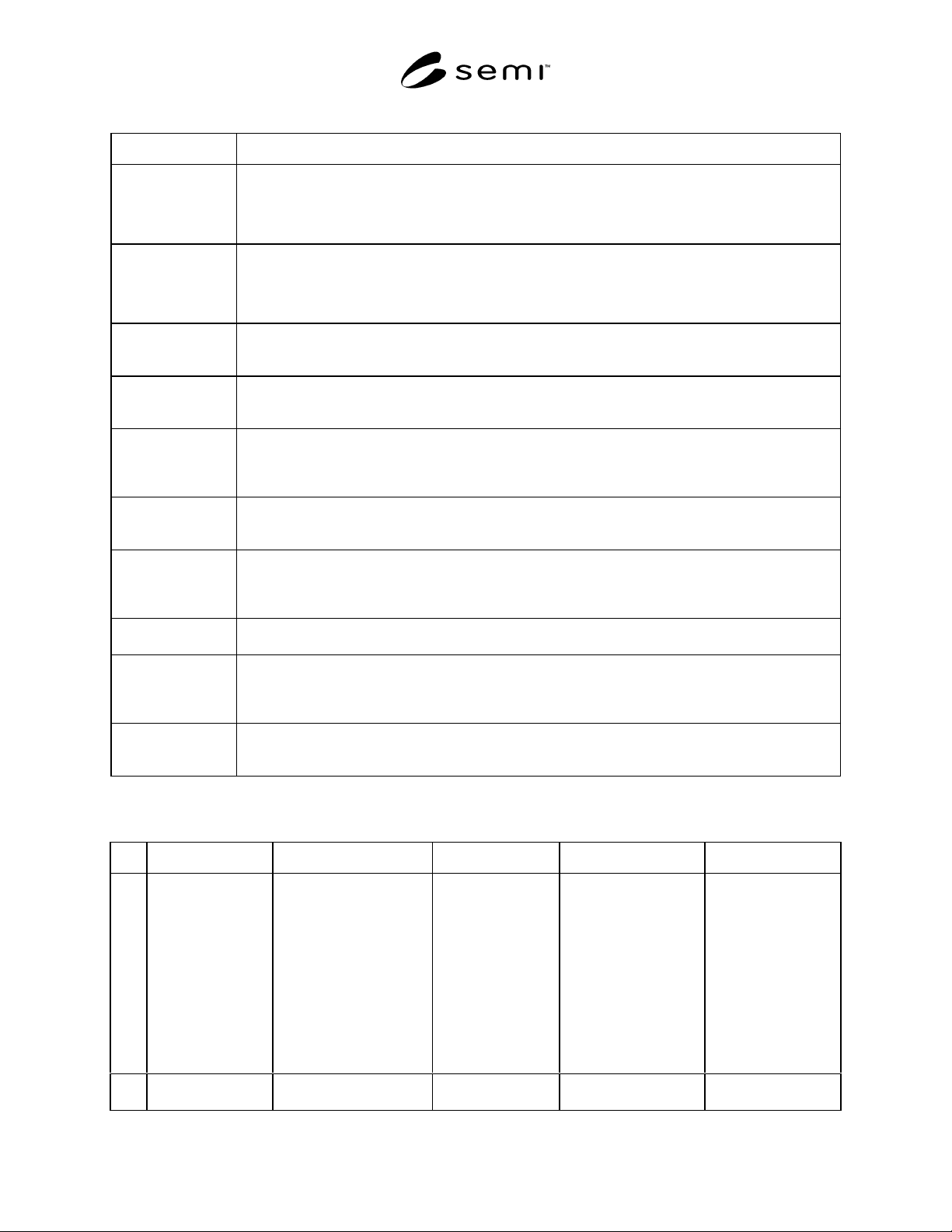
8.2.3.1 Device Manager EXECUTING State Behavior — Required sub-states within the EXECUTING state,
descriptions of these substates, and a transition matrix associated with these sub-states are given in Figure 2, Table
8, and Table 9 respectively.
LASER
INTERLOCKED
SENSOR
MISSING
EXECUTING
C
1
2
3
4
5
10
11
6
7
LASER
OFF
12,13
8
9
LASER NOT OFF
LASER
TURNING
ON
C
15
16
LASER ON
LASER
ON AND
STABLE
LASER
ON AND
NOT
STABLE
18
C
17
LASER ADDRESSABLE
14
Figure 2
Device Manager Object Behavior Within the EXECUTING State
SEMI E54.10-0600 © SEMI 2000 8
Table 8 Device Manager Behavior EXECUTING Sub-State Description
State Description
EXECUTING Laser is in one of the following enumerated states as indicated in the Laser Status Device Manager
attribute: LASER INTERLOCKED (optional), LASER MISSING (optional), or LASER OFF. Device
will respond to Laser On and Laser Off services as appropriate to move between sub-states within the
EXECUTING and LASER ADDRESSABLE states.
LASER
ADDRESSABLE
Laser is in one of the following enumerated states as indicated in the Laser Status Device Manager
attribute: LASER OFF, LASER ON AND STABLE, LASER TURNING ON (optional), or LASER ON
BUT NOT STABLE (optional). Device will respond to Laser On and Laser Off services as appropriate
to move between sub-states within the LASER ADDRESSABLE state.
LASER OFF This is the entry sub-state to LASER ADDRESSABLE; Laser is Off; Laser Status Device Manager
attribute is in the enumerated state: LASER OFF. Device is not performing the “counting” process.
(See NOTE 1.)
LASER ON AND
STABLE
Sub-state of LASER ADDRESSABLE; device is “counting” (See NOTE 1); Laser Status Device
Manager attribute is the enumerated state: LASER ON AND STABLE. Laser is performing the
“counting” process.
LASER
INTERLOCKED
Laser is Interlocked off; Laser Status Device Manager attribute is in the enumerated state: LASER
INTERLOCKED. Device is not performing the “counting” process. (See NOTE 1.) Sensor may or may
not be missing. Device cannot move to the LASER ADDRESSABLE or SENSOR MISSING states
until the interlock is removed.
SENSOR
MISSING
Laser sensor is missing; Laser Status Device Manager attribute is in the enumerated state: SENSOR
MISSING. Device is not performing the “counting” process. (See NOTE 1.) Device cannot move to the
LASER ADDRESSABLE state until the sensor is replaced.
LASER NOT OFF Laser is in one of the enumerated states as indicated in the Laser Status Device Manager attribute:
LASER TURNING ON (optional), LASER ON AND NOT STABLE (optional), or LASER ON AND
STABLE. Device will respond to Laser Off service as appropriate to move between sub-states within
the LASER ADDRESSABLE state.
LASER
TURNING ON
An optional sub-state of LASER NOT OFF. This is a conditional entry sub-state to LASER NOT OFF.
Device is preparing to turn on. Device is not performing the “counting” process. (See NOTE 1.)
LASER ON Laser is in one of the enumerated states as indicated in the Laser Status Device Manager attribute:
LASER ON AND NOT STABLE (optional) or LASER ON AND STABLE. Device will respond to
Laser Off service as appropriate to move between sub-states within the LASER ADDRESSABLE
state.
LASER ON AND
NOT STABLE
Sub-state of LASER ON; device is not “counting” (See NOTE 1); Laser Status Device Manager
attribute is the enumerated state: LASER ON AND NOT STABLE. Laser is not performing the
“counting” process.
NOTE 1: The “counting” process is defined in Section 8.8.3.1.
Table 9 Device Manager Behavior EXECUTING Sub-State Transition Matrix (See NOTE 1.)
# Current State Trigger New State Action Comment
1 Entry into
EXECUTING
Device detects interlock
condition, and
availability and state of
laser.
Conditional:
LASER
ADDRESSABLE/
LASER OFF or
LASER
INTERLOCKED
or SENSOR
MISSING
If the sensor is in an
interlocked or missing
condition then state is
LASER
INTERLOCKED. If
laser interlock and or
laser missing is not
supported then state is
LASER OFF.
Set Laser Status
attribute to
appropriate value.
Entry state depends
on availability of
laser and physical
laser interlock
setting on device.
2LASER
INTERLOCKED
Device detects removal
of interlock condition
LASER MISSING Set Laser Status
attribute to
Device moves to
LASER OFF state.