semi合集-English.pdf - 第2234页
SEMI E58-0703 © SEMI 1997, 2003 15 1.14.7 Both models cover all time, twenty-four hours each day. The ARAMS State Model describes how the equipment is used in the factory. The Ge neral Equipment Operations Model descri b…
SEMI E58-0703 © SEMI 1997, 2003
14
# Table 1 Current State Trigger New State Action(s) Comment
4 1 INITIALIZING System
initialization is
complete.
IDLE Begin normal
internal activities.
Wait for input.
Normal. Equipment is able
to interact with the user.
5 11 READY(any
substate)
Internal error, or
soft re-boot by
request.
INITIALIZING Re-initialize
system.
This is treated in the same
way as Transition 2.
6 1 (any substate of)
POWER-ON
System reset. INITIALIZING Re-initialize
system.
A reset is done through
hardware.
7 Conditional IDLE Equipment
receives
instructions to
perform an
automated or
manual function.
BUSY
(See NOTE 1.)
Perform the
requested function.
Equipment may be capable
of performing multiple
functions while in BUSY.
8 Continued
Conditional
BUSY
(See NOTE 1.)
The equipment has
completed all
requested
functions.
IDLE Wait for new
instructions.
Equipment may be capable
of performing non-hardware-
related functions in IDLE.
NOTE 1: The PROCESSING ACTIVE state of the Processing State Model example in SEMI E30 would be a substate of BUSY. Other substates
may exist for maintenance and diagnostics.
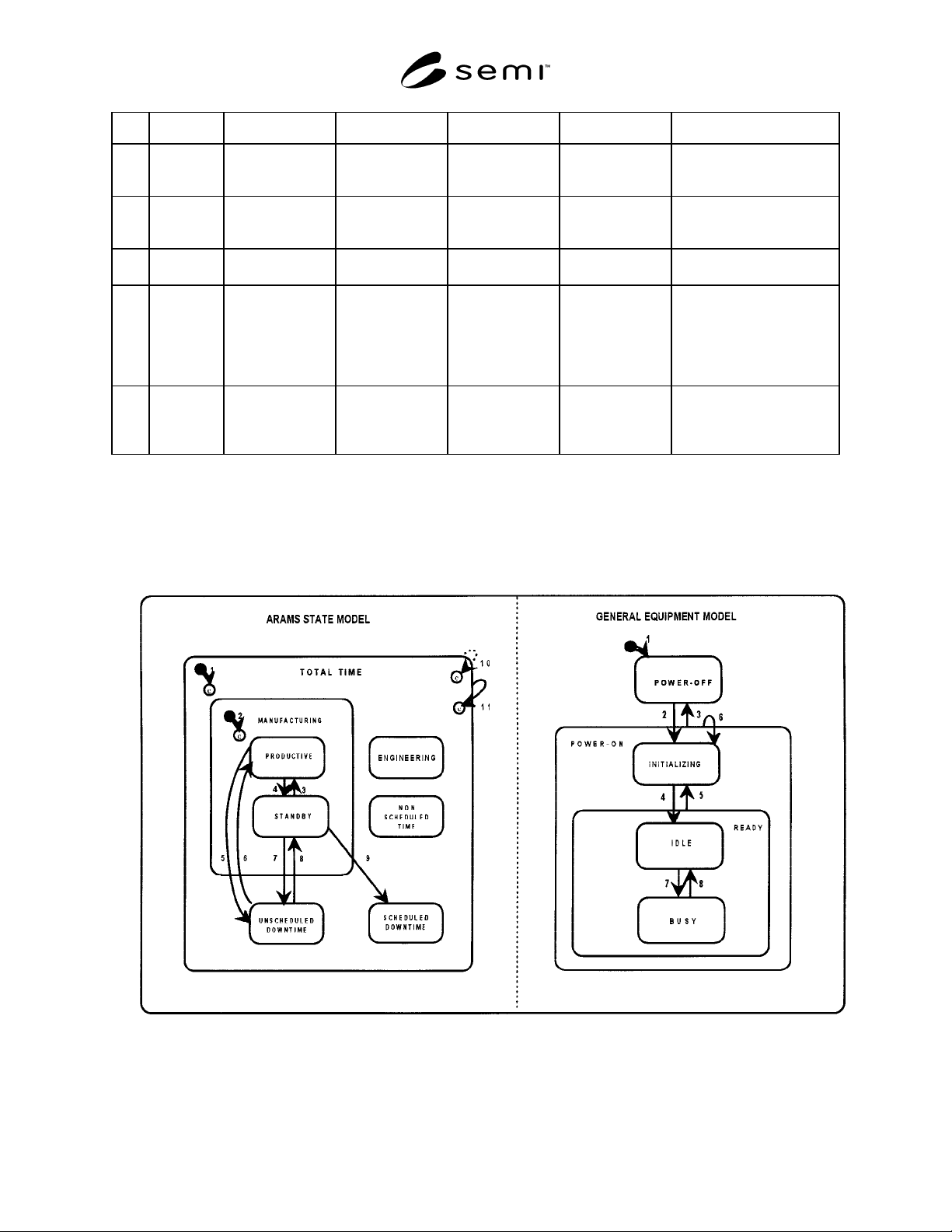
8.4 State Model Relationships — Figure 4 shows the ARAMS State Model and the General Equipment Operations
Model as both simultaneously active. Certain relationships exist between the two models.
Figure 4
ARAMS State Model and General Equipment Operations Model
SEMI E58-0703 © SEMI 1997, 2003 15
1.14.7 Both models cover all time, twenty-four hours
each day. The ARAMS State Model describes how the
equipment is used in the factory. The General
Equipment Operations Model describes the
equipment’s activities, including the time when it has
no power and is completely inactive.
1.14.7.1 The General Equipment Operations Model is
provided to clarify two specific areas of relationship:
• The transitions related to powerup (#2),
powerdown (#3), soft re-boot (#5), and reset (#6).
• The IDLE and BUSY activity states.
1.14.7.2 The term “reset” is used in this document to
collectively represent both the soft re-boot and the
hardware reset where no powerdown occurs.
1.14.7.3 Requirements related to powerup,
powerdown, re-boot, and reset are specified in Section
16.
NOTE 15: Although the equipment is unable to detect a
condition of no power, it is able to detect when the
INITIALIZING state has been entered and is able to
differentiate between a hard reset (Transition 6) and a soft re-
boot (Transition 5).
8.4.1 IDLE and BUSY — By definition, the equipment
is not in the IDLE state and in the PRODUCTIVE state
at the same time, and it is not intended to be in the
BUSY state while in STANDBY. The PRODUCTIVE
and STANDBY states correspond to implicit substates
of the BUSY and IDLE states only for the time the
equipment is within the MANUFACTURING
superstate — that is, it is scheduled for manufacturing
(non-engineering factory operations) and is in a
condition to perform its intended function.
1.14.7.4 Occasional exceptions may occur due to
improper timing of a user request to change to a
manufacturing state before the equipment completes a
non-processing activity started in another state. For
example, the equipment may be performing an
automatic calibration during routine maintenance in a
downtime state. In this case, the equipment determines
that its production criteria are not satisfied and shall
transition to STANDBY, as it is busy performing a
function other than its intended function.
8.4.2 Non-Manufacturing States — The equipment
may be in any of the POWER-OFF, INITIALIZING,
IDLE, or BUSY states in the General Equipment
Operations Model while in any of the non-
manufacturing states: ENGINEERING,
UNSCHEDULED DOWNTIME, SCHEDULED
DOWNTIME, or NON-SCHEDULED TIME. For
example, it may be powered off while being installed
(NON-SCHEDULED TIME) or repaired
(SCHEDULED or UNSCHEDULED DOWNTIME). It
may be required to perform its normal processing cycle
(its intended function) in ENGINEERING, NON-
SCHEDULED TIME or in a downtime state.
9 ARAMS Substate Codes
1.15 This section defines the format for ARAMS
Substate Codes and a set of reserved values for generic
substates based on the descriptions in SEMI E10. The
format is defined specifically to allow further resolution
of the six basic SEMI E10 equipment states by both the
factory and equipment supplier.
1.15.1 An ARAMS Substate Code consists of four
ordered alphanumeric text characters, where the first
two characters are reserved digits. The first character
indicates the primary ARAMS state as follows:
1. PRODUCTIVE
2. STANDBY
3. ENGINEERING
4. SCHEDULED DOWNTIME
5. UNSCHEDULED DOWNTIME
6. NON-SCHEDULED TIME
1.15.2 The second character of the code, if non-zero,
indicates a substate of the primary state. A zero in the
second position indicates no substate has been selected.
This may also be referred to as a substate of “default”.
1.15.3 Codes of the form “n000” indicate no substates
of a basic state have been selected. This is the “default
code” for that basic state. For example, a code of
“1000” indicates the PRODUCTIVE state with no
substates.
1.15.4 Descriptive formatted text is defined to
correspond to each ARAMS code. The first three
characters of this text represent the basic state. If the
next character is a forward slash “/”, then subsequent
text represents a substate of the basic state.
9.1 Reserved Codes — States and substates referenced
by the reserved text in this section are based on SEMI
E10 specifications. For further definition of
terminology, see SEMI E10.
1.15.5 The following ARAMS Substate Codes, and
the corresponding descriptive text strings for the
English language (delimited by quotes), are reserved.
Descriptive text with a substate of “Reserved” indicates
the corresponding code is reserved for future expansion
by this standard.
1.15.6 In the future, text strings in other languages
may also be reserved. Equipment supporting other
languages shall provide a method for the user to define
SEMI E58-0703 © SEMI 1997, 2003
16
alternative text strings. This provides the consistency,
across different equipment, that is important to the user.
PRODUCTIVE
1000 “PRD” (default productive code)
1100 “PRD/Regular production”
1200 “PRD/Work for third parties”
1300 “PRD/Rework”
1400 “PRD/Engineering runs”
1500 “PRD/Reserved*”
1600 “PRD/Reserved”
1700 “PRD/Reserved”
1800 “PRD/Reserved”
1900 “PRD/Reserved”
STANDBY
2000 “SBY” (default standby code)
2100 “SBY/No operator”
2200 “SBY/No product”
2300 “SBY/No support tool”*
2400 “SBY/Associated cluster module down”
2500 “SBY/No host”
2600 “SBY/Reserved”
2700 “SBY/Reserved”
2800 “SBY/Reserved”
2900 “SBY/Reserved”
* NOTE: A support tool is a mechanical device used by, but
not part of, the equipment. This includes cassettes, probe
cards, etc.
ENGINEERING
3000 “ENG” (default engineering code)
3100 “ENG/Process experiments”
3200 “ENG/Equipment experiments”
3300 “ENG/Reserved”
3400 “ENG/Reserved”
3500 “ENG/Reserved”
3600 “ENG/Reserved”
3700 “ENG/Reserved”
3800 “ENG/Reserved”
3900 “ENG/Reserved”
SCHEDULED DOWNTIME
4000 “SDT” (default scheduled downtime code)
4100 “SDT/User maintenance delay”
4200 “SDT/Supplier maintenance delay”
4300 “SDT/Preventive maintenance”
4400 “SDT/Change of consumables”
4500 “SDT/Setup”
4600 “SDT/Production test”
4700 “SDT/Facilities-related”
4800 “SDT/Reserved”
4900 “SDT/Reserved”
UNSCHEDULED DOWNTIME
5000 “UDT” (default unscheduled downtime
code)
5100 “UDT/User maintenance delay”
5200 “UDT/Supplier maintenance delay”
5300 “UDT/Repair”
5400 “UDT/Out-of-spec input material”
5500 “UDT/Change of consumables”
5600 “UDT/Facilities-related”
5700 “UDT/Reserved”
5800 “UDT/Reserved”
5900 “UDT/Reserved”
NON-SCHEDULED TIME
6000 “NST” (default non-scheduled
downtime code)
6100 “NST/Unworked shifts”
6200 “NST/Equipment installation”
6300 “NST/Equipment modifications” (modify,
rebuild, upgrade)
6400 “NST/Off-line training”
6500 “NST/Shutdown/startup”
6600 “NST/Reserved”
6700 “NST/Reserved”
6800 “NST/Reserved”
6900 “NST/Reserved”
9.2 Additional Codes — Additional codes may be
defined by both the user and supplier, subject to the
following constraints: