semi合集-English.pdf - 第4406页
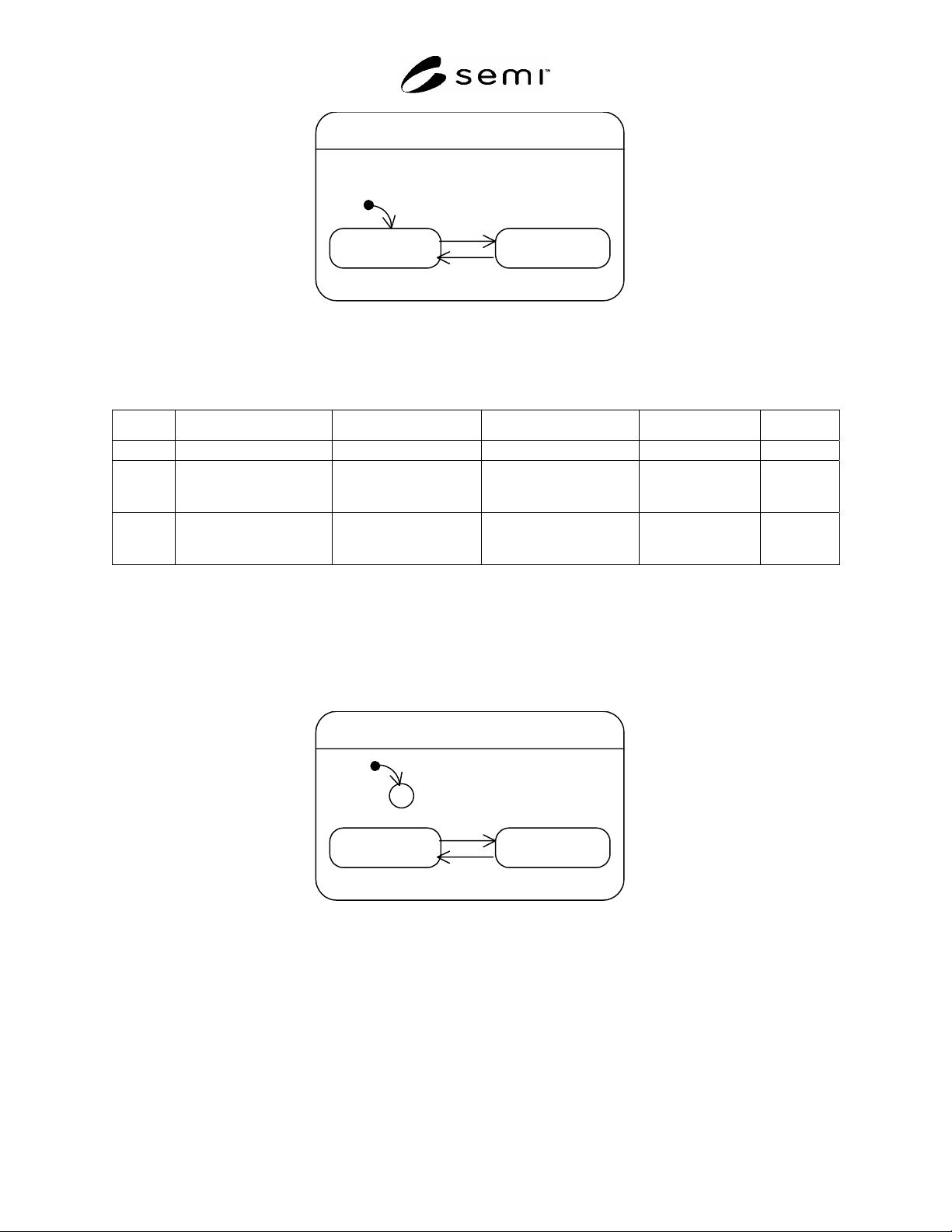
SEMI F97-0305 © SEMI 2005 16 Table 9 State Transition Table Simulation-M ode Number Previous State Trigge r New State Actions Remark 1 (no state) Start up of FPU. No_Simulation or Simulation None. Dependent on local oper…
SEMI F97-0305 © SEMI 2005 15
Maintenance-Mode
No_Maintenance Maintenance
2
3
1
Figure 11
State Transition Diagram Maintenance-Mode
Table 8 State Transition Table Maintenance-Mode
Number Previous State Trigger New State Actions Remark
1 (no state) Start up of FPU. No_Maintenance None.
2 No_Maintenance Error or preventive
maintenance event
occurred.
Maintenance FPU may request
maintenance.
3 Maintenance Error condition or
preventive maintenance
condition disappeared.
No_Maintenance None.
9.4.10 Simulation-Mode
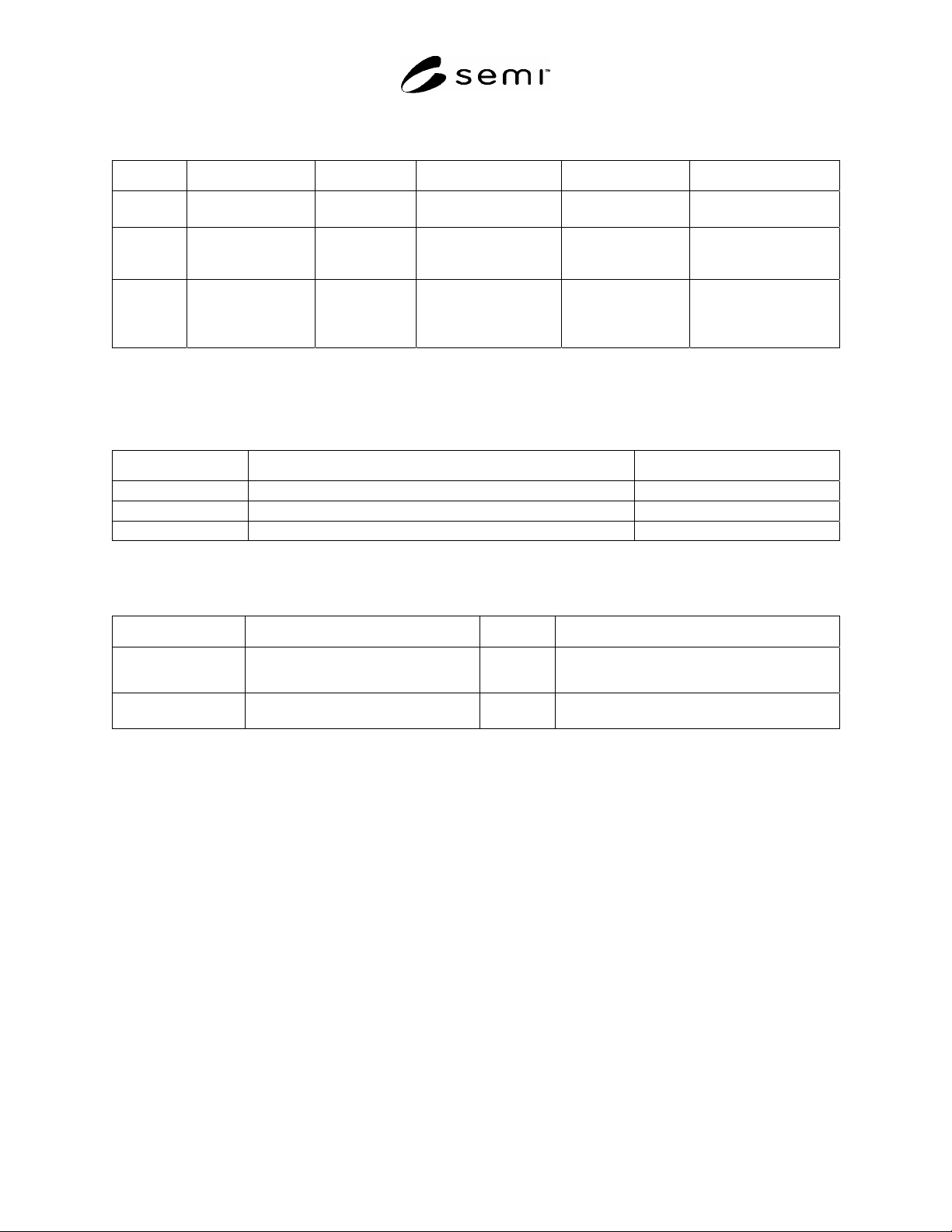
9.4.10.1 Simulation-Mode specifies whether the FPU or parts of the FPU are simulated:
No_Simulation: FPU operates not in simulation mode (simulation turned off).
Simulation: FPU or parts of the FPU are simulated. FPU functions are performed using simulated I/O signals.
Simulation-Mode
No_Simulation Simulation
2
3
C
1
Figure 12
State Transition Diagram Simulation-Mode
SEMI F97-0305 © SEMI 2005 16
Table 9 State Transition Table Simulation-Mode
Number Previous State Trigger New State Actions Remark
1 (no state) Start up of FPU. No_Simulation or
Simulation
None. Dependent on local
operator action.
2 No_Simulation Local or remote
operator action.
Simulation FPU simulates parts
of FPU or the entire
FPU functions.
3 Simulation Local or remote
operator action.
No_Simulation FPU disables
simulation of parts of
the FPU or the entire
FPU functions.
9.5 Operations Between FMCS and FPUs
9.5.1 The Table below lists the operations between the FMCS and the FPU.
Table 10 Operation Definition
Operation Description Mandatory/Optional
Get Status FMCS requests status data from FPU. mandatory
Set Data FMCS requests FPU to update data in the FPU. optional
Get Data FMCS requests to retrieve data from the FPU. optional
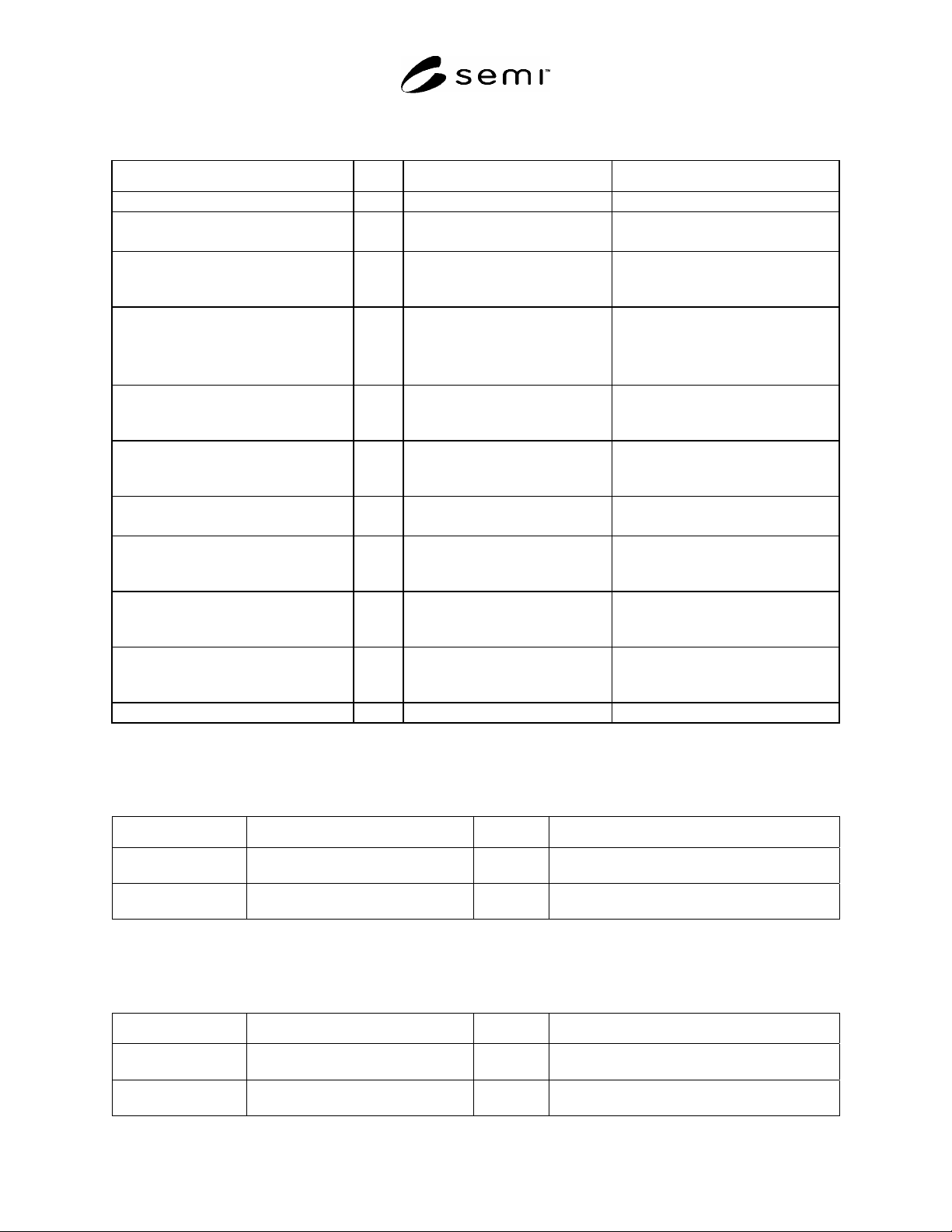
9.5.2 Get Status — Is used by the FMCS to request the status of the FPU.
Table 11 Status Parameters
Parameter Description Direction Data Type
Tag Local identifier for the FMCS. FMCS ->
FPU
Out of scope.
Status value Status field values of the FPU. FPU ->
FMCS
See Table 12 for details.
SEMI F97-0305 © SEMI 2005 17
Table 12 Status Field Values
Field Bit Meaning Mandatory/optional
Watchdog-Toggle 0 0/1 mandatory
OP-Mode 1 0: Manual
1: Automatic
mandatory
Control-Mode 2 0: Local (default, when not
supported)
1: Remote (FMCS)
optional
Run-Mode 3-4 0: Down (unscheduled)
1: Down (scheduled)
2: Stand by
3: Run
mandatory
Alarm-Mode 5 0: No_Alarm (default, when not
supported)
1: Alarm
optional
Warning-Mode 6 0: No_Warning (default, when not
supported)
1: Warning
optional
Error-Mode 7 0: No_Error
1: Error
mandatory
Maintenance-Mode 8 0: No_Maintenance (default, when
not supported)
1: Maintenance
optional
Simulation-Mode 9 0: No_Simulation (default, when
not supported)
1: Simulation
optional
Lock-Mode 10 0: Not_Locked (default, when not
supported)
1: Locked
optional
Reserved 11-15 none optional
9.5.3 Set Data — Is used by the FMCS to set data in the FPU. Upon receiving this, the FPU shall update the data
with the Set value.
Table 13 Set Data Parameter
Parameter Description Direction Data Type
Tag Local identifier for the FMCS. FMCS ->
FPU
Out of scope.
Set value Value of the Set parameter field. FMCS ->
FPU
Must be agreed between suppliers and purchasers.
See Related Information 2.
9.5.4 Get Data — Is used by the FMCS to get data from the FPU. Upon receiving this from the FPU, the FMCS
shall update its data cache.
Table 14 Get Data Parameter
Parameter Description Direction Form
Tag Local identifier for the FMCS. FMCS ->
FPU
Out of scope.
Get Parameter value Value of the Get parameter field. FPU ->
FMCS
Must be agreed between suppliers an purchasers.
See Related Information 2.