semi合集-English.pdf - 第3615页
SEMI E139-0705 © SEMI 2005 39 R1-2.1.1 .2 Notes: The Equipment Node is the only one re quired to validate upon recei pt of a TransportContainer . Transfer to FIC S or to Editor would be similar, but with the internal V…
SEMI E139-0705 © SEMI 2005 38
RELATED INFORMATION 1
NOTICE: This related information is not an official part of SEMI E139 and was derived from North American
Information and Control Committee. This related information was approved for publication by full letter ballot on
December 10, 2004.
R1-1 Scenarios
R1-1.1 This section contains example scenarios to illustrate how RaP services might be used in practice. They
represent only a subset of possible scenarios. The purpose of including these scenarios is to demonstrate how the
RaP services can work together to perform complex tasks.
R1-1.1.1 For these scenarios, certain assumptions were needed about how business rules of the FICS and about the
outcome of certain services. These assumptions are stated. The FICS business rules are not intended to represent
actual factory systems. Instead, they are designed to demonstrate possible combinations of services to perform a
task. RaP is intended to work with a wide range of FICS business rules. It is not possible to demonstrate all
situations.
R1-1.1.2 Assumptions for all scenarios: (unless otherwise noted in the individual scenario)
Equipment, Editor, and FICS nodes are separate nodes that communicate via RaP services (note that Equipment
to Editor communications are not required to use RaP services).
The "User" entity represents any source of stimulus, human or electronic.
All message receive positive or "success" (response unless otherwise noted).
The provided scenarios may not be the only way to accomplish each task. This set is not meant to be
exhaustive.
Response messages are not shown unless they add information for the reader.
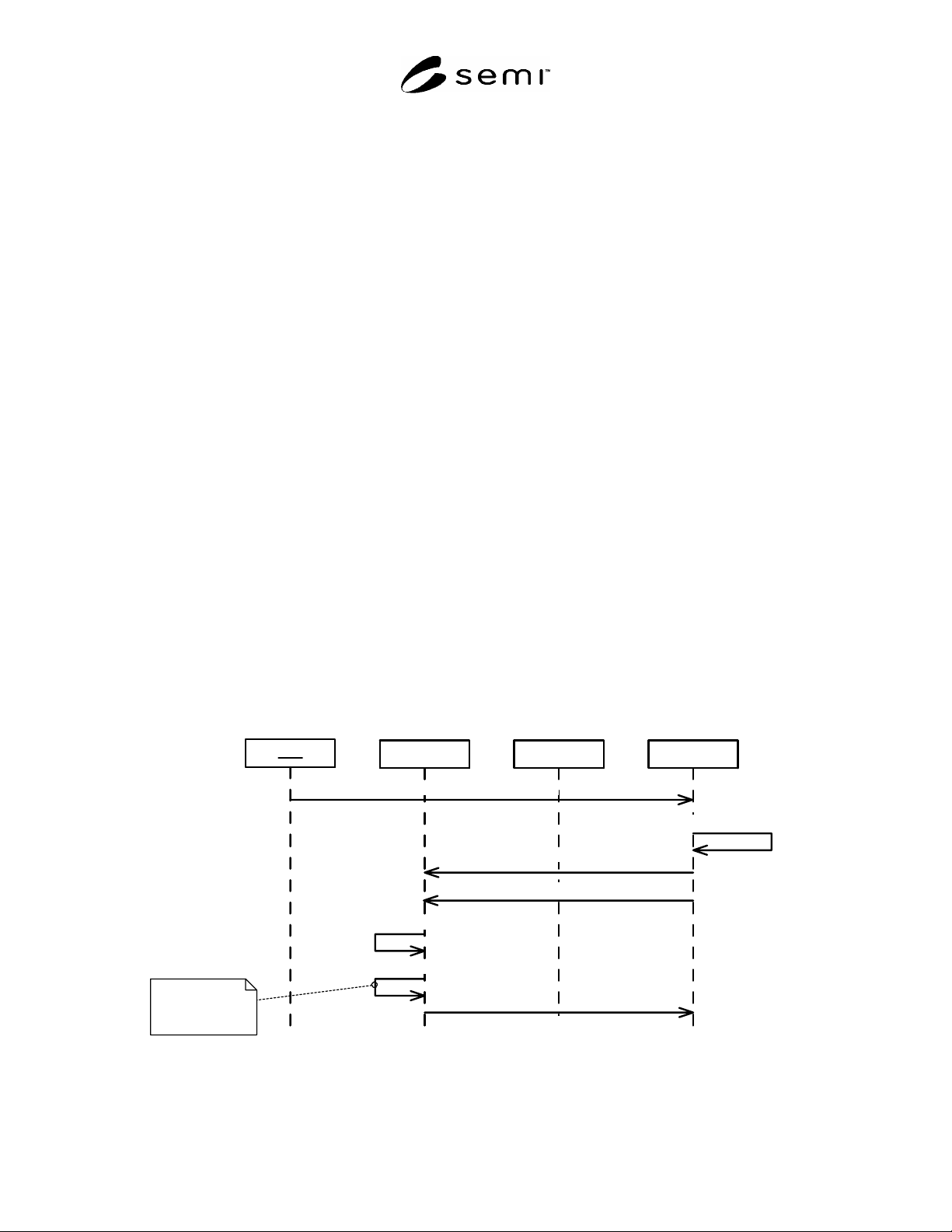
R1-2 Scenario – Download PDEs
R1-2.1 This scenario is representative of most uses of the sendPDE() service.
R1-2.1.1 Assumptions:
The PDEs to be downloaded are not currently stored on the equipment.
Ed it o r FICSEquipmentUser
Create TransportContainer
requestToSendPDE()
sendPDE()
sendPDE()- rsp
Verify is automatic
with
verifyType=validity,
verifyDepth=single
Dow nload Unrelated PDE's
Unpack TransportContainer
Verify All New PDE's
Figure R1-1
SEMI E139-0705 © SEMI 2005 39
R1-2.1.1.2 Notes:
The EquipmentNode is the only one required to validate upon receipt of a TransportContainer. Transfer to FICS
or to Editor would be similar, but with the internal Verify step left off.
Whether the PDEs are related (e.g. same recipe) or not does not affect this scenario. If all PDEs for a recipe are
available, a subsequent scenario to validate the full recipe can be executed.
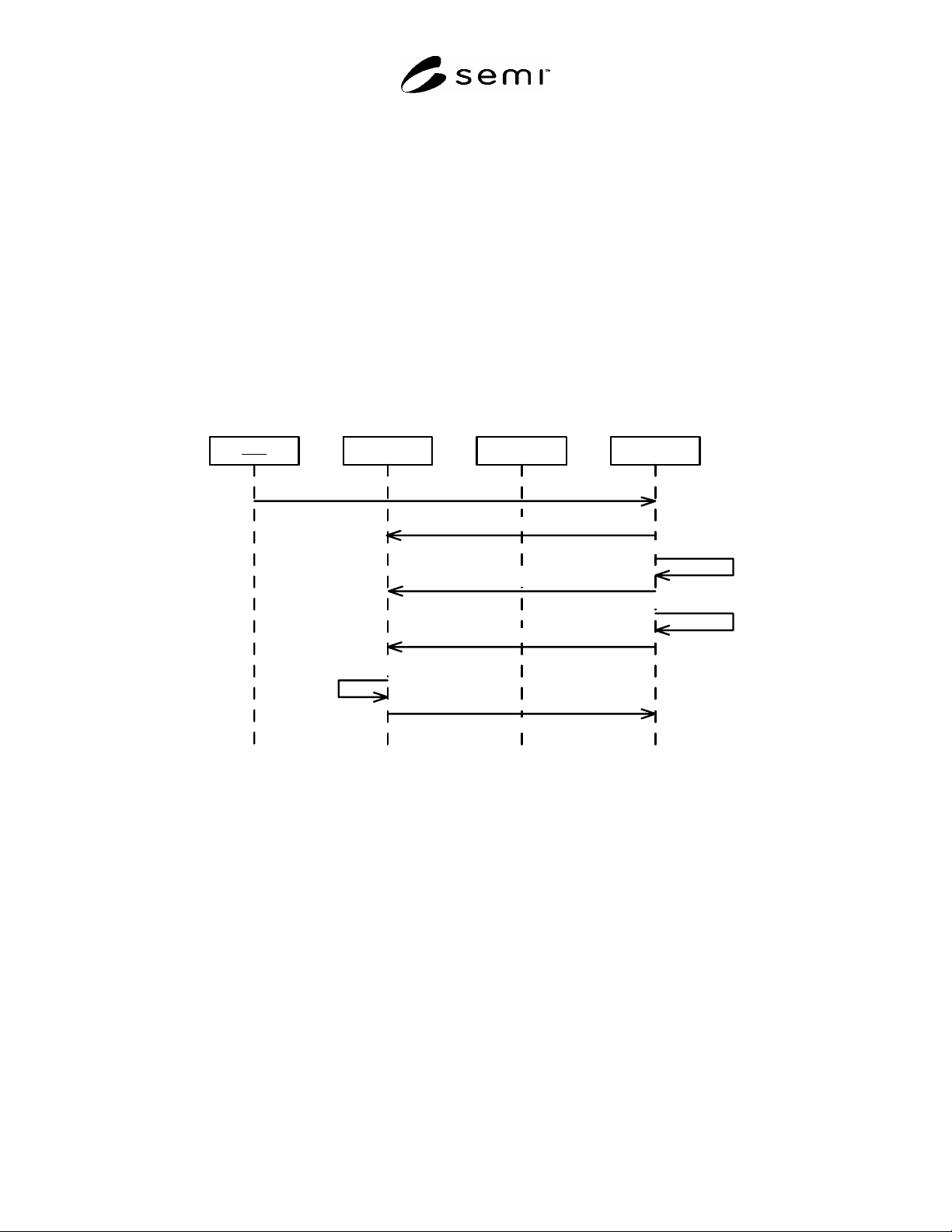
R1-3 Scenario – Upload Selected PDEs
R1-3.1 This scenario is representative of most uses of the getPDE() service.
R1-3.1.1 Assumptions:
The equipment stores some PDEs. It may or may not be the “System of Record”.
The user is searching for particular PDEs, based on some unspecified criteria that is beyond what can be
returned in getPDEdirectory().
Once the PDEs are identified, they are to be uploaded to the FICS.
PDEe ditor FICSEq u i p m e n tUs er
getPDEdirectory()
Upload Selected PDE's
Select subset of PDE's
getPDEheader()
Select subset of PDE's
getPDE()
getPDE() rsp
Create TransportContainer
Figure R1-2
R1-3.1.1.2 Notes:
The getPDEdirectory() service is used to get a complete list of PDEs available.
The getPDEheader() service is used to get detailed information about a subset of the PDEs available.
The final PDEs uploaded are selected based on the PDEheader information.
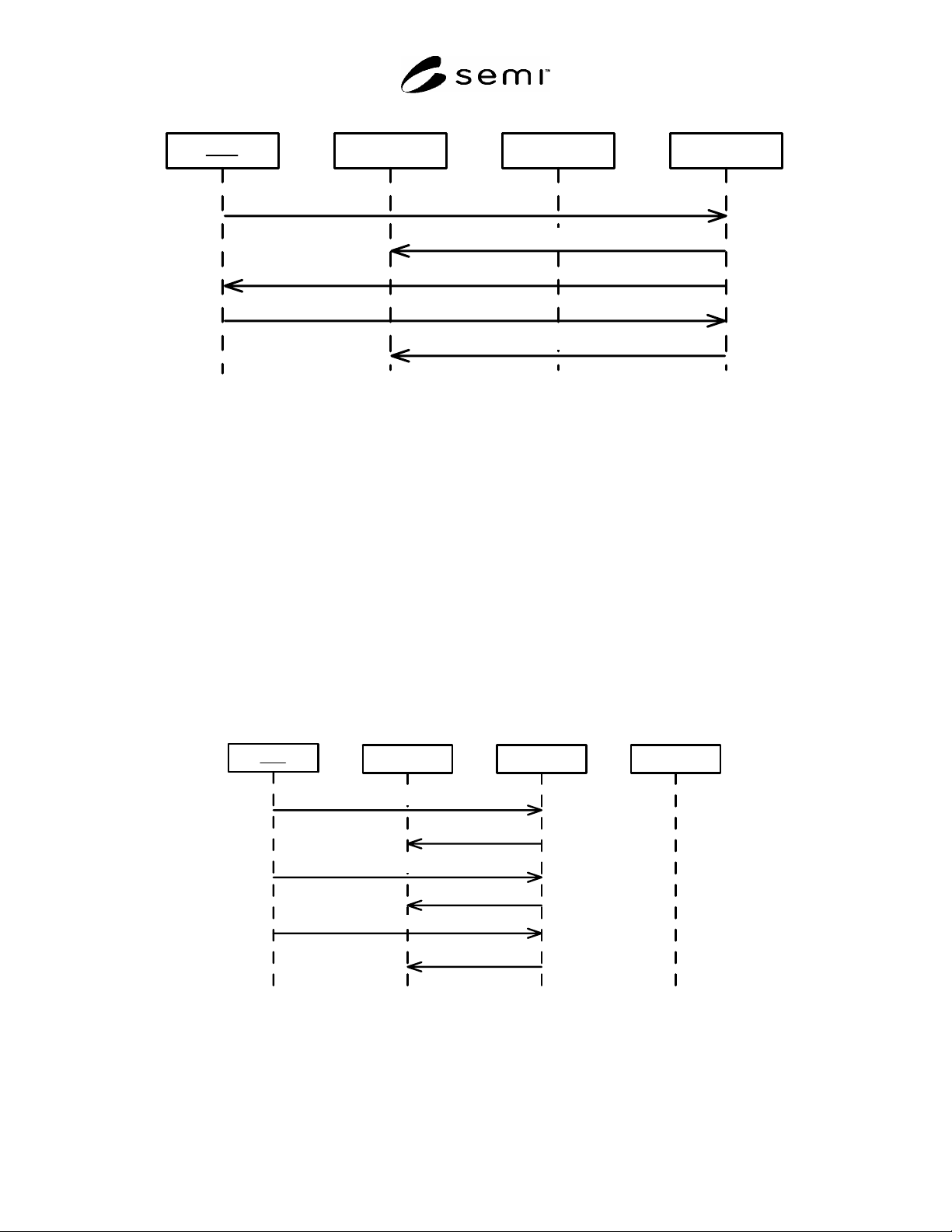
R1-4 Scenario – Delete Selected PDEs
R1-4.1 This is a common usage of the deletePDE() service, but does not assume pre-knowledge of which PDEs are
actually on the equipment.
R1-4.1.1 Assumptions:
The user knows which PDEs should be on the equipment. So he/she needs to see a list of PDEs actually on the
equipment and will delete those that are not needed.
SEMI E139-0705 © SEMI 2005 40
Ed it o r FICSEquipmentUs e r
getPDEdirectory()
Display PDE List
deletePDE()
Delete Selected PDE's
Display PDE list
Figure R1-3
R1-4.1.1.2 Notes:
The getPDEdirectory() service can return basic information about the PDEs, including name, uid, description,
createDate, etc. as needed to support the identification of PDEs.
Systems that track which recipes are on the equipment may not need to request a directory listing. Such
tracking is possible by monitoring the event reports when the recipe collection changes and checking the status
variable that notes the last time the recipe collection changed.
R1-5 Scenario – Create PDE
R1-5.1 There are many different ways to approach this scenario. This is just one of those ways. It is intended to
demonstrate most of the services that might be used.
R1-5.1.1 Assumptions:
The equipment is the “system of record” for PDEs in this example.
This PDE is created based on an existing PDE that is stored on the equipment.
PDEeditor FICSEquipmentUs e r
getPDEdirectory()
Create A New PDE
getPDE()
sendPDE()
Select Base PDE
Perform Editing
Figure R1-4
R1-5.1.1.2 Notes:
If the existing & resulting PDEs were stored by the FICS, the scenario would be similar (replace Equipment
with FICS).