semi合集-English.pdf - 第3323页
SEMI E130-1104 © SEMI 2003, 2004 37 R1-1.2.2 Job Start Host Prober Load Substr ate() Move substr ate to Pre -align( ) Load subst rate on Chuck Move next subs trate to Pre-align Align and P rofile PS: HANDLING M ATERIAL t…
SEMI E130-1104 © SEMI 2003, 2004 36
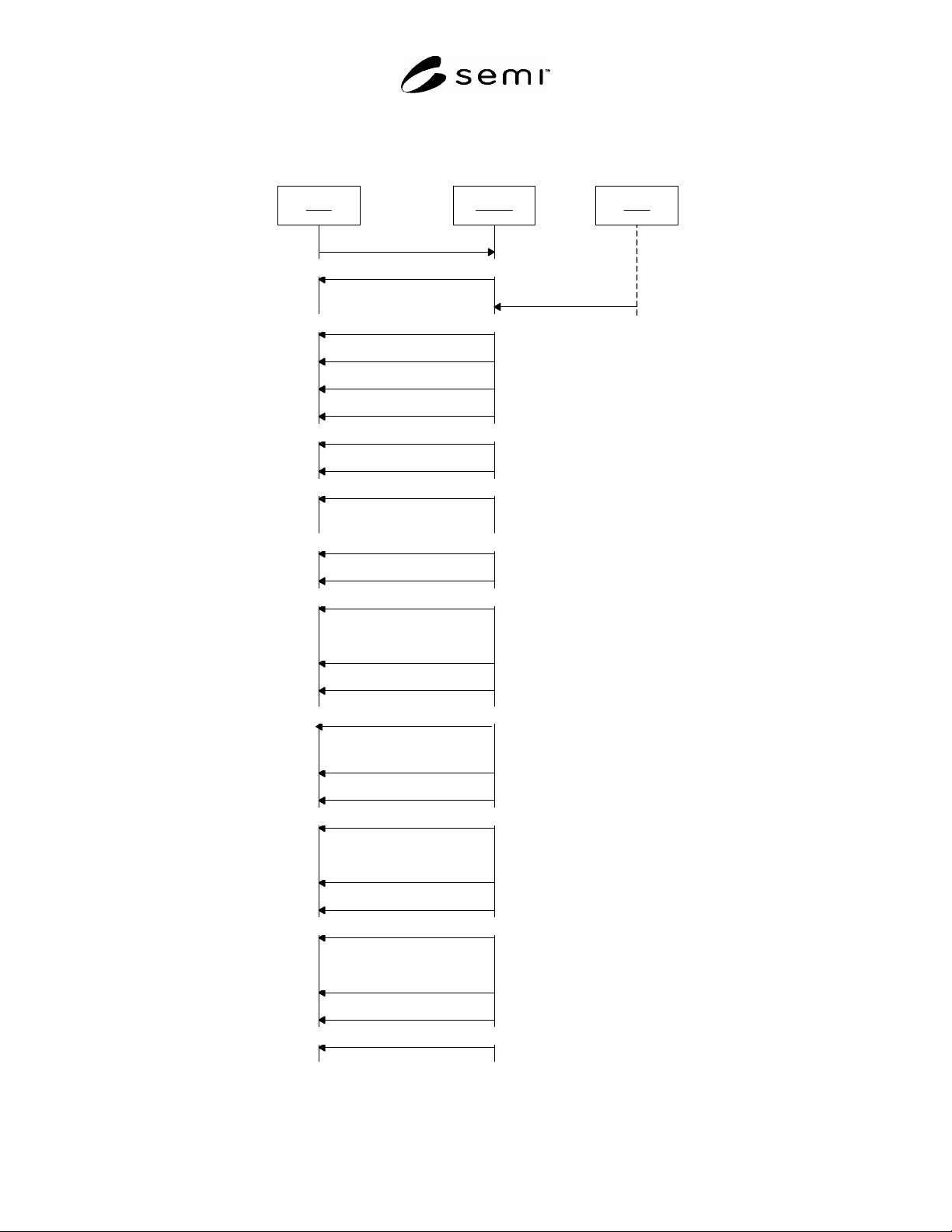
R1-1.2 Scenario II – Substrate Tracking Events — This scenario demonstrates the E90 Substrate tracking events
corresponding to the job defined in Scenario I. E40 and E94 messages are omitted for clarity.
R1-1.2.1 Job Setup
Host Prober
E87 Bind
User
Deliver FOUP to tool
CA: IDNR to IDVO
CA: SMNR to SMVO
LP: READY TO LOAD to TRANSFER BLOCKED
LPCA: NOT ASSOCIATED to ASSOCIATED
CA: to IDNR
SubstPJ01.01: to AT SOURCE()
SubstPJ01.01: to NEEDS PROCESSING()
SubstPJ01.02: to AT SOURCE()
SubstPJ01.02: to NEEDS PROCESSING
SubstPJ01.03: to AT SOURCE
SubstPJ01.03: to NEEDS PROCESSING
SubstPJ02.01: to AT SOURCE
SubstPJ02.01: to NEEDS PROCESSING
SubstPJ02.02: to AT SOURCE
SubstPJ02.02: to NEEDS PROCESSING
SubstPJ02.03: to AT SOURCE
SubstPJ02.03: to NEEDS PROCESSING
CarrierA.01: to OCCUPIED()
CarrierA.02: to OCCUPIED()
CarrierA.03: to OCCUPIED
CarrierA.23: to OCCUPIED
CarrierA.24: to OCCUPIED()
CarrierA.25: to OCCUPIED()
Figure R1-11
Substrate Tracking – Job Setup Scenario
SEMI E130-1104 © SEMI 2003, 2004 37
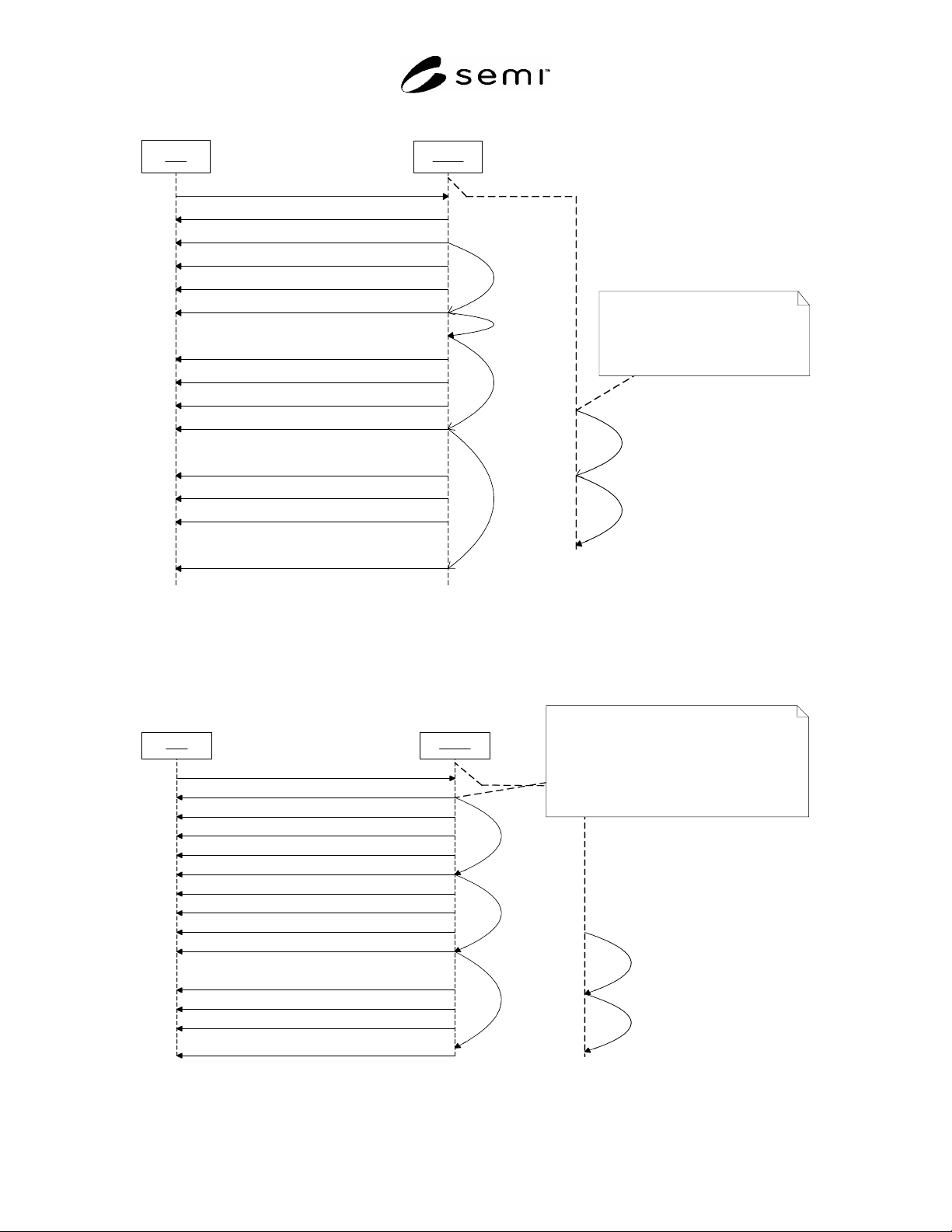
R1-1.2.2 Job Start
Host Prober
Load Substrate()
Move substrate to Pre-align()
Load substrate on Chuck
Move next substrate to Pre-align
Align and Profile
PS: HANDLING MATERIAL to AWAITING COMMAND
PS: AWAITING LOAD to HANDLING MATERIAL
CA: NOT ACCESSED to IN ACCESS()
Pre-align: UNOCCUPIED to OCCUPIED()
CarrierA.01: OCCUPIED to UNOCCUPIED
Main Chuck: UNOCCUPIED to OCCUPIED
Pre-align
Pre-align: OCCUPIED to UNOCCUPIED
Pre-align: UNOCCUPIED to OCCUPIED
CarrierA.02: OCCUPIED to UNOCCUPIED
SubstPJ01.01: AT SOURCE to AT WORK()
SubstPJ01.01: AT WORK to AT WORK()
SubstPJ01.01: NEEDS PROCESSING to IN PROCESS()
SubstPJ01.02: AT SOURCE to AT WORK()
Pre-align
Loading a substrate onto the Pre-align
stage begins as soon as the Pre-align
stage becomes available. The timing of
this task is asynchronous with respect to
the processing of the substrate on the
main chuck.
Figure R1-12
Substrate Tracking – Job Start Scenario
R1-1.2.3 Process Material — No Substrate Tracking events occur as the substrate on the main chuck is processed.
R1-1.2.4 Load 2
nd
Substrate
Host Prober
Load Substrate()
Unload substrate from chuck
Load substrate on Chuck
Move next substrate to Pre-align
Align and Profile
PS: AWAITING COMMAND to HANDLING MATERIAL()
PS: HANDLING MATERIAL to AWAITING COMMAND
SubstPJ01.01: IN PROCESS to PROCESSED()
CarrierA.01: UNOCCUPIED to OCCUPIED()
Main Chuck: OCCUPIED to UNOCCUPIED()
Main Chuck: UNOCCUPIED to OCCUPIED()
SubstPJ01.01: AT W O RK to AT DESTINATION()
SubstPJ01.02: AT WORK to AT W ORK()
SubstPJ01.02: NEEDS PROCESSING to IN PROCESS()
Pre-align: OCCUPIED to UNOCCUPIED()
Pre-align: UNOCCUPIED to OCCUPIED
CarrierA.03: OCCUPIED to UNOCCUPIED()
SubstPJ01.03: AT SOURCE to AT WORK()
Pre-align
Unloading a substrate from the main chuck
triggers the substrate state transition from
PROCESSING to PROCESSED. The host is
responsible for determining the processing
for a given substrate. If the host doesn't
issue any MOVEXYZ remote commands for a
substrate (i.e. no die on the substrate are probed),
the substrate will still proceed to the PROCESSED
state by virtue of having been loaded and unloaded
from the main chuck.
Figure R1-13
Substrate Tracking – Load 2
nd
Substrate Scenario
SEMI E130-1104 © SEMI 2003, 2004 38
R1-1.2.5 Process Remaining Material — The Substrate Tracking events are identical for the remaining substrates in
the two process jobs.
R1-1.3 Scenario III – PJ1 is Stopped on 2
nd
Substrate — This scenario involves the same job description as
Scenario I. After the 2nd substrate from PJ1 is loaded on the chuck, the host issues a PJStop service message. PJ1
is unloaded and PJ2 continues processing. The purpose of this scenario is to demonstrate the affect of an abnormal
job event as it relates to the Process State model.
R1-1.3.1 Preconditions — This section provides a summary of the sequence steps from scenario I leading up to the
PJStop.
R1-1.3.1.1 Job setup. See Section R1-1.1.2.1
R1-1.3.1.2 Job Start. See Section R1-1.1.2.2.
R1-1.3.1.3 Process Material. See Section R1-1.1.2.3
R1-1.3.1.4 Load 2
nd
substrate. See Section R1-1.1.2.4.
R1-1.3.1.5 Process Material. See Section R1-1.1.2.3
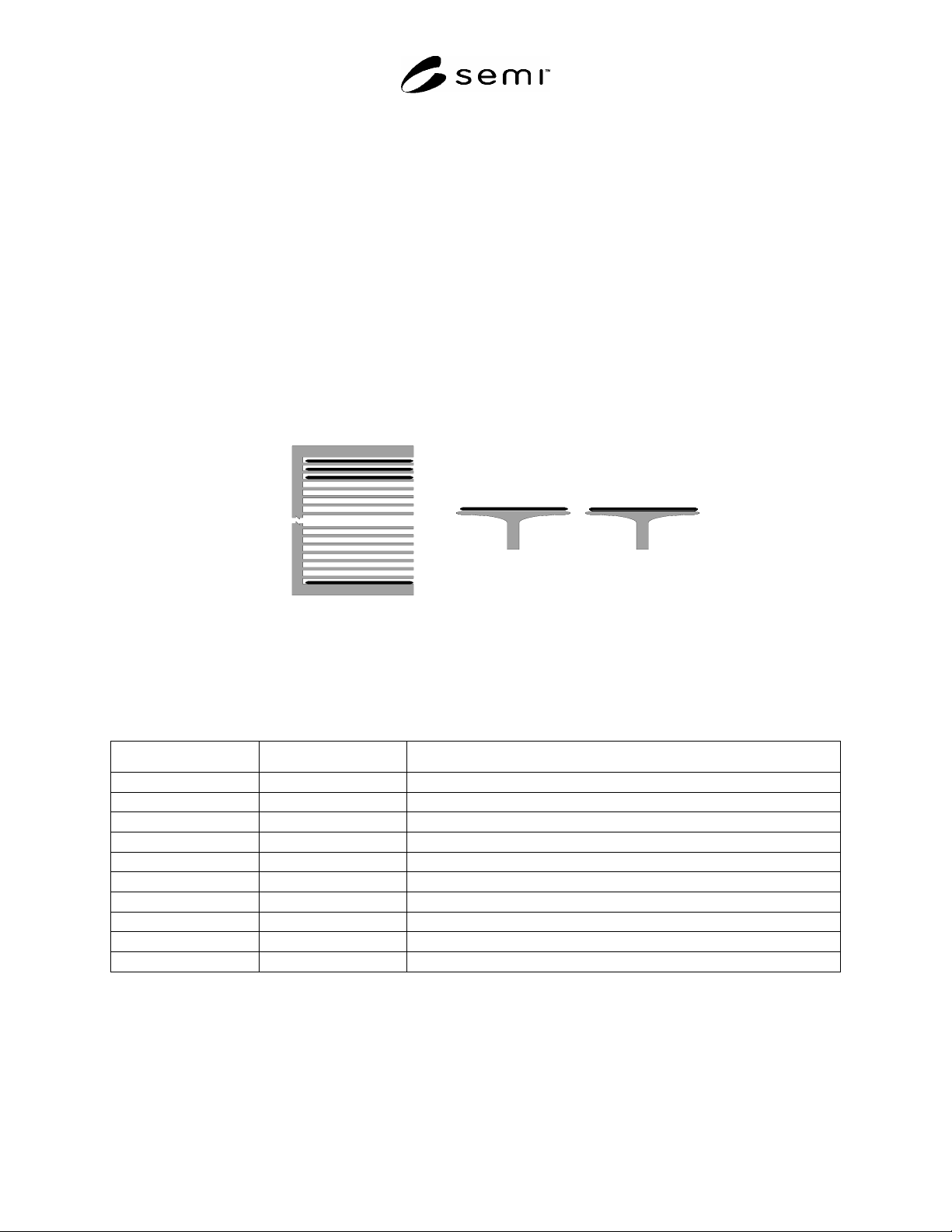
R1-1.3.1.6 Physical View
Pre-Align Chuck
CarrierA
PJ02
PJ01
SubstPJ01.02SubstPJ01.03
Figure R1-14
Physical View after 2
nd
Substrate Loaded
R1-1.3.1.7 State Models
Table R1-1 Object States after 2
nd
Substrate Loaded
Object Reference Description States Occupied
PS Process State model AWAITING COMMAND
CJ1 Control Job 1 EXECUTING
PJ01 Process Job 1 PROCESSING
PJ02 Process Job 2 PROCESSING
SubstPJ01.01 PJ1 Substrate 1 AT DESTINATION; PROCESSED
SubstPJ01.02 PJ1 Substrate 2 AT WORK; IN PROCESSED
SubstPJ01.03 PJ1 Substrate 3 AT WORK; NEEDS PROCESSING
SubstPJ02.01 PJ2 Substrate 1 AT SOURCE; NEEDS PROCESSING
SubstPJ02.02 PJ2 Substrate 2 AT SOURCE; NEEDS PROCESSING
SubstPJ02.03 PJ2 Substrate 3 AT SOURCE; NEEDS PROCESSING