semi合集-English.pdf - 第3335页
SEMI E130-1104 © SEMI 2003, 2004 49 R1-1.10 S cenario X – Pre-align Fails on Sub sequent Substrate. User Fails to Clear th e Condition Prior to the Host Issuing the Next LOAD-SUBSTRATE C ommand — The prober fails to pre-…
SEMI E130-1104 © SEMI 2003, 2004 48
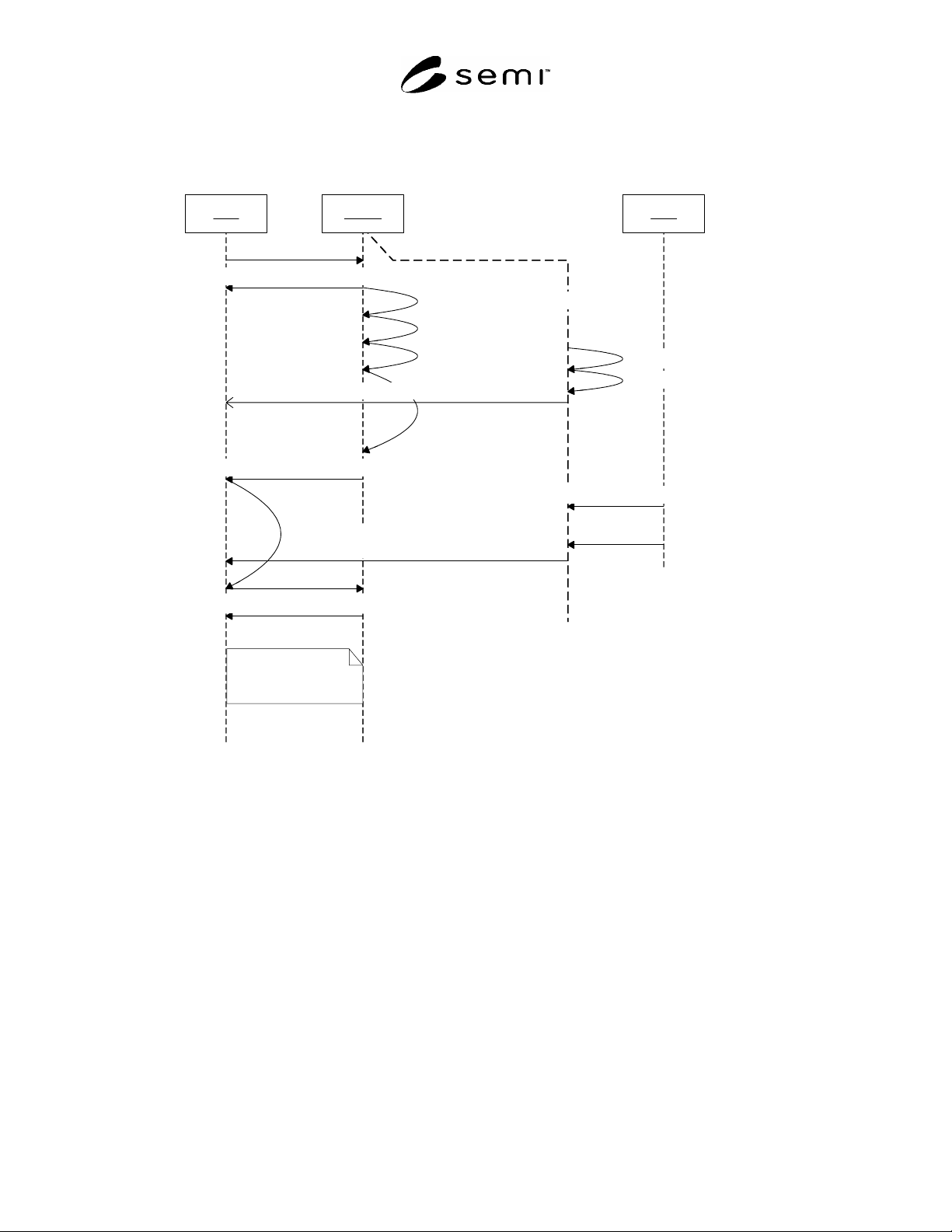
R1-1.9 Scenario IX – Pre-align Fails on Subsequent Substrate. User Clears Condition Prior to the Host Issuing the
Next LOAD-SUBSTRATE Command — The prober fails to pre-align a substrate while the host is processing a
substrate on the main chuck. The user manually aligns the substrate and presses Start on the prober console to clear
the alarm. The next LOAD-SUBSTRATE command from the host proceeds as normal.
Host Prober User
Load Substrate()
Move substrate to Pre-align
Pre-align
Load Substrate on Chuck
Align and Profile
Move Next Substrate to Pre-align
PS: AWAITING LOAD to HANDLING MATERIAL()
PS: HANDLING MATERIAL to AWAITING COMMAND
Pre-align Failure
Alarm Notification (Pre-align Failed)
Load Substrate()
Process Substrate()
Manually align Substrate
Start
PS: AWAITING COMMAND to HANDLING MATERIAL()
Proceed as normal
Alarm Cleared (Pre-align Failed)
Figure R1-23
Pre-Align Failure 2 – Alarm Cleared by User
SEMI E130-1104 © SEMI 2003, 2004 49
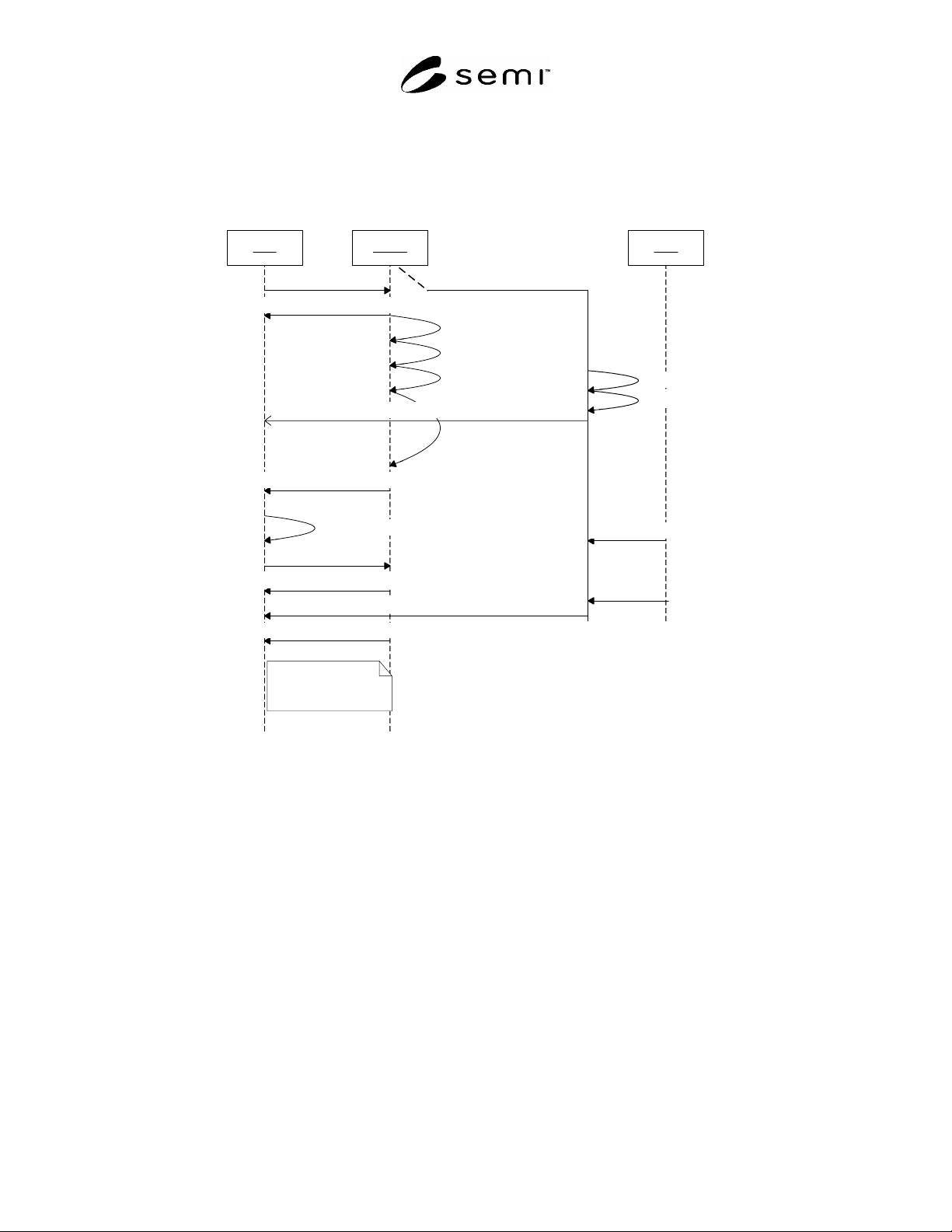
R1-1.10 Scenario X – Pre-align Fails on Subsequent Substrate. User Fails to Clear the Condition Prior to the Host
Issuing the Next LOAD-SUBSTRATE Command — The prober fails to pre-align a substrate while the host is
processing a substrate on the main chuck. The user manually aligns the substrate but fails to complete the manual
alignment prior to the host issuing the LOAD-SUBSTRATE command. The Process State model transitions to the
PROCESSING BLOCKED state until the user clears the alarm. When the alarm is cleared, the Process State model
transitions to the HANDLING MATERIAL state and processing resumes as normal.
Host Prober User
Load Substrate
Move substrate to Pre-align
Pre-align
Load Substrate on Chuck
Align and Profile
Move Next Substrate to Pre-align
PS: AWAITING LOAD to HANDLING MATERIAL
PS: HANDLING MATERIAL to AWAITING COMMAND
Pre-align Failure
Alarm Notification (Pre-align Failed)
Load Substrate
Process Substrate
Manually align Substrate
Start
PS: HANDLING MATERIAL to PROCESSING BLOCKED(Pre-align Failed)
Proceed as normal
PS: PROCESSING BLOCKED to HANDLING MATERIAL()
Alarm Cleared(Pre-align Failed)
Figure R1-24
Pre-Align Failure 3 – User Failed to clear Alarm
R1-1.11 Scenario XI – Correlation Substrate Testing
R1-1.11.1 Overview — This scenario describes the use of a correlation substrate. The correlation substrate is
loaded on the chuck to verify the test results for the current setup. From the Process/Control Job perspective,
correlation substrate testing is a normal task available to the host. Therefore, there are no job related collection
events associated with correlation testing.
R1-1.11.1.1 The correlation substrate is not part of a Process Job. The correlation substrate must be run using the
same recipe as the currently loaded process job.
R1-1.11.2 Pre-Conditions
R1-1.11.2.1 Job Setup — See Section R1-1.1.2.1
R1-1.11.2.2 Job Start — See Section R1-1.1.2.2.
SEMI E130-1104 © SEMI 2003, 2004 50
R1-1.11.2.3 Physical View
Pre-Align Chuck
CarrierA
PJ02
PJ01
SubstPJ01.01
SubstPJ01.02
AUX Tray
SubstAUX
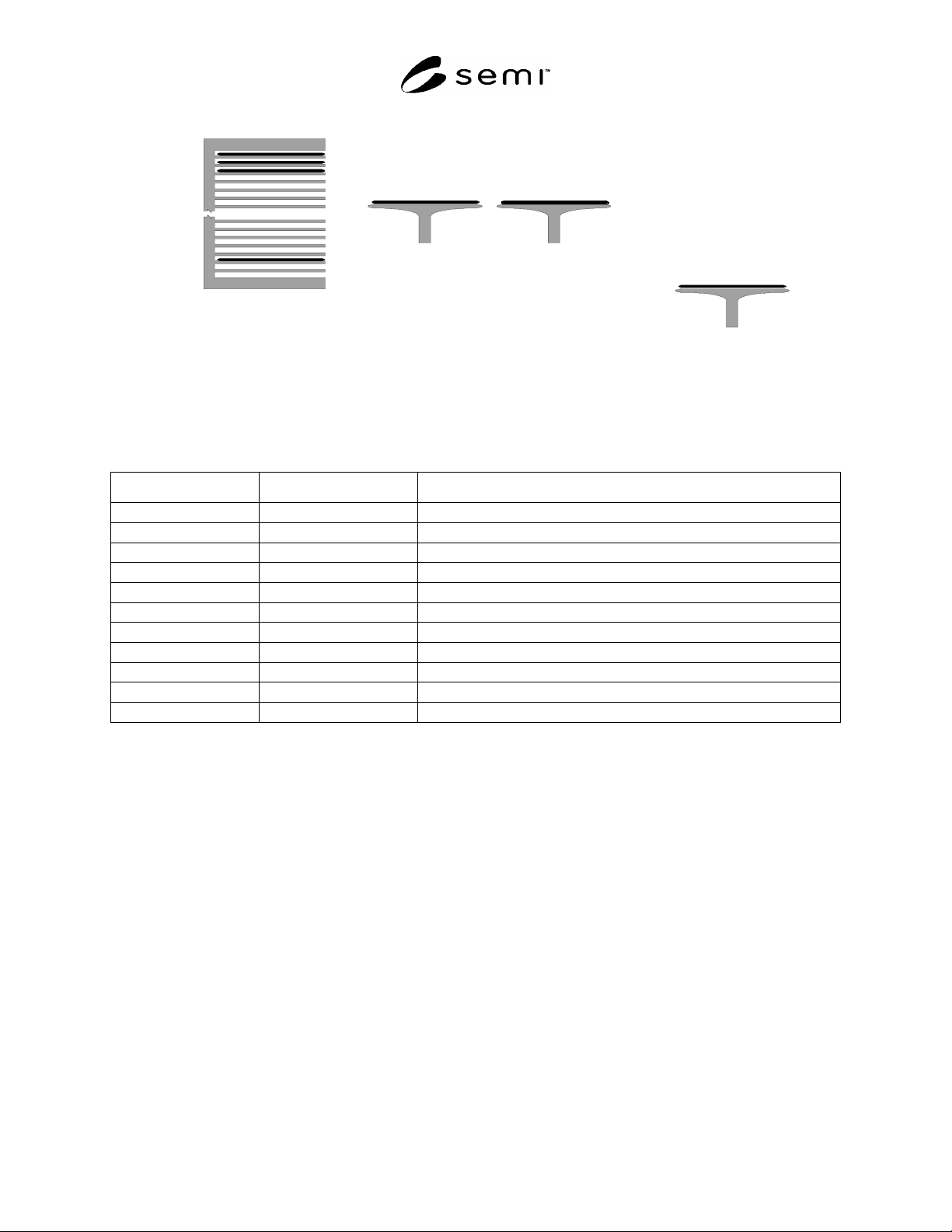
Figure R1-25
Correlation Scenario - Physical View
R1-1.11.2.4 State Models
Table R1-4 Correlation Scenario Object States
Object Reference Description States Occupied
PS Process State model AWAITING COMMAND
CJ1 Control Job 1 EXECUTING
PJ01 Process Job 1 PROCESSING
PJ02 Process Job 2 POOLED
SubstPJ01.01 PJ1 Substrate 1 AT WORK; IN PROCESS
SubstPJ01.02 PJ1 Substrate 2 AT WORK; NEEDS PROCESSING
SubstPJ01.03 PJ1 Substrate 3 AT SOURCE; NEEDS PROCESSING
SubstPJ02.01 PJ2 Substrate 1 AT SOURCE; NEEDS PROCESSING
SubstPJ02.02 PJ2 Substrate 2 AT SOURCE; NEEDS PROCESSING
SubstPJ02.03 PJ2 Substrate 3 AT SOURCE; NEEDS PROCESSING
SubstAUX Correlation Substrate AT SOURCE; NEEDS PROCESSING