semi合集-English.pdf - 第2604页
SEMI E91-0600 © SEMI 1999 , 2000 9 Table 4 Colle ction Event s Required by Process State Transition Transiti on Transition No. Current State New State Typical V ariable Data Start INIT 1 Undefined INIT Previous Process S…
SEMI E91-0600 © SEMI 1999, 2000 8
5.3.3.5 JOB STOPPING — State where attempts are made to stop Prober Job.
5.3.3.6 JOB ABORTING — State where attempts are made to abort Prober Job.
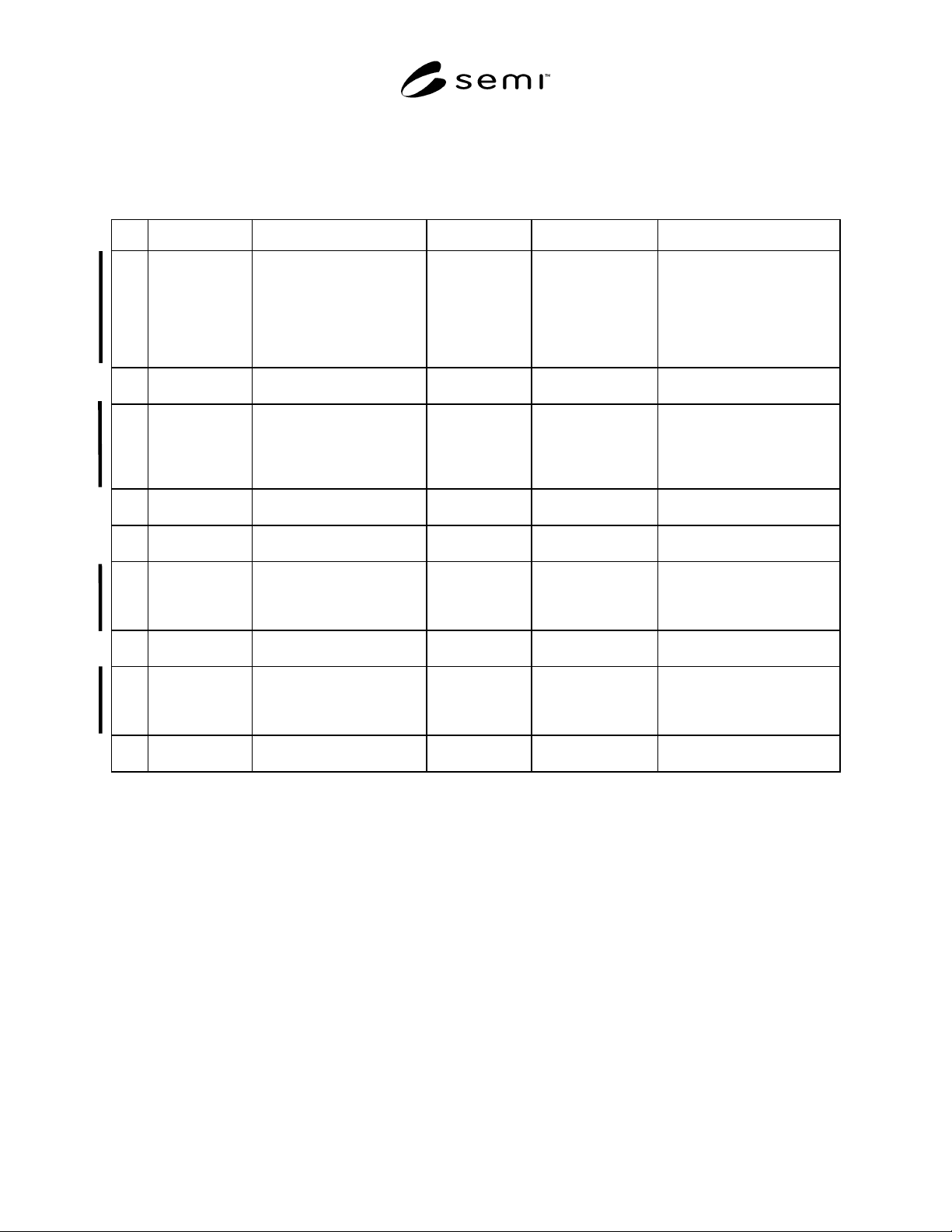
5.3.4 Prober Job State Transition Table
Table 3 Prober Job State Transition Table
No. Current State Trigger New State Action Comments
1 Undefined JOB_CREATE command
was received from host or
the Job Create operation
was instructed by operator
when Processing State is
neither INIT nor
MAINTENANCE state.
JOB
CREATED
Create Prober Job. None.
2JOB
CREATED
JOB_CANCEL command
from host or operator.
Undefined Cancel Prober Job. None.
3JOB
CREATED
START command from
host or the Start operation
was instructed by operator.
JOB SET UP Prepare for
processing of
Prober Job and
wait for processing
to be possible.
None.
4 JOB SET UP Prober Job processing
conditions were established.
JOB
PROCESSING
Start processing of
the main unit.
None.
5JOB
PROCESSING
Processing of Prober Job
was normally completed.
Undefined Delete Prober Job. None.
6 JOB ACTIVE STOP command was
received from host or the
stop operation was
instructed by operator.
JOB
STOPPING
Start stop
processing.
A trigger may be caused by
error detection of the
equipment itself as well as by
instruction from outside.
7JOB
STOPPING
The stop operation was
completed.
Undefined Delete Prober Job. None.
8 JOB ACTIVE ABORT command was
received from host of the
Abort operation was
instructed by operator.
JOB
ABORTING
Start abort
processing.
A trigger may be caused by
error detection of the
equipment itself as well as by
instruction from outside.
9JOB
ABORTING
Abort processing was
completed.
Undefined Delete Prober Job. None.
6 Collection Event List
6.1 Requirements
6.1.1 All GEM-required Events are required by the PSEM. Since Processing State Model is required by the PSEM,
all state transitions are required Events.
6.1.2 All GEM-required Events asso ciated with the GEM Control, Communications, Alarm, and Spooling State
Models are required. This section of the PSEM lists only those collection events that are not associated with a
change of state or those requiring specific data variables (DVVALs) or Reports defined in the PSEM.
6.2 Collection Event Tables
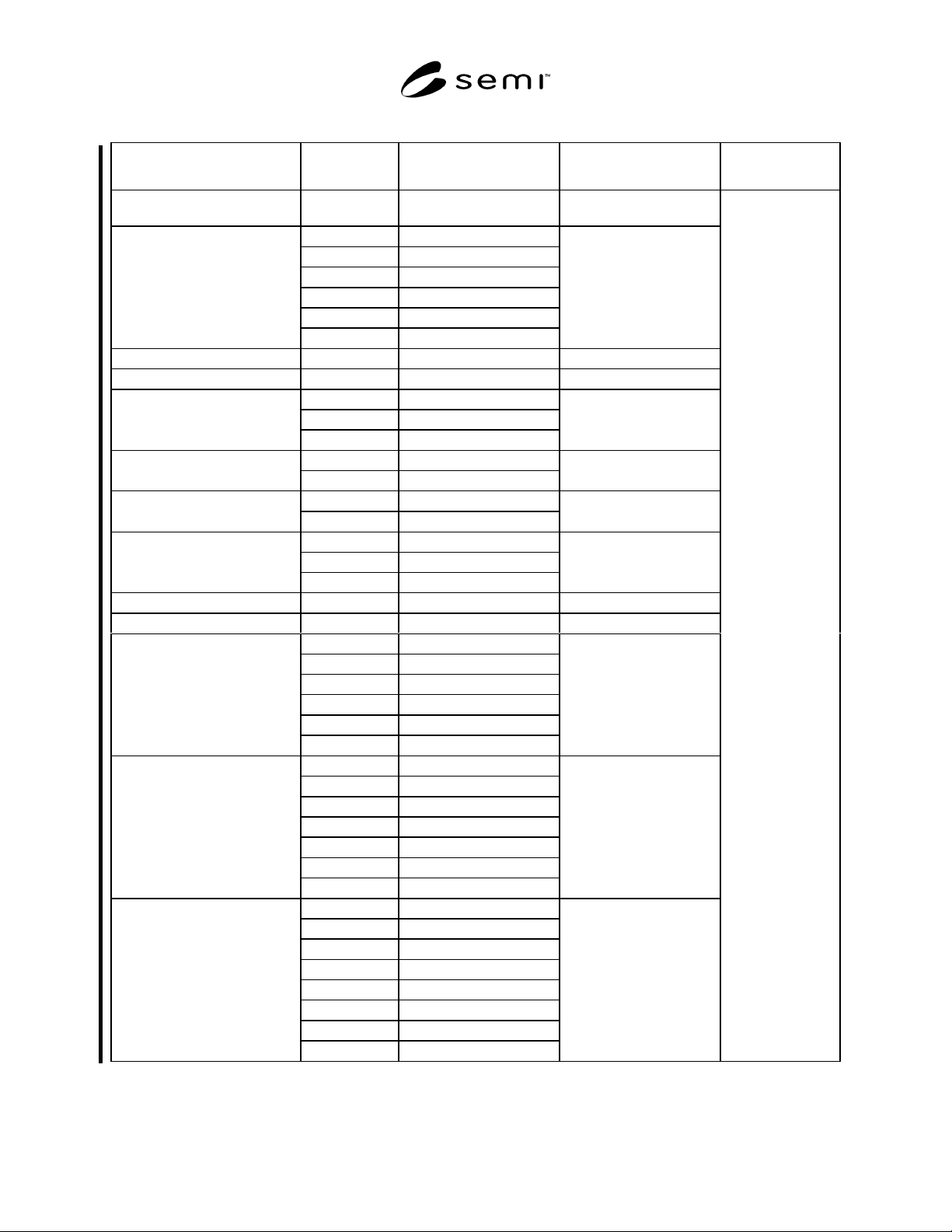
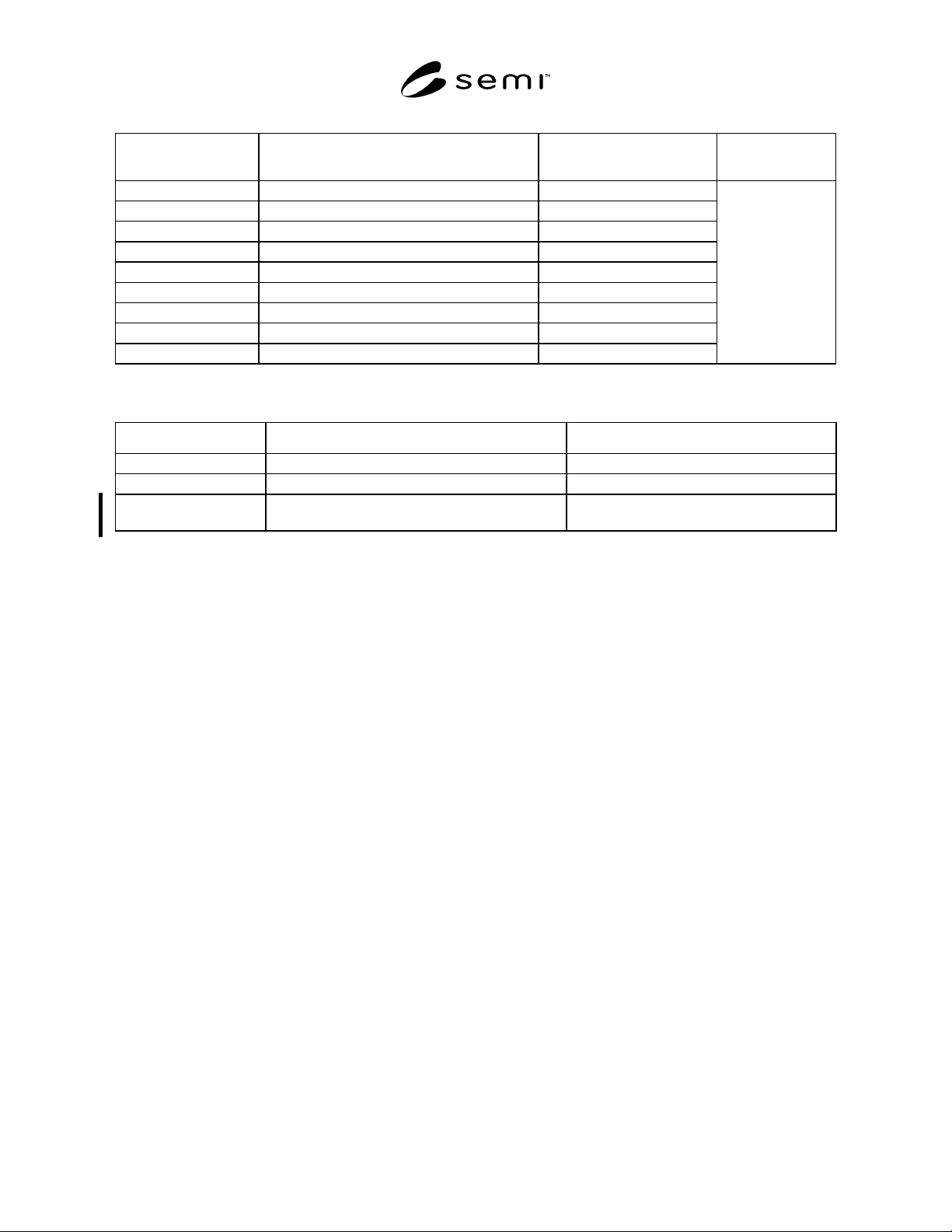
6.2.1 Table 4 shows events and reports required for the PSEM process state transition. Table 5 shows events and
reports required for the Prober Job state transition. Table 6 shows other collection events.
SEMI E91-0600 © SEMI 1999, 20009
Table 4 Collection Events Required by Process State Transition
Transition Transition No. Current State New State Typical Variable
Data
Start INIT 1 Undefined INIT Previous Process
State
Into IDLE 2 INIT IDLE
5EXECUTING
12 STOPPING
22 ABORTING
24 IDLE with ALARMS
26 MAINTENANCE
Into IDLE with ALARMS 23 IDLE IDLE with ALARMS
Into MAINTENANCE 25 IDLE MAINTENANCE
Start SETTING UP 3 IDLE SETTING UP
11 EXECUTING
10 CHECKING
Start EXECUTING 4 SETTING UP EXECUTING
10 CHECKING
Start PAUSING 9 SETTING UP PAUSING
9EXECUTING
Into PAUSED 13 PAUSING PAUSED
18 PAUSED SETTING UP
14 ALARM PAUSED
Start CHECKING 16 PAUSED CHECKING
Into PAUSED SETTING UP 17 PAUSED PAUSED SETTING UP
Into ALARM PAUSED 8 SETTING UP ALARM PAUSED
8EXECUTING
15 CHECKING
15 PAUSING
15 PAUSED SETTING UP
15 PAUSED
Start STOPPING 6 SETTING UP STOPPING
6EXECUTING
19 CHECKING
19 PAUSING
19 PAUSED SETTING UP
19 PAUSED
19 ALARM PAUSED
Start ABORTING 7 SETTING UP ABORTING
7EXECUTING
20 CHECKING
20 PAUSING
20 PAUSED SETTING UP
20 PAUSED
20 ALARM PAUSED
21 STOPPING
SEMI E91-0600 © SEMI 1999, 2000 10
Table 5 Collection Events Required by Prober Job State Transition
Transition Current State New State
Typical Variable
Data
JOB Created Undefined JOB CREATED
JOB Canceled JOB CREATED Undefined
JOB Started JOB CREATED JOB SET UP
Enter Processing JOB SET UP JOB PROCESSING
End Processing JOB PROCESSING Undefined
Start Aborting JOB SET UP, JOB PROCESSING JOB ABORTING
End Aborting JOB ABORTING Undefined
Start Stopping JOB SET UP, JOB PROCESSING JOB STOPPING
End Stopping JOB STOPPING Undefined
EventJobID
Table 6 Other Collection Events
Event Name Contents Typical Variable Data
Wafer Start Wafer processing was started. WaferStartJobID, WaferStartWaferID
Wafer End Wafer processing was completed. WaferEndJobID, WaferEndWaferID
Ready to Receive
Previous Data
Waits for reception of instructed data for wafer. WaitPreDataJobID, WaitPreDataWaferID
7 Data Item Variables
7.1 The purpose of this section is to define the list of
data item variables required by the PSEM. Values of
these variables will be available to the host through
collection event reports and host status queries.
7.2 Requirements
7.2.1 All generic variable data items defined in GEM
are required by all PSEM equipment. Any supplier-
defined variables shall be documented in the same
format used by this document. The following minimum
information is required:
<variable name> Class: <ECV, SV, or DVVAL>
Format: <SML>
Description: <if class=DVVAL, description must
contain statement of when data is
valid>.
<If format = ASCII then a length is
required. It is assumed to be left-
justified unless otherwise noted. >
7.3 Data Types
7.3.1 Equipment Constants (ECVs) can be changed by
the host using S2F15. The operator may be able to
change some values, but the equipment does not change
the values on its own. The value of an equipment
constant may be queried by the host at any time, using
the S2F13/14 transaction. They reside in non-volatile
memory of the equipment. Equipment constants remain
in effect until they are overwritten either by manual
entry or by a NEW EQUIPMENT CONSTANT SEND.
Equipment constants have various uses in PSEM,
including the following:
• Equipment offsets that match the performance of
several pieces of equipment that would otherwise
perform differently due to inherent manufacturing
differences. Examples are home values and motion
axis scaling factors.
• Setting the configuration of the equipment to allow
for different material specifications, equipment
options, material flows, frequency of automatic
functions, etc. Examples are yield check frequency.
• Managing optional machine features. Examples are
constants that tell the system whether optional
features such as automated media stackers are
present and control the configuration and function
of these optional subsystems when they are
present.
7.3.2 Status Variables (SVs) are val id at all times. A
SV may not be changed by the host but may be changed
by the equipment or operator. The value of status
variables may be queried by the host at anytime using
the S1,F3/4 or S6,F19/20 transactions. DVVALs are
variables that are valid only upon the occurrence of
specific collection events. An attempt to read a data
variable at the wrong time will not generate an error,
but the data reported may not have relevant meaning.