semi合集-English.pdf - 第1524页
SEMI E32-0997 © SEMI 1994 , 1997 19 Figure 4.7 Extend ed Trans fer Job State Model ABO RT The ABORT state is an AND s ubstate of T RANSFER JOB AC T IVE. This state i s respons ible for coordin ation of any activities nec…

SEMI E32-0997 © SEMI 1994, 1997 18
4.3 Extended Behavior Models — In this section, the
concepts of Pause/Resume, Stop/Cancel/Abort, and
AutoStart/StartHandoff are added to the state models
for the transfer job and the atomic transfer. In addition,
the possibility that some transfers will end abnormally
is discussed. While not every implementation requires
these capabilities, all face the prospect of problems
during transfer. This section describes how the basic
state models provided above may be extended to
include such features.
4.3.1 Extended Communications — This section
describes the new commands the host may use to affect
current transfer jobs and the events associated with
these new capabilities.
Pause — The host may issue a command to pause a
transfer job
9
. A command to pause shall cause the
subject to continue to the first safe, continuable pausing
place and then cease activity. The pause shall occur
only at points that allow for the resumption of the
activity (see the resume command). Pausing a transfer
job results in the pausing of each atomic transfer for
that transfer job (see Figure 4.8). The points where a
pause may fall should be defined by the supplier. Note
that a paused transfer job may be aborted or stopped as
an alternative to the resume command. In this case, the
stop command may cause the equivalent of a resume in
order to allow the current atomic transfers to complete.
There are two actions that may cause a pause. The first
is a host command as described in the paragraph above.
The second is a decision by the equipment that a
problem exists that requires outside intervention. For
instance, if a port hardware problem exists, the
equipment may pause the job automatically. The user or
host may then resume the transfer job when the
hardware problem is corrected, or alternately abort/stop
the transfer job if the problem is severe.
Resume — The resume command is used to continue a
previously paused transfer activity.
Stop — The host may command the involved partners
to stop a transfer job. The stop command terminates a
job in an orderly manner. The object of the stop
command is to complete currently executing atomic
transfers and leave the equipment and material in a safe
state. While the time needed to stop should be kept as
short as possible, this goal should be a lower priority.
If the specified transfer job is queued, the stop
command acts as a cancel command.
9 It is expected that a host may also pause a port or other hardware.
However, this document does not specify these hardware-related
commands.
Cancel — The host may cancel a transfer job which has
not yet become active (e.g., a job which is queued).
This is useful when it is unacceptable to affect transfer
which is in–progress. A canceled job is removed from
the queue and discarded. No physical action may be
associated with canceling a transfer job. If the specified
transfer job is active, the equipment shall reject this
command.
Abort — The host may command the involved partners
to abort a transfer job. The goal of the abort command
is to end the transfer activities (especially movement) as
quickly as possible, while retaining equipment and
material integrity. Aborting a transfer job shall cause
the individual atomic transfers to also abort. As with
stop, the abort command terminates the transfer job.
Different from the stop command is that equipment
executing an abort command shall require manual
intervention before further material movement
operations are performed. Abort is intended for use
when serious problems are detected and further damage
needs to be prevented.
The abort command takes precedence over the stop,
pause, and cancel commands. If the specified transfer
job is queued, the abort command acts as a cancel
command.
Transfer Job Create — The Transfer Job Create is not
new, but is extended to include the “AutoStart” option.
There is a parameter added to each atomic transfer
definition which allows selection of this option. If not
selected, the atomic transfer shall enter a WAIT state
after completing SETUP operations, but before
informing its transfer partner that it is ready to begin.
An event signals the host that the equipment is awaiting
instructions.
This feature allows the host added flexibility in
synchronizing material movement activities. The host
may manually synchronize two transfer partners or it
may wish to align a material movement activity with
another equipment or factory-related activity.
StartHandoff — The StartHandoff command is issued
by the host to cause a specific atomic transfer to
transition from the WAIT state to the TRANSFER
ACTIVE state.
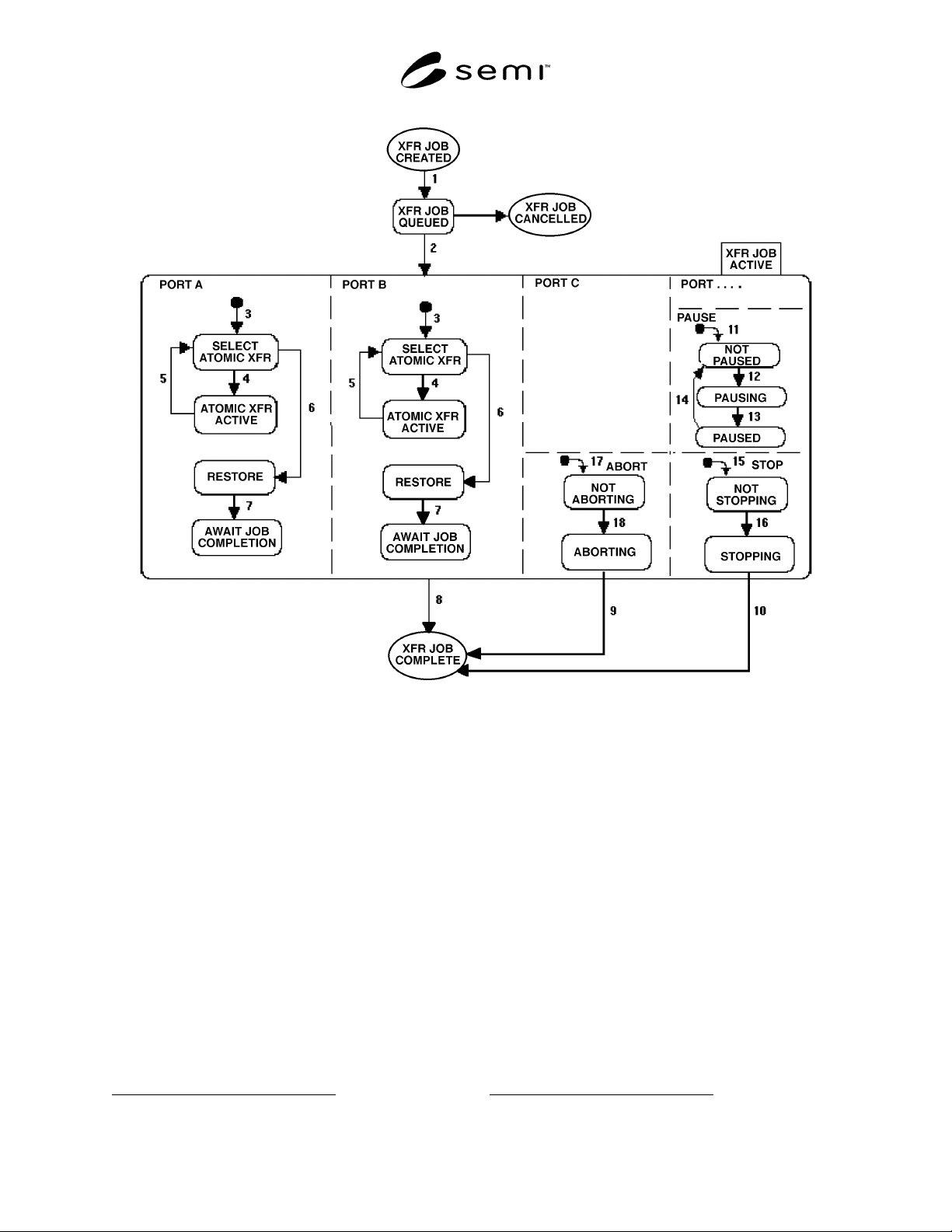
4.3.2 Extended Transfer Job State Model — Figure
4.7 presents an extended transfer job state model. This
model provides for the capability to pause/resume, stop,
and abort. Except for the extensions, this model is the
same as that in Figure 4.5. Therefore, only the
extensions are discussed in this section.
SEMI E32-0997 © SEMI 1994, 199719
Figure 4.7
Extended Transfer Job State Model
ABORT
The ABORT state is an AND substate of TRANSFER
JOB ACTIVE. This state is responsible for coordination
of any activities necessary to abort
10
the active transfer
job. The ABORT state has two substates: NOT
ABORTING and ABORTING.
NOT ABORTING
In this state, the abort process is not in effect. The
transfer job proceeds normally.
ABORTING
In this state the transfer job is causing its active atomic
transfers to abort. This state is active only so long as
any of the transfer job's atomic transfers remains active.
STOP
10 See Section 4.1 for the defintion of abort.
The STOP state is an AND substate of TRANSFER
JOB ACTIVE. This state is responsible for coordination
of any activities necessary to stop
11
the active transfer
job. STOP has two substates: NOT STOPPING and
STOPPING.
NOT STOPPING
In this state, the STOP process is not in effect. The
transfer job proceeds normally.
STOPPING
In this state the process of stopping occurs. When the
STOPPING state is active and the SELECT ATOMIC
TRANSFER state is entered, that atomic transfer shall
transition to the AWAIT JOB COMPLETION state.
When all ports have reached that state, transition 10
from the STOPPING state occurs (see Figure 4.7).
11 See Section 4.1 for the definition of stop.

SEMI E32-0997 © SEMI 1994, 1997 20
PAUSE
The PAUSE state is an AND substate of TRANSFER
JOB ACTIVE. That is, the pause feature is concurrent
with the execution of the transfer job. The PAUSE state
has three substates: NOT PAUSED, PAUSING, and
PAUSED.
NOT PAUSED
A newly activated job is NOT PAUSED by default. In
this state, the transfer job proceeds as normal.
PAUSING
This state is coordinating the movement of the transfer
job from NOT PAUSED to PAUSED. It is responsible
for making sure that the current activity for each port
for the job has ceased at an appropriate point. The
transfer job is PAUSING until all of its active atomic
transfers are paused.
PAUSED
All activity has ceased. The transfer job is awaiting a
Resume command. Note that the PORT A, PORT B,
etc., substates retain their current states, but their
activity ceases when PAUSED.
The following transition table defines the added
transitions between states for the extended transfer job
state model. It applies to Figure 4.7.
Table 4.3 Extended Transfer Job State Transition Table
# Current State Trigger New State Action(s) Comment
9 ABORTING Abort process is complete. (Transfer Job
Complete)
Send “Transfer Job Complete”
message to host indicating
abnormal termination.
Host or equipment
previously issued
abort.
10 STOPPING Stop process is complete. (Transfer Job
Complete)
Send “Transfer Job Complete”
message to host indicating
abnormal termination.
Host or equipment
previously issued
abort.
11 (Undefined) Default entry into PAUSE state. NOT PAUSED None. None.
12 NOT PAUSED Host or equipment issued a
directive to pause.
PAUSING None. None.
13 PAUSING All transfer job activity has
ceased.
PAUSED None. “Transfer Job
Paused” event has
occurred.
14 PAUSED Host issued a directive to resume
the transfer job.
NOT PAUSED None. “Transfer Job
Resumed” event
has occurred.
15 (Undefined) Default entry into STOP state. NOT STOPPING None. None.
16 NOT STOPPING Stop initiated. STOPPING Begin stop activities. None.
17 (Undefined) Default entry into ABORT state. NOT
ABORTING
None. None.
18 NOT ABORTING Abort initiated. ABORTING Begin abort activities. None.
19 TRANSFER JOB
QUEUED
Cancel, Abort, or Stop command
received.
TRANSFER JOB
CANCELLED
Remove the transfer job from
the queue.
None.