semi合集-English.pdf - 第3679页
SEMI PR8-0703 © SEMI 2003 9 Figure 5 Data Collection Plan State Diagram 7.5.4 Data Collection Plan Transition Definition Table 4 Data Colle ction Plan Transition Definition Table Num Previous State Trigger New State Acti…
SEMI PR8-0703 © SEMI 2003 8
7.4.2 EDA Client Configuration — There shall be a
persistent equipment configuration setting for each
EDA client that establishes the URL to which
equipment-initiated SOAP messages will be sent for
that client, and the value of the ‘From’ element of the
‘MessageHeader’ SOAP header that that client will use
in all client-initiated SOAP messages to the equipment.
If an EDA client will be performing data management
via SECS/GEM, it is not necessary to configure the
value of the ‘From’ element of the ‘MessageHeader’
SOAP header for that client, but the configuration must
indicate that the client can perform data management
via SECS/GEM. It must be possible for the factory to
change these configuration settings without requiring
the involvement of the supplier.
7.4.3 Equipment Identity Configuration — There shall
be a persistent equipment configuration setting that
establishes the value of the ‘From’ element of the
‘MessageHeader’ SOAP header that will be used for all
SOAP messages sent by the equipment. It must be
possible for the factory to change this configuration
setting without requiring the involvement of the
supplier.
7.4.4 Multi-Client Considerations — When the data
management interface configuration setting is set to
SECS/GEM, the equipment shall accept data
management messages only from the single configured
SECS/GEM client, and shall send all equipment-
initiated SOAP messages only to the single URL that
was configured for that client. When the data
management configuration setting is set to SOAP, the
EDA interface may be multi-client, if the equipment
supports this optional feature, and shall accept data
management messages from any valid configured EDA
SOAP client.
7.5 EDA State Models
7.5.1 EDA Communications State Diagram
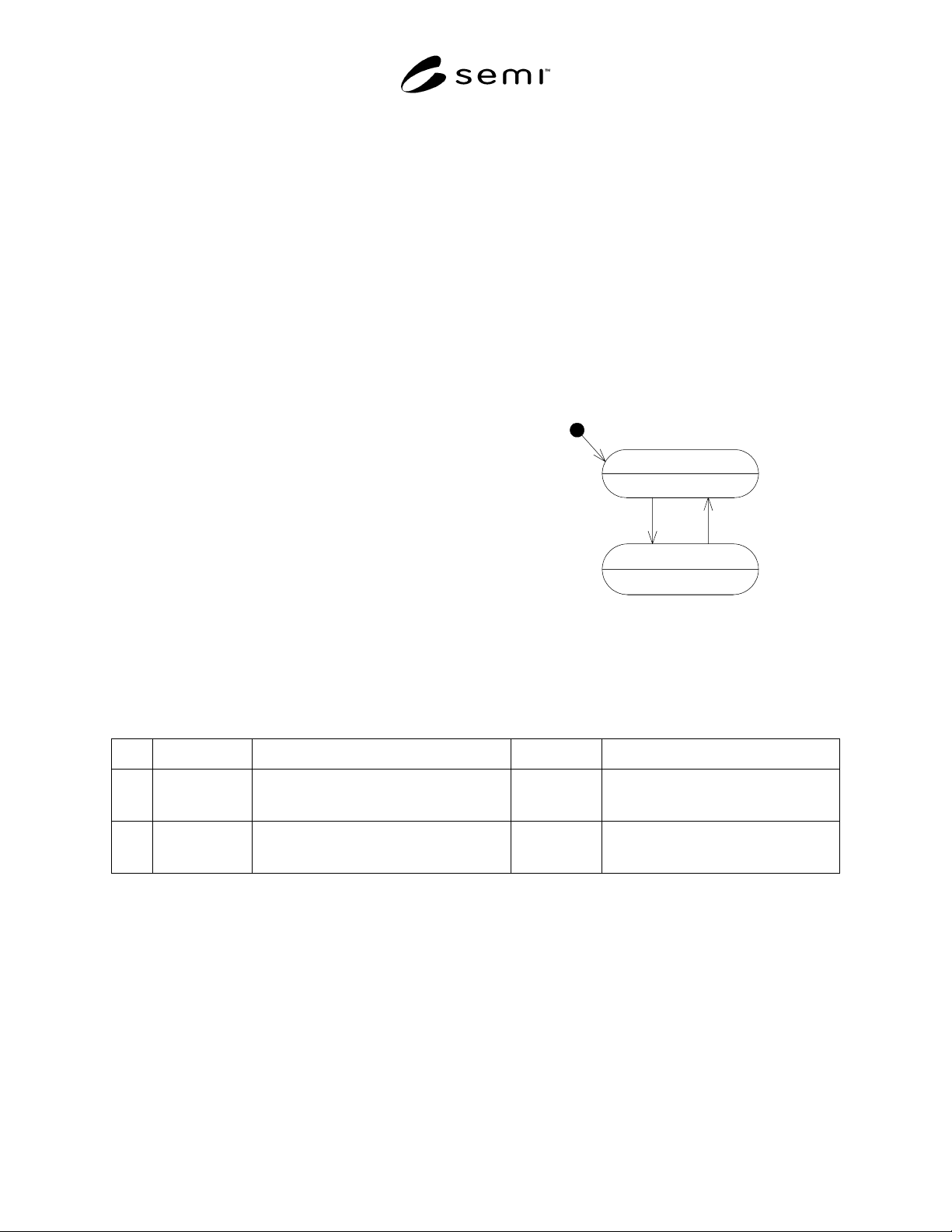
7.5.1.1 Figure 4 shows the state model for the
availability of the EDA interface to the factory. When
disabled, the equipment is not in a condition whereby it
can process data management messages, nor transmit
data to clients. When enabled, the equipment can both
process EDA data management messages, as well as
transmit data to clients.
EDADisabled
EDAEnabled
1 2
H
Figure 4
EDA Communications State Diagram
7.5.2 EDA Communications Transition Definition Table
Table 3 EDA Communications Transition Definition Table
Num Previous State Trigger New State Actions
1 EDADisabled Equipment powers up, achieves condition to
accept EDA data management requests and
transmit DCP data.
EDAEnabled For each configured client, equipment
begins sending EdaEnabled message, as
described in Section 7.7.4.1.
2 EDAEnabled Equipment is entering a state wherein it will
not be possible to perform EDA activities.
EDADisabled For each configured client, equipment
sends EdaDisabled message, as described
in Section 7.7.4.2.
7.5.3 Data Collection Plan State Diagram
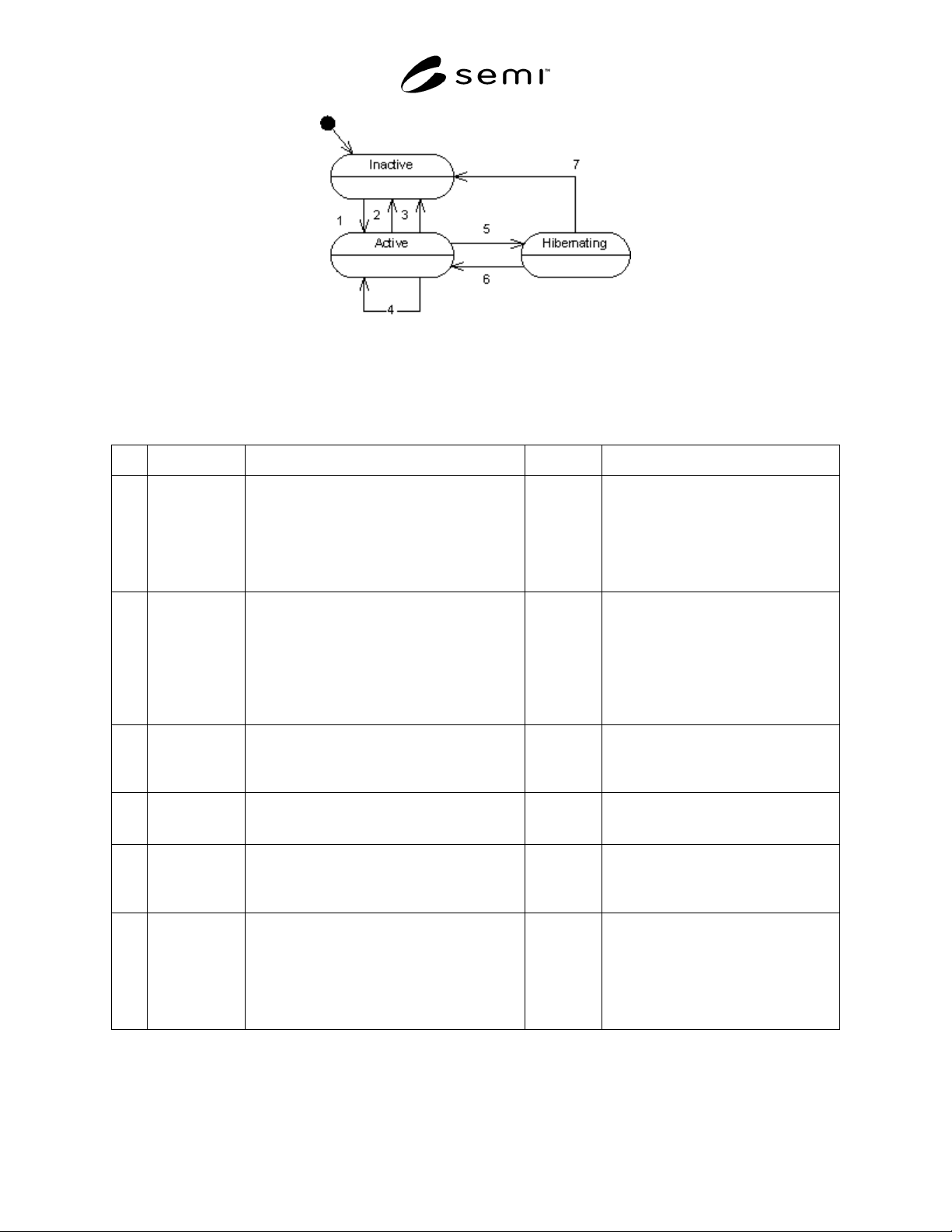
7.5.3.1 Figure 5 shows the EDA client’s view of equipment behavior for each DCP defined on the equipment. Each
DCP for a given client follows this behavior model independently of every other DCP on the equipment. For
example, if client A activates “DCP1”, and client B does not, and client A subsequently requests the list of active
DCP’s from the equipment, “DCP1” will be returned in the list of active plans, because it is in the “Active” state for
client A. If client B requests a list of active DCP’s from the equipment, “DCP1” will not be returned in the list of
active plans, because client B did not activate “DCP1”, and it is still in the “Inactive” state for client B.
SEMI PR8-0703 © SEMI 2003 9
Figure 5
Data Collection Plan State Diagram
7.5.4 Data Collection Plan Transition Definition
Table 4 Data Collection Plan Transition Definition Table
Num Previous State Trigger New State Actions
1 Inactive A client requests the activation of a DCP using a
valid DCP id, via the ActivatePlan operation
Active The equipment responds affirmatively to
the request, and begins sending the data
included in the plan to the client. If
activated with “UntilDeactivated” set to
“true”, the equipment shall store a record
in non-volatile memory of the DCP ID
and its client’s address information.
2 Active A client requests the deactivation of a DCP
using a valid DCP id via the DeactivatePlan
operation.
Inactive The equipment responds affirmatively to
the request, and discontinues sending
data defined by that DCP to the client. If
the DCP had been activated with
“UntilDeactivated” set to “true”, the
equipment shall remove the previously
stored record regarding the DCP and its
client from non-volatile memory.
3 Active The equipment is entering a state in which it will
not be possible to transmit data to its client. The
DCP was activated with “UntilDeactivated” set
to “false” (see Section 7.6.2.4.1).
Inactive The equipment shall cease sending data
included in the DCP to the client.
4 Active A client requests the activation of the DCP, via
the ActivatePlan operation. The DCP is already
active.
Active The equipment responds with an error,
indicating that the DCP is already active.
5 Active The equipment is entering a state in which it will
not be possible to transmit data to its client. The
DCP was activated with “UntilDeactivated” set
to “true” (see Section 7.6.2.4.1)
Hibernating The equipment shall cease sending data
included in the DCP to the client.
6 Hibernating The equipment is entering a state in which it will
be possible to transmit data to its client. The
DCP was activated with “UntilDeactivated” set
to “true” (see Section 7.6.2.4.1). The client has
responded to the EdaEnabled message within the
configured number of attempts (see Section
7.7.6.1).
Active The equipment shall begin sending the
data included in the DCP to the client
that originally activated it, as specified in
the record that was stored in non-volatile
memory for the DCP when it was
activated.

SEMI PR8-0703 © SEMI 2003 10
Num Previous State Trigger New State Actions
7 Hibernating The equipment is entering a state in which it will
be possible to transmit data to its client. The
DCP was activated with “UntilDeactivated” set
to “true” (see Section 7.6.2.4.1). The client has
not responded to the EdaEnabled message within
the configured number of attempts (see Section
7.7.6.1).
Inactive The equipment shall cease attempting to
send the data included in the DCP to the
client.
7.6 Data Management
7.6.1 Overview — Data management is defined by the
set of messages necessary to control the flow of data
from the equipment for a given client. Requested data
is organized by data collection plans (DCPs) that can be
individually activated and de-activated by name.
Additionally, EDA clients are able to determine which
plans are defined on the equipment, and which plans are
currently active. Data management can be performed
by either the SECS/GEM client or any configured
SOAP client, as established through configuration (see
Section 7.4).
7.6.2 Data Management Messages — The equipment
must support the following data management messages,
whether data management takes place via SECS/GEM
or SOAP. The equipment shall only respond to data
management requests originating from configured
clients. SOAP clients are identified by the value of the
‘From’ element of the ‘MessageHeader’ SOAP header
in each message originating from that client. The
equipment shall respond to all data management
messages received from unrecognized clients with an
error.
7.6.2.1 IsEdaEnabled — This operation allows the data
management client to ascertain whether the equipment
is ready to receive EDA data management
communications and to transmit data through the EDA
port.
7.6.2.1.1 When this message is sent via SOAP, the
SOAPAction HTTP header used shall be “urn:semi-
org:ws:eda_ps_v0.0:IsEdaEnabled”. When this
message is sent via SECS/GEM, the S14F19 message
shall be used, with the SVCNAME data variable equal
to “IsEdaEnabled” (see Table 5).
7.6.2.1.2 The equipment shall always respond to this
request, whether it originates from the SECS/GEM port
or a valid configured SOAP client, and independent of
the setting of the data management configuration
switch.
7.6.2.2 GetDefinedPlanIds — In this operation the data
management client requests the names of the data
collection plans that are available for activation by the
client at the current time. The equipment returns the
names of all data collection plans that are currently
defined, regardless of their activation status.
7.6.2.2.1 When this message is sent via SOAP, the
SOAPAction HTTP header used shall be “urn:semi-
org:ws:eda_ps_v0.0:GetDefinedPlanIds”. When this
message is sent via SECS/GEM, the S14F19 message
shall be used, with the SVCNAME data variable equal
to “GetDefinedPlanIds” (see Table 7).
7.6.2.2.2 The equipment shall only respond to this
request if it originates from a client that is compatible
with the setting of the data management configuration
switch. For example, if the configuration switch is set
to enable data management via SECS/GEM and the
request originates from the SECS/GEM client, the
equipment shall respond with the list of defined DCP
ids. If the request originates from a SOAP client, the
equipment shall respond with an error.
7.6.2.3 GetActivePlanIds — In this operation the data
management client requests the names of the data
collection plans currently active for that client. The
equipment EDA port responds with the list of data
collection plans currently active for the requesting
client.
7.6.2.3.1 When this message is sent via SOAP, the
SOAPAction HTTP header used shall be “urn:semi-
org:ws:eda_ps_v0.0:GetActivePlanIds”. When this
message is sent via SECS/GEM, the S14F19 message
shall be used, with the SVCNAME data variable equal
to “GetActivePlanIds” (see Table 9).
7.6.2.3.2 The equipment shall only respond to this
request if it originates from a client that is compatible
with the setting of the data management configuration
switch. For example, if the configuration switch is set
to enable data management via SECS/GEM and the
request originates from the SECS/GEM client, the
equipment shall respond with the list of active DCP ids.
If the request originates from a SOAP client, the
equipment shall respond with an error.
7.6.2.4 ActivatePlan — In this operation the data
management client requests that a specific data
collection plan is activated. The equipment responds
successfully if it can fulfill the activation request. A
given DCP need not be restricted to activation by a