semi合集-English.pdf - 第70页
SEMI E6-0303 © SEMI 1982, 2003 16 connection number(s) at the ot her end of the line. If th e line comes from a facilities source enter facilities system. For example: 603 or facilities system. 14.2.6 Purity Requirements…
SEMI E6-0303 © SEMI 1982, 2003 15
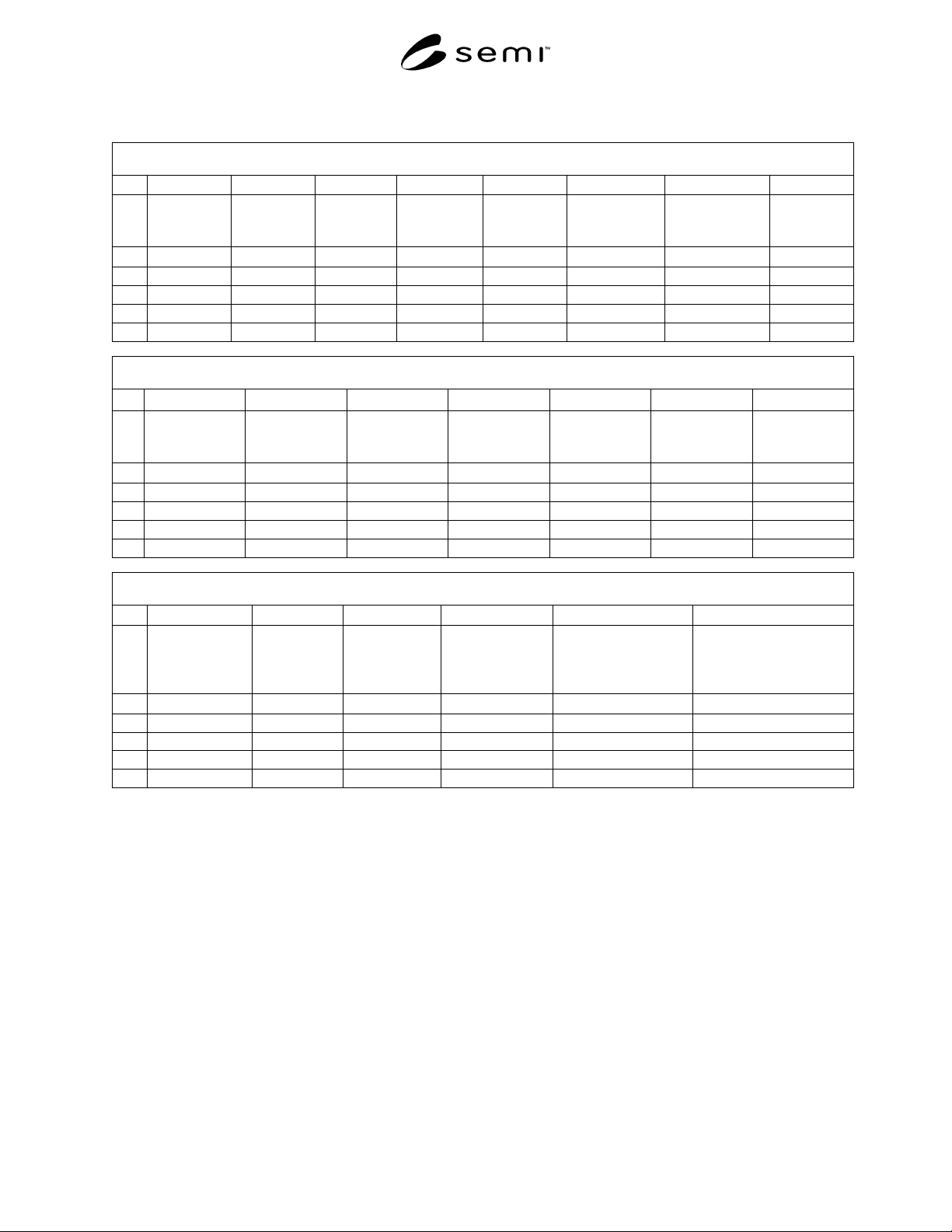
Data Sheet 500 - Water (See SEMI E6 Section 13)
500 Water
A B C D E F G H
1
Equipment
Component
Water
Connection
Number
Connection
Label on
Equipment
Utility
Type
Line Source Purity
Requirements
Contaminants Minimum
Pressure
2
text text text text text text text kPa
3
4
5
6
500 Water
I J K L M N O
1
Maximum
Pressure
Maximum
Pressure
Fluctuation
Minimum.
Pressure
Differential
Idle Average
Flow
Process Average
Flow
Maximum Flow Maximum
Temperature
2
kPa kPa kPa lpm lpm lpm degrees C
3
4
5
6
500 Water
P Q R S T U
1
Minimum
Temperature
Equipment
Component
Fitting Size
Equipment
Component
Fitting
Material
Equipment
Component Fitting
Type
Drawing References Water Comments
2
degrees C mm or inches text text text text
3
4
5
6
14 Bulk Chemicals Data Sheet
14.1 Include in the Bulk Chemicals Data Sheet the
requested information for equipment connections to
facilities systems including but not limited to chemical
dispense, and slurry dispense.
14.2 Data Sheet 600, Bulk Chemicals contains the
following items.
14.2.1 Equipment Component (600A) — Enter the
name of the equipment component where the
connection is located. The name should be the same
name used in Data Sheet 200 and 300. For example:
Mainframe or Pump.
14.2.2 Bulk Chemicals Connection Number (600B) —
Enter a unique connection number for every utility
connection. For example: 601, 602, 603, and so on. For
loop distribution utilities, the supply connection could
be 602S and the corresponding return connection could
be 602R. For loop distribution utilities, return
connection data should be entered in the row
immediately below the supply connection data row.
14.2.3 Connection Label on Equipment (600C) —
Enter the name found on the label that identifies this
physical connection on the equipment. For example:
Slurry 1 Supply.
14.2.4 Utility Type (600D) — Enter the name of the
bulk chemical to be provided through the connection.
For example: NH
3
or HCL.
14.2.5 Line Source (600E) — Identify the source of the
supply line for this connection. If the line comes from a
provided component covered in the data sheets enter the

SEMI E6-0303 © SEMI 1982, 2003 16
connection number(s) at the other end of the line. If the
line comes from a facilities source enter facilities
system. For example: 603 or facilities system.
14.2.6 Purity Requirements (600F) — List minimum
purity requirements and basis of purity. If applicable
indicate SEMI chemical standards and filtration
requirements.
14.2.7 Contaminants (600G) — Enter the type and
value of any significant impurities.
14.2.8 Minimum Pressure (600H) — Enter the
minimum supply pressure for the equipment to operate
correctly.
14.2.9 Maximum Pressure (600I) — Enter the highest
supply pressure that can be used to operate the
equipment correctly.
14.2.10 Maximum Pressure Fluctuation (600J) —
Enter the maximum supply pressure change during the
processing cycle for the equipment to operate correctly.
The data entered for a loop distribution return
connection should be n/a (not applicable).
14.2.11 Minimum Pressure Differential (600K) —
Enter the minimum pressure difference between the
supply and return connections for the equipment to
operate correctly. The data should be entered in the
return connection data row and n/a (not applicable)
entered into the supply connection data row.
14.2.12 Idle Average Flow (600L) — Enter the average
flow rate when the equipment is in idle condition.
14.2.13 Process Average Flow (600M) — Enter the
average flow rate over the processing cycle.
14.2.14 Maximum Flow (600N) — Enter the maximum
flow rate (for the equipment processing cycle or idle
condition whichever is greater).
14.2.15 Maximum Temperature (600O) — Enter the
maximum supply temperature for the equipment to
operate correctly.
14.2.16 Equipment Component Fitting Size (600P) —
Enter the line or fitting size of the connection provided
on the equipment component. For double containment
this would be the inner fitting. Use the units indicated
by the fitting manufacturer. For example: 6 or 0.25. In
row 2 enter or select the units of measure for the
specified fitting size. For example: mm or inches.
14.2.17 Equipment Component Fitting Material
(600Q) — Enter a general description of the fitting
material of the connection provided on the equipment
component. For example: PFA.
14.2.18 Equipment Component Fitting Type (600R) —
Enter the generic style of fitting of the connection
provided on the equipment component. Be sure to
include type and gender of the fitting. For example:
Flare or Female Pipe Thread (FPT).
14.2.19 Double Containment (600S) — Enter yes if
double containment is necessary for utility type
supplied through the connection, enter no if not
necessary.
14.2.20 Equipment Component Double Containment
Fitting Size (600T) — Enter the line or fitting size of
the double containment connection on the equipment.
This would be the outer fitting. Use the units indicated
by the fitting manufacturer. For example: 12 or 0.50. In
row 2 enter or select the units of measure for the
specified fitting size. For example: mm.
14.2.21 Equipment Component Double Containment
Fitting Material (600U) — Enter a general description
of the fitting material of the double containment
connection the equipment. For example: PFA.
14.2.22 Equipment Component Fitting Type (600V) —
Enter the generic style of fitting of the double
containment connection on the equipment. Be sure to
include type and gender of fitting provided on
equipment. For example: Flare or Female Pipe Thread
(FPT).
14.2.23 Drawing References (600W) — Enter
references, such as drawing numbers, for any drawings,
schematics, instructions, jigs or fixtures showing this
connection. For example: connection template XXXXX
and P&ID YYYYY. Submit referenced material to
equipment purchaser with this data sheet.
14.2.24 Bulk Chemicals Comments (600X) — Enter
any comments necessary to clarify data provided for
this connection. For example: dual containment.
SEMI E6-0303 © SEMI 1982, 2003 17
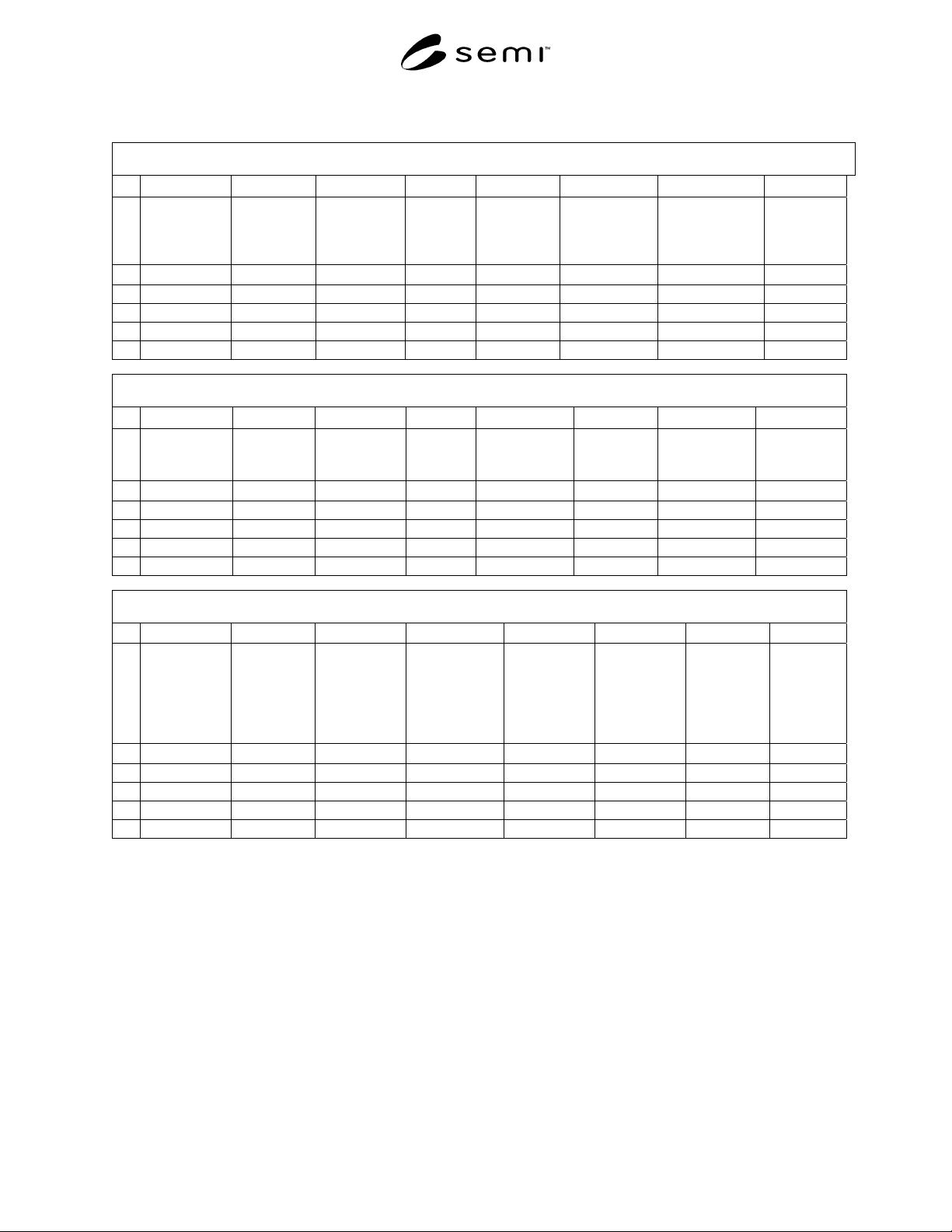
Data Sheet 600 – Bulk Chemicals (See SEMI E6 Section 14)
600 Bulk Chemicals
A B C D E F G H
1
Equipment
Component
Bulk
Chemicals
Connection
Number
Connection
Label on
Equipment
Utility
Type
Line Source Purity
Requirements
Contaminants Minimum
Pressure
2
text text text text text text text kPa
3
4
5
6
600 Bulk Chemicals
I J K L M N O P
1
Maximum
Pressure
Maximum
Pressure
Fluctuation
Minimum
Pressure
Differential
Idle
Average
Flow
Process
Average Flow
Maximum
Flow
Maximum
Temperature
Equipment
Component
Fitting Size
2
kPa kPa kPa kPa lpm lpm lpm mm or inches
3
4
5
6
600 Bulk Chemicals
Q R S T U V W X
1
Equipment
Component
Fitting
Material
Equipment
Component
Fitting Type
Double
Containment
Equipment
Component
Double
Containment
Fitting Size
Equipment
Component
Double
Containment
Fitting
Material
Equipment
Component
Double
Containment
Fitting Type
Drawing
References
Bulk
Chemicals
Comments
2
text text yes or no mm or inches text text text text
3
4
5
6
15 Drains Data Sheet
15.1 Include in the Drains Data Sheet the requested
fluid waste information for equipment connections to
facilities systems. This includes, but is not limited to
industrial waste, drain, collection, storage, reprocessing,
UPW recycle, UPW reclaim, and treatment systems.
15.2 Data Sheet 700, Drains contains the following
items.
15.2.1 Equipment Component (700A) — Enter the
name of the equipment component where the
connection is located. The name should the same name
used in Data Sheet 200 and 300. For example:
Mainframe or Pump.
15.2.2 Drains Connection Number (700B) — Enter a
unique connection number for every utility connection.
For example: 701, 702, 703, and so on.
15.2.3 Connection Label on Equipment (700C) —
Enter the name found on the label that identifies this
physical connection on the equipment. For example
Caustic Waste.
15.2.4 Utility Type (700D) — Enter the fluid
discharged through the connection. The identifying
description is for information only and is not intended