semi合集-English.pdf - 第2952页
SEMI E109-0305 © SEMI 2001, 2005 62 22.3 Alarm Usage 22.3.1 Reticle and Pod Management requi res standardization on t he alarm codes. Many er rors may be mapped t o a sinlge “generic” alarm code. In this case, the recove…
SEMI E109-0305 © SEMI 2001, 2005 61
Variable Name Description Type Access Comment
Reject Reason The reason a reticle is
rejected.
Enumerated:
ID Verification
failedParticle qualification
failed
Rejected By Host
Rejected By Operator
Inspection Results Expired
RO Information to aid the host in
understanding why a reticle is
rejected.
#1
These are defined in the Alarm Information table.
#2
For all the variables defined as lists of port information (such as states), the port information should be placed in the list in numerical order by
PortID, from lowest to highest.
22 Alarms
22.1 This section includes specific alarms that are required to be implemented by RPMS compliant equipment.
22.2 Alarm List Table
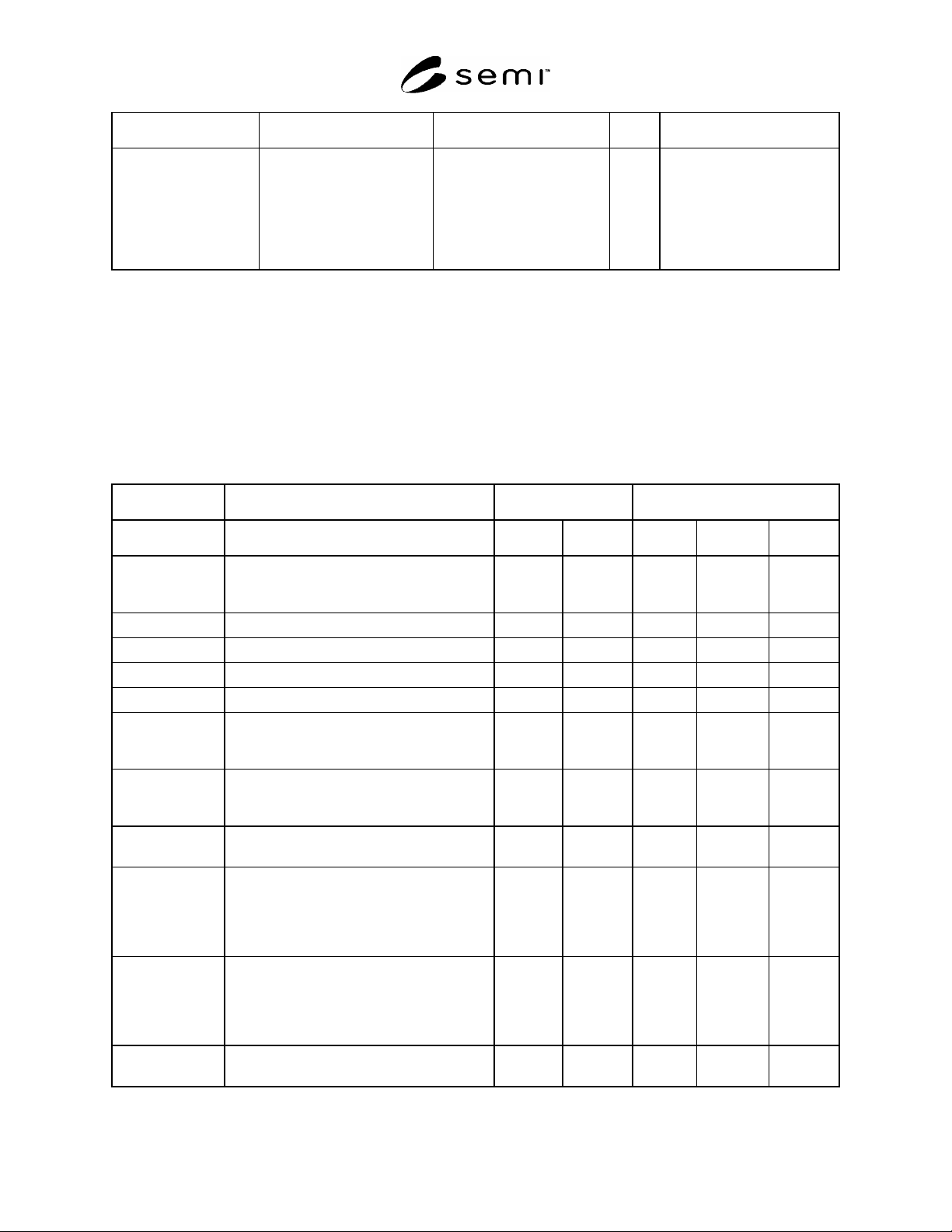
22.2.1 Table 57 is a listing of required alarms for both fixed buffer and internal buffer equipment. This list is only a
subset of the pod transfer alarms. There may be more pod transfer related alarms that are not listed here.
Table 57 Alarm List
Equipment Danger Affected
Configuration Alarm Text Potential Imminent Operator Equipment Material
Fixed & Internal
Pod Buffer
Equipment
PIO Failure X X X X
Access Mode Violation X X X X
Attempt To Use Out Of Service Load Port X X X
Pod Placement Error X X X X
Pod Open/Close Failure X X X
Fixed and Internal
Pod Buffer
Equipment
Duplicate PodID X X
Fixed & Internal
Pod Buffer
Equipment
Pod Removal Error X X X X
Duplicate Reticle
ID
A duplicate reticle is detected. X X
Pod Pick/Place
error
The internal robot that moves the Pods failed
to pick or place a pod. Can be triggered if the
state of the system after a pick or place is
inconsistent (i.e., both robot and pod think
they are empty).
X X X
Reticle Pick/Place
error
The internal robot that moves the reticles
failed to pick or place a reticle. Can be
triggered if the state of the system after a pick
or place is inconsistent (i.e. both robot and
pod think they are empty).
X X X
Automation Error Automation errors that do not fit other
categories have been detected.
X X X X
SEMI E109-0305 © SEMI 2001, 2005 62
22.3 Alarm Usage
22.3.1 Reticle and Pod Management requires standardization on the alarm codes. Many errors may be mapped to a
sinlge “generic” alarm code. In this case, the recovery scenario would be the same but the alarm text shall contain a
more descriptive explanation of the error. For example, the Pod Open/Close alarm can be caused by many different
opener errors.
22.3.2 This alarm applies to both Fixed and Internal Pod Buffer Equipment.
22.3.3 For any load port Alarm condition, process equipment should not stop processing current jobs.
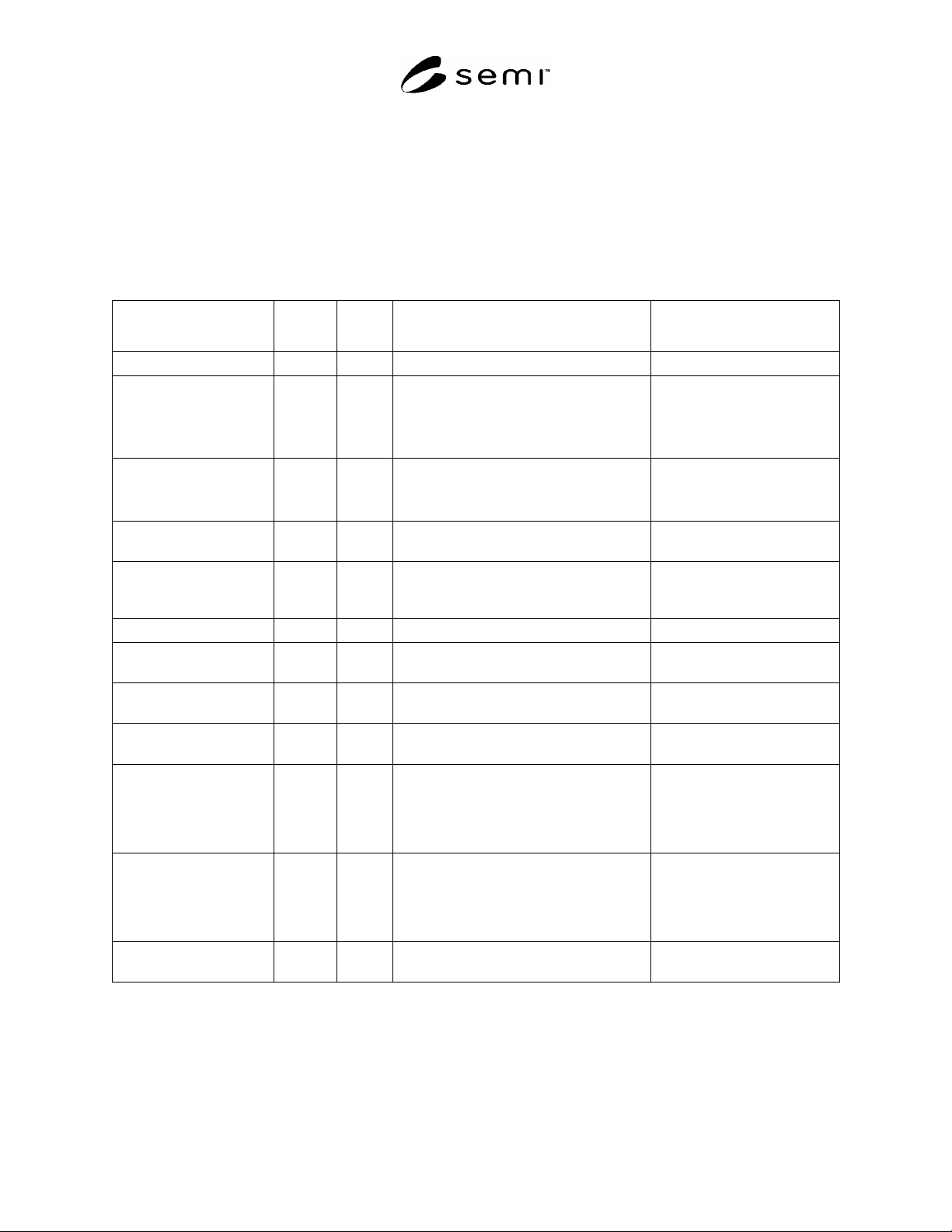
Table 58 Alarm Information
Alarm Description Alarm
Number
Auto
Clear
Set trigger Clear Trigger
PIO Failure 1 NO E84 error. Manual intervention
Access Mode Violation
(unexpected load)
2 NO Operator places pod on load port with access
mode set to auto.
Operator switches to manual
Operator removes the pod
Operator switches to auto
Operator clears alarm at UI
Access Mode
Violation
(unexpected unload)
NO Operator takes a pod off load port with
access mode set to auto.
Operator clears alarm at UI
Attempt to use out of
service load port
3 YES Pod placed on load port with transfer state
set to out-of-service.
Pod is removed
Pod placement/placement
error
4 YES Sensors detect pod is not properly placed at
pod opener.
Sensors detect pod is properly
placed at pod opener or no pod
present
Pod Open/Close error 5 NO Opener errors while opening or closing. Manual intervention
Duplicate Pod ID 6 Yes A duplicate pod is detected. Methods vary by equipment
type
Pod Removal Error 7 NO Pod removed before the Pod is in the
READY TO UNLOAD state.
Operator clears alarm at UI
Duplicate Reticle ID 8 YES A duplicate reticle is detected. Methods vary by equipment
type
Pod Pick/Place error 9 NO The internal robot that moves the Pods
failed to pick or place a pod. Can be
triggered if the state of the system after a
pick or place is inconsistent (i.e. both robot
and pod think they are empty).
Manual intervention
Reticle Pick / Place error 10 NO The internal robot that moves the reticles
failed to pick or place a reticle. Can be
triggered if the state of the system after a
pick or place is inconsistent (i.e. both robot
and pod think they are empty).
Manual intervention
Automation Error 11 NO Equipment and Alarm dependent, alarms
that do not fit other categories.
Manual intervention
22.4 Duplicate PodID at Production Equipment
22.4.1 If the equipment receives a pod with a PodID that is the same as that of another pod present at the
equipment, the following rules shall apply:
1. The second pod with a PodID shall not be processed.

SEMI E109-0305 © SEMI 2001, 2005 63
2. If processing on the first pod with the PodID has not begun, it should not be processed.
3. If processing on the first pod has begun a Duplicate PodID In Process event shall be issued to notify the host.
23 Reticle and Pod Management Equipment Constants
23.1 Reticle ID Verification Constant — Reticle ID verification may or may not be required by IC makers. To
facilitate common implementation across reticle handling tools, an equipment constant (ECV) called
ReticleIDVerification (RIV) is required. The values of this constant are Boolean. If true, ID verification is required.
Verification is provided by the equipment if the reticle is instantiated (by service) prior to reticle ID read.
Verification is provided by the Host or an operator if the reticle not instantiated at the time of reticle ID read. If
false, ID verification is not required.
23.2 Particle inspection may or may not be required by IC makers. To facilitate common implementation across
reticle handling tools, an equipment constant call ReticleParticleInspection (RPI) is required. The values of this
constant are Boolean. If true, particle inspection is required. If false, no particle inspection is required.
24 Requirements for Compliance
24.1 Table 59 provides a checklist for RPMS compliance.
Table 59 RPMS Compliance Statement
Fundamental RPMS Requirements RPMS Section Implemented RPMS Compliant
Load Port Numbering 9.2 Yes No Yes No
Reticle Pod Slot Numbering 9.3 Yes No Yes No
Reticle Pod Load Port Transfer State Model 9.5 Yes No Yes No
Reticle Pod Object Implementation 10 Yes No Yes No
Reticle Object Implemenation 14 Yes No Yes No
Reticle State Model 14.4 Yes No Yes No
Reticle Pod Load Port/Pod Association State Model 13 Yes No Yes No
Reticle Location Object Implementation 17 Yes No Yes No
Reticle Location State Model 17.2 Yes No Yes No
PodID Verification Support 15.2 Yes No Yes No
Slot Map Verification Support 15.3 Yes No Yes No
Reticle Verification Support 15.4 Yes No Yes No
Fundamental Services Implementation 18.4 Yes No Yes No
Additional Events Implementation 20 Yes No Yes No
Variable Data Definitions 21.2 Yes No Yes No
Alarms Implementation 22 Yes No Yes No
Additional RPMS Capabilities RPMS Section Implemented RPMS Compliant
Reservation Visible Signal 12.2 Yes No Yes No
Reticle Pod Load Port Reservation State Model 12 Yes No Yes No
ReticleTransferJob 18.5.11 Yes No Yes No
Access Mode State Model 11 Yes No Yes No
Additional Services Implementation 18.5 Yes No Yes No