semi合集-English.pdf - 第1872页
SEMI E53-0704 © SEMI 1996, 2004 12 Table 5 Collection Event Object State Definitions State Definition CREATED Each collection event is associ ated with a unique Collection Event ID. ENABLED The Service User will be notif…
SEMI E53-0704 © SEMI 1996, 2004 11
Attribute Name Definition Rqmt Access Form
ReportChangeOnly If TRUE, then only those data reports linked to the trace report which
have changed since the last sample will be sent with the trace report.
Otherwise, all data reports will be sent with the trace report.
N RO Boolean
8.1.4 Data Source Object — The data source is an entity, accessible to the service provider, which contains data
(attributes) that may be of interest to the service user. The event reporting service can be composed of one or more
data sources. In the case of only one data source, the use of its identifier in messages can be dropped. In this case,
the data source is the default object. The attributes of a data source may be referenced by zero or more data reports.
Table 4 Data Source Object Attribute Definitions
Attribute Name Definition Rqmt Access Form
ObjType The specification of the name for object type of " Data Source.” N RO Text = “DATASRC”
ObjID The identifier of a Data Source Object. (This identifier is used in the
object specifier when defining Data Report.)
N RO Text
AttrList A list of the data source object attribute names. Names from this list
may be used when defining a data report.
Y RO List
8.1.5 Event Source Object — This object represents components within a system that generate collection events.
The service provider supplies mechanisms such that the when collection events are generated by the event source,
then the collection event object, if enabled, will be triggered to generate an event report. ERS does not specify the
attributes or behavior of the event source object. It is included in the event report object model to provide context for
other objects within ERS.
8.2 Object Behaviors — This section specifies the behavior of the three objects in the information model which
have standardized behaviors. The message detail for the service is addressed in a later section. Message flow
diagrams presented in the previous section are useful to show simple situations. The data report, event report and
trace report state models presented in this section provide the information necessary to extrapolate the message flow
diagrams for all situations within the scope of this standard.
8.2.1 Event Reporting State Models — The behavior required for event reporting is fully specified by the service
provider state model. All required service user behavior is inferred by this model.
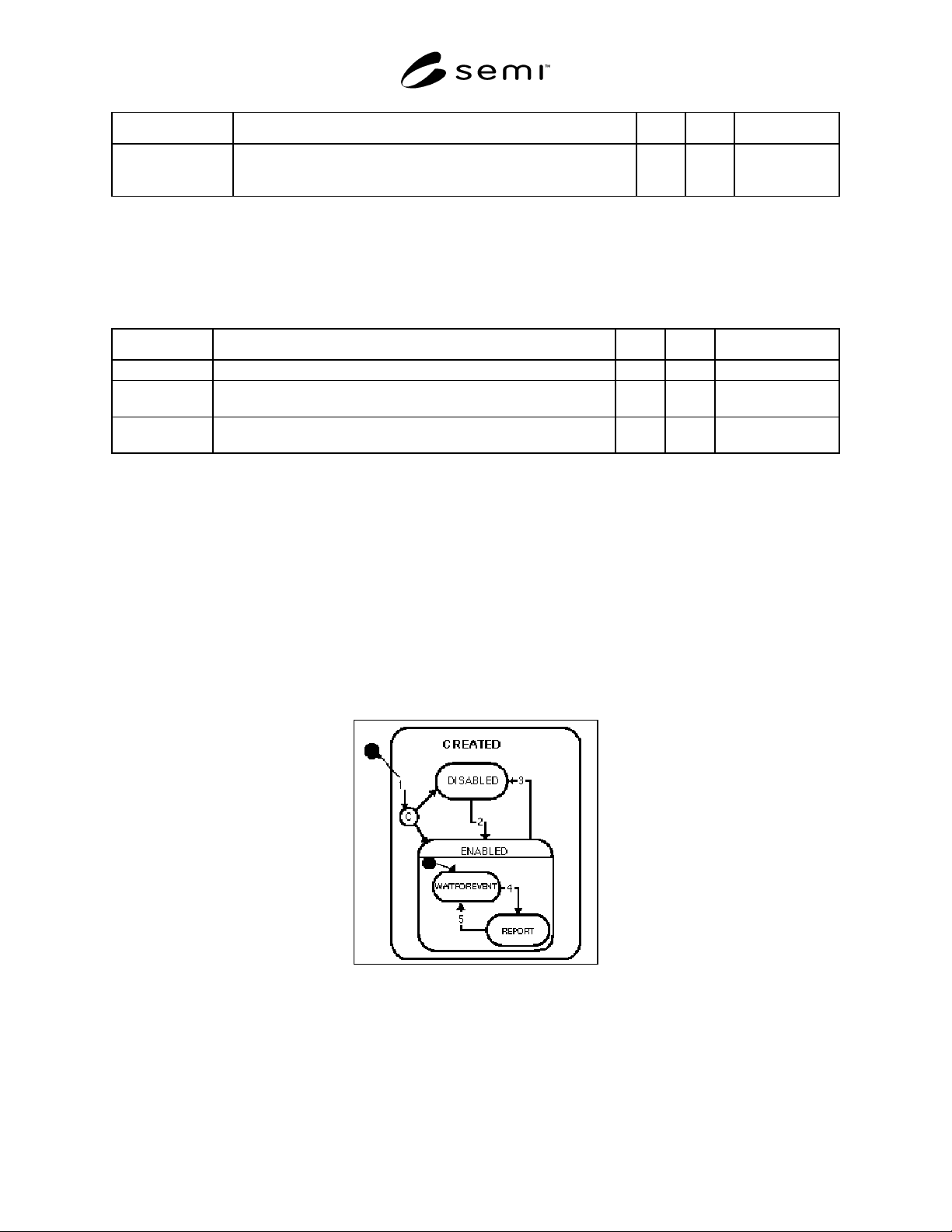
Figure 10
Collection Event Object State Diagram
8.2.1.1 Figure 10 shows the state diagram for a collection event object. The Harel State Model Notation used is
described in Section 5.
SEMI E53-0704 © SEMI 1996, 2004 12
Table 5 Collection Event Object State Definitions
State Definition
CREATED Each collection event is associated with a unique Collection Event ID.
ENABLED The Service User will be notified by the sending of an event report when the collection event occurs.
DISABLED Event reports will not be sent to the Service User.
WAITFOREVENT The object is waiting for its associated Collection Event to occur.
REPORT Send an Event Report to a Service User, sample Data Reports which have been linked.
notExist User view of Collection Event Objects prior to connection (establishment of communications).
Table 6 Event Report Transition Table
# Current State Trigger New State Action(s)
1 Service user
establishes connection.
CREATED and
ENABLED or
DISABLED
A Collection Event Object is created on behalf of the
service user for every collection event. The event
reporting Enable attribute setting is conditional. It may
get its value from stored configuration information.
2 DISABLED Enable attribute set to
TRUE
ENABLED Event reporting is enabled for a specific collection event.
3 ENABLED Enable attribute set to
FALSE
DISABLED Event reporting is disabled for a specific collection event.
4 WAITFOREVENT Collection Event
occurs
REPORT Sample linked data reports. Send event report with linked
data reports.
5 REPORT Reporting Complete WAITFOREVENT The object waits for the collection event.
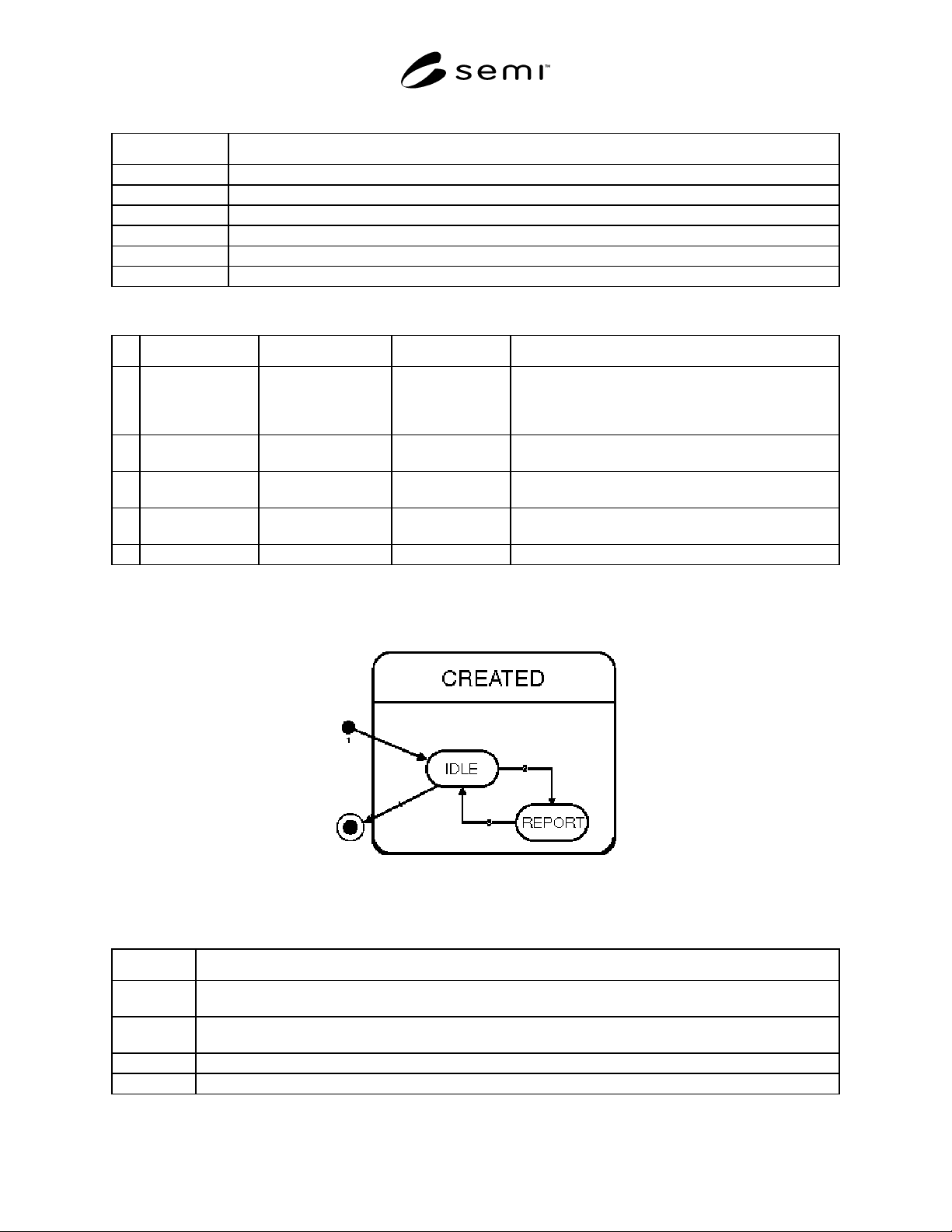
8.2.2 Data Report Object State Model — Each data report shall follow the transitions as specified in Figure 11.
Multiple instances of data report are managed by the event services. There are two basic types of data reports; pre-
defined and user defined.
Figure 11
Data Report Object State Chart
Table 7 Data Report Object State Definitions
State Definition
notExist The state from which the service provider creates reports.
NOTE: Some reports may be predefined, that is, they are not created by a user request.
IDLE Reports are sampled and generated only when requested from an external source such as the Trace or Event
Report object or the Service User directly.
CREATED This is the super-state of Idle and Report. Variables and/or attributes to be sampled are defined.
REPORT The variables or attributes specified in the Data Report Object are sampled and then sent to the report requestor.
SEMI E53-0704 © SEMI 1996, 2004 13
Table 8 Data Report State Transition
# Current State Trigger New State Action(s)
1 CreateRequest CREATED and IDLE New ReportID is defined. Wait for an actionable
event.
2 IDLE ReportRequest REPORT Sample data in report definition.
3 REPORT SamplingComplete IDLE Send data to report requestor.
4 IDLE DeleteRequest and not pre-defined notExists ReportID is no longer valid.
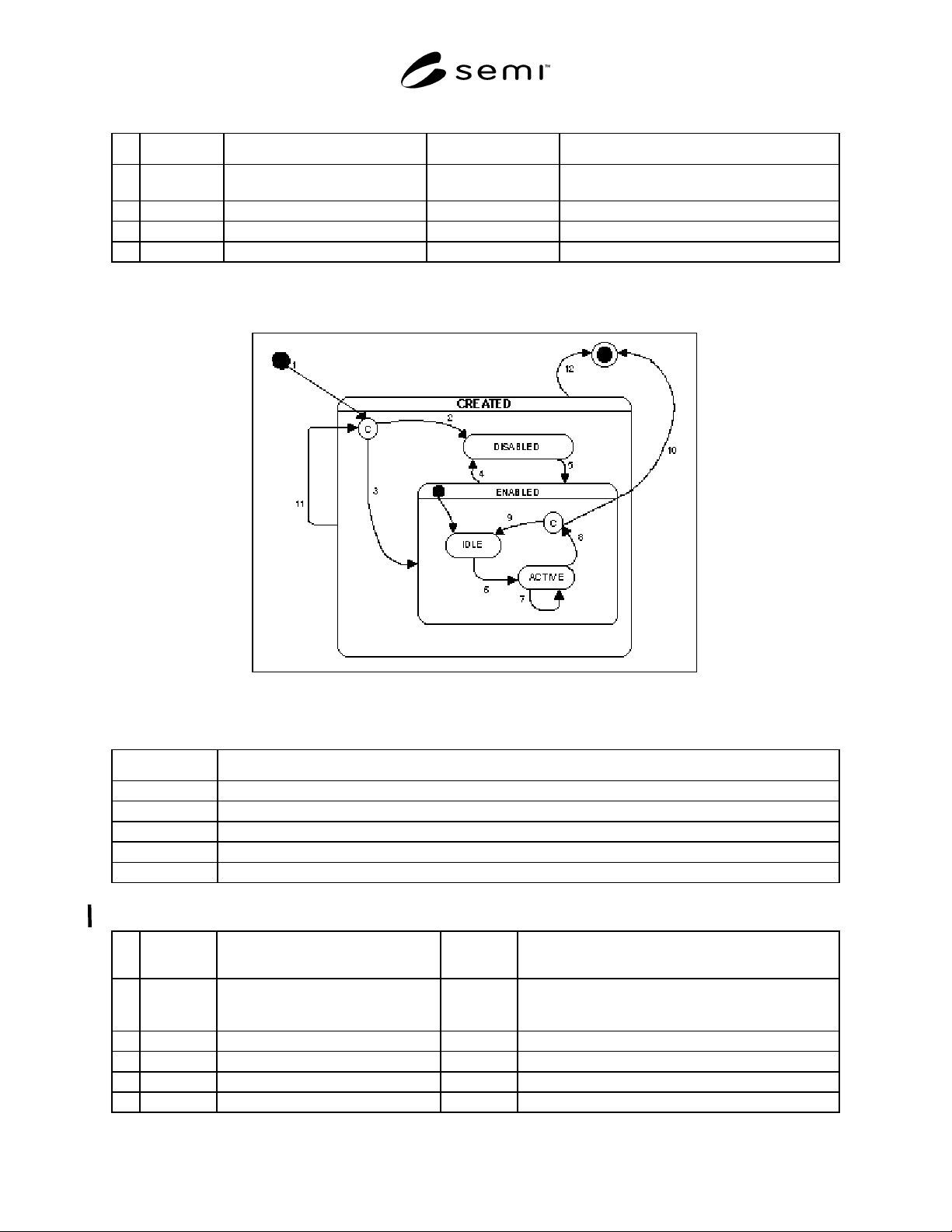
8.2.3 Trace Object State Model — Figure 12 shows the state diagram for a trace object. The Harel State Model
Notation used is described Section 5. The state transition table is shown in Table 10.
Figure 12
Trace Object State Diagram
Table 9 Trace Object State Definitions
State Definition
CREATED The Trace Object is created and ready to be accessed.
DISABLED Trace report is created but will not be sampled or sent.
ENABLED Trace object may begin generation of trace reports. See sub-states IDLE and ACTIVE.
IDLE Trace reports are not being generated.
ACTIVE The trace reports are being generated and sent periodically.
Table 10 Trace Object State Transition Table
# Current
State
Trigger New State Action(s)
1 (deleted) Trace Object Create (condition) A Trace Object is created with Report ID, Enabled,
Group Size, Total Samples, Sample Period, Start Event,
Stop Event, and Auto Delete parameters.
2 (condition) Enabled was initially FALSE. DISABLED Trace reporting is disabled.
3 (condition) Enabled was initially TRUE. ENABLED Trace reporting is enabled.
4 ENABLED Trace Report Disable DISABLED Trace reporting is disabled.
5 DISABLED Trace Report Enable ENABLED Trace reporting is enabled.