semi合集-English.pdf - 第1868页
SEMI E53-0704 © SEMI 1996, 2004 8 7.3.3 Trace Reporting with Event Control — Figure 8 shows a scenario in whic h a trace object is creat ed with enabled and AutoDelete both set to FALSE. There is al so a start event (Pro…
SEMI E53-0704 © SEMI 1996, 2004 7
• Delete a data report.
7.2.6 Event Report — Event reports may be sent as
messages to the service user whenever the associated
collection event occurs. The collection event object is
the source of the event report message. Event reporting
is initially disabled. If the data to be sent with an event
report has more than one data source, then there must
be at least one data report for each data source to be
included in the event report link definition. The service
user may request:
• Event reporting to be enabled.
• Event reporting to be disabled.
• One or more data reports to be to linked (included
in) the event report.
7.2.7 Trace Report — Trace reports are messages
which are sent to the service user periodically. The
trace report will contain the value(s) of the data item(s)
specified in the data report(s) referred to by the trace
object which is the source of the trace report.
7.2.7.1 The trace object contains the description of
what to include in the trace report and trace objects are
either pre-defined or defined dynamically by the service
user. The service user may request:
• Trace reporting to be enabled.
• Trace reporting to be disabled.
• One or more trace reports to be reset at any time to
their initial state.
• One or more trace reports to be deleted at any time.
7.2.7.2 When the enabled attribute of the trace object is
set, then trace reporting may be started or in response to
a start event. When the trace reporting starts, the sample
count is reset to zero. A trace report may be stopped
when a certain number of samples have been reported
or when a stop event occurs.
7.2.7.3 The service user may specify a trace object to
be automatically deleted once it has been stopped by
whichever mechanism. Otherwise, the trace reporting
simply stops. If no start event is defined, then the trace
is restarted immediately. Otherwise, the next start event
will restart the trace. Disabling or deleting a trace report
stops reporting immediately.
7.3 Scenarios — The communications involved in
event reporting are introduced below in the form of
some representative scenarios. The full behavior and
message set are covered in Sections 8.2 and 8.3
respectively.
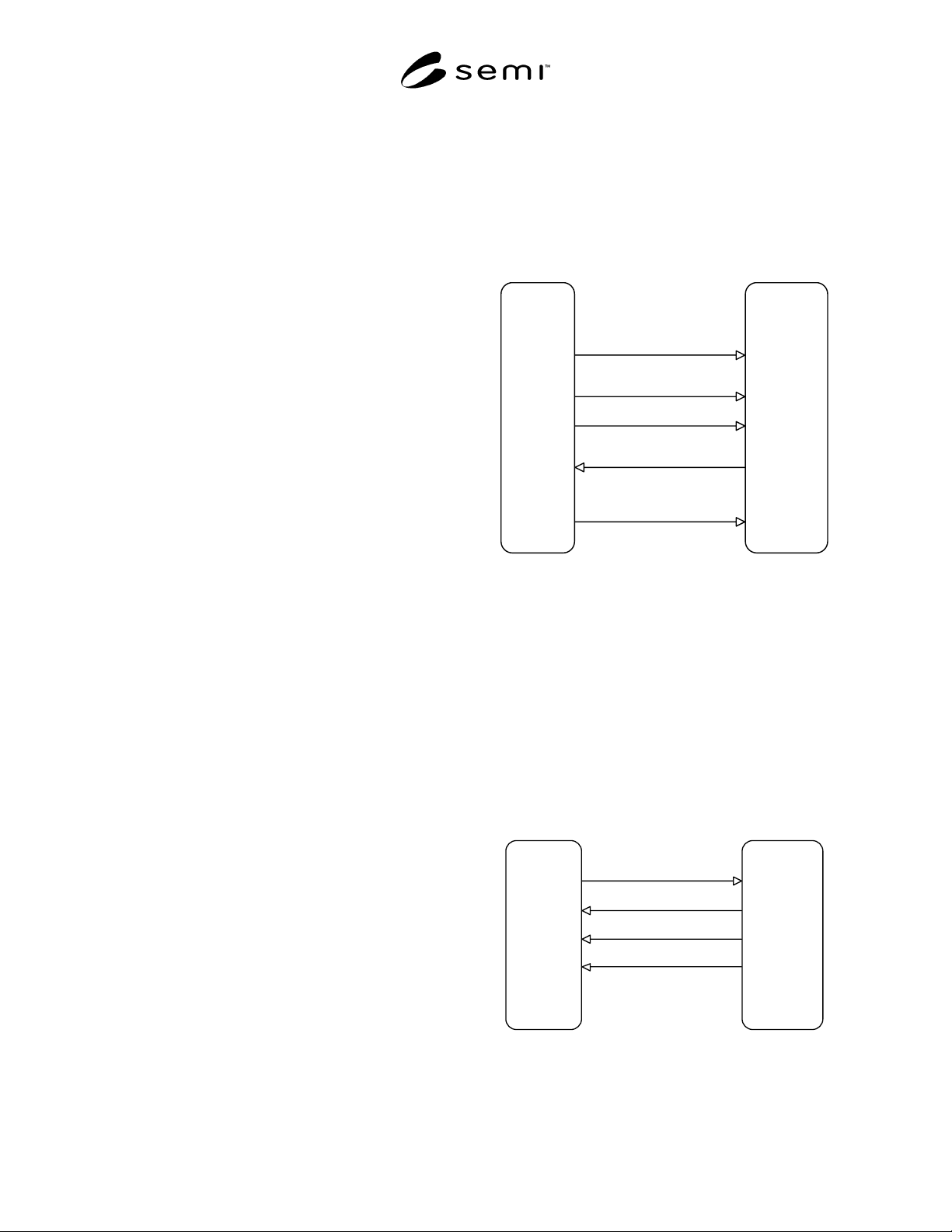
7.3.1 Event Reporting — Figure 6 shows a scenario in
which a data report is created by the service user and
linked to an event report. Event reporting is then
enabled. Subsequently, an event report is sent with the
data reports attached whenever the collection event
occurs. The service user then disables event reporting,
preventing subsequent collection events from triggering
the report. Data reports and links to event reports may
be pre-defined by the equipment in which case the
DataReportCreate and LinkCreate messages are
omitted.
EQUIPMENT
Service Provider
FACTORY
Service Use
r
Event report
disabled
Processing
com
p
lete
Compile data
re
p
ort and send
with event report
Enables an
event re
p
ort
Disables
event report
Receives
event reports
Event report
enabled
Defines a
data report
Event re
p
ort
disabled
Data report
created
Links
data report to
an event re
p
ort
Data report
linked
EventRe
p
ortEnable
EventRe
p
ortSend
EventRe
p
ortDisable
DataRe
p
ortCreate
LinkCreate
Figure 6
Event Reporting Scenario
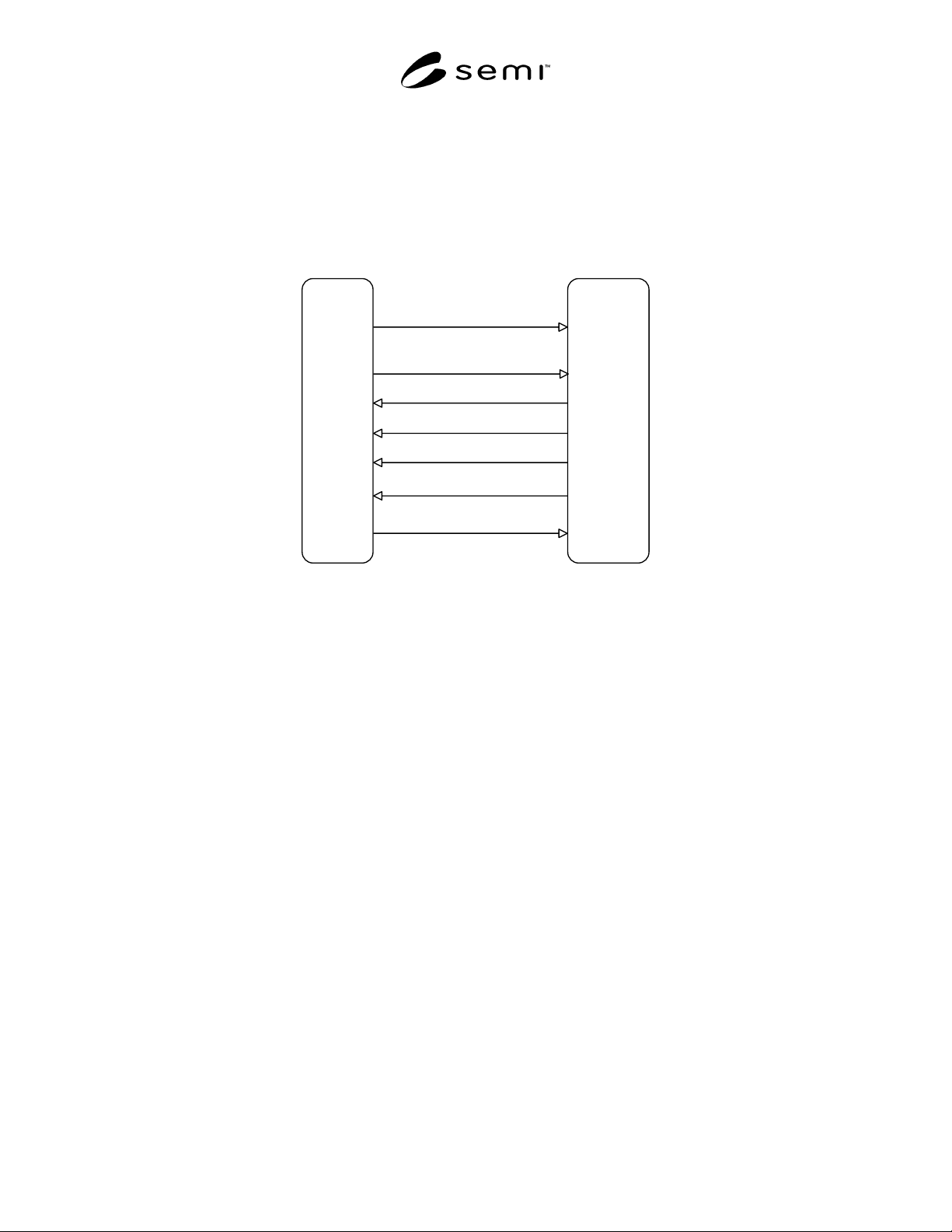
7.3.2 Trace Reporting — Figure 7 shows a scenario in
which a trace object is created with enabled and
AutoDelete both set to TRUE. Since the trace object is
enabled and there is no start event defined the data
reports assigned to the trace object are sampled and sent
immediately as a trace report message. The trace object
timer is started and the sample counter set to zero. Each
time the sample period elapses thereafter, a new trace
report is sent, and the sample counter incremented.
When the sample counter reaches the total samples
parameter, then the trace report is automatically
deleted.
EQUIPMENT
Service Provider
FACTORY
Service User
First re
p
ort sent
immediately
Sample Period
Ela
p
sed
Sam
p
le Period
Elapsed
Total Sam
p
les
reached
Trace re
p
ort
auto deleted
Creates a
trace report
Receives
trace re
p
orts
Trace report
created
TraceReportCreate
TraceReportSend
TraceReportSend
TraceRe
p
ortSend
Figure 7
Trace Reporting Scenario
SEMI E53-0704 © SEMI 1996, 2004 8
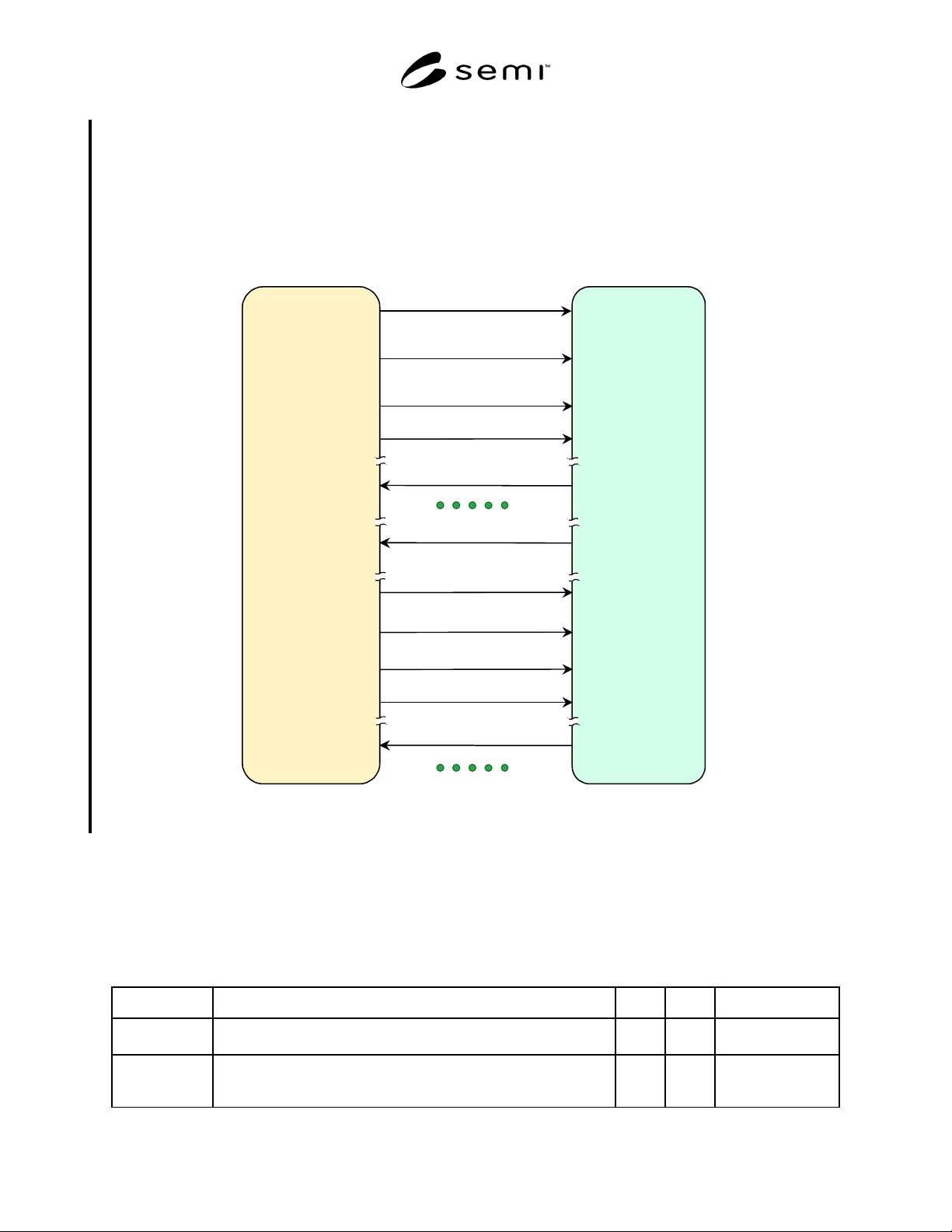
7.3.3 Trace Reporting with Event Control — Figure 8 shows a scenario in which a trace object is created with
enabled and AutoDelete both set to FALSE. There is also a start event (ProcessingStarted) and a stop event
(ProcessingComplete) defined. When the start event occurs, the data reports assigned to the trace are sampled and
sent, the trace timer is started and the sample counter set to zero. Each time the sample period elapses thereafter, a
report is sent and the sample counter incremented. Since a total samples parameter was not specified, the trace report
stops only when the stop event occurs. Once the stop event has occurred, the service user disables the trace report
preventing it from restarting when the next start event occurs.
EQUIPMEN
T
Service Provider
FACTORY
Sevice Use
r
Processin
g
started
Sample Period
Ela
p
sed
Sample Period
Ela
p
sed
Processin
g
com
p
lete
Will no longer
res
p
ond to
StartEvent
Creates a
trace report
Receives
trace reports
Disables
trace re
p
or
t
Will respond to
StartEven
t
Enables
trace re
p
or
t
Trace re
p
or
t
created but will
not res
p
ond
to StartEvent
TraceReportCreate
TraceRe
p
ortSend
TraceReportSend
TraceRe
p
ortSend
TraceReportSend
TraceRe
p
ortDisabl
e
TraceRe
p
ortEnabl
e
Figure 8
Trace Reporting with Event Control
SEMI E53-0704 © SEMI 1996, 2004 9
7.3.4 Event Reporting with Non-predefined CollectionEvent Object — Additional capabilities of SEMI E39 (OSS)
give Event Reporting standard more flexibility. For example, CollectionEvent objects can be created while
equipment is running if the equipment has been installed the capability. If event sources are dynamically generated
as process job, CollectionEvent objects must be created after the source is generated. If a user is not interested in
such source, this capability is not required. However, if the user needs to get event report for such source, the
capability is useful. This document doesn’t recommend nor suppress that but it’s depending on users.
Creat e
(Collect ionEvent object )
Dat Report Cr eat e (x n)
FACTORY
(Ser vice User )
Cr eat es a
Collect ionEvent obj ect
A Collect ionEvent
obj ect is cr eat ed.
Ret ur ns obj ect I D
EQUI PMENT
(Ser vice Pr ovider )
Dat aRepor t obj ect (s)
is(ar e) cr eat ed.
Ret ur ns obj ect I D
Cr eat es Dat aRepor t
obj ect (s)
Collect ionEvent Link (x n)
Dat aRepor t obj ect (s)
is(ar e) linked.
Links Dat aRepor t
obj ect (s)
Set At t ribut e
(Enabled=TRUE)
Collect ionEvent
obj ect is Enabled.
Enables
Collect ionEvent
Event Report Send
Event happens.
Linked Dat aRepor t (s)
value(s) ar e acquir ed
Cor r esponding
Pr ocedur e begins
Event Report Send
Event happens.
Linked Dat aRepor t (s)
value(s) ar e acquir ed
Cor r esponding
Pr ocedur e begins
Collect ionEvent
obj ect is Disabled.
Disables
Collect ionEvent
Collect ionEvent Unlink (x n)
Dat aRepor t obj ect (s)
is(ar e) unlinked.
Unlinks Dat aRepor t
obj ect (s)
Collect ionEvent Link (x n)
Dat aRepor t obj ect (s)
is(ar e) linked.
Links Dat aRepor t
obj ect (s)
Collect ionEvent
obj ect is Enabled.
Enables
Collect ionEvent
Event Report Send
Event happens.
Linked Dat aRepor t (s)
value(s) ar e acquir ed
Cor r esponding
Pr ocedur e begins
Set At t ribut e
(Enabled=FALSE)
Set At t ribut e
(Enabled=TRUE)
Figure 9
Non-predefined Collection Event Scenario
8 Specification
8.1 Object Definitions
8.1.1 Collection Event Object — A collection event object generates an event report each time it is triggered by a
collection event from an event source. An event report contains the data samples from zero or more data reports to
which it is linked by the collection event object.
Table 1 Collection Event Object Attribute Definitions
Attribute Name Definition Rqmt Access Form
ObjType Specification of the Object Type of “Collection Event.” Y RO Text =
“COLLEVENT”
ObjID Object Identifier, within the scope of the event source object, for the
Collection Event which is the trigger for the generation of an event
report.
Y RO Text