semi合集-English.pdf - 第1583页
SEMI E37-0303 © SEM 1995, 2003 5 6 Use of TCP/IP 6.1 TCP/IP API — The specification of a required TCP Application Program Interface (API) for use in implem entations is outside th e scope of HS MS. A given HSMS im plemen…
SEMI E37-0303 © SEMI 1995, 2003 4
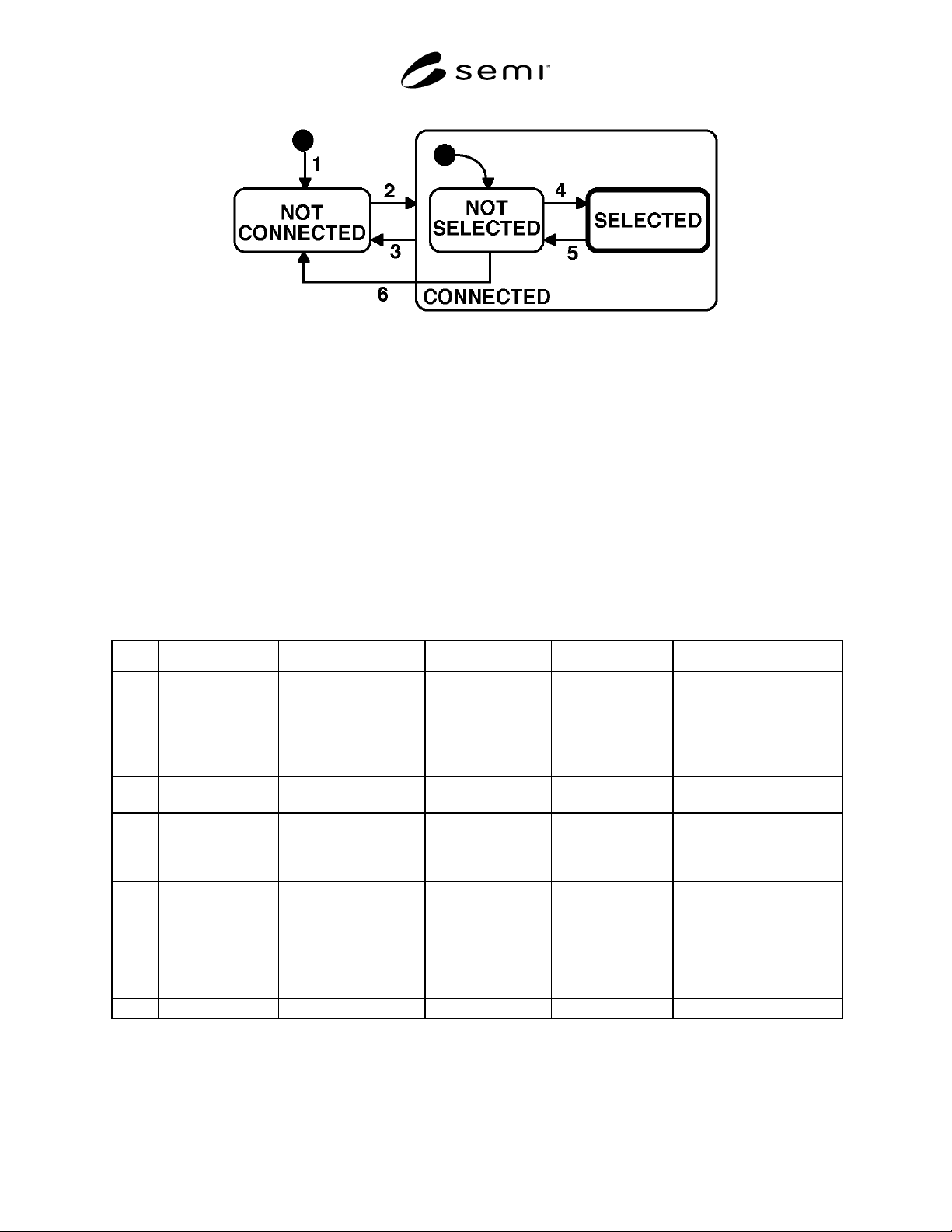
5.2 State Descriptions
5.2.1 NOT CONNECTED — The entity is ready to listen for or initiate TCP/IP connections but either has not yet
established any connections or all previously established TCP/IP connections have been terminated.
5.2.2 CONNECTED — A TCP/IP connection has been established. This state has two substates, NOT SELECTED
and SELECTED.
5.2.2.1 NOT SELECTED — A substate of CONNECTED in which no HSMS session has been established or any
previously established HSMS session has ended.
5.2.2.2 SELECTED — A substate of CONNECTED in which at least one HSMS session has been established. This
is the normal “operating” state of HSMS: data messages may be exchanged in this state. It is highlighted by a heavy
outline in the state diagram.
5.3 State Transition Table
Table 1
# Current State Trigger New State Actions Comment
1 ... Local entity-specific
preparation for TCP/IP
communication.
NOT CONNECTED Local entity-specific Action depends on
connection procedure to be
used: active or passive.
2 NOTCONNECTED A TCP/IP connection is
established for HSMS
communication.
CONNECTED -
NOT SELECTED
Local entity-specific none
3 CONNECTED Breaking of TCP
connection.
NOT CONNECTED Local entity-specific See Section 6.4.
4 NOT SELECTED Successful completion of
HSMS Select Procedure.
SELECTED Local entity-specific HSMS communication is
now fully established: data
message exchange is
permitted.
5 SELECTED Successful completion of
HSMS Deselect or
Separate.
NOT SELECTED Local entity-specific This transition normally
indicates the end of HSMS
communication and so an
entity would immediately
proceed to break the TCP/IP
connection (transition 3
above).
6 NOT SELECTED T7 Connection Timeout. NOT CORRECTED Local entity-specific per Section 9.2.2
SEMI E37-0303 © SEM 1995, 2003 5
6 Use of TCP/IP
6.1 TCP/IP API — The specification of a required TCP
Application Program Interface (API) for use in
implementations is outside the scope of HSMS. A given
HSMS implementation may use any TCP/IP API —
sockets, TLI (Transport Layer Interface), etc. —
appropriate to the intended hardware and software
platform, as long as it provides interoperable TCP/IP
streams protocol on the network.
The appendix contains examples of the TCP/IP
procedures referenced in this standard and sample
scenarios using both the TLI (POSIX standard 1003.12)
and the popular BSD socket model for TCP/IP
communication.
6.2 TCP/IP Network Addressing Conventions
6.2.1 IP Addresses — Each physical TCP/IP
connection to a given Local Area Network (LAN) must
have a unique IP Address. IP Addresses must be
assignable at installation time, and an HSMS
implementation cannot select a fixed IP Address. A
typical IP Address is 192.9.200.1.
IP imposes restrictions on these numbers which are
outside the scope of the HSMS protocol. Consult
Section 2.3 of RFC 791, Internet Protocol (IP) in
Section 3.
6.2.2 TCP Port Numbers — A TCP Port Number can
be considered as an extension of the IP Address.
HSMS implementations should allow configuring TCP
Port to the full range of the TCP/IP implementation
used. A typical TCP Port Number is 5000.
Conventions have been established for selecting TCP
Port Numbers which are outside the scope of the HSMS
protocol. Consult RFC 793, Transmission Control
Protocol (TCP) in Section 3.
6.3 Establishing a TCP/IP Connection
6.3.1 Connect Modes — The procedures for
establishing a TCP/IP connection are defined in RFC
793. However, not all the procedures defined by RFC
793 are supported by commonly available APIs. In
particular, while RFC 793 permits both entities to
initiate the connection simultaneously, this feature is
rarely supported in available
APIs. Therefore, HSMS restricts an entity to one of the
following modes:
• Passive Mode. The Passive mode is used when the
local entity listens for and accepts a connect
procedure initiated by the Remote Entity.
• Active Mode. The Active mode is used when the
connect procedure is initiated by the Local Entity.
The appendix provides an example of how an entity
may operate alternately in the active and passive modes
to achieve greater flexibility in establishing
communications.
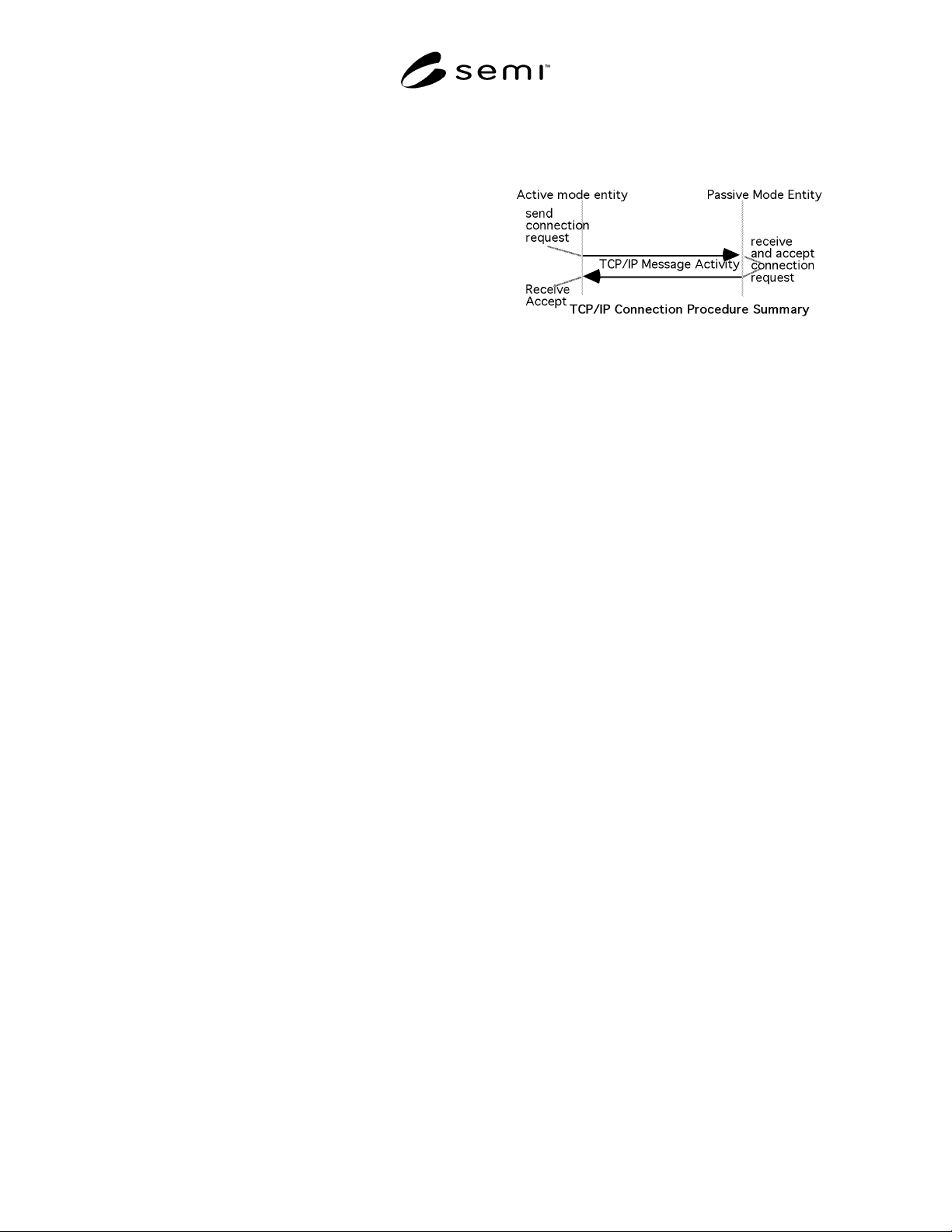
6.3.2 Passive Mode Connect Procedure — The
procedure followed by the Passive Local Entity is
defined in RFC 793. It is summarized as follows:
1. Obtain a connection endpoint and bind it to a
published port.
2. Listen for an incoming connect request to the
published port from a remote entity.
3. Upon receipt of a connect request, acknowledge it
and indicate acceptance of the connection. At this
point, the connect procedure has completed
successfully, and the CONNECTED state is
entered (Section 5).
These procedures are carried out through the API of the
local entity' s implementation of TCP/IP. The
appendices provide the API-specific procedures for the
above steps using both TLI and BSD.
NOTE: A failure may occur during the above steps. The
reason for failure may be local entity-specific or may be due
to a lack of any connect request after a local entity-specific
timeout. The action to be taken (for example: return to step 1
to retry) is a local entity-specific issue.
NOTE: See Section 9, Special Considerations, for issues
relating to multiple connection requests to the same passive
mode entity.
6.3.3 Active Mode Connect Procedure — The
procedure followed by the Active Local Entity is
defined in RFC 793. It is summarized as follows:
1. Obtain a connection endpoint.
2. Initiate a connection to the published port of a
passive mode remote entity.
3. Wait for the receipt of the acknowledge and the
acceptance of the connect request from the remote
entity. Receipt of the acceptance from the remote
SEMI E37-0303 © SEMI 1995, 2003 6
entity indicates successful completion of the
connect procedure, and the CONNECTED state is
entered (Section 5).
These procedures are carried out through the API of the
local entity' s implementation of TCP/IP. The appendix
provides the API-specific procedures for the above
steps using both TLI and BSD.
NOTE: A failure may occur during the above steps. The
reason for failure may be local entity-specific or may be due
to a lack of any accept message after a local entity-specific
timeout. The action to be taken is a local entity-specific issue.
If, however, the local entity intends to retry the connection, it
should do so subject to the T5 connect separation timeout (see
“Special Considerations”).
6.4 Terminating a TCP/IP Connection — Connection
termination is the logical inverse of Connection
establishment. From the Local Entity' s perspective, a
TCP/IP connection may be broken at any time.
However, HSMS only permits termination of the
connection when the connection is in the NOT
SELECTED substate of the CONNECTED state.
The procedures for termination of a connection are
defined in RFC 793. Either entity may initiate
termination of the connection. The NOT CONNECTED
state is entered, indicating the end of HSMS
communications. The appendix illustrates the
procedures for both release and disconnect using the
TLI and BSD APIs.
7 HSMS Message Exchange Procedures
HSMS defines the procedures for all message exchange
between entities across the TCP/IP connection
established according to the procedures in the previous
section. As explained in the overview, once the
connection is established, the two entities establish
HSMS communications with the Select procedure.
Then data messages may be exchanged in either
direction at any time. When the entities wish to end
HSMS communications, the Deselect or Separate
procedure is used to end HSMS communications.
7.1 Sending and Receiving HSMS Messages — All
HSMS procedures involve the exchange of HSMS
messages. These messages are sent and received as
TCP/IP streams using the previously established
TCP/IP connection at standard priority. In particular,
the use of “Urgent” data is not supported under HSMS
(see RFC 793 for more information on send and receive
procedures).
The appendix gives examples of sending and receiving
HSMS messages using both TLI and BSD socket APIs.
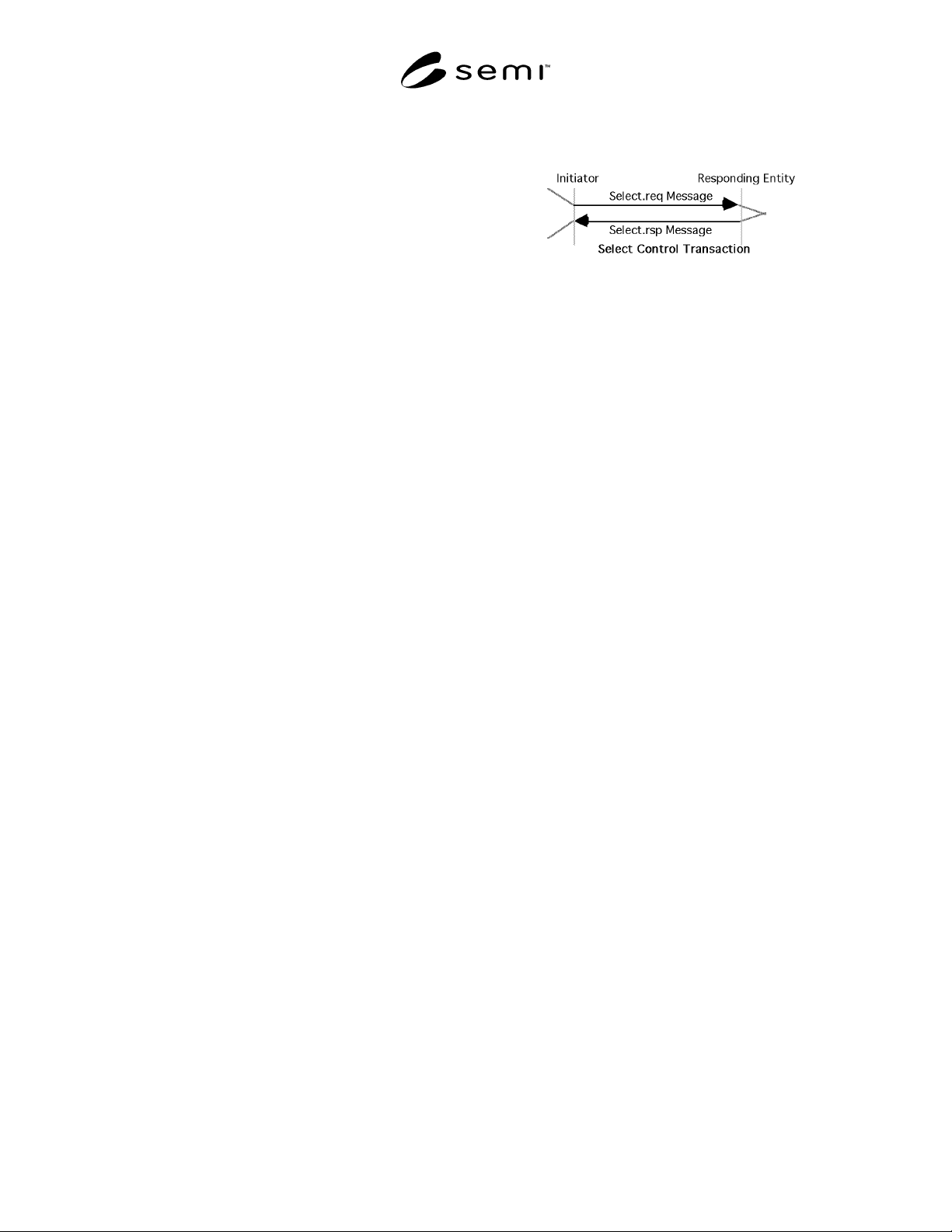
7.2 Select Procedure — The Select procedure is used
to establish HSMS communications on a TCP/IP
connection using the Select.req and Select.rsp messages
in a control transaction.
Although HSMS permits Select at any time in the
CONNECTED state, subsidiary standards may further
require the connection to be in the NOT SELECTED
substate (see “Special Considerations”).
7.2.1 Initiator Procedure — The procedure followed
by the initiator is as follows.
1. The initiator of the select procedure sends the
Select.req message to the responding entity.
2. If the initiator receives a Select.rsp with a Select
Status of 0, The HSMS Select procedure completes
successfully and the SELECTED state is entered
(see Section 5).
3. If the initiator receives a Select.rsp with a non-zero
Select Status, the Select completes unsuccessfully
(no state transitions).
4. If the T6 timeout expires in the initiator before
receipt of a Select.rsp, it is considered a
communications failure (see “Special
Considerations”).
7.2.2 Responding Entity Procedure — The procedure
followed by the responding entity is as follows.
1. The responding entity receives the Select.req.
2. If the responding entity is able to accept the select,
it transmits the Select.rsp with a Select Status of 0.
The HSMS Select Procedure for the responding
entity is successfully completed, and the
SELECTED state is entered (see Section 5).
3. If the responding entity is unable to permit the
select, it transmits the Select.rsp with a non-zero
Select Status. The HSMS Select Procedure for the
responding entity completes unsuccessfully (no
state transitions).
7.2.3 Simultaneous Select Procedures — If the
subsidiary standards do not restrict the use of the Select,
it is possible that both entities simultaneously initiate
Select Procedures with identical SessionID’s. In such a
case, each entity will accept the other entity' s select
request by responding with a Select.rsp.