semi合集-English.pdf - 第3680页
SEMI PR8-0703 © SEMI 2003 10 Num Previous State Trigger New State Actions 7 Hibernating The equipment is entering a state in which it will be possible to transmit data to its client. The DCP was activated with “U ntilDea…
SEMI PR8-0703 © SEMI 2003 9
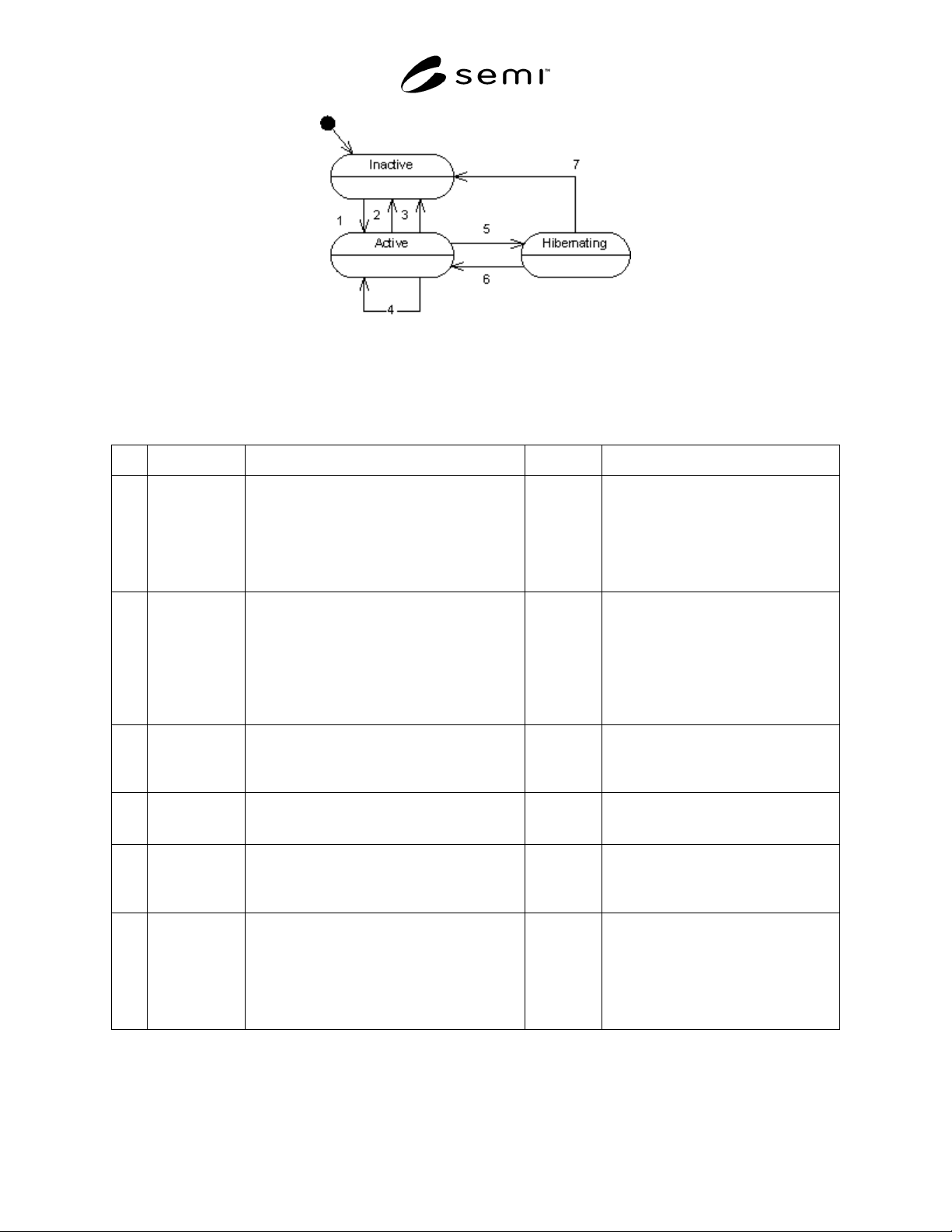
Figure 5
Data Collection Plan State Diagram
7.5.4 Data Collection Plan Transition Definition
Table 4 Data Collection Plan Transition Definition Table
Num Previous State Trigger New State Actions
1 Inactive A client requests the activation of a DCP using a
valid DCP id, via the ActivatePlan operation
Active The equipment responds affirmatively to
the request, and begins sending the data
included in the plan to the client. If
activated with “UntilDeactivated” set to
“true”, the equipment shall store a record
in non-volatile memory of the DCP ID
and its client’s address information.
2 Active A client requests the deactivation of a DCP
using a valid DCP id via the DeactivatePlan
operation.
Inactive The equipment responds affirmatively to
the request, and discontinues sending
data defined by that DCP to the client. If
the DCP had been activated with
“UntilDeactivated” set to “true”, the
equipment shall remove the previously
stored record regarding the DCP and its
client from non-volatile memory.
3 Active The equipment is entering a state in which it will
not be possible to transmit data to its client. The
DCP was activated with “UntilDeactivated” set
to “false” (see Section 7.6.2.4.1).
Inactive The equipment shall cease sending data
included in the DCP to the client.
4 Active A client requests the activation of the DCP, via
the ActivatePlan operation. The DCP is already
active.
Active The equipment responds with an error,
indicating that the DCP is already active.
5 Active The equipment is entering a state in which it will
not be possible to transmit data to its client. The
DCP was activated with “UntilDeactivated” set
to “true” (see Section 7.6.2.4.1)
Hibernating The equipment shall cease sending data
included in the DCP to the client.
6 Hibernating The equipment is entering a state in which it will
be possible to transmit data to its client. The
DCP was activated with “UntilDeactivated” set
to “true” (see Section 7.6.2.4.1). The client has
responded to the EdaEnabled message within the
configured number of attempts (see Section
7.7.6.1).
Active The equipment shall begin sending the
data included in the DCP to the client
that originally activated it, as specified in
the record that was stored in non-volatile
memory for the DCP when it was
activated.

SEMI PR8-0703 © SEMI 2003 10
Num Previous State Trigger New State Actions
7 Hibernating The equipment is entering a state in which it will
be possible to transmit data to its client. The
DCP was activated with “UntilDeactivated” set
to “true” (see Section 7.6.2.4.1). The client has
not responded to the EdaEnabled message within
the configured number of attempts (see Section
7.7.6.1).
Inactive The equipment shall cease attempting to
send the data included in the DCP to the
client.
7.6 Data Management
7.6.1 Overview — Data management is defined by the
set of messages necessary to control the flow of data
from the equipment for a given client. Requested data
is organized by data collection plans (DCPs) that can be
individually activated and de-activated by name.
Additionally, EDA clients are able to determine which
plans are defined on the equipment, and which plans are
currently active. Data management can be performed
by either the SECS/GEM client or any configured
SOAP client, as established through configuration (see
Section 7.4).
7.6.2 Data Management Messages — The equipment
must support the following data management messages,
whether data management takes place via SECS/GEM
or SOAP. The equipment shall only respond to data
management requests originating from configured
clients. SOAP clients are identified by the value of the
‘From’ element of the ‘MessageHeader’ SOAP header
in each message originating from that client. The
equipment shall respond to all data management
messages received from unrecognized clients with an
error.
7.6.2.1 IsEdaEnabled — This operation allows the data
management client to ascertain whether the equipment
is ready to receive EDA data management
communications and to transmit data through the EDA
port.
7.6.2.1.1 When this message is sent via SOAP, the
SOAPAction HTTP header used shall be “urn:semi-
org:ws:eda_ps_v0.0:IsEdaEnabled”. When this
message is sent via SECS/GEM, the S14F19 message
shall be used, with the SVCNAME data variable equal
to “IsEdaEnabled” (see Table 5).
7.6.2.1.2 The equipment shall always respond to this
request, whether it originates from the SECS/GEM port
or a valid configured SOAP client, and independent of
the setting of the data management configuration
switch.
7.6.2.2 GetDefinedPlanIds — In this operation the data
management client requests the names of the data
collection plans that are available for activation by the
client at the current time. The equipment returns the
names of all data collection plans that are currently
defined, regardless of their activation status.
7.6.2.2.1 When this message is sent via SOAP, the
SOAPAction HTTP header used shall be “urn:semi-
org:ws:eda_ps_v0.0:GetDefinedPlanIds”. When this
message is sent via SECS/GEM, the S14F19 message
shall be used, with the SVCNAME data variable equal
to “GetDefinedPlanIds” (see Table 7).
7.6.2.2.2 The equipment shall only respond to this
request if it originates from a client that is compatible
with the setting of the data management configuration
switch. For example, if the configuration switch is set
to enable data management via SECS/GEM and the
request originates from the SECS/GEM client, the
equipment shall respond with the list of defined DCP
ids. If the request originates from a SOAP client, the
equipment shall respond with an error.
7.6.2.3 GetActivePlanIds — In this operation the data
management client requests the names of the data
collection plans currently active for that client. The
equipment EDA port responds with the list of data
collection plans currently active for the requesting
client.
7.6.2.3.1 When this message is sent via SOAP, the
SOAPAction HTTP header used shall be “urn:semi-
org:ws:eda_ps_v0.0:GetActivePlanIds”. When this
message is sent via SECS/GEM, the S14F19 message
shall be used, with the SVCNAME data variable equal
to “GetActivePlanIds” (see Table 9).
7.6.2.3.2 The equipment shall only respond to this
request if it originates from a client that is compatible
with the setting of the data management configuration
switch. For example, if the configuration switch is set
to enable data management via SECS/GEM and the
request originates from the SECS/GEM client, the
equipment shall respond with the list of active DCP ids.
If the request originates from a SOAP client, the
equipment shall respond with an error.
7.6.2.4 ActivatePlan — In this operation the data
management client requests that a specific data
collection plan is activated. The equipment responds
successfully if it can fulfill the activation request. A
given DCP need not be restricted to activation by a
SEMI PR8-0703 © SEMI 2003 11
single client. There is no guarantee of the time between
activation request and the transmission of data from the
newly activated DCP to the client.
7.6.2.4.1 Data collection plans can be activated in two
modes, determined by the value of the
“UntilDeactivated” parameter (see Tables 11 and 15).
If the plan is activated with “UntilDeactivated” set to
“true”, then the plan will remain active until a
DeactivatePlan request is sent for that plan. In this
mode, the equipment shall place the plan in the
“Hibernating” state when the equipment shuts down, to
be re-activated during equipment startup. If the plan is
activated with “UntilDeactivated” set to “false”, then
the equipment shall place the plan in the “Inactive”
state when the equipment shuts down, requiring an
“ActivatePlan” request from a client to be made in
order to activate the plan again.
7.6.2.4.2 When this message is sent via SOAP, the
SOAPAction HTTP header used shall be “urn:semi-
org:ws:eda_ps_v0.0:ActivatePlan”. When this message
is sent via SECS/GEM, the S14F19 message shall be
used, with the SVCNAME data variable equal to
“ActivatePlan” (see Table 11).
7.6.2.4.3 The equipment shall only act on this request
if it originates from a client that is compatible with the
setting of the data management configuration switch.
For example, if the configuration switch is set to enable
data management via SECS/GEM and the request
originates from the SECS/GEM client, the equipment
shall respond by activating the requested DCP. If the
request originates from a SOAP client, the equipment
shall respond with an error.
7.6.2.5 DeactivatePlan — In this operation the data
management client requests the deactivation of one or
all of the currently activated data collection plans for
that client. If the data management client intends to de-
activate all data collection plans then Deactivate Plan
ID field should contain “ALL”. The equipment
responds with the list of data collection plans that have
been deactivated. If the equipment is unable to de-
activate the requested DCP it should respond with an
error message.
7.6.2.5.1 When this message is sent via SOAP, the
SOAPAction HTTP header used shall be “urn:semi-
org:ws:eda_ps_v0.0:DeactivatePlan”. When this
message is sent via SECS/GEM, the S14F19 message
shall be used, with the SVCNAME data variable equal
to “DeactivatePlan” (see Table 13).
7.6.2.5.2 The equipment shall only act on this request
if it originates from a client that is compatible with the
setting of the data management configuration switch.
For example, if the configuration switch is set to enable
data management via SECS/GEM and the request
originates from the SECS/GEM client, the equipment
shall respond by deactivating the requested DCP. If the
request originates from a SOAP client, the equipment
shall respond with an error.
7.6.2.6 SECS/GEM Data Management Messages
(S14,F19/20)
7.6.2.6.1 Each data management request sent via
SECS/GEM is implemented using the Generic Service
Request stream and function defined in SEMI E5.
Tables 5–14 define the arguments for the requests and
acknowledgements for each of these messages.
Although data management via SECS/GEM may not be
performed if the SECS/GEM port enters the offline
state or otherwise becomes unavailable, the equipment
shall continue to send DCP data activated while the
SECS/GEM was available.
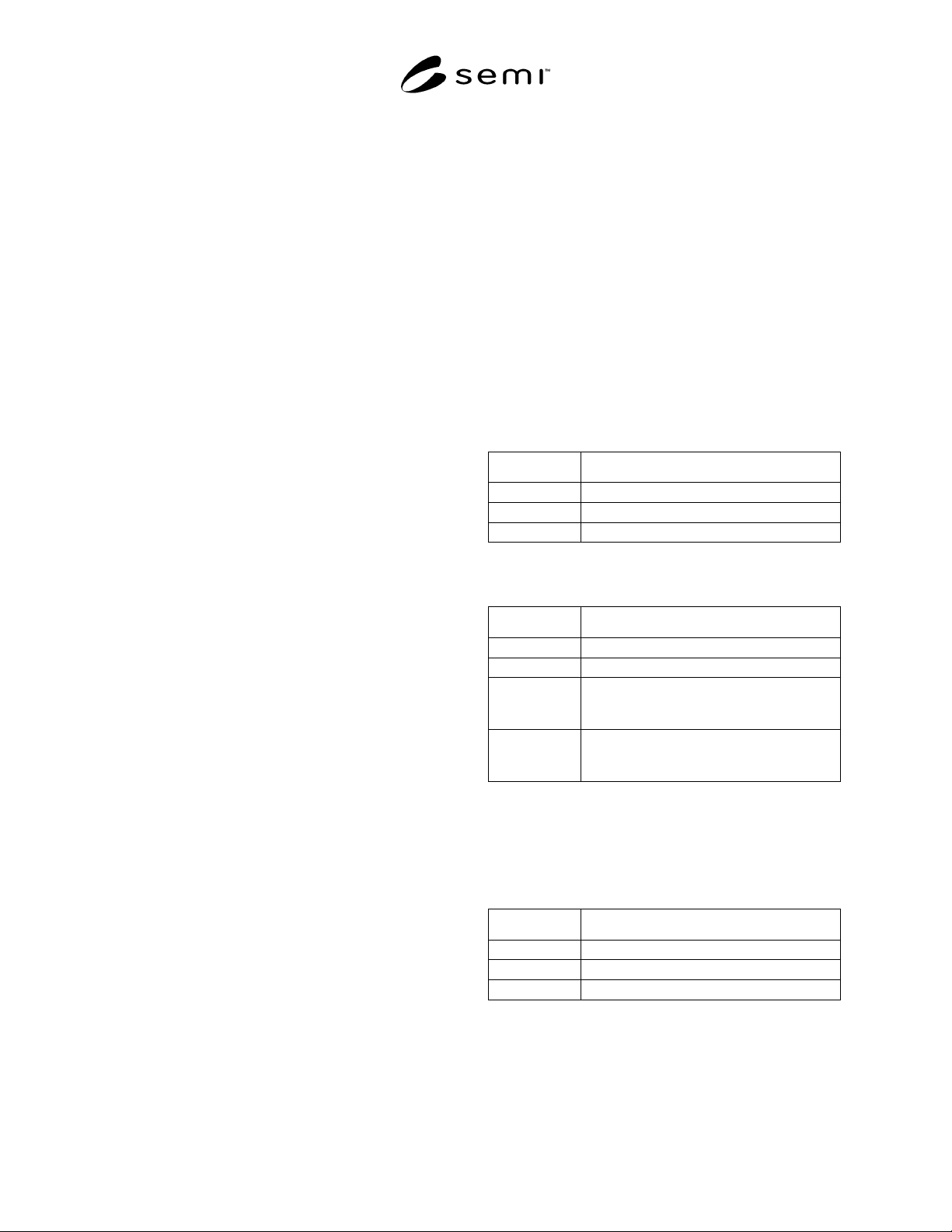
Table 5 Generic Service Request for IsEdaEnabled
Field Name Value
OPID 0
OBJSPEC “DataCollectionManager”
SVCNAME “IsEdaEnabled”
Table 6 Generic Service Acknowledge for
IsEdaEnabled
Field Name Value
SVCACK 0, 2
LINKID 0
ERRCODE
n
Supplier chooses the number and value of
ERRCODE
n
and ERRTEXT
n
entries for
error responses.
ERRTEXT
n
Supplier chooses the number and value of
ERRCODE
n
and ERRTEXT
n
entries for
error responses.
7.6.2.6.2 This message does not provide any return
parameters (list item 3 of the S14F20 message has zero
length).
Table 7 Generic Service Request for
GetActivePlanIds
Field Name Value
OPID 0
OBJSPEC “DataCollectionManager”
SVCNAME “GetActivePlanIds”