semi合集-English.pdf - 第6933页
SEMI S8-0705 © SEMI 1995, 2005 30 R1-4 Viewing Zones R1-4.1 The Figures R1-3 and R 1-4 depi ct the prim ary viewin g areas for visual displays. This area is conical. 30 0 Primar y viewing area Eye at rest 15 0 Horizontal…
SEMI S8-0705 © SEMI 1995, 2005 29
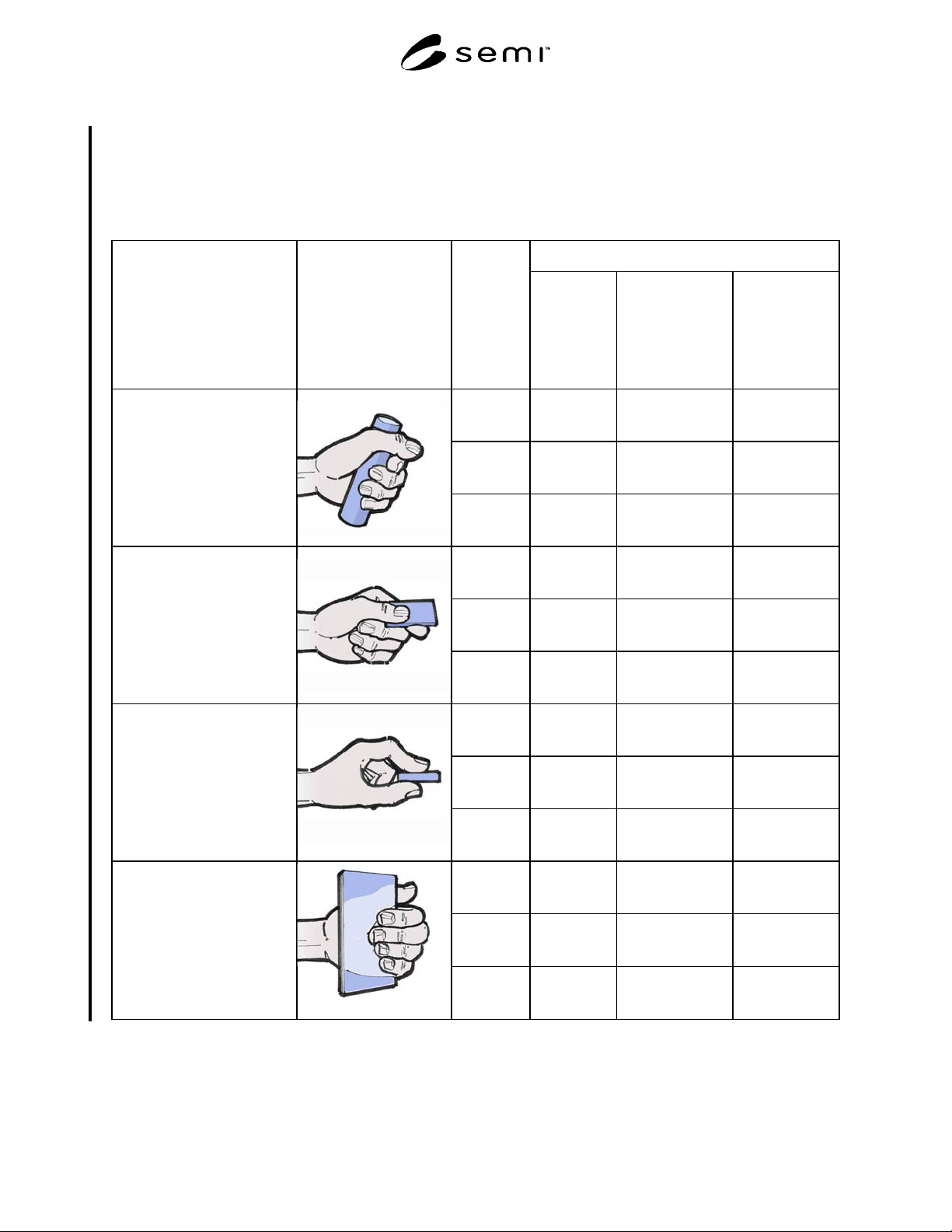
R1-3 Maximum Recommended Grip Forces
R1-3.1 The grip forces in Table R1-4 are based upon percentages of maximum one-time grip forces. These values
differ from maximum hand grip force values in Appendix 1: Supplier Ergonomic Success Criteria ¶6.7.1.1 through
¶6.9.2, which are maximum values for lift or pull forces based upon comfort and contact pressure against the hand.
Table R1-4 Maximum Recommended Grip Forces
Maximum Force
Grip Type Image Glove Use
Infrequent
Tasks
Repetition is
less than once
every 5 minutes
Occasional
Tasks
Tasks with a
repetition rate
between that of an
infrequent and a
f
requent tas
k
Static or
Frequent Tasks
Duration greater
than 4 seconds or
repeated more than
once every 30
seconds
Grip
without
gloves
137 N
(30.9 lbf.)
82 N
(18.5 lbf.)
41 N
(9.4 lbf.)
Grip with
cleanroom
gloves
116 N
(26.3 lbf.)
70 N
(15.7 lbf.)
35 N
(8.0 lbf.)
Power Grip:
The fingers of the hand wrap
around the object, and the
thumb overlaps the index
finger (e.g., gripping a
hammer).
Grip with
chemical
gloves
111 N
(25.0 lbf.)
66 N
(15.0 lbf.)
33 N
(7.6 lbf.)
Grip
without
gloves
35 N
(7.9 lbf.)
21.8 N
(4.9 lbf.)
10.7 N
(2.4 lbf.)
Grip with
cleanroom
gloves
30 N
(6.7 lbf.)
19 N
(4.2 lbf.)
9 N
(2.0 lbf.)
Lateral Pinch:
Object is held between the
thumb and the side of the index
finger (often referred to as key
grip).
Grip with
chemical
gloves
28 N
(6.4 lbf.)
18 N
(4.0 lbf.)
9 N
(1.9 lbf.)
Grip
without
gloves
24.5 N
(5.5 lbf.)
14.7 N
(3.3 lbf.)
7.6 N
(1.7 lbf.)
Grip with
cleanroom
gloves
21 N
(4.7 lbf.)
13 N
(2.8 lbf.)
7 N
(1.4 lbf.)
Tip Pinch:
Object held between the tips of
the thumb and index finger.
Grip with
chemical
gloves
20 N
(4.5 lbf.)
12 N
(2.7 lbf.)
6 N
(1.4 lbf.)
Grip
without
gloves
36 N
(8.2 lbf.)
21.6 N
(4.85 lbf.)
11.1 N
(2.5 lbf.)
Grip with
cleanroom
gloves
31 N
(7.0 lbf.)
18 N
(4.1 lbf.)
9 N
(2.1 lbf.)
Palmar Pinch:
Fingers pressed against the
palm of the hand, with the
object held between the fingers
and the palm. Thumb is not
used (e.g., picking up a sheet of
plywood).
Grip with
chemical
gloves
29 N
(6.6 lbf.)
18 N
(3.9 lbf.)
9 N
(2.0 lbf.)
SEMI S8-0705 © SEMI 1995, 2005 30
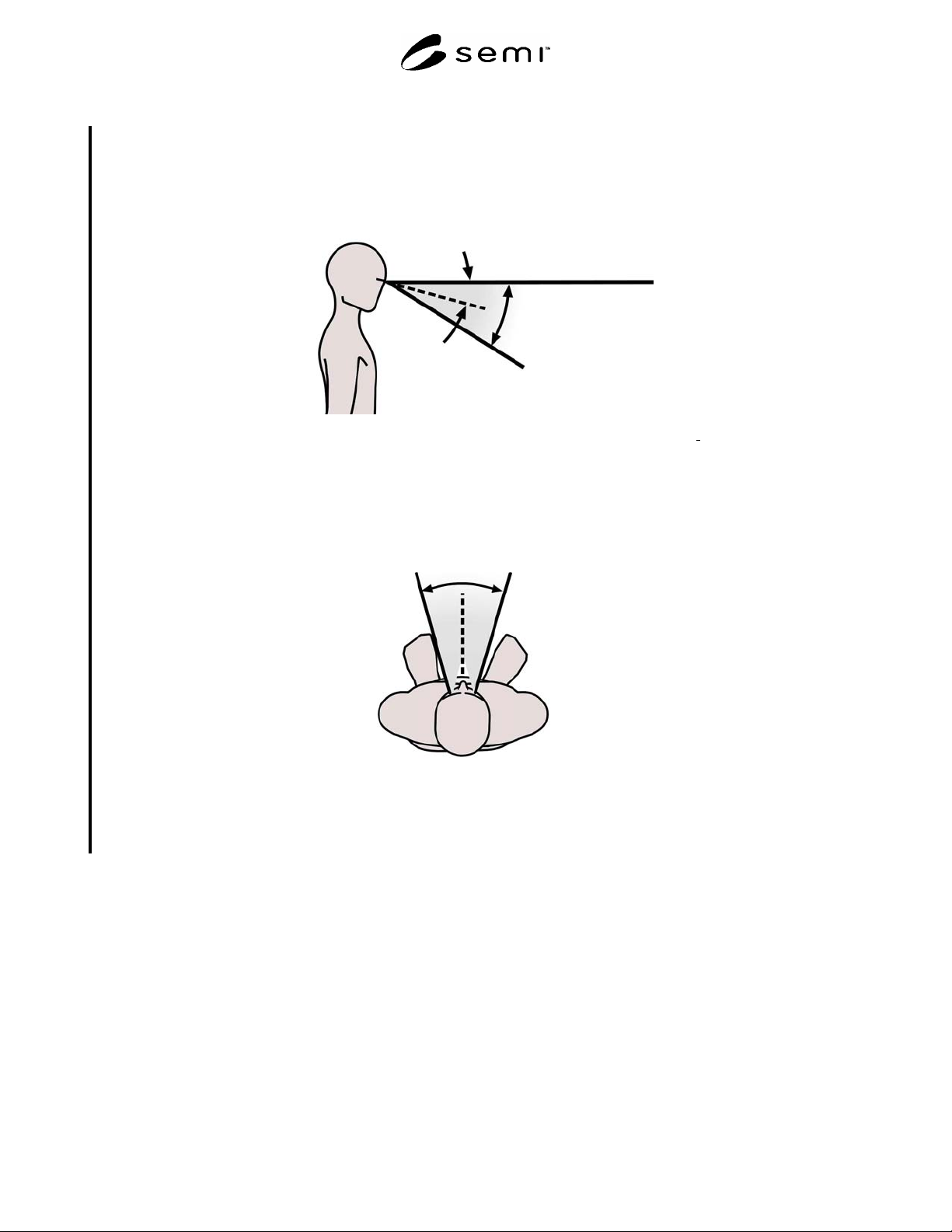
R1-4 Viewing Zones
R1-4.1 The Figures R1-3 and R1-4 depict the primary viewing areas for visual displays. This area is conical.
30
0
Primary
viewing
area
Eye at rest
15
0
Horizontal
line of sight
NOTE: This figure is based on data from: Pheasant, Stephen., Bodyspace: Anthropometry Ergonomics
and Design, Taylor and
Francis, 1996.
Figure R1-3
Side View of Primary Viewing Area for Visual Displays
Primary viewing area
30
0
NOTE: This figure is based on data from: Eastman Kodak Company, Ergonomic Design for People at Work (2
nd
Ed.), John
Wiley & Sons Inc., 2004.
Figure R1-4
Top View of Primary Viewing Area for Visual Displays

SEMI S8-0705 © SEMI 1995, 2005 31
RELATED INFORMATION 2
WORKSTATION DESIGN
NOTICE: This related information is not an official part of SEMI S8 and is not intended to modify or supersede the
official guidelines. It was derived from the work of the originating task force. Publication was authorized by full
ballot procedures. Determination of the suitability of the material is solely the user’s responsibility.
R2-1 General Considerations
R2-1.1 To enable good system performance, equipment and workspaces should be designed to accommodate the
physical dimensions of greater than 90 percent of user population. For recommended anthropometric data see
Related Information 1, Table R1-1, Figures R1-1 and R1-2.
R2-1.2 Where impairment of safety might result in danger to life, such as the inability to exit or escape under
emergency conditions, wider percentile ranges should be used (e.g., 1st through 99th percentile range).
R2-1.3 Many anthropometric databases cite unclothed dimensions.
R2-1.4 Critical and frequently used equipment, tools, and work items should be placed in the operator’s primary
viewing area.
R2-1.5 Provision for placement of required materials and informational items used during operation should be
accommodated in the design. Examples of materials/items include product boxes, wafer boxes, maintenance
manuals, and shop orders.
R2-2 Working Postures
R2-2.1 Workspace configurations that require static or frequent awkward postures (where the limbs or torso deviate
from a neutral position) should be avoided. For ranges of posture to avoid see Related Information 1.
R2-2.2 Equipment should be designed to avoid unsupported awkward static postures for operational tasks lasting
more than 20 seconds and unsupported awkward static postures for maintenance and service tasks lasting for more
than 40 seconds.
R2-2.3 Where applicable to tasks performed, equipment should be designed to allow both sitting and standing
operation.
R2-2.4 Controls, tools, and materials should be located so that the most frequent activities are performed from a
neutral posture.
R2-2.5 To prevent users from bending at the waist, the design should place users close to the point of operation by
providing adequate leg and foot clearance and keeping work materials at an appropriate height. See the “Supplier
Ergonomics Success Criteria” in Appendix 1 for design criteria.
R2-3 Standing Workstations
R2-3.1 See the “Supplier Ergonomics Success Criteria” in Appendix 1 for standing workstation design criteria.
R2-3.2 Display screens should be perpendicular to the normal line of sight and the angle of the screen should be
adjustable or positioned to minimize glare.
R2-4 Sitting Workstations
R2-4.1 See the “Supplier Ergonomics Success Criteria” in Appendix 1 for seated workstation design criteria.
R2-4.2 Sit/stand workstations are workstations where the operator can assume a standing posture or a seated posture
using a task stool.