semi合集-English.pdf - 第2244页
SEMI E58-0703 © SEMI 1997, 2003 25 13.4 User-Defined ARAMS Symptom Tables — Wh ere ARAMS Symptom Tables are supported, the descriptive text for symptoms provided within ex isting ARAMS Symptom Tables shall be presented t…
SEMI E58-0703 © SEMI 1997, 2003
24
Attribute Name Definition Access Reqd Form
SubstateSelect Enables (TRUE) or disables (FALSE) equipment-initiated
selection of substates in PRODUCTIVE and STANDBY.
RW N Boolean.
SymptomID The identifier of a symptom selected by the user when
requesting a state change.
RO Y Text. Conforms to
ObjID.
SymptomText The descriptive text of the symptom selected by the user
when requesting a state change.
RO Y Text. 0–80 characters.
UDTime Accumulated minutes in UNSCHEDULED DOWNTIME
state/substate. Required if accumulators are supported.
RW N Unsigned integer.
NOTE 1: The Clock attribute may be replaced by a Clock object having a DateTime attribute, as defined in SEMI E38.
1.21 Table Objects — Table 7 defines the attributes of a generic table. This is an abstract type of object that is not
itself directly implemented. Specific table types, which require definitions of their row formats (Section 10.2), are
subtypes of the generic table supertype and inherit all of the attributes of the supertype (see SEMI E39, Appendix).
Table 7 Table 7 Table Object Attribute Definition
Attribute Name Definition Access Reqd Form
ObjType The object type. RO Y Text = “Table”.
ObjID The object’s identifier. RO Y Text. 1–80 characters.
NumCols Number of columns. RO Y Unsigned integer.
NumRows Number of rows. RO Y Unsigned integer.
DataLength Total number of bytes required to store the table elements,
exclusive of any formatting required for storage or transfer.
RO Y Unsigned integer.
1.22 Different applications may define additional table attributes for specific table types. The subtypes defined by
ARAMS (Sections 10.3 and 10.4) are “TableARAMSCode” and “TableARAMSSymptom” and have no additional
attributes.
2 Human Interface Requirements
This section provides a central location for requirements affecting the human interface. It specifies the functions that
shall be available to the operator through the equipment’s console (human interface), where the equipment provides
such an interface. Applications that do not otherwise provide such an interface (e.g., cluster modules) are exempted
from these requirements.
13.2 Data Access — All supported data elements defined in Section 11 shall be accessible to the operator.
Specifically, the operator shall be able to view all ARAMS data provided by the equipment and shall be able to
modify the values of all data defined in Section 11.4.
2.1.1 Where the accumulators defined in Section 11.5 are supported, the operator shall be able to change their
individual values, with the exception of ARAMSAccumReset, and to reset the entire set together.
13.3 Selection of an ARAMS State/Substate — The operator shall be able to select any of the standard ARAMS
states and substates defined in Section 9.2, exclusive of those definitions with a “Reserved” substate that are
reserved for future standards. The operator shall also be able to select MANUFACTURING.
2.1.2 Where ARAMS Substate Tables are provided with user-defined or supplier-defined extensions, these
extensions shall also be available to the operator for selecting a change in the current ARAMS state and /or substate.
2.1.3 When selecting a SCHEDULED DOWNTIME or UNSCHEDULED DOWNTIME state/substate, the
operator shall be able to enter a comment to be stored in DowntimeData (Section 11.2.10).
SEMI E58-0703 © SEMI 1997, 2003 25
13.4 User-Defined ARAMS Symptom Tables — Where
ARAMS Symptom Tables are supported, the
descriptive text for symptoms provided within existing
ARAMS Symptom Tables shall be presented to the
operator for selection, according to the specifications in
Section 10.4, at the time the operator selects an
ARAMS State (Section 14.3). The operator is not
required to select a symptom. If the operator selects a
symptom, the symptom identifier is stored in the
variable SymptomID and the descriptive text is stored
in SymptomText.
13.5 Table Access — Where the equipment supports
one or both types of tables specified by ARAMS
(Sections 10.3 and 10.4), the operator shall have full
access to entries within those tables that are user-
defined. The operator shall be able to enter (define),
modify, and delete user-defined entries within ARAMS
table. The operator shall not be able to change or delete
the generic ARAMS Substate Codes defined in Section
9 or supplier extensions to those generic codes.
2.1.4 The operator shall be able to read the contents of
all existing ARAMS tables.
13.6 Color Codes — The use of color associated with
the display of ARAMS state information is optional. To
ensure consistency for the user, the following color
schemes shall be applied for all cases where color is
associated with an ARAMS state.
Uptime states
PRODUCTIVE: green
STANDBY: yellow
ENGINEERING: blue
Downtime states
SCHEDULED DOWNTIME: light red
UNSCHEDULED DOWNTIME: red
Other
NON-SCHEDULED TIME: grey
2.1.5 This scheme provides a visual grouping.
NOTE 21: The colors used for the two downtime states
should be both clearly related and readily distinguishable,
such as pink and bright red.
3 Services
3.1 This section formally defines the message services
specifically required to support ARAMS functionality.
3.1.1 Formal definition has three parts:
• A list of the services defined (Table 8),
• a common parameter dictionary defining all of the
parameters of these services (Table 9), and
• a dictionary of the individual services that defines
the parameters used by each service.
3.1.2 Services that are used by ARAMS, but are not
specific to ARAMS, are defined by other standards and
are referenced in Section 3.
3.1.3 Both the equipment and the host provide the
services TableSend and TableRequest, and both may
use the services provided by the other. The service
ARAMSStateChange is provided by equipment only.
3.1.4 Table 8 lists the ARAMS services. There are two
types of services:
• An initial message and response between the
service user and the service provider.
• A notification message from the service provider to
the service user that does not require a response.
3.1.5 The column in Table 8 that is called “Type” is
used to indicate whether the service consists of a
request/response message pair (R) or a single
notification message (N).
Table 8 Table 8 ARAMS Services
Message Service Name Type Description
TableSend R Used by the service user to send or delete a table.
TableRequest R A request to receive a table.
ResetAccumulators R A request to reset the set of accumulators.
ARAMSStateChange R Request to go to a specified ARAMS state/substate.
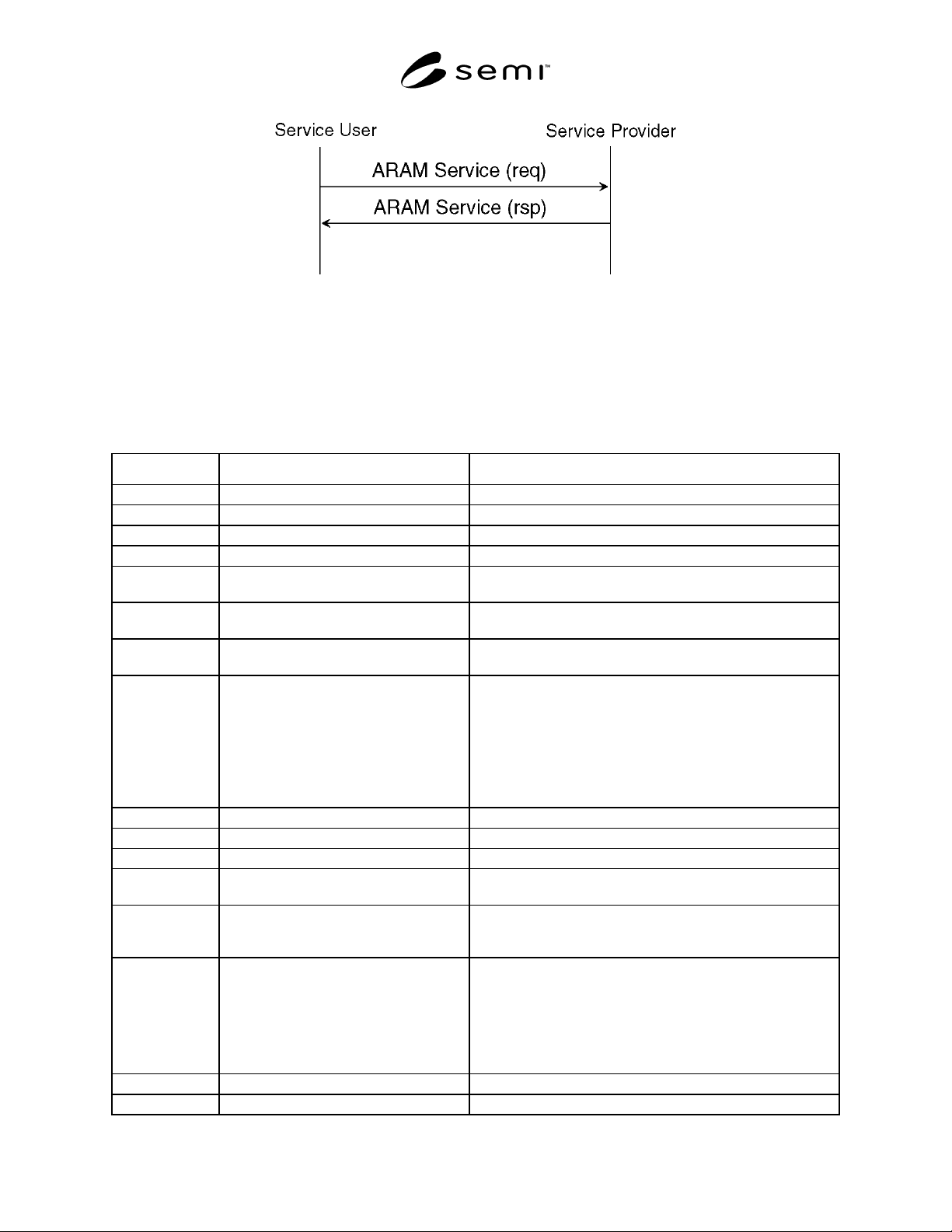
3.1.6 Figure 5 shows the message flow for each of the above ARAMS services.
SEMI E58-0703 © SEMI 1997, 2003
26
Figure 5
ARAM Service Message Flow
13.7 Services Parameter Dictionary — Table 9 defines all of the parameters, including the elements of complex
parameters, used in ARAMS message services. Parameters are listed in alphabetical order.
3.1.7 The “Form” column in Table 9 indicates the data type for the parameter. A list of the standard data types for
“Form” is included in Section 4.3.
Table 9 Table 9 ARAMS Services Parameter Dictionary
Parameter Definition Form
ARAMSCode ARAMS state/substate code. Alphanumeric text with fixed length of four characters.
AttrData The value of an attribute. Varies with attribute.
AttrName The attribute’s name. Text. Varies with object type.
ColHdr Column header. Text. 1–20 characters.
ErrorCode Contains the code for the specific error
found.
Enumerated.
ErrorText Text in support of the error code to provide
additional information.
Text.
ObjSpec The object specifier, used to specify the
owner of the target object.
Formatted text.
RequestStatus The result of the request to change to a new
ARAMS state/substate.
Enumerated:
0 = Acknowledge, action has been effected.
2 = Cannot perform now.
3 = Invalid parameter
4 = Acknowledge, action will be performed with
completion signaled later by an event.
6 = Object unknown.
Status Error information. Structure consisting of ErrorCode and ErrorText.
SymptomID The numeric symptom identifier. Unsigned integer.
SymptomText Descriptive text for symptom. Text. 0–80 characters.
TableAck Indicates the success (=T) or failure (=F) of
the operation.
Boolean.
TableAttr A table attribute other than object (table)
type or object (table) identifier. (See NOTE
1.)
Structure consisting of AttrName and AttrData.
TableCmd Instructions concerning the table transfer. Enumerated:
Entire table
Add new rows
Append new columns
Replace existing rows
Replace existing columns
TableElem One of the basic elements of a table. Varies with table type and (column) position within the row.
TableID Table identifier. Text. 1–80 characters.