semi合集-English.pdf - 第2767页
SEMI E98-1102 © SEMI 2000, 2002 32 10.6.4.5 Network Time 10.6.4.5.1 It shall be p ossible to set cur rent date and t ime by using t ime services provi ded by the network in the factory. Use of network ti me allows the di…
SEMI E98-1102 © SEMI 2000, 2002 31
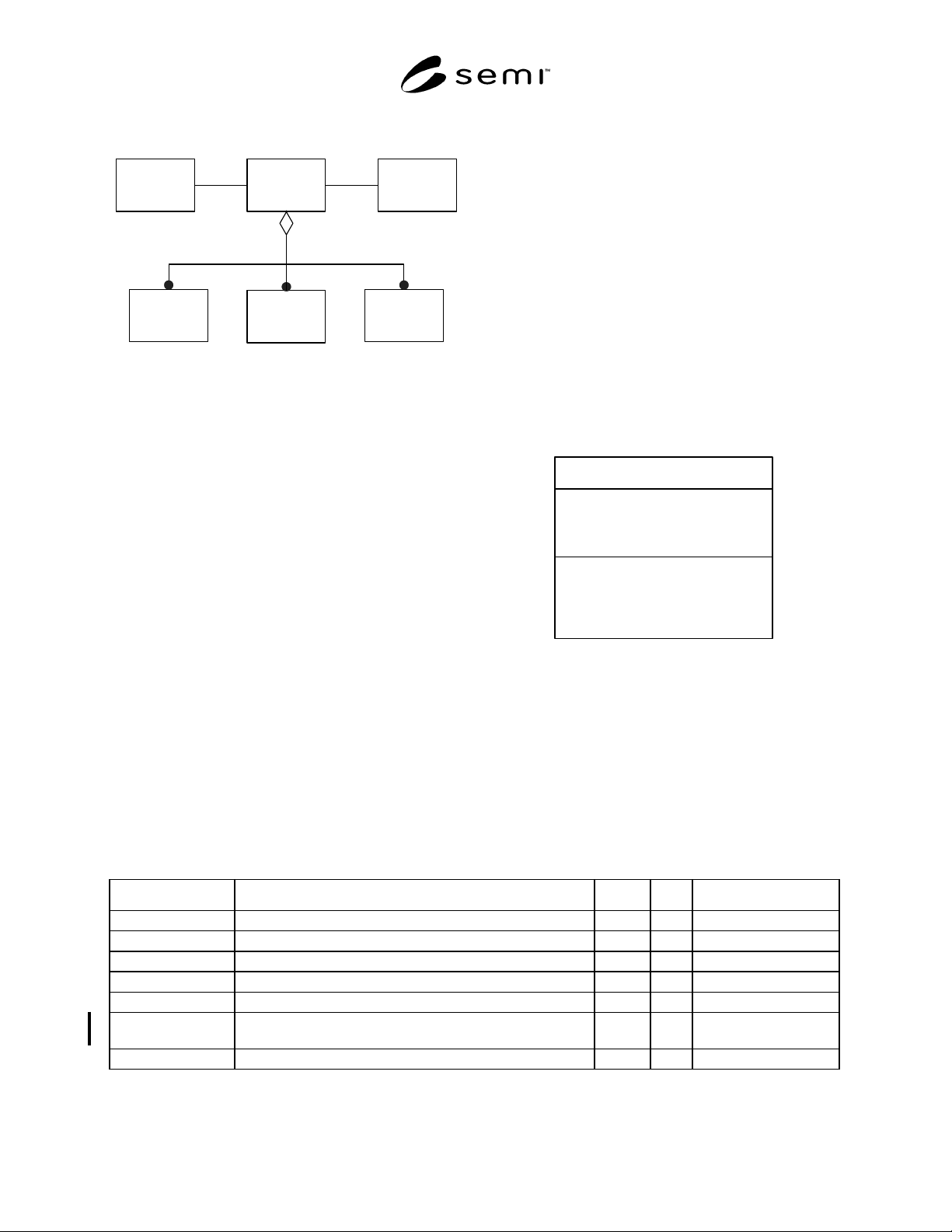
made. Figure 21 shows the relationships of the
Equipment.
Equipment
Access
Manager
Equipment
I/ODevice
Equipment
Module
Clock
Equipment
Subsystem
M
N
P
M + N + P >= 1
Figure 21
Equipment Object Relationships
10.6.3 Equipment Requirements — All equipment shall
satisfy the following requirements:
• The Equipment provides the interface to the factory
and shall not be made up of other Equipment.
• Equipment is the root object within the equipment
hierarchy.
• Equipment may not be a component of any other
AbstractEquipmentElement or any of its subtypes.
• Equipment may be made up of any standardized
objects except for other Equipment objects.
• Equipment is required to have a Clock.
• Equipment is required to have at least one
CarrierPort. Exceptions to this requirement may be
made for testers and for exposure equipment in a
linked litho cell that have separate communications
with the factory systems.
• Equipment is responsible for (owns) all of its
components
10.6.4 Clock Object
10.6.4.1 Clock represents current real-time date and
time of day information. This information may be
provided by a physical real-time clock or by other
methods of calculating time. The Clock is used to
timestamp data and events.
10.6.4.2 Requirements include:
• The user shall be able to read the current date and
time at any time.
• Equipment shall be capable of using both factory
network time services and user interface services to
set current date and time.
• Clock resolution shall be 0.01 seconds or smaller.
• Date shall maintain a four-digit year.
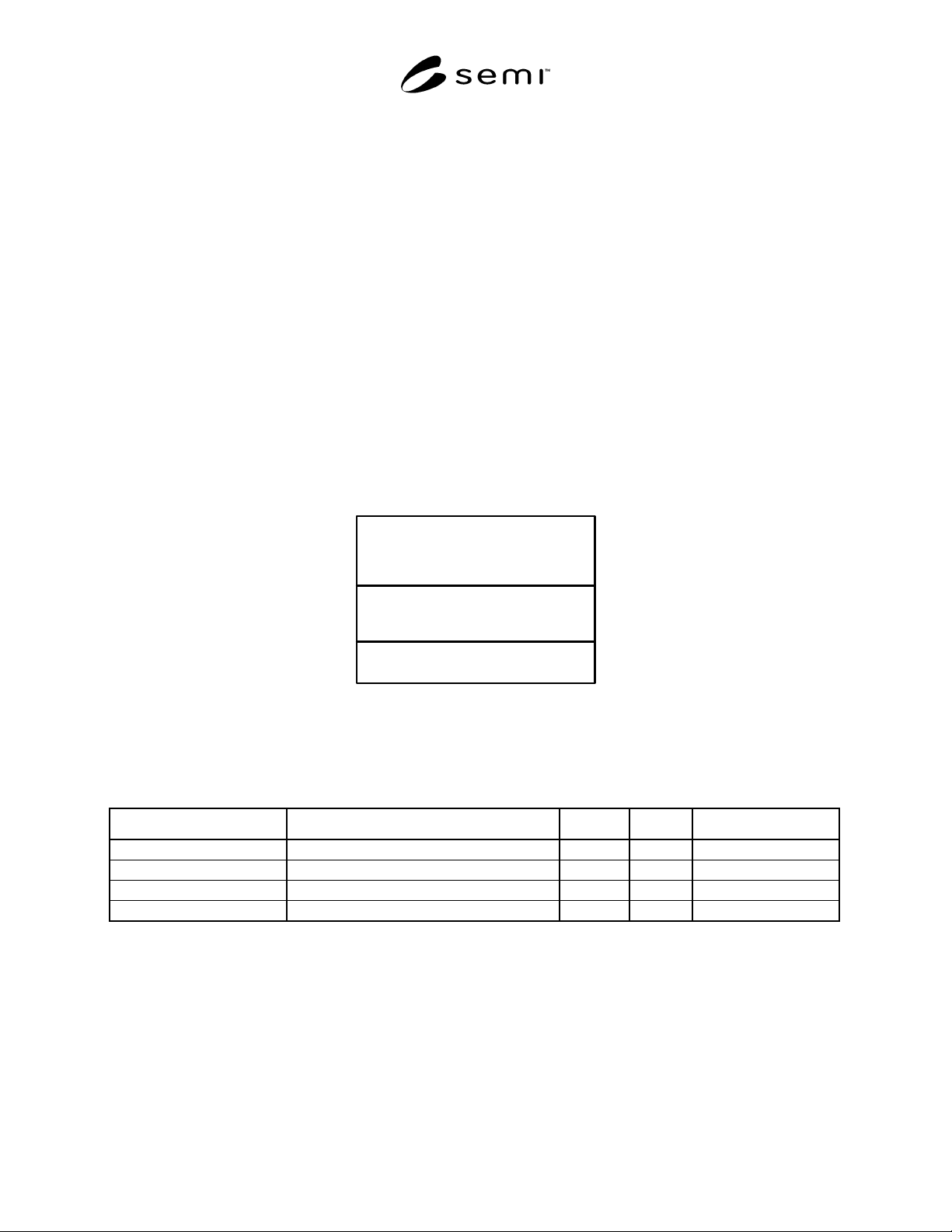
Clock
- DateTime
- UseNet
- TimestampFormat
- GMTDelta
- UseDelta
setDate&Time
getDate&Time
setFormattedDate&Time
getFormattedDate&Time
synchDate&Time
Figure 22
Clock Object
10.6.4.3 All calculations based on, or related to, date
and time shall be fault-free in both the twentieth and
twenty-first centuries.
10.6.4.4 Table 14 defines the attributes of Clock.
Table 14 Clock Attribute Definitions
Attribute Name Definition Access Reqd Form
ObjType Object type RO Y Text = “Clock”
ObjID Object identifier RO Y Text
DateTime Current date and time RO Y Protocol specific
UseNet Enable/disable network time synchronization RW Y Boolean
TimestampFormat Date and time format used to timestamp events RW Y Enumerated
GMTDelta Difference, in minutes, between the current time and
Greenwich Mean Time (GMT)
RO Y Integer
UseDelta Enable/disable showing current GMTDelta on timestamps RW Y Boolean
SEMI E98-1102 © SEMI 2000, 2002 32
10.6.4.5 Network Time
10.6.4.5.1 It shall be possible to set current date and time by using time services provided by the network in the
factory. Use of network time allows the different systems within the factory to remain closely synchronized with a
high degree of accuracy, and it relieves the factory host from explicitly setting the equipment’s clock. The attribute
UseNet allows the user to enable and disable use of network time services.
10.6.4.5.2 When enabled, the equipment shall be responsible for ensuring that any change in time does not result in
discontinuities in date/timestamp reporting. For example, if the time changes in the middle of a process, applying
the time change to current process events can cause later events to appear earlier than previous events, or they can
give the appearance of large pause in activities during processing. Both of these cases can cause time-based analysis
of data to give wrong results and must be prevented.
10.6.4.6 Timestamp Data
10.6.4.6.1 Date/time information is used by the factory for a variety of purposes, including analysis of historical
data. Typically a factory keeps local time. GMTDelta, the offset between local time and Greenwich Mean Time, is
provided to allow time values to be compared outside of the local time zone. GMTDelta may also be added to the
timestamp to clarify time data when local time changes within a process.
10.6.4.6.2 The attribute TimestampFormat allows the user to select the format used for timestamping events.
Possible formats include: formatted time, a text string of the form YYYYMMDDhhmmsscc, long signed integer,
and floating point.
10.6.5 Equipment Attributes
Equipment
AssignedOperators
EqpName
Cleanup
Figure 23
Equipment Object
10.6.5.1 Table 15 defines the attributes of the Equipment object, as shown in Figure 23.
Table 15 Equipment Attribute Definitions
Attribute Name Definition Access Reqd Form
ObjType Object type RO Y Text=“Equipment”
ObjID Object identifier RO Y Text
AssignedOperators Currently assigned operators. RO Y List of text
Nickname User-assigned name. RW Y Text
10.6.6 Equipment Services
10.6.6.1 Basic operational commands may be directed to an EquipmentModule, the Equipment as a whole, or to an
individual Process Job.
10.6.6.2 For multi-module or multi-process Equipment, the effect of an operational command varies depending
upon the level of the target object and the configuration of the Equipment. Given the number of Process Jobs that
are defined during the course of a work shift and their temporary nature; it is unlikely that an operator will
differentiate easily between one Process Job and another. Whereas they will be able to more quickly identify an
individual module or the Equipment when time is a critical factor.

SEMI E98-1102 © SEMI 2000, 2002 33
10.6.6.3 Operational Services
10.6.6.3.1 Abort — The user may direct the Equipment
to abort its operations at any time. The Equipment shall
stop all activity as soon as possible while maintaining
the safety of the product, the Equipment itself, and
people. Product is not returned to the carriers.
10.6.6.3.2 Cleanup — When product is left in the
Equipment following an abort operation, it may be
necessary to request the Equipment to return all
substrates to their carriers.
10.6.6.3.3 Pause — The user may request the
Equipment to pause its operations. The Equipment is
responsible for determining the appropriate points
within its process where it is safe to temporarily stop.
As with the Stop command above, the multi-module
Equipment may direct individual EquipmentModules to
Pause one at a time.
10.6.6.3.4 Resume — This command directs the
Equipment to resume normal operations from the
PAUSED state.
10.6.6.3.5 Start — The Start command directs the
Equipment to begin an activity that is already setup and
ready. Its use is not intended for automatic processing
by Equipment providing Process Job capabilities.
10.6.6.3.6 Stop — The user may direct the Equipment
to stop activity at any time. The Equipment shall be
responsible for ensuring that all of its components stop
their activities in an orderly fashion at the first
opportunity. Processing shall be completed for all work
in process (e.g., substrates that have already been
removed from their input carrier), but no processing
shall be started for remaining work.
For Equipment with multiple EquipmentModules
performing individual process steps in a sequence of
steps, a Stop command to the Equipment is equivalent
to issuing a Stop command to the first
EquipmentModule in the sequence, followed by
subsequent Stop commands to each EquipmentModule
once it has accepted the substrate last started.
10.6.6.4 Time Services — This section describes the
services provided by the clock.
10.6.6.4.1 Request Date and Time — The user shall be
able to read the equipment’s current date and time as a
numeric value.
10.6.6.4.2 Set Date and Time
10.6.6.4.2.1 If UseNet is disabled, the user shall be
able to set the current date and time as a numeric value.
Note that this method does not generally give good
synchronization results.
10.6.6.4.2.2 Set Date and Time shall not cause a
discontinuity in timestamps for data associated with an
individual substrate in process.
10.6.6.4.3 Request Formatted Date and Time — The
user shall be able to read the equipment’s current date
and time as a formatted text string.
10.6.6.4.4 Set Formatted Date and Time — If UseNet
is disabled, the user shall be able to set the current date
and time as a formatted text string. Note that this
method does not generally give good synchronization
results.
10.6.6.4.5 Synchronize Date and Time — The user may
request the equipment to synchronize date and time
from the network as soon as it can do so without
disrupting the timestamp series for any work in process.
11 OBEM Equipment Functional Requirements
11.1 The functional areas of the equipment are
described in the Functional View in Section 8.3.
Section 11 defines the requirements for each of these
functional areas. These are requirements at the level of
the Equipment object, in addition to those specified in
Section 10.
11.2 Access Management
11.2.1 Access Management is responsible for all
communications with the user, including local
operators, factory systems, and remote users. As
illustrated in Figure 24, the equipment may be required
to support multiple users, with at least one connection
to the factory and at least one interface to the local
operator. Where automation is used for material
handling, more than one human interface will be
required.
11.2.2 Objects shown in Figure 24 are not standardized
objects. Further work is required to determine
requirements for standardized objects to support access
management.
11.2.3 Arbitration — This section is reserved.
11.2.4 Authorization — This section is reserved.