semi合集-English.pdf - 第2610页
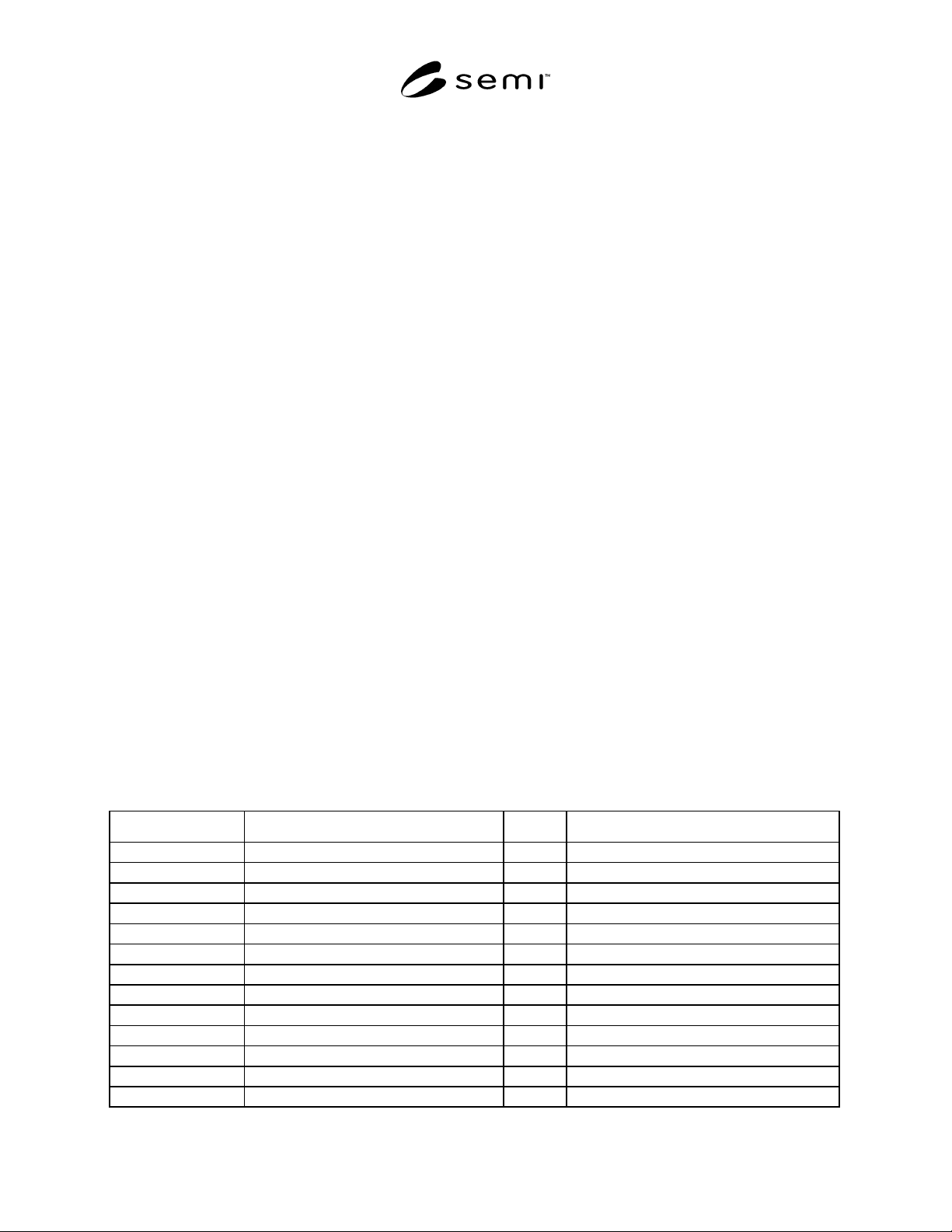
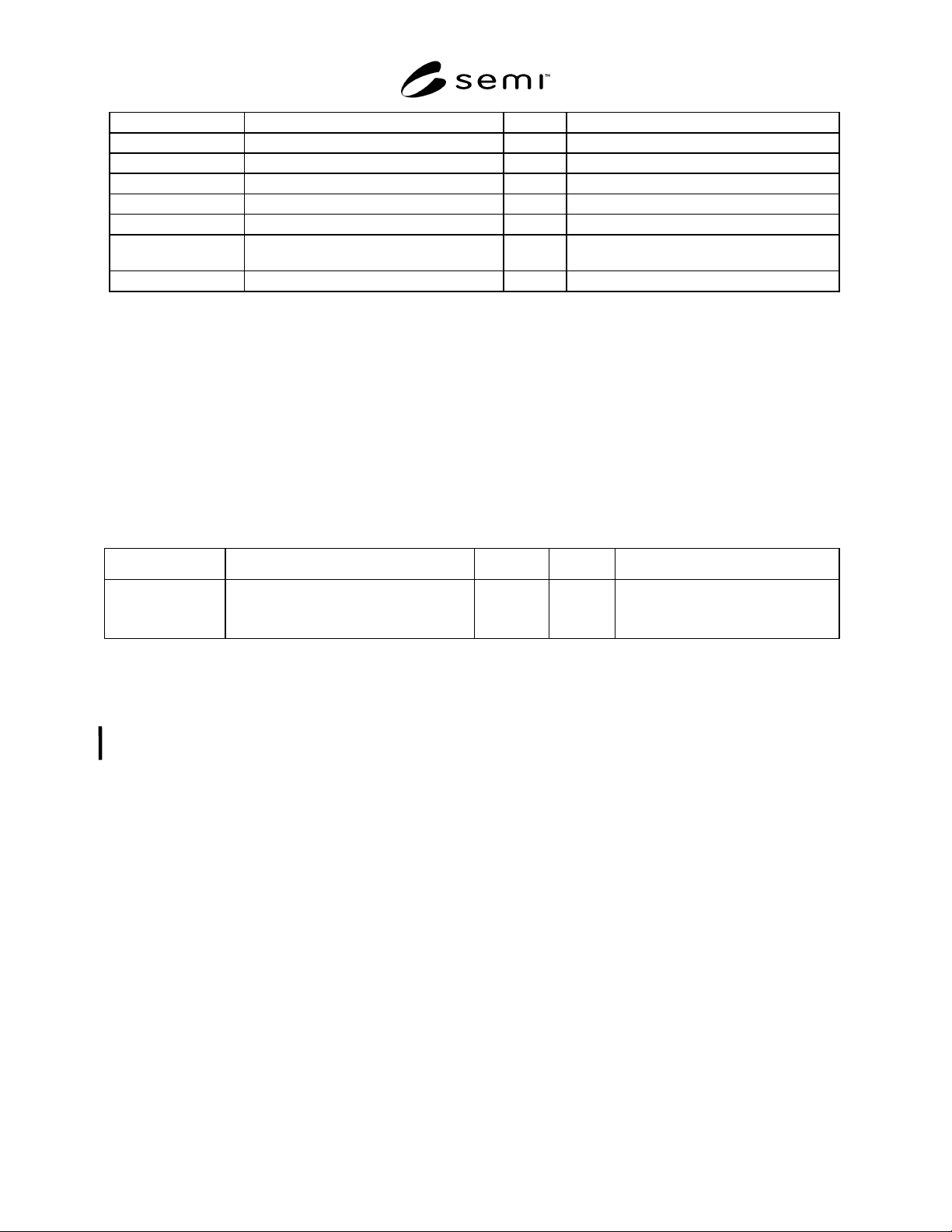
SEMI E91-0600 © SEMI 1999 , 2000 15 DIESIZE_X Die Siz e X A[1,6] Unit is mic ron DIESIZE_Y Die Size X A[1,6] Unit is micron REFDIEC OORD _X X coordina tor of refere nce die A[1,4] REFDIEC OORD _ Y Y coordina tor of re fe…
SEMI E91-0600 © SEMI 1999, 2000 14
9.5.2 An example of Waiting Previo us Data event report S6,F11 in the procedure above is shown below:
9.5.2.1 Example:
S6,F11
L,3
1. <DATAID>
2. <CEID> :Waiting Previous Data
3. L,2
1. <RPTID1>
2. L,4
1. <LOTID> :Prober Job ID
2. <PROCID>
3. <MID>
4. <IDTYP>
9.5.3 An example of remote command S2,F49 used in the procedure above is shown below.
9.5.3.1 Example:
S2,F49
L,4
1. <DATAID>
2. <OBJSPEC> :a null length item.
3. < RCMD> :“PRE-DATA_DOWNLOAD”
2. L,n
1. L,2
1. <CPNAME
1
>
2. <CEPVAL
1
>
:
n. L,2
1. <CPNAME
n
> :PreviousResultData
2. L,b
1. <CPVAL
n1
>
:
b. <CPVAL
nb
>
9.6 Map Data Item Variable Table
Table 11 Map Data Item Variable Table
Variable Name Description Format Comments
LOTID Lot ID (Prober Job ID) A[30]
PROCID Process ID A[20]
LOC Cassette location U1
PRODID Product name (i.e., Device type) A[24]
SLOTNO Slot position in the cassette A[2] MID
WAFERNO Wafer number A[2] MID
WAFERID Wafer ID A[32] MID
IDTYP ID type to recognize a wafer. A[8] “SLOTNO” or “WAFERNO” or “WAFERID”
WAFSIZE Wafer size A[3] Unit is mm
FLAT Flat or Notch A[5] “FLAT” or “NOTCH”
FLATANGLE Flat angle A[3] Range from “000” to “359”. Unit is degree.
ROW Row count U2
COLUMN Column count U2
SEMI E91-0600 © SEMI 1999, 200015
DIESIZE_X Die Size X A[1,6] Unit is micron
DIESIZE_Y Die Size X A[1,6] Unit is micron
REFDIECOORD_X X coordinator of reference die A[1,4]
REFDIECOORD_Y Y coordinator of reference die A[1,4]
REFDIEPOS_X X address of reference die from wafer center I4 Unit is micron
REFDIEPOS_Y Y address of reference die from wafer center I4 Unit is micron
BINLIST Bin value array containing pass/fail
information.
B[n]
ResultData Result data B[m]
NOTE 1: One of these three OPT items needs to be specified.
9.6.1 The data structure of ResultDa ta is selectable with soft-switch as below:
(i) X,Y,BIN,...,X,Y,BIN
(ii) X,Y,N,BIN,BIN,...,BIN
(iii) BIN,BIN,...,BIN
9.6.2 The BIN data is a binary array and defined by an equipment supplier. For example, BIN data may include an
attribute of die (skip, on-wafer, etc.), pass or fail information and bin code.
9.7 Data Item Variable Table
Table12 Data Item Variable Table
Variable Name Description Class Format Comments
BinType Constant which specifies the kind of the
data structure of ResultData.
ECV U1 0= X, Y, BIN, ..., X, Y, BIN
1= X, Y, N, BIN, BIN, ..., BIN
2= BIN, BIN, ..., BIN
10 Remote Commands
10.1 The purpose of this section is t o identify remote commands, command parameters, and valid commands
versus states in the processing state models. The specification in this section is provisional. This will be revised in
the near future.
10.2 Requirements
10.2.1 The prober must support the GEM-required remote commands. (Some of the GEM required remote
commands are restated here to define PSEM specific requirements.)
10.2.2 All the remote commands defined by PSEM are required.
10.2.3 The alphanumeric strings defined by PSEM for remote commands (RMCD) and command parameter
(CPNAME) are required.
10.2.4 If additional remote command s are supported, then the “Remote Command Versus Valid States” matrix
must be generated for these additional commands. Place an “X” in the table for each state in which a given
command is valid.
10.3 Remote Commands Descriptions
10.3.1 ABORT — This command terminates the current processing. ABORT makes no guarantee about completion
of the current process.
10.3.2 JOB_CANCEL — Instruct to d elete Prober Job before starting processing.
10.3.3 JOB_CREATE — Instruct to create Prober Job in batch processing unit (usually, unit of one cassette). This
allows management data for batch processing unit to be instructed to the prober.
SEMI E91-0600 © SEMI 1999, 2000 16
10.3.4 PRE-DATA_DOWNLOAD — Downloads previous result data which instructs the details of processing for a
wafer.
10.3.5 ONLINE-LOCAL — Change the control state from On-Line Remote to On-Line Local.
10.3.6 ONLINE-REMOTE — Change the control state from On-Line Local to On-Line Remote.
10.3.7 PAUSE — Instructs the equipment to pause the processing. This command puts the prober into PAUSING
state when the current operation is completed.
10.3.8 PP-SELECT — This command instructs the prober to copy the indicated Process Program from non-volatile
storage to the prober’s Process Program execution area.
10.3.9 RESUME — Instructs the equipment in pause to resume operation. This command makes the equipment
resume the processing from a point where the processing PAUSED.
10.3.10 START — Instructs to start Pro ber Job.
10.3.11 STOP — Instructs the equipment to stop the processing. This command completes the current processing
unit, stops the equipment in safe state, and puts the equipment back to IDLE state. STOP has an intention of causing
a normal completion after the current unit is completed. Also, whether the processing unit is die or wafer can be
specified by the equipment constant Stop Unit.
10.4 Parameter Related to Remote Command
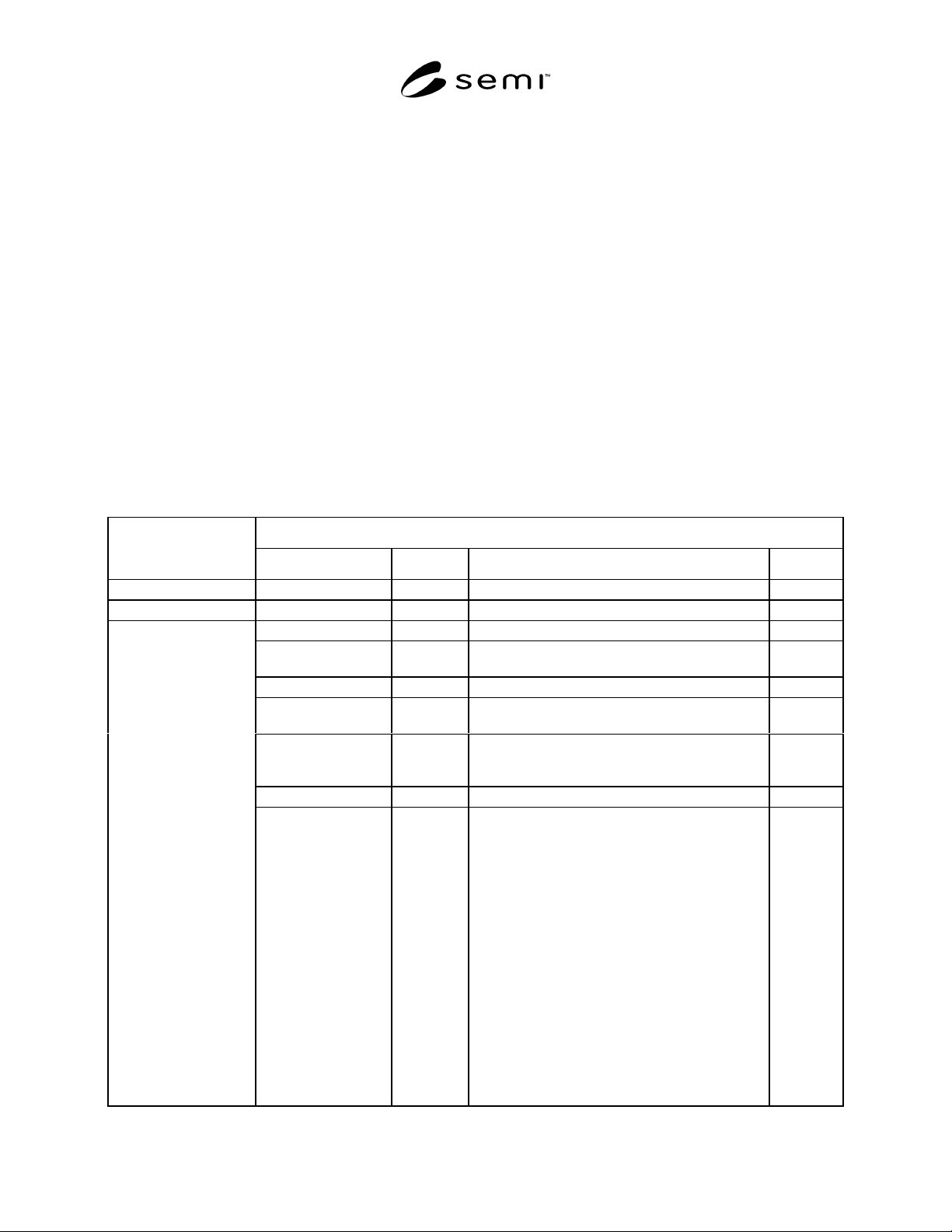
Table 13 Description of Remote Command
Command Parameter
Command Name
Name OPT/REQ Description Format
ABORT No parameter.
JOB_CANCEL ProberJobID REQ. ID of deleted Prober Job A[30]
ProberJobID REQ. ID of created Prober Job (Used as lot ID.) A[30]
LOC REQ. Location number of the cassette in which
processed wafers are placed.
B
PRODID OPT Product name i.e., Device type A[24]
PPID OPT Product type master record name. Unless
otherwise specified, use the current PPID.
A[]
NO-OF-WAFER OPT Number of wafers held in the cassette (regardless
of whether the wafers are subject to processing or
not).
A[20]
SLOT-ORD OPT Specify the wafer pick-up order from the cassette. BOOL
JOB_CREATE
SLOT-INFO OPT Set a wafer ID and whether a wafer is subject to
processing or not.
Example:
L[25,26]
1. L[2]
1. A[1,28] ; wafer ID
2. B ; whether a wafer is subject to
processing or not.
:
n. L[2]
1. A[1,28] ; wafer ID
2. B ; whether a wafer is subject to
processing or not.
(Notes) n = 25 or 26
L[25,26]